LogoAI Jet

Introduction

AI-powered accounting practice management software with client portal, workflow automation, and month-end close review tools.

Features
  • AI-Powered Intelligence — Advanced AI capabilities that draft emails, generate workflows, answer questions by searching through all content including files and emails, summarize email threads, and adjust email tone - saving hours of manual work
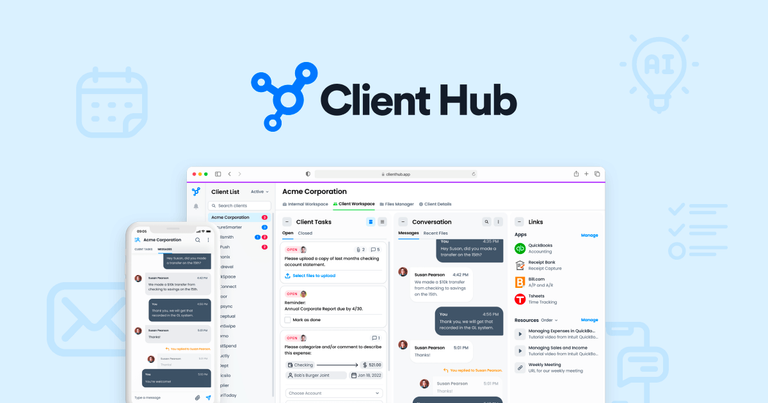
  • Client Portal & Communication Hub — Centralized client portal experience that streamlines communication, eliminates scattered emails, and ensures clients actually respond to requests in a timely manner with powerful task management features
  • Month-End Close Automation — Deep QuickBooks Online and Xero integration with AI-based tools to help close clients' books with accuracy in record time, including transaction recategorization and data anomaly detection
  • Workflow Management — Comprehensive workflow tracking with easy-to-follow checklists, job management, team collaboration tools, and automated recurring monthly tasks to ensure nothing falls through the cracks
  • Document Management — Integrated document management system that keeps internal team docs and client-facing documents in one easily accessible location, eliminating the need for separate file storage solutions
  • Email Management Magic — Transformative email features that summarize threads, draft replies, and adjust email tone - saving hours of inbox time and keeping all client communication documented and centralized
Use Cases
Small Business Accounting & Bookkeeping Firms

Firms offering client accounting or bookkeeping services use Client Hub to streamline month-end closes, manage client communications, and automate recurring workflows - replacing 5-10 disconnected tools with one unified platform Target Audience: Small to mid-sized accounting and bookkeeping firms serving small business clients

Month-End Close & Financial Review

Accounting teams leverage the deep QuickBooks/Xero integration and AI tools to find and fix data anomalies, resolve uncategorized transactions, and complete month-end closes faster with greater accuracy Target Audience: Bookkeepers and accountants handling monthly financial closes for multiple clients

Client Communication & Collaboration

Firms struggling with scattered client communications use Client Hub's portal to centralize all interactions, track deliverables, and ensure clients respond to requests - eliminating email chaos and communication silos Target Audience: Accounting professionals who need better client communication and task management

Practice Management Standardization

Growing firms use Client Hub to standardize workflow processes, gain visibility into team activities, and manage work across multiple team members with powerful dashboards and reporting Target Audience: Accounting firm owners and managers looking to scale operations efficiently

Pros
  • All-in-one solution that replaces 5-10 disconnected tools, combining practice management, client portal, workflow automation, and bookkeeping workflows in a single streamlined platform
  • Deep AI integration that goes beyond basic automation - drafting emails, generating workflows, searching through all content including files, and providing intelligent assistance throughout the platform
  • Exceptionally easy setup and implementation - users report setup taking less than 10 minutes with intuitive design that clients love from the first interaction
  • Strong QuickBooks Online and Xero integration with specialized tools for transaction recategorization, data anomaly detection, and month-end close automation
  • Client-centric design that actually improves client response rates - the portal experience is so good that clients engage proactively rather than ignoring requests
Cons
  • Primarily designed for accounting and bookkeeping firms - may not be suitable for other professional service industries without customization
  • Full functionality requires integration with QuickBooks Online or Xero - firms using other accounting software may have limited capabilities
  • Pricing information not readily available on website, requiring potential customers to request demos or contact sales for cost details
  • May have a learning curve for firms transitioning from multiple specialized tools to understand all available features and maximize the platform's potential

Latest News

Introducing the Enhanced Client Details Page and Client Import ...

Introducing the Enhanced Client Details Page and Client Import ...

8/5/2026

Client Hub is thrilled to introduce a revamped Client Details page that not only sports a fresh look but also offers a more efficient way for you to consolidate all your client and contact information in one centralized location. This update is designed to help you keep all your client and contact i...

New Feature Update: Assign Due Dates to Job Task Groups for Clarity

New Feature Update: Assign Due Dates to Job Task Groups for Clarity

8/5/2026

Client Hub’s latest update brings much-needed structure to job management with due dates by task groups. No more guessing when task groups should be completed. This highly requested feature keeps projects organized, timelines crystal clear, and accountability front and center, making workflows smoot...

Introducing Client Hub Frictionless Workflow

Introducing Client Hub Frictionless Workflow

8/5/2026

The job cards can be dragged and dropped to easily update the status. Clicking on a job from the dashboard will open the job details page to allow users to view the task details. Future enhancements will bring together the client collaboration feature and workflow to help automate sending client req...

New feature: Pinned Panel

New feature: Pinned Panel

8/5/2026

We've got some fantastic news to share – the wait is officially over! Client Hub is thrilled to introduce our brand-new feature: the Pinned panel on the Internal Workspace page. This handy tool is designed to revolutionize the way you manage your Client Tasks, Client Messages, Client Notes, Internal...

Client Hub | Modern Accounting Practice Management & Client Portal ...

Client Hub | Modern Accounting Practice Management & Client Portal ...

8/5/2026

Client Hub has helped us stay organized and eliminate the constant back-and-forth emails." ... Easy-to-follow workflow checklists for every engagement. Every task has an owner, a deadline, and a status. Nothing falls through the cracks with automatic tracking. Structured job creation keeps your team...

Alternatives

  • TaxDome

    TaxDome offers a comprehensive suite of tools for tax professionals, including client management, workflow automation, and secure document sharing.

  • Canopy

    Canopy provides a practice management platform with features like client relationship management, workflow automation, and document management, designed to streamline accounting workflows.

  • Karbon

    Karbon is a collaborative practice management platform that helps accounting firms manage workflows, communicate with clients, and track progress on projects.

  • Jetpack Workflow

    Jetpack Workflow focuses on workflow management and task automation for recurring client work in accounting firms.

  • Financial Cents

    Financial Cents is a practice management software built for accounting and bookkeeping firms to manage clients, tasks, and time tracking.

  • AccountancyManager

    AccountancyManager offers a CRM, workflow automation, and client portal solution tailored for accounting practices.

  • Practice Ignition

    Practice Ignition streamlines client onboarding, engagement letters, and automated billing for accounting firms.

  • Xero Practice Manager

    Xero Practice Manager provides job management, time tracking, and invoicing features integrated with the Xero accounting platform.

  • CCH Axcess

    CCH Axcess is a comprehensive tax and accounting software suite with practice management, tax compliance, and research tools.

  • Intuit ProConnect Tax Online

    Intuit ProConnect Tax Online offers cloud-based professional tax preparation software with client management and collaboration features.

FAQ

User Reviews

4.0/5.0
(38reviews)
Click stars to rate

Pricing

Pricing Model: Subscription

Solopreneur (Annual Billing)

Limited to solo user firms — all features included

$49 per month (billed annually)
yearly

Practice Manager (Annual Billing)

Complete Practice Management, Including a Client Portal

$59 per firm user per month (billed annually)
yearly

Practice Manager PLUS (Annual Billing)

+ QuickBooks and Xero Integrations. Get 4 months free (versus month-to-month) with the referral code: EOY2025

$66 per firm user per month (billed annually, with discount)
yearly

Practice Manager (Monthly Billing)

Complete Practice Management, Including a Client Portal

$79 per firm user per month
monthly

Practice Manager PLUS (Monthly Billing)

+ QuickBooks and Xero Integrations

$99 per firm user per month
monthly

More Products

TinyPNG is Tinify’s browser-based image compressor and converter. This review explains how its web tool differs from its Developer API, what each free allowance covers, and when its compression, conversion, resizing, and cropping features may fit an image workflow.

Zamzar is an online file conversion and compression service for documents, images, video, sound, and other formats. Its free web service has daily file and upload-size limits.

iLoveIMG is a browser-based image service for compression, resizing, cropping, conversion, and editing, with a free Basic plan and paid options.

Smallpdf is an online PDF toolkit for conversion, compression, editing, merging, signing, and more. Its Free plan includes 30+ tools but limits downloads.

Convertio is a browser-based service for converting files between supported formats, with optional settings for many conversion types.

FreeConvert is an online file converter with more than 1,500 listed conversion types and a free allowance of 20 conversion minutes per day.

HiPDF is an online PDF service with conversion, editing, compression, merging, cropping, image tools, and AI features.

123apps is a browser-based suite of video, audio, PDF, and file-conversion tools. Its apps are free to use with limits on file size and daily operations.

ChatPDF summarizes PDFs and answers questions about them. Its free plan allows two document analyses per day, with no account needed to get started.

CloudConvert is a browser-based converter for more than 200 file formats, including documents, images, audio, video, archives, and specialist formats.

OCR.space provides free browser-based OCR for images and PDFs, searchable PDF creation, and a separate API for adding text recognition to software.

Free online itinerary maker with 900+ trip plans across 96 countries. Edit day-by-day in the browser; export to PDF, Excel, CSV, Google Sheets or .ics. Free account required to download/print. Optional Pro adds premium themes; AI chat helps draft plans.

TasteDir is a curated directory of finished, well-crafted software from indie makers and small teams. Every listed tool is reviewed by hand.

An AI meeting copilot that combines live transcripts, screenshots, and project documents to deliver contextual answers, response drafts, and meeting recaps.

Create professional invoices free in your browser: live preview, any currency, tax and discounts, custom templates, and no-watermark PDF. No signup needed.

Vidsembly is an AI video creation platform that turns PowerPoint presentations, PDFs, and documents into narrated videos. Create AI presentations, clone voices, translate slides, transcribe recordings, generate soundtracks, and host videos in one place.