LogoAI Jet

Introduction

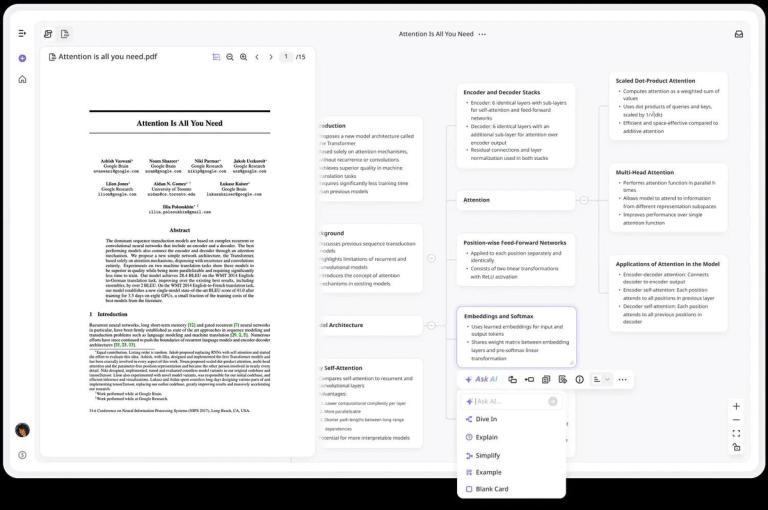
Ponder AI is a knowledge management tool designed to help users build structured knowledge bases. It allows users to upload various types of content, connect different pieces of information, and gain deeper insights through AI-powered analysis.

Key Features:

  • All-in-one Knowledge Workspace: Combines research, note-taking, and AI assistance in a single platform.
  • Structured Knowledge Building: Facilitates the creation of knowledge maps that mirror cognitive processes.
  • AI Thinking Partnership: Offers an AI agent to assist with exploring ideas, challenging assumptions, and structuring insights.
  • Versatile Content Support: Handles PDFs, videos, texts, and web pages.
  • Insight Discovery: Enables pattern identification and connection-making across multiple sources.
  • Flexible Creative Space: Provides a customizable workspace for note-taking and visual organization.
  • Export Options: Allows exporting knowledge as structured reports, mind maps, or Markdown files.

Use Cases:

  • Research: Assisting researchers in managing and analyzing large volumes of papers and data.
  • Knowledge Work: Helping knowledge workers make sense of reports and data, extracting key insights efficiently.
  • Education: Supporting students in structuring complex course materials for better understanding.
  • Analysis: Enabling analysts to synthesize information from multiple sources and develop strategic perspectives.

Latest News

Ponder: where thinking happens

Ponder: where thinking happens

8/4/2026

Ponder: where thinking happens Dashboard Pricing Blog Features English Log In Try for free Discord New and Trends # Ponder: where thinking happens Simon S·3/2/2026·2 min read Every breakthrough in computing promised to make us smarter. They made us faster instead. We're building something ...

New and Trends | Ponder Blog

New and Trends | Ponder Blog

8/4/2026

New and Trends | Ponder Blog # A new way to work with knowledge Ponder helps you map thoughts, connect insights, and explore knowledge the way your mind actually works. Jul 28, 2026 New and Trends ## Top Coggle Alternatives 2026: Mind Mapping Tools | Ponder.ing Coggle alternatives: MindMeister,...

How to Streamline Your Literature Review: AI Methods | Ponder.ing

How to Streamline Your Literature Review: AI Methods | Ponder.ing

8/4/2026

How to Streamline Your Literature Review: AI Methods | Ponder.ing # Streamline Your Literature Review Process with Ponder AI: AI Literature Review Software for Deeper Research Insights Dr. Alex Chen· 7/28/2026· 15 min read Literature reviews are the backbone of rigorous research, yet they are oft...

Research Organization: AI Tools & Best Practices 2026

Research Organization: AI Tools & Best Practices 2026

8/4/2026

Research Organization: AI Tools & Best Practices 2026 | Ponder Dashboard Pricing Blog Features English Log In Try for free Discord # Organize Your Research Efficiently with Ponder AI: The Ultimate AI Research Assistant and Knowledge Management Software Olivia Ye·7/2/2026·15 min read Research...

Ponder: New Way to Work with Knowledge Using AI | AI ...

Ponder: New Way to Work with Knowledge Using AI | AI ...

8/4/2026

Ponder: New Way to Work with Knowledge Using AI | AI Research Workspace For Research Notes, Literature Review, Paper Summaries, Knowledge Graph & Team Collaboration English Log In # Where Thinking Happens Ponder is the first all-in-one knowledge workspace — built for how your mind actually works...

Alternatives

  • Notion AI

    This all-in-one workspace integrates AI directly into its pages, allowing users to generate, summarize, and refine content within their knowledge base.

  • Mem.ai

    An AI-powered self-organizing workspace that automatically connects and surfaces relevant information from your notes and digital life.

  • Obsidian

    A powerful local-first knowledge base that, with community AI plugins, enables deep exploration and connection of ideas through a graph-based system.

  • Roam Research

    Known for its bi-directional linking and graph database, it helps users build a network of interconnected thoughts and knowledge.

  • Craft.do

    A beautiful and intuitive document editor that offers AI assistance for writing, summarizing, and structuring information within a collaborative workspace.

  • Coda

    This flexible doc combines words, data, and AI capabilities to create custom tools and workspaces for managing information and projects.

  • Miro

    An online collaborative whiteboard that leverages AI for brainstorming, mind mapping, and visually organizing complex ideas and projects.

  • Logseq

    An open-source knowledge base and outliner that uses bi-directional links to help users build a personal knowledge graph and evolve their thinking.

  • Evernote

    A long-standing note-taking and organization app that now incorporates AI features for enhanced search, summarization, and content generation.

  • ClickUp

    An all-in-one productivity platform that integrates AI across tasks, documents, and projects to streamline workflows and enhance knowledge management.

FAQ

More Products

TinyPNG is Tinify’s browser-based image compressor and converter. This review explains how its web tool differs from its Developer API, what each free allowance covers, and when its compression, conversion, resizing, and cropping features may fit an image workflow.

Zamzar is an online file conversion and compression service for documents, images, video, sound, and other formats. Its free web service has daily file and upload-size limits.

iLoveIMG is a browser-based image service for compression, resizing, cropping, conversion, and editing, with a free Basic plan and paid options.

Smallpdf is an online PDF toolkit for conversion, compression, editing, merging, signing, and more. Its Free plan includes 30+ tools but limits downloads.

Convertio is a browser-based service for converting files between supported formats, with optional settings for many conversion types.

FreeConvert is an online file converter with more than 1,500 listed conversion types and a free allowance of 20 conversion minutes per day.

HiPDF is an online PDF service with conversion, editing, compression, merging, cropping, image tools, and AI features.

123apps is a browser-based suite of video, audio, PDF, and file-conversion tools. Its apps are free to use with limits on file size and daily operations.

ChatPDF summarizes PDFs and answers questions about them. Its free plan allows two document analyses per day, with no account needed to get started.

CloudConvert is a browser-based converter for more than 200 file formats, including documents, images, audio, video, archives, and specialist formats.

OCR.space provides free browser-based OCR for images and PDFs, searchable PDF creation, and a separate API for adding text recognition to software.

Free online itinerary maker with 900+ trip plans across 96 countries. Edit day-by-day in the browser; export to PDF, Excel, CSV, Google Sheets or .ics. Free account required to download/print. Optional Pro adds premium themes; AI chat helps draft plans.

Verla AI is an AI learning platform that helps teams and students learn and apply AI faster with guided courses, tools, and hands-on practice.

TasteDir is a curated directory of finished, well-crafted software from indie makers and small teams. Every listed tool is reviewed by hand.

An AI meeting copilot that combines live transcripts, screenshots, and project documents to deliver contextual answers, response drafts, and meeting recaps.

Create professional invoices free in your browser: live preview, any currency, tax and discounts, custom templates, and no-watermark PDF. No signup needed.