LogoAI Jet
icon of Joplin

Joplin

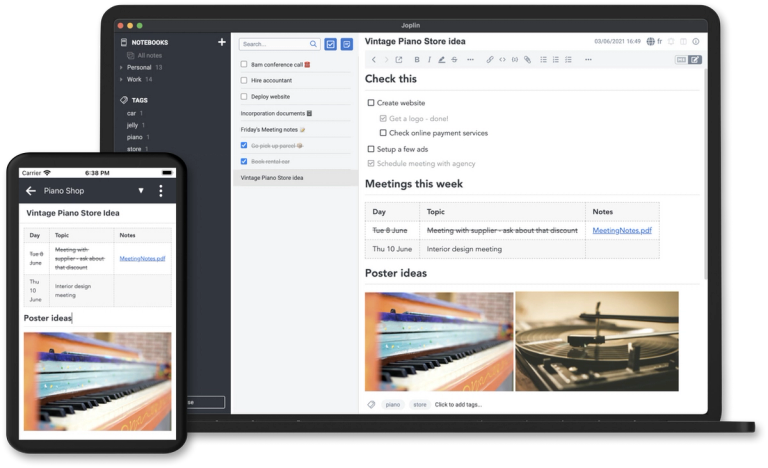
Joplin is an open-source note-taking application that allows you to capture your thoughts and securely access them from any device.

Introduction

Joplin is a free, open-source note-taking and to-do application. It offers robust features for organizing, securing, and accessing notes across multiple platforms.

Key Features:

  • Note Organization: Create notebooks, sub-notebooks, and tags to categorize and manage notes effectively.
  • Multimedia Support: Embed images, videos, PDFs, and audio files within notes. Supports mathematical expressions and diagrams.
  • Web Clipper: Save web pages and screenshots as notes using the browser extension (Chrome and Firefox).
  • Synchronization: Sync notes across devices using Joplin Cloud, Dropbox, OneDrive, or other services.
  • End-to-End Encryption (E2EE): Secure notes with E2EE to ensure only you can access them.
  • Customization: Customize the app with plugins, themes, and multiple text editors (Rich Text or Markdown).
  • Cross-Platform Availability: Available on Windows, macOS, Linux, Android, and iOS. A terminal application is also available.

Use Cases:

  • Personal Note-Taking: Capture ideas, create to-do lists, and organize personal information.
  • Research: Collect and annotate research materials, save web articles, and create literature reviews.
  • Project Management: Manage project-related notes, track tasks, and collaborate with team members (using Joplin Cloud).
  • Knowledge Base: Build a personal or team knowledge base with organized notes and multimedia content.
  • Secure Storage: Store sensitive information with E2EE, ensuring data privacy and security.

Latest News

News | Joplin

News | Joplin

8/5/2026

We have introduced a publicly signed warrant canary for Joplin. A warrant canary is a regularly updated statement confirming that, as of the stated date, the project has not received secret legal orders, gag orders, or demands requiring the introduction of backdoors into the software or its infrastr...

What's new in Joplin 3.5 | Joplin

What's new in Joplin 3.5 | Joplin

8/5/2026

Issues causing UI elements to appear off-screen have been addressed, and the app behaves more consistently in situations that previously caused hangs or visual glitches. Joplin 3.5 includes about 114 bug fixes across desktop and mobile, addressing issues in editing, syncing, importing, rendering, an...

Joplin Server Changelog | Joplin

Joplin Server Changelog | Joplin

8/5/2026

New: Add Joplin Server SAML support (#11865 by @ttcchhmm) New: Added endpoint configuration for StorageDriverS3 (#12032 by @forsaken628) Improved: Add CSS style for description list elements (#12158) (#12138 by @pedr) ... Improved: Updated packages @adobe/css-tools (v4.4.2), @rollup/plugin-commonjs ...

Joplin Desktop Changelog | Joplin

Joplin Desktop Changelog | Joplin

8/5/2026

Improved: Surface Joplin Cloud AI degraded state and map error codes (#15849) Improved: Tests in lib package print OneNote related warnings (#15767) (#15720 by @Rygaa) Improved: Update note lock session state (#15773) (#15772 by @keshav0479) Improved: Whiteboard: Allow changing the origin of an edge...

Joplin changelog | Joplin

Joplin changelog | Joplin

8/5/2026

Improved: Show installed plugins in Help - About Joplin (#7711) (#6143 by @julien) Fixed: App freezes and displays fatal error when text provided in the search bar is too long (#7764) (#7634 by @pedr) Fixed: Certain plugins could create invalid settings, which could result in a crash (#7621) Fixed: ...

Alternatives

  • Evernote

    It offers a comprehensive suite of note-taking features, web clipping, and robust cross-device synchronization for a more feature-rich experience.

  • Microsoft OneNote

    This free and versatile digital notebook integrates deeply with the Microsoft ecosystem, providing extensive organization and collaboration tools across devices.

  • Obsidian

    It's a powerful local-first knowledge base that uses plain text Markdown files, offering unparalleled linking and customization for personal knowledge management.

  • Standard Notes

    This open-source and encrypted note-taking app prioritizes privacy and security, offering a minimalist yet powerful platform for sensitive information.

  • Notion

    As an all-in-one workspace, Notion combines notes, tasks, wikis, and databases, providing immense flexibility for personal and team organization.

  • Simplenote

    It provides a fast, clean, and free note-taking experience with markdown support and instant synchronization across all your devices.

  • Google Keep

    Ideal for quick notes, lists, and reminders, it offers a simple, colorful interface and seamless integration with other Google services.

  • Apple Notes

    For users within the Apple ecosystem, it offers robust note-taking capabilities, rich media support, and seamless synchronization across all Apple devices.

  • Bear

    This elegant markdown editor focuses on beautiful typography and powerful organization with tags, making it a favorite for writers and thinkers on Apple platforms.

  • Logseq

    An open-source, local-first knowledge base and outliner, it helps you organize your thoughts with block-based notes and powerful linking capabilities.

FAQ

User Reviews

4.9/5.0
(12reviews)
Click stars to rate

Pricing

Pricing Model: Subscription

Basic

Joplin Cloud allows you to synchronise your notes across devices. It also lets you publish notes, and collaborate on notebooks with your friends, family or colleagues.

2.99€/month
monthly

Basic

Joplin Cloud allows you to synchronise your notes across devices. It also lets you publish notes, and collaborate on notebooks with your friends, family or colleagues.

2.40€/month (28.69€/year)
yearly

Pro

Joplin Cloud allows you to synchronise your notes across devices. It also lets you publish notes, and collaborate on notebooks with your friends, family or colleagues.

5.99€/month
monthly

Pro

Joplin Cloud allows you to synchronise your notes across devices. It also lets you publish notes, and collaborate on notebooks with your friends, family or colleagues.

4.79€/month (57.48€/year)
yearly

Teams

Joplin Cloud allows you to synchronise your notes across devices. It also lets you publish notes, and collaborate on notebooks with your friends, family or colleagues.

7.99€/month (*)
monthly, per-user

Teams

Joplin Cloud allows you to synchronise your notes across devices. It also lets you publish notes, and collaborate on notebooks with your friends, family or colleagues.

6.69€/month (*) (80.28€/year)
yearly, per-user

Joplin Server Business

Joplin Server Business is a synchronisation server that you can install on your own infrastructure, so that your data remains private and secure within your business.

Get a quote
Contact for pricing

More Products

TinyPNG is Tinify’s browser-based image compressor and converter. This review explains how its web tool differs from its Developer API, what each free allowance covers, and when its compression, conversion, resizing, and cropping features may fit an image workflow.

Zamzar is an online file conversion and compression service for documents, images, video, sound, and other formats. Its free web service has daily file and upload-size limits.

iLoveIMG is a browser-based image service for compression, resizing, cropping, conversion, and editing, with a free Basic plan and paid options.

Smallpdf is an online PDF toolkit for conversion, compression, editing, merging, signing, and more. Its Free plan includes 30+ tools but limits downloads.

Convertio is a browser-based service for converting files between supported formats, with optional settings for many conversion types.

FreeConvert is an online file converter with more than 1,500 listed conversion types and a free allowance of 20 conversion minutes per day.

HiPDF is an online PDF service with conversion, editing, compression, merging, cropping, image tools, and AI features.

123apps is a browser-based suite of video, audio, PDF, and file-conversion tools. Its apps are free to use with limits on file size and daily operations.

ChatPDF summarizes PDFs and answers questions about them. Its free plan allows two document analyses per day, with no account needed to get started.

CloudConvert is a browser-based converter for more than 200 file formats, including documents, images, audio, video, archives, and specialist formats.

OCR.space provides free browser-based OCR for images and PDFs, searchable PDF creation, and a separate API for adding text recognition to software.

Free online itinerary maker with 900+ trip plans across 96 countries. Edit day-by-day in the browser; export to PDF, Excel, CSV, Google Sheets or .ics. Free account required to download/print. Optional Pro adds premium themes; AI chat helps draft plans.

TasteDir is a curated directory of finished, well-crafted software from indie makers and small teams. Every listed tool is reviewed by hand.

An AI meeting copilot that combines live transcripts, screenshots, and project documents to deliver contextual answers, response drafts, and meeting recaps.

Create professional invoices free in your browser: live preview, any currency, tax and discounts, custom templates, and no-watermark PDF. No signup needed.

Vidsembly is an AI video creation platform that turns PowerPoint presentations, PDFs, and documents into narrated videos. Create AI presentations, clone voices, translate slides, transcribe recordings, generate soundtracks, and host videos in one place.