LogoAI Jet
icon of AutoEntry

AutoEntry

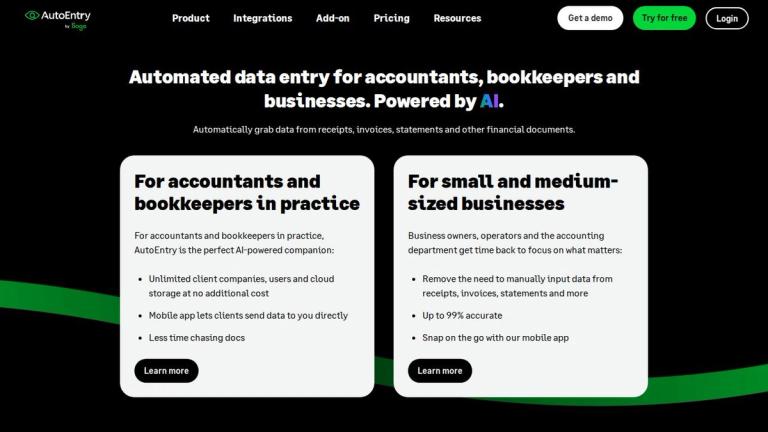
AI-powered solution automating data entry from invoices, receipts, and statements directly into accounting software for accountants and SMEs.

Introduction

AI-powered solution automating data entry from invoices, receipts, and statements directly into accounting software for accountants and SMEs.

Features
  • AI-Powered OCR & Machine Learning — AutoEntry uses proprietary optical character recognition (OCR) combined with machine learning AI to automatically extract data from invoices, receipts, bank statements, and other financial documents with up to 99% accuracy. The system learns from your categorization patterns over time, progressively automating repetitive tasks and reducing manual intervention.
  • Mobile App for On-the-Go Capture — The AutoEntry mobile app allows users to snap photos of receipts, invoices, and documents directly from their smartphone. Users can also upload documents from desktop or forward PDFs to a dedicated AutoEntry email address, providing multiple flexible capture methods for any workflow.
  • Seamless Accounting Software Integrations — AutoEntry integrates natively with HMRC-recognised accounting platforms including Xero, Sage, QuickBooks, FreeAgent, KashFlow, SortMyBooks, and ClearBooks. Extracted data publishes directly into your accounting ledger, ensuring records are always MTD-ready and eliminating double data entry.
  • Statement Reconciliation — Save hours of manual work by quickly matching invoices to monthly supplier statements. This feature is particularly valuable for industries like construction where reconciling supplier statements against individual invoices is a time-consuming but critical task.
  • Unlimited Users, Storage & Client Companies — All AutoEntry plans include unlimited user accounts, unlimited cloud storage, and unlimited client companies at no additional cost. Accountants and bookkeepers can onboard entire teams and manage multiple clients without worrying about per-seat licensing or storage limits.
  • VAT Grouping & Reporting — Group invoices by VAT period and generate comprehensive VAT reports for easy filing. Combined with MTD compliance support, this feature streamlines tax preparation for businesses and accounting practices operating under Making Tax Digital requirements.
Use Cases
Accounting Practices Managing Multiple Clients

Accountants and bookkeepers in practice use AutoEntry to automate data entry across an unlimited number of client companies. Clients capture their own documents via the mobile app and send them directly, eliminating the back-and-forth of chasing paperwork. With unlimited users and cloud storage included, firms can scale their client base without increasing overhead costs. Target Audience: Accountants, bookkeepers, and accounting firms managing multiple SME clients

SME Owners Eliminating Manual Data Entry

Small and medium-sized business owners and their accounting departments use AutoEntry to remove the burden of manually keying in data from receipts, invoices, and bank statements. The mobile app enables staff to snap receipts on the go, while the AI automatically extracts and categorizes data before publishing it directly into Xero, Sage, QuickBooks, or other supported platforms. Target Audience: Small and medium-sized business owners, finance teams, and in-house bookkeepers

Making Tax Digital (MTD) Compliance for UK Businesses

UK businesses and their advisors use AutoEntry to maintain digital records required under HMRC's Making Tax Digital initiative. By automating the capture and entry of financial documents into MTD-recognised software like Xero, Sage, and QuickBooks, businesses ensure their records are compliant and audit-ready without manual digitization effort. Target Audience: UK businesses, accountants, and bookkeepers navigating MTD compliance requirements

Supplier Statement Reconciliation for Project-Based Industries

Construction firms, trades businesses, and other industries dealing with high volumes of supplier invoices use AutoEntry's statement reconciliation feature to quickly match invoices against monthly supplier statements. This eliminates hours of manual cross-referencing and helps identify discrepancies or missing invoices before they become problems. Target Audience: Construction companies, trades businesses, and industries with complex supplier relationships

Pros
  • Up to 99% data extraction accuracy powered by proprietary OCR and machine learning AI, significantly reducing errors compared to manual data entry.
  • No long-term contracts required — uses a rolling monthly subscription that can be cancelled, paused, or downgraded anytime (up to 24 hours before renewal), providing maximum flexibility.
  • All features are included on every plan with no feature gating. Users only pay for data extraction credits, while unlimited users, cloud storage, and client companies come standard at no extra cost.
  • Award-winning software recognised with Institute of Certified Bookkeeping LUCA awards almost every year since launch, including Data and Expenses App of the Year in 2021, 2022, and 2023.
  • Unused credits roll over and can be kept for up to 90 days, so businesses with fluctuating document volumes don't lose value during quieter months.
Cons
  • Credit-based pricing model may be confusing for new users who need to estimate monthly document volumes upfront, potentially leading to over- or under-subscription.
  • AccountsPrep add-on is only available to accountants and bookkeepers in the UK and Ireland, limiting its utility for international practices.
  • Integration is limited to a specific set of supported accounting platforms — businesses using less common or custom accounting software may not be able to connect directly.
  • The free trial only includes 25 credits, which may not be enough for businesses to fully evaluate the platform's capabilities across all document types and workflows.

Latest News

News & Insights - AutoEntry

News & Insights - AutoEntry

8/5/2026

Here's how to get started on that journey to becoming a consultant or advisor, from marketing to asking the right questions of clients. ... Elina took a circuitous route to AutoEntry. Here, she tells her story of working for the automation company. ... AutoEntry is rebranded with a new look and new ...

AutoEntry by Sage: New name, same great product

AutoEntry by Sage: New name, same great product

8/5/2026

Discover the power of AutoEntry to reduce days of work to just hours, and massively reduce concerns about accuracy. ... Our free guide explains how you can harness digitisation to save time and improve productivity. ... Get started with AutoEntry in minutes. No credit card required. Cancel whenever ...

Autoentry

Autoentry

8/5/2026

News · AutoEntry by Sage: New name, same great product · by · Keir Thomas-Bryant · News · How Accounting Automation might Save your Business ·

AutoEntry's plans for earth month | AutoEntry Blog

AutoEntry's plans for earth month | AutoEntry Blog

8/5/2026

More good news: on a personal and professional level, you’ve probably slashed your carbon footprint this past year. And even before Covid, businesses were showing innovative, committed ways to make a positive difference. No matter the size of your business, you can take positive steps, including: .....

Invoice OCR Software: Key Features for 2025 | AutoEntry

Invoice OCR Software: Key Features for 2025 | AutoEntry

8/5/2026

Many providers offer free trials or demos that let you see how well the system captures data and how intuitive it is for your team. Ongoing support and frequent updates are also essential, ensuring the software keeps pace with both technology and compliance requirements. For businesses looking for a...

Alternatives

  • Dext Prepare

    It automates the collection and processing of receipts, invoices, and other financial documents, integrating with accounting software.

  • Hubdoc

    This platform automates the collection of financial documents and extracts key data, seamlessly integrating with Xero and other accounting systems.

  • Expensify

    It streamlines expense reporting by allowing users to scan receipts and automatically extract data for reimbursement and accounting purposes.

  • Lightyear

    This solution provides automated invoice processing, purchase order matching, and approval workflows for businesses.

  • Datamolino

    It offers cloud-based invoice and receipt data extraction, converting documents into structured data for accounting systems.

  • Veryfi

    This AI-powered platform provides real-time OCR and data extraction from receipts and invoices, often used for expense and spend management.

  • Rossum

    An AI-powered document processing platform that intelligently extracts data from various document types, including invoices, with high accuracy.

  • Kofax ReadSoft

    It offers enterprise-level invoice automation solutions, streamlining the entire accounts payable process from capture to posting.

  • ABBYY FlexiCapture

    This is a comprehensive platform for intelligent document processing, capable of extracting data from various structured and unstructured financial documents.

  • DocuWare

    It provides document management and workflow automation, including features for capturing and processing invoices and other financial records.

FAQ

User Reviews

4.8/5.0
(10reviews)
Click stars to rate

Pricing

Pricing Model: Paid

Paid

- **AI-Powered OCR & Machine Learning** — AutoEntry uses proprietary optical character recognition (OCR) combined with machine learning AI to automatically extract data from invoices, receipts, bank statements, and other financial documents with up to 99% accuracy. The system learns from your categorization patterns over time, progressively automating repetitive tasks and reducing manual intervention. - **Mobile App for On-the-Go Capture** — The AutoEntry mobile app allows users to snap photos o

Not publicly listed

More Products

TinyPNG is Tinify’s browser-based image compressor and converter. This review explains how its web tool differs from its Developer API, what each free allowance covers, and when its compression, conversion, resizing, and cropping features may fit an image workflow.

Zamzar is an online file conversion and compression service for documents, images, video, sound, and other formats. Its free web service has daily file and upload-size limits.

iLoveIMG is a browser-based image service for compression, resizing, cropping, conversion, and editing, with a free Basic plan and paid options.

Smallpdf is an online PDF toolkit for conversion, compression, editing, merging, signing, and more. Its Free plan includes 30+ tools but limits downloads.

Convertio is a browser-based service for converting files between supported formats, with optional settings for many conversion types.

FreeConvert is an online file converter with more than 1,500 listed conversion types and a free allowance of 20 conversion minutes per day.

HiPDF is an online PDF service with conversion, editing, compression, merging, cropping, image tools, and AI features.

123apps is a browser-based suite of video, audio, PDF, and file-conversion tools. Its apps are free to use with limits on file size and daily operations.

ChatPDF summarizes PDFs and answers questions about them. Its free plan allows two document analyses per day, with no account needed to get started.

CloudConvert is a browser-based converter for more than 200 file formats, including documents, images, audio, video, archives, and specialist formats.

OCR.space provides free browser-based OCR for images and PDFs, searchable PDF creation, and a separate API for adding text recognition to software.

Free online itinerary maker with 900+ trip plans across 96 countries. Edit day-by-day in the browser; export to PDF, Excel, CSV, Google Sheets or .ics. Free account required to download/print. Optional Pro adds premium themes; AI chat helps draft plans.

TasteDir is a curated directory of finished, well-crafted software from indie makers and small teams. Every listed tool is reviewed by hand.

An AI meeting copilot that combines live transcripts, screenshots, and project documents to deliver contextual answers, response drafts, and meeting recaps.

Create professional invoices free in your browser: live preview, any currency, tax and discounts, custom templates, and no-watermark PDF. No signup needed.

Options research platform with live data. Scan for puts and calls, compare strikes in a yield matrix, model strategies, and journal every trade.