LogoAI Jet

Introduction

Airtable AI is a platform designed to integrate AI capabilities directly into business workflows. It allows users to leverage AI models without requiring coding, enabling rapid transformation of operations. Key features include:

  • AI App Building: Enables teams to build custom business apps using conversational AI and no-code components.
  • Airtable Agents: Allows deployment of AI agents inside apps to automate tasks and orchestrate actions across operations.
  • Omni: An AI app builder, data analyst, and web researcher that simplifies workflow automation.
  • AI Plays: Provides real-world AI use cases and templates for immediate business value.

Use cases range from generating campaign concepts and conducting event attendee research to visualizing product materials and extracting customer insights. Airtable AI also emphasizes trust and security, allowing enterprise customers to choose AI models and manage AI usage while ensuring data security.

Latest News

Airtable AI Plays: Real world AI use cases

Airtable AI Plays: Real world AI use cases

8/5/2026

Airtable AI Plays: Real world AI use cases | Airtable # Airtable AI Plays: High-impact workflows to try today Put AI to work and unlock speed, insight, and decision making at scale. OperationsTransform static documents into operational dataExtract data from contracts and power operational workflo...

Localize image and copy variants: Airtable AI Play

Localize image and copy variants: Airtable AI Play

8/5/2026

Localize image and copy variants: Airtable AI Play | Airtable # Localize image and copy variants at scale Instantly adapt campaigns across regions, ensure cultural relevance, and maintain global brand consistency. Get the template Watch demo (2 min) ## 5 ways this play transforms your localizati...

Use AI for competitive analysis

Use AI for competitive analysis

8/5/2026

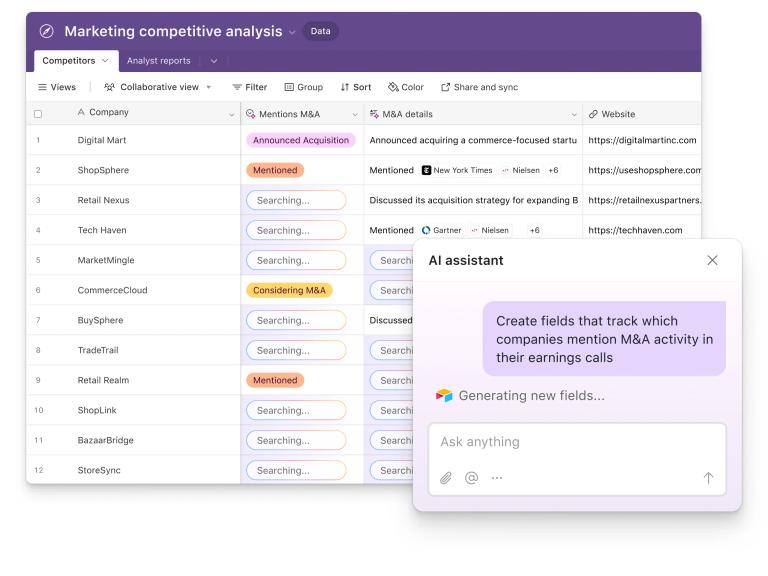
Use AI for competitive analysis: Airtable AI play | Airtable # Automate competitor product research Generate a competitive analysis that benchmarks your performance against rivals using recent intelligence from the web. Get the template Watch demo (2 min) ## 4 ways this AI play transforms your c...

Brand checker: Review thousands of images at scale

Brand checker: Review thousands of images at scale

8/5/2026

Brand checker: Review thousands of images at scale | Airtable # Run instant brand and compliance reviews Use our brand checker to analyze marketing assets against your guidelines, flag off-brand issues, and send designers actionable next steps. Get the template Watch demo (2 min) ## 3 ways our b...

Research companies and people to personalize outreach

Research companies and people to personalize outreach

8/5/2026

Use AI to research companies and people | Airtable # Research companies and people to personalize outreach Gather intel on companies and people—recent news, logos, headshots, bios—and turn it into personalized outreach that resonates. Get the template Watch demo (2 min) ## 3 ways this play trans...

Alternatives

  • Notion

    Notion provides a flexible workspace for teams to collaborate on documents, projects, and wikis, offering a similar all-in-one approach to productivity.

  • Coda

    Coda is a document-based platform that combines the flexibility of documents with the power of apps, enabling teams to build custom workflows.

  • Monday.com

    Monday.com is a work operating system that allows teams to plan, track, and manage their work, similar to Airtable's project management capabilities.

  • Smartsheet

    Smartsheet is a spreadsheet-based work management tool that offers robust project tracking and automation features.

  • Zoho Creator

    Zoho Creator is a low-code platform that enables businesses to build custom applications to automate processes and manage data.

  • Microsoft Power Apps

    Microsoft Power Apps allows users to build custom business applications with a drag-and-drop interface and integration with other Microsoft services.

  • Google AppSheet

    Google AppSheet is a no-code development platform that allows users to create mobile and web apps from data sources like Google Sheets and Excel.

  • Retool

    Retool enables developers to quickly build internal tools and dashboards with pre-built components and integrations.

  • Zapier

    Zapier automates workflows by connecting different apps and services, streamlining tasks and data transfer.

  • IFTTT

    IFTTT (If This Then That) automates tasks between different apps and devices, creating simple and personalized workflows.

FAQ

User Reviews

4.4/5.0
(10reviews)
Click stars to rate

Pricing

Pricing Model: Freemium

Free

Available to teams for no charge and provides the key building blocks to help you build applications. The Free plan is formulated for individual users, very small teams, or those with lightweight needs.

Free

Team

For teams who like the features of our Free plan but need more capacity.

$20/user/month
yearly
Business

Includes the additional customization, data scale, flexibility, and administrative features that departments and enterprise organizations need.

$45/user/month
yearly
Enterprise Scale

Enterprise Scale plan pricing is custom, based on the organization’s needs and scale with Airtable.

Custom

More Products

TinyPNG is Tinify’s browser-based image compressor and converter. This review explains how its web tool differs from its Developer API, what each free allowance covers, and when its compression, conversion, resizing, and cropping features may fit an image workflow.

Zamzar is an online file conversion and compression service for documents, images, video, sound, and other formats. Its free web service has daily file and upload-size limits.

iLoveIMG is a browser-based image service for compression, resizing, cropping, conversion, and editing, with a free Basic plan and paid options.

Smallpdf is an online PDF toolkit for conversion, compression, editing, merging, signing, and more. Its Free plan includes 30+ tools but limits downloads.

Convertio is a browser-based service for converting files between supported formats, with optional settings for many conversion types.

FreeConvert is an online file converter with more than 1,500 listed conversion types and a free allowance of 20 conversion minutes per day.

HiPDF is an online PDF service with conversion, editing, compression, merging, cropping, image tools, and AI features.

123apps is a browser-based suite of video, audio, PDF, and file-conversion tools. Its apps are free to use with limits on file size and daily operations.

ChatPDF summarizes PDFs and answers questions about them. Its free plan allows two document analyses per day, with no account needed to get started.

CloudConvert is a browser-based converter for more than 200 file formats, including documents, images, audio, video, archives, and specialist formats.

OCR.space provides free browser-based OCR for images and PDFs, searchable PDF creation, and a separate API for adding text recognition to software.

Free online itinerary maker with 900+ trip plans across 96 countries. Edit day-by-day in the browser; export to PDF, Excel, CSV, Google Sheets or .ics. Free account required to download/print. Optional Pro adds premium themes; AI chat helps draft plans.

Contextual nofollow link exchanges for sites you control, handled with your coding agent and your approval.

TasteDir is a curated directory of finished, well-crafted software from indie makers and small teams. Every listed tool is reviewed by hand.

An AI meeting copilot that combines live transcripts, screenshots, and project documents to deliver contextual answers, response drafts, and meeting recaps.

Create professional invoices free in your browser: live preview, any currency, tax and discounts, custom templates, and no-watermark PDF. No signup needed.