

What FreeConvert is
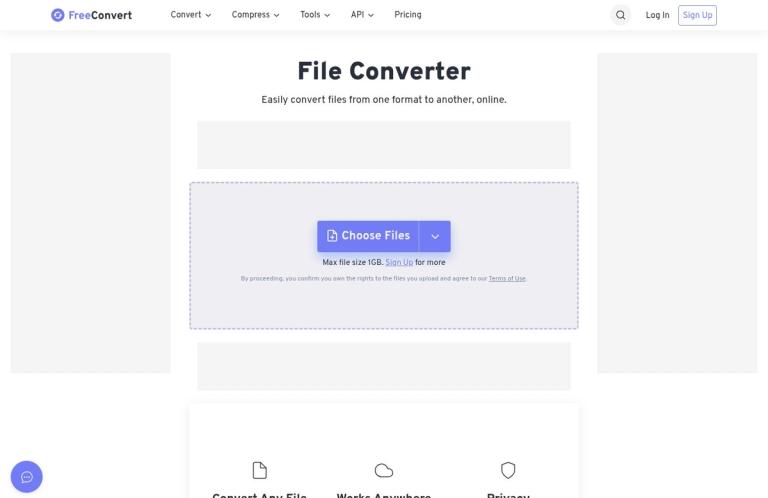
FreeConvert is an online service for converting files from one format to another. Its official website presents a browser-based workflow: choose a file, select a target format, and convert. The homepage says the service supports more than 1,500 file conversions, including video, image, audio, and ebook conversions. It also advertises advanced options for fine-tuning conversions. That breadth makes it a candidate for varied format-change tasks, though the useful question is always whether the specific input and output formats you need are supported.
The free allowance is defined in conversion minutes rather than as an unlimited number of jobs. According to FreeConvert’s pricing page, free users get 20 conversion minutes per day for both Web and API use, with a separate maximum of five conversion minutes per file. The pricing page explains that conversion minutes measure how long a file takes to convert on FreeConvert’s servers. It says photo and document conversions generally take about a minute, while large files or advanced codecs can use more. It also says usage is visible on the account dashboard and that only successful conversions are billed in minutes. These details make the allowance more useful to understand than a simple daily file count: a short image conversion and a demanding video conversion may draw differently on the daily total.
For ordinary website use, FreeConvert says an account is not required to receive the free allowance. Its pricing page says a free account is needed to use free minutes through the API. The shared daily amount therefore covers two different ways of using the service, but the entry requirements differ: visitors can use the website without signing up, while API use requires a free account. Neither route is unlimited, and the separate five-minute per-file ceiling still applies to free usage.
Conversion options and file sources
The homepage describes a general file converter and names common categories rather than restricting the service to one kind of file. Its navigation includes video and audio converters, image converters, PDF and document converters, ebook conversion, and archive conversion. Named examples include MP4 to MP3, MOV to MP4, WEBP to PNG, HEIC to JPG, PDF to Word, PDF to JPG, and EPUB to PDF. These examples help show the range of tasks the site is built to address; they are not a promise that every source file will produce a perfect result in every destination format.
The site also lists tools for compression and other file tasks, including video, audio, image, and PDF compressors, plus PDF tools such as editing, annotation, merging, splitting, and e-signing. These are distinct from format conversion. If your goal is to reduce a file’s size, edit a PDF, or combine PDF pages, select the relevant tool rather than assuming that converting the file will accomplish that separate task. Check the live page for the exact function and options you need.
You can choose files from a device, Dropbox, Google Drive, OneDrive, or a URL. These are useful alternatives when a file is already in cloud storage or available at a link, as well as when you have a local copy ready to upload. The homepage displays a maximum file size of 1GB. Its pricing page lists different size limits for paid plans, but the homepage figure alone does not establish the free plan’s specific file-size allowance. If file size is central to your decision, check the current limit shown in the converter before starting.
FreeConvert says the online service works on Windows, Mac, Linux, and mobile devices, and that major browsers are supported. That offers a straightforward option when you want a browser-based conversion rather than installing desktop software. The homepage also states that advanced settings are available to fine-tune conversions. The exact settings depend on the converter and file type, so it is sensible to inspect the options for the particular task instead of expecting the same controls everywhere.
How to use it effectively
A useful approach is to begin with the outcome you need, not simply the file you have. Identify the target format required by the person, application, or service that will use the converted file. Then find the matching converter on the official site. The homepage’s format examples provide a starting point, but the current converter page is the place to confirm that your precise source and destination formats are available.
Next, choose an appropriate file source. Uploading from a device is a direct option when you already have a local copy. A listed cloud-storage connection may suit a file kept in Dropbox, Google Drive, or OneDrive, and the URL option may be convenient when a file is available online. As practical advice, use a source route you recognize and have permission to use; the homepage says that proceeding confirms you own the rights to uploaded files and agree to the terms of use.
Before you start, consider the free time allowance as well as the file itself. FreeConvert measures conversion minutes by time spent converting on its servers. Its pricing FAQ says most photo and document conversions take about a minute, while large files and advanced codecs can consume more. A short task is therefore a different proposition from a long or technically demanding conversion. The five-minute cap applies to each free file, while the daily allowance applies across free Web and API use. If a conversion fails, the pricing FAQ says the minutes used for that task are automatically refunded.
After choosing the output format, review any available advanced settings that matter to your task. These may let you adjust a conversion, but the options should be assessed on the specific converter page rather than assumed from the service’s general description. For example, if a video needs a particular output format, confirm that format first and check any relevant settings before converting. If an image needs to be delivered in a different file type, make sure the selected output is the one the receiving application expects.
Finally, open the converted file and check it in the context where you intend to use it. This is sensible advice for any converter, not a claim that FreeConvert produces unreliable results. Formats can represent content differently, and a successful conversion does not necessarily mean every feature of the original carries over unchanged. Keep the original until you have confirmed that the converted version is suitable for your purpose.
Free allowance and paid plans
The free offer is a real, usable allowance, but it is not unlimited. FreeConvert states that users receive 20 conversion minutes per day for Web and API use, with a five-minute maximum per file for free usage. Its pricing FAQ says the website can be used without an account for those benefits, while API use requires a free account. It describes a conversion minute as the time a file takes to convert on its servers, notes that larger files or advanced codecs can use more minutes, and says users can see usage in the account dashboard.
FreeConvert’s pricing page lists Basic at $12.99 per month, Standard at $24.99 per month, and Pro at $29.99 per month. It also lists an On-Demand Scale option. The page gives paid plans monthly conversion-minute allowances, file-size limits, and other plan features. It describes Basic as including 1,500 conversion minutes per month and a 1.5GB maximum file size; Standard as including 2,000 minutes and a 2GB maximum; and Pro as including 4,000 minutes and a 5GB maximum. These are paid-plan details, not the free allowance. Prices and plan terms can change, so check the current pricing page before subscribing.
The pricing page also describes paid plans as having unlimited operations per day and says all paid plans support 100 conversions at a time, with up to 100 files at a time for merging. These are plan-specific claims from FreeConvert, not a reason to treat the free service as unlimited. The same page says paid plans can be used for Web and API access and do not show ads. If you only need occasional conversions, begin with the free allowance and see whether it fits. If you regularly hit its time or file limits, compare the current paid allowances with your actual workload before paying.
Privacy and file handling
FreeConvert’s privacy policy says user files, including uploaded and converted files, are stored on Amazon Web Services in Ireland. It states that uploaded files are automatically and permanently deleted after eight hours, and that users can delete them manually sooner. The company says it does not access or view files without explicit written consent, except when required to comply with legal procedures. These are the vendor’s published statements; they are not an independent security assessment or a guarantee that uploading is suitable for every kind of file.
The policy also describes information collected through the website and account, and says personal information is retained only as long as legally necessary. FreeConvert says it does not sell user data to third parties. It lists third-party services used for purposes such as payments, email, performance monitoring, and analytics. Anyone handling confidential, personal, or regulated material should consider whether uploading to an online service is permitted under their own requirements and review the current policy before using it. The site’s upload interface also says that proceeding confirms you own the rights to the files you upload and agree to the terms of use.
Who should consider FreeConvert?
FreeConvert is a reasonable option when you need a browser-based format change and the relevant converter supports the input and output you want. Its range of image, video, audio, document, ebook, and archive conversion examples gives it broader scope than a single-purpose converter. The choice of device, cloud-storage, and URL inputs can also suit different file locations. Its free allowance is most appealing for occasional jobs that fit within both the daily conversion-minute total and the per-file maximum.
It is less suitable to treat the free offer as a dependable unlimited pipeline for frequent or demanding work. Long jobs, large files, and advanced codecs may use more conversion minutes, and the free per-file ceiling can matter independently of the daily balance. If you rely on repeated conversions, API access, or large files, check the appropriate current plan details and whether the expected limits fit your workflow before committing.
Most importantly, choose a tool according to the result you need. Conversion changes a file’s format; it is not automatically the same as extracting text from a scan, editing a document, or preserving every detail of a file’s original presentation. For scan or image text recognition, compare i2OCR. For PDF editing, PDFescape is a more relevant alternative to investigate. If your task is simply a supported format conversion, FreeConvert is worth considering; if it involves a different kind of work, look for a tool that explicitly offers that function.
Verdict
FreeConvert combines a broad set of online conversion categories with a clearly described, limited free allowance. Its homepage lists more than 1,500 conversions and provides device, cloud-storage, and URL file sources. The pricing page explains the free boundary as 20 conversion minutes per day for Web and API use, plus a five-minute maximum per free file. It also clarifies that website use does not require an account for the free allowance, whereas API use does.
The practical fit depends on the particular conversion and how often you need it. Check the specific converter and its advanced settings, keep the time limits in mind, and review the output before relying on it. The homepage displays a 1GB maximum file size, but that figure should not be mistaken for a confirmed free-plan allowance. FreeConvert’s privacy policy states that uploaded files are stored in Ireland and automatically deleted after eight hours; users should still decide whether uploading suits the sensitivity and permissions attached to their files. For occasional, supported format changes, it is a useful service to try. For sustained volume or specialist work, compare the relevant paid plan or a purpose-built alternative.


