LogoAI Jet
icon of Vidsembly

Vidsembly

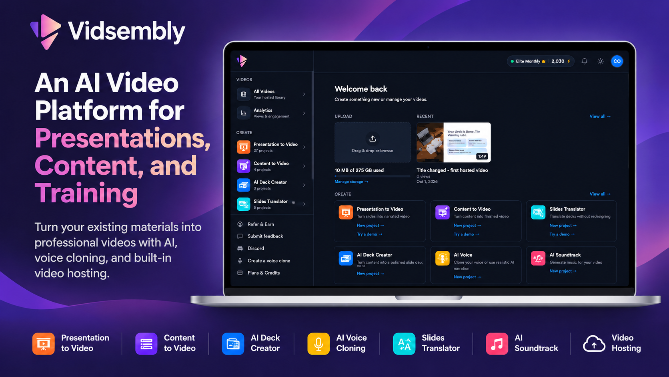
Vidsembly is an AI video creation platform that turns PowerPoint presentations, PDFs, and documents into narrated videos. Create AI presentations, clone voices, translate slides, transcribe recordings, generate soundtracks, and host videos in one place.

Introduction

Vidsembly is an AI-powered video creation platform that helps businesses, educators, and content creators turn PowerPoint presentations, PDFs, documents, and written content into professional videos without complicated editing software.

The platform combines AI video generation, voice cloning, presentation creation, translation, transcription, background music, and video hosting in one place.

Key Features

PowerPoint to Video: Convert PowerPoint presentations and PDF slides into narrated MP4 videos. Upload your slides, import speaker notes or generate a script, select an AI voice, and export a finished video. Ideal for employee training, educational lessons, onboarding, and business presentations.

Content to Video: Transform written content and documents into videos with AI-generated visuals and narration. Repurpose articles, training materials, and informational content without building everything manually.

AI Deck Creator: Generate editable PowerPoint presentations from text or uploaded documents. Customize the design and use the finished slides to create narrated videos.

AI Voice Cloning: Generate AI voiceovers using a library of voices or create a custom voice clone. Produce consistent narration without recording each script manually, with support for multiple languages.

Slides Translator: Translate PowerPoint presentations and PDFs into different languages while preserving their original formatting and layout as closely as possible.

AI Transcriber: Convert audio and video recordings into written transcripts. Useful for lectures, meetings, interviews, and documentation, with downloadable text and subtitle formats.

AI Soundtrack: Generate instrumental background music for presentations, marketing videos, and other content using AI.

Video Hosting: Upload, share, and embed videos using dedicated watch links. Track viewing activity with video analytics and publish videos directly from Vidsembly's creation tools.

Who Uses Vidsembly?

Vidsembly is designed for people and organizations that regularly create educational, instructional, or business video content.

  • HR and training teams creating employee onboarding, compliance, and professional development videos.
  • Educators converting lecture slides and teaching materials into narrated lessons.
  • Sales enablement teams producing product demonstrations and training presentations.
  • Marketing teams repurposing documents and presentations into video content.
  • Content creators generating presentations, narration, soundtracks, and transcripts.
Why Choose Vidsembly?

Traditional video production often requires separate tools for editing, voiceovers, presentations, transcription, and hosting. Vidsembly simplifies these workflows by bringing specialized AI tools together in one platform.

Users can start with existing PowerPoint presentations, PDFs, documents, or recordings instead of creating everything from scratch.

The platform is especially useful for turning existing training materials into reusable videos, creating multilingual educational content, and producing professional presentations without advanced video editing skills.

Pricing

Vidsembly offers a free plan with 30 introductory credits and no credit card required. Paid subscriptions unlock additional usage and premium capabilities, including voice cloning.

Visit https://www.vidsembly.com/ to explore the available AI video creation tools.

User Reviews

4.6/5.0
(18reviews)
Click stars to rate

Website Traffic

vidsembly.com ·

Estimated monthly visits
5,191
+247.7% vs. prior month
Pages per visit
2.56
Bounce rate
39.26%
Avg. session
1m 41s
Global rank
#2,853,293
Country rank (US)
#1,912,361

Visits Over Time

1,229
1,493
5,191

Traffic Sources

Direct
39.21%
Search
34%
Referrals
10.08%
Social
6.12%
Paid referrals
3.31%
Mail
3.37%
Generative AI
1.48%
Affiliate
2.42%
Other
0%
Organic search
32.57%
Paid search
1.43%
Organic social
5.38%
Paid social
0.74%

Top Keywords

KeywordVolumeCPCEst. monthly value
vidsembly340$0.00$400.00
vidsembly ai60$0.00$150.00
ai presentation maker36,120$1.98$20.00
video to link8,810$0.76$20.00
naturalreader:500$0.00$10.00

Top Regions

RegionPercentage
United States (US)51.33%
India (IN)41.48%
United Kingdom (GB)4.48%
Canada (CA)2.71%

More Products

TinyPNG is Tinify’s browser-based image compressor and converter. This review explains how its web tool differs from its Developer API, what each free allowance covers, and when its compression, conversion, resizing, and cropping features may fit an image workflow.

Zamzar is an online file conversion and compression service for documents, images, video, sound, and other formats. Its free web service has daily file and upload-size limits.

iLoveIMG is a browser-based image service for compression, resizing, cropping, conversion, and editing, with a free Basic plan and paid options.

Smallpdf is an online PDF toolkit for conversion, compression, editing, merging, signing, and more. Its Free plan includes 30+ tools but limits downloads.

Convertio is a browser-based service for converting files between supported formats, with optional settings for many conversion types.

Ezgif is a free online toolset for making and editing animated GIFs, converting videos to animations, and working with other image formats.

FreeConvert is an online file converter with more than 1,500 listed conversion types and a free allowance of 20 conversion minutes per day.

HiPDF is an online PDF service with conversion, editing, compression, merging, cropping, image tools, and AI features.

123apps is a browser-based suite of video, audio, PDF, and file-conversion tools. Its apps are free to use with limits on file size and daily operations.

ChatPDF summarizes PDFs and answers questions about them. Its free plan allows two document analyses per day, with no account needed to get started.

CloudConvert is a browser-based converter for more than 200 file formats, including documents, images, audio, video, archives, and specialist formats.

OCR.space provides free browser-based OCR for images and PDFs, searchable PDF creation, and a separate API for adding text recognition to software.

Free online itinerary maker with 900+ trip plans across 96 countries. Edit day-by-day in the browser; export to PDF, Excel, CSV, Google Sheets or .ics. Free account required to download/print. Optional Pro adds premium themes; AI chat helps draft plans.

Verla AI is an AI learning platform that helps teams and students learn and apply AI faster with guided courses, tools, and hands-on practice.

TasteDir is a curated directory of finished, well-crafted software from indie makers and small teams. Every listed tool is reviewed by hand.

An AI meeting copilot that combines live transcripts, screenshots, and project documents to deliver contextual answers, response drafts, and meeting recaps.