

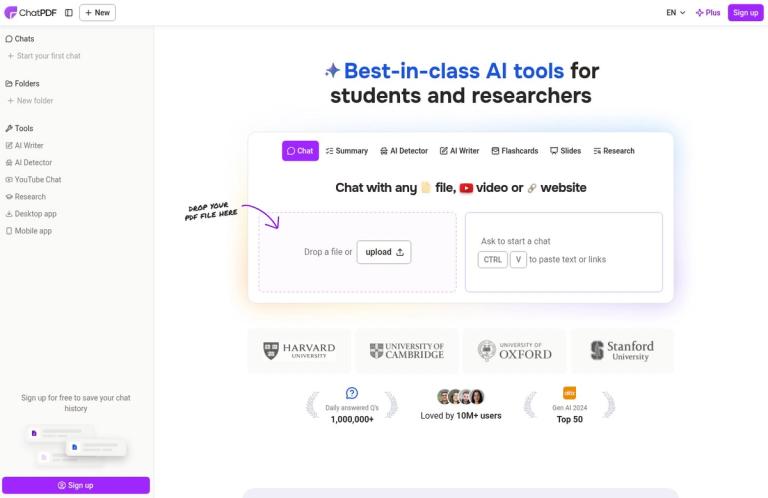
What ChatPDF does
ChatPDF is a document-chat service built around asking questions about files and receiving summaries or answers with citations. The central idea is straightforward: instead of searching page by page before you know where to look, describe what you want to understand and use the response to guide your reading. The site presents the product for students, researchers and professionals, with examples including research papers, books, reports, legal contracts, financial reports, manuals and training material.
Its most useful distinction from a general-purpose chat is the document-focused layout and its references to the PDF. ChatPDF says citations anchor responses to PDF references, and describes a side-by-side view in which the chat and PDF remain open together. It also says citations can link to the original content, helping you return to the passage behind an answer. These are useful aids for checking a response, not a promise that every interpretation is complete or correct. For important claims, open the cited passage and read enough surrounding context to understand qualifications and exceptions.
The free boundary is unusually easy to state: ChatPDF says its free plan lets you analyze two documents every day. It also says you can try the service without an account. That is a limited allowance, not unlimited free analysis. A free account adds saved chat history and multi-document chats, according to the site; the page does not say that creating an account increases the daily document allowance. ChatPDF Plus is described as offering unlimited document analysis and more advanced features, but the homepage does not give a price or itemize those features.
Questions, summaries and document navigation
The primary job is asking questions about a document. For example, a student might ask for the central argument of a paper, the evidence used to support a conclusion, or an explanation of a particular term. A professional might ask where a contract discusses renewal, what a manual says about a procedure, or which recommendations appear in a report. These examples describe sensible ways to use the tool; they are not claims that ChatPDF has been tested on those tasks or will always answer them correctly.
Starting with a broad request for an overview can help you decide where to focus. Then use narrower questions to examine specific topics, sections or claims. If a response is vague, ask about a named point rather than repeating the original broad request. If the question concerns a number, date, exception or exact wording, inspect the cited passage directly. For a decision that depends on precise interpretation, treat the chat as a way to locate and understand material, not as a substitute for reading the source or consulting an appropriate expert.
Summaries are another advertised core use. ChatPDF describes summarizing academic articles, research papers and reports to extract key insights. This can be a practical starting point when you need orientation before reading in depth, or when you want to identify which parts of a long document deserve attention. A summary is necessarily selective, however. If you need a full account of methods, caveats, competing arguments or appendices, ask targeted follow-up questions and check the original sections rather than assuming a short overview covers them.
Citations and the PDF view
ChatPDF presents citations as a way to connect answers with PDF references. Its description of the side-by-side view says the PDF stays available next to the conversation and that answers link to original content. This can make it easier to move from a question to a relevant passage without manually searching the entire file. It is especially useful when you want to check whether a response reflects the document’s wording and context.
A reference is a pointer, not a guarantee. A passage can be relevant without supporting every part of an answer, and a cited paragraph may rely on definitions or qualifications elsewhere. When checking an important response, read the citation and nearby material, and compare the answer’s wording with the document’s. If the question asks for a comparison, confirm that the response has considered the passages or files you intended. This habit matters for academic work, contracts, financial material and operational instructions, where a small qualification can change the meaning.
Formats, languages and multiple files
The homepage lists PDF, Word (.doc and .docx), PowerPoint (.ppt and .pptx), Markdown (.md) and text (.txt) files as supported formats. This provides more flexibility than a PDF-only description, although the site does not specify whether every format is available under the free plan or behaves identically. If a task depends on a particular file type, check that the current interface accepts it before preparing a large batch or relying on it for a deadline.
ChatPDF also advertises multilingual use. It says users can upload PDFs in any language and chat in their preferred language, including asking questions in a different language from the document. That may suit readers working across languages or trying to understand a foreign-language paper. The site does not detail language-specific limits or guarantee that specialized terms will be rendered perfectly. For an exact translation or a consequential interpretation, compare the response with the relevant source wording and have important passages reviewed by someone qualified in the language and subject.
For more than one document, ChatPDF says users can create folders, add files and ask questions across them in one conversation. It describes this as a way to find connections or compare content among multiple PDFs. A free account unlocks multi-document chats, so users should not assume that this feature is included in the no-account starting experience. The homepage does not state a maximum number of files for a folder or conversation. For a comparison, identify the versions or documents you want considered, ask about the specific differences that matter, and check the relevant passages in each file. Do not treat a generated comparison as an exhaustive change log.
The page also advertises tools beyond document chat, including AI Writer, AI Detector, YouTube Chat, Research, flashcards and slides. These names indicate a broader product menu, but the homepage does not provide enough detail to assess each tool’s workflow, free access or limits. If your main requirement is PDF question-answering, judge ChatPDF on that core task. If you are considering one of the additional tools, check its own current description rather than assuming that its availability or terms match the PDF plan.
A practical way to use it
- Visit the official ChatPDF website and start a chat. ChatPDF says you can try the service without creating an account.
- Choose a document in a format the current interface accepts. The homepage lists PDF, Word, PowerPoint, Markdown and text files; it does not confirm that every format is included in the free plan.
- Begin with a question that matches your goal. For orientation, ask for the document’s main subject or conclusions. For a specific task, name the topic, recommendation, section or claim you want to find.
- Use the response to guide your reading. Follow the citations back to the PDF and check the wording and surrounding context before relying on a significant answer.
- Ask a more focused follow-up when an answer leaves out a distinction you care about. If the point remains unclear, read the relevant part of the document directly.
- Create a free account if saved history or multi-document chats matter to your workflow. The site identifies those as account features; it does not say an account increases the free daily allowance.
- Keep the two-document daily free limit in mind. If you expect to analyze more documents, check the current plan details before depending on the service for that workload.
For instance, someone reviewing a research paper could ask for its research question, then ask what evidence supports the conclusion, and finally check those cited passages in the paper. A reader comparing two policy documents could use a multi-document chat after signing up, ask about a specific subject such as eligibility or deadlines, and verify the answer in both files. These examples are workflow suggestions based on the advertised capabilities, not reported test results. The useful principle is to make questions specific and use the source references to check answers that matter.
Free plan and Plus
The official FAQ states that the free plan allows analysis of two documents every day. ChatPDF separately says users can start without an account, while a free account unlocks saved history and multi-document chats. Those are distinct details: the no-account option supports getting started, and account creation adds named features. The homepage does not say that an account changes the daily document allowance.
ChatPDF Plus is described as providing unlimited document analysis and more advanced features for power users. The homepage does not provide a Plus price, billing interval or complete feature list. Check the live plan and checkout details before subscribing, including the amount charged and renewal terms. The word “unlimited” in the Plus description should not be read as a guarantee that every file type, feature or service condition is unrestricted.
The homepage does not give a free-plan file-size cap, page limit or question allowance. Those details may matter if you have unusually large files or need to ask many questions, so check the current interface and plan information before building a workflow around them. The most important published free limit remains the stated allowance of two documents per day; avoid assuming that other unlisted limits are either present or absent.
Privacy and sharing
ChatPDF says documents are private by default and describes encryption during transfer and while stored. It also says its storage provider is SOC2 Type II certified, that users can delete documents, and that specific PDFs can be shared using links with access controls that can be revoked. These are the vendor’s statements, not an independent security assessment. Before uploading confidential, personal, legal or business material, review the official privacy policy and terms, and consider whether your organization permits use of an online document service.
Sharing deserves particular care: the site describes a way to invite others to access a PDF through a generated link. If you use that option, check who can access the shared document and revoke access when it is no longer needed. Do not assume that a default privacy description removes the need to review sharing settings or your own data-handling requirements.
Alternatives and fit
ChatPDF is most directly suited to asking questions about document content, summarizing PDFs and following citations to source passages. If your task is editing a PDF rather than understanding its contents, PDFescape is a relevant alternative to compare. For general PDF operations, consider PDF24 Tools or iLovePDF. LightPDF is another PDF-oriented service to compare. These tools are not interchangeable: choose according to whether you need document chat, editing or file utilities, and check each provider’s current features and plan terms.
A useful selection rule is to name the job before choosing the tool. For a quick orientation to a paper, a focused question about a report, or a route from an answer to a PDF passage, ChatPDF’s advertised features are relevant. For changing a PDF or carrying out file operations, compare a service that explicitly offers the operation you need. If you have many documents, check both the account requirements for multi-file work and the free allowance before starting.
Verdict
ChatPDF has a clear purpose: summarize documents, answer questions and help readers navigate PDFs through citations and a side-by-side view. Its free starting point is concrete—two document analyses per day—and the site says no account is needed to try the service. A free account adds saved history and multi-document chats. It also lists Word, PowerPoint, Markdown and text alongside PDF, and advertises multilingual use.
It is a good fit for readers who want an initial overview or a faster way to locate material, provided they are willing to check important responses against the source. It is not a reason to skip the document itself when exact wording, complete coverage or careful interpretation matters. The Plus plan is described as offering unlimited document analysis, but its price and full terms are not given on the homepage. Check the current plan details before paying, and keep the stated free daily allowance in view when planning regular use.


