

What OCR.space does
OCR.space is an online optical character recognition service for turning image-based text into machine-readable text. You can use its browser tool to submit an image or PDF, then view the recognized result. The site also offers searchable PDF creation: a PDF can retain its page image while gaining a text layer that makes its contents searchable. These are related but different outcomes. Extracted text is useful for copying or reusing words; a searchable PDF is useful when you want to find text within the document itself.
The service has two main entry points. The online OCR page is designed for an individual processing a document interactively. The OCR API is for software that sends documents to OCR.space and receives results in JSON. The API can accept a file upload, a URL to an image or PDF, or a Base64-encoded document. The browser service is free without registration and states a 5 MB limit per document. API access has its own key, quota, file-size limit, and PDF page limit; the browser allowance does not apply to API requests.
That separation matters when choosing OCR.space. If you need to extract a few pages from a scan, the website is the straightforward starting point. If you are building a document-processing feature, the API provides programmatic access and structured responses, but you should design around its stated limits and check the current plan. The API page lists a free tier as well as paid options. It is not simply an unlimited version of the browser tool.
OCR.space is worth considering when the immediate task is recognition rather than full document editing. OCR can make words searchable or reusable, but it does not automatically produce a faithful, editable replica of the original page design. A text result may need correction, and a searchable PDF is not the same as a carefully reconstructed Word document. If exact layout or downstream editing is important, test a representative document and compare the result with a tool intended for that particular output.
For other OCR workflows, compare i2OCR for browser-based recognition, Mathpix when mathematical notation is central, or LightPDF for a broader PDF-oriented workflow. Those products have their own capabilities and limits; do not assume that OCR.space’s free allowance, engine options, or output behavior applies to them.
Online OCR: the free browser tool
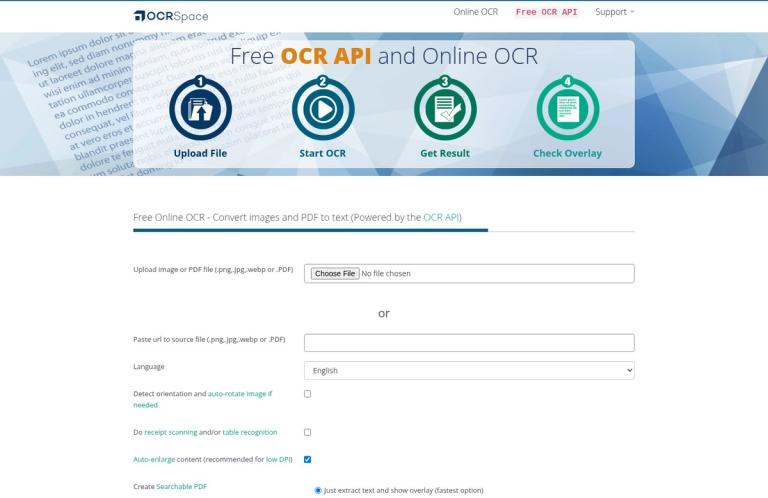
The homepage describes its online OCR service as free to use without registration. It states a 5 MB maximum per document. The page’s instructions name JPG, PNG, GIF, and PDF for the free service, while its current upload form also displays WEBP as an accepted option. If your file uses a less common format, check the live form rather than relying on an assumption about conversion or automatic detection.
The browser interface is aimed at interactive use. The homepage presents controls for uploading a file or providing a source URL, choosing a language, selecting an OCR engine, and starting recognition. It also shows options for orientation detection, enlarging low-resolution content, table or receipt recognition, and searchable PDF output. The current interface offers a text result and JSON, with controls for downloading and viewing an overlay. The particular options you need depend on whether you want plain recognized text, coordinates showing where words appear, or a PDF with a text layer.
For a simple image-to-text job, the useful path is to choose a clear image, submit it, and inspect the recognized text before copying it elsewhere. For a scanned PDF, decide whether the goal is to extract its words or to make the PDF searchable. If you need a searchable PDF, select the relevant option shown by the page and inspect the resulting document. A searchable layer helps with search and selection; it does not promise that the page’s original layout will become an editable document with matching fonts, spacing, and columns.
The homepage also offers a choice of OCR engine. Engine 2 is described by OCR.space as its default and all-round option; Engine 3 is presented for tasks including handwriting and tables. The interface includes an Engine 1 option but labels it deprecated, and the API documentation says Engine 1 is retired and calls are redirected to Engine 2. For a current workflow, start with Engine 2 or compare Engine 2 and Engine 3 on representative pages rather than designing around Engine 1.
These workflow suggestions are practical advice, not reports of independent testing. A clean, high-resolution page is generally easier to check than a faint or blurred scan, but no engine description guarantees a correct transcription for every file. Before using the text in a report, spreadsheet, database, or formal record, compare important details with the source. Names, dates, decimal points, account numbers, and table values deserve particular attention because a small recognition error can change their meaning.
API for applications and batch workflows
The OCR API documentation describes a free endpoint that accepts images and multi-page PDFs and returns extracted results in JSON. It supports three input methods: a remote URL, a multipart file upload, or a Base64-encoded image or PDF. The documentation recommends the URL method for files larger than 10 MB for faster upload speeds, but the Free plan’s table still sets a 1 MB file-size limit. A recommendation about transport does not remove the plan’s size restriction; check the plan you will actually use.
A free API key is available through the provider’s registration page. For a small integration, a sensible development workflow is to use a representative file, send it to the documented endpoint, and examine the JSON response before building downstream processing. The response can include parsed text, processing and error information, and—if requested—word coordinates. For PDFs, the results are organized by page. The documentation also provides examples for tools and languages including cURL, Python, JavaScript, PHP, C#, and Node.js, which can help developers choose an implementation starting point.
The API’s options are more specific than a basic upload-and-extract workflow. Engine 2 and Engine 3 use automatic language detection by default, so the documentation says an explicit language code is generally unnecessary for those engines. The API can optionally return text-overlay coordinates, detect and correct image orientation, and request a searchable PDF. It also has a table-recognition parameter: the documentation says this returns parsed text line by line and recommends it for tables, receipts, and invoices. These options help developers shape a request, but they do not guarantee that every source table will become a perfectly structured spreadsheet.
The API’s JSON response can also report whether processing succeeded, partially succeeded, or failed. That distinction matters in automated workflows: receiving a response is not the same as receiving usable text for every page. A reasonable implementation should check the status and error fields, handle missing or partial results, and retain a path for reviewing documents that need attention. This is recommended integration practice, not a claim that OCR.space supplies a complete document-review system.
The API page gives two different free request figures: its plan table lists 25,000 requests per month, while the page also states a rate limit of 500 requests per day per IP address. It does not explain how these figures interact. Treat both as published constraints and ask OCR.space for clarification if your application’s expected traffic makes the distinction important. The Free plan table also lists a 1 MB file-size limit and a three-page PDF limit. These restrictions are separate from the browser tool’s 5 MB per-document allowance.
Engine 3 has its own free quota: 1,000 conversions, in addition to the 25,000 Engine 1/2 conversions listed for the Free plan. OCR.space says Engine 3 is more compute-intensive and has lower monthly conversion limits. Do not count its allowance as unlimited or assume it is interchangeable with the Engine 1/2 quota. If a workflow depends on Engine 3 for handwriting or table recognition, estimate the number of documents and pages you expect to process and confirm current plan terms first.
Engines and recognition features
OCR.space describes Engine 2 as the default and an all-round choice. Its documentation lists language auto-detection, support for mixed languages or scripts, and recognition of vertical Japanese and Chinese text. The online page and API documentation list different language details, so consult the current engine-specific language information when your documents use a less common language. Engine 2 does not have a dedicated model for every language named on the site; OCR.space notes that some languages are handled through Latin or Cyrillic recognition and may have occasional diacritic errors.
Engine 3 is described as supporting more than 200 languages with automatic detection, along with handwriting recognition, tables, and checkboxes. The API documentation says it can return tables in Markdown format. These features may make it relevant for varied documents, but they should be understood as product capabilities rather than promises of error-free results. Difficult handwriting, dense layouts, unusual print, and low-quality scans should be checked against the source.
There are trade-offs. OCR.space says Engine 3 can be slower on larger files, and that requesting overlay data makes an Engine 3 call two to three times slower. Its documentation also describes Engine 3’s word-position coordinates as less precise than those from Engines 1 and 2, and says its searchable-PDF text layer is placed by recognized text region rather than word. If precise coordinates or performance are important to an application, compare the output and processing needs on sample documents before selecting an engine.
The API documentation says the response format is the same across engines, so changing the engine parameter does not require a different response format. The provider recommends trying the engines to see which is most suitable for a particular input. That is a useful approach for a small evaluation set: include the types of pages the real workflow will process, compare text and structure, and review errors rather than choosing solely on a feature list.
Pricing and free limits
| Offering | Published price or allowance | Relevant conditions |
|---|---|---|
| Online OCR | Free, with no registration required | 5 MB per document. This is the browser service, not the API quota. |
| API Free plan | Free; 25,000 requests per month in the plan table | 1 MB file limit and three-page PDF limit; the page also states 500 requests per day per IP. |
| API Engine 3 on Free | 1,000 conversions | Listed in addition to the 25,000 Engine 1/2 conversions. |
| API PRO | $30 per month | The API plan table lists 300,000 requests per month and a 5 MB file limit. |
| API PRO PDF | $60 per month | The API plan table lists 300,000 requests per month and a 100 MB+ file limit. |
| Enterprise | $999+ per month | The table lists custom request limits and 100 MB+ files; contact sales for details. |
The prices and plan figures above are published on the official API page; confirm them there before purchasing. The page also describes monthly paid plans as cancellable at any time and mentions yearly plans with a 20% discount. Those paid API options are distinct from the free browser tool, so they should not be read as a requirement for occasional online OCR.
The free boundary depends on the route you use. In the browser, the stated limit is 5 MB per document. For the API, the Free plan table lists a smaller file limit and a maximum PDF page count, as well as monthly requests. The page separately states a daily per-IP request limit without explaining its relationship to the monthly total. Engine 3 adds a separate conversion quota. Free API searchable PDFs also carry a “Generated by OCR.space” watermark; the API plan table lists searchable PDF creation for paid plans as well, and the documentation says the PRO output has no watermark.
Searchable PDFs and output expectations
OCR.space supports creating searchable PDFs through its online service and API. For the API, a request must enable the searchable-PDF option. The response provides a download link, which the documentation says remains valid for one hour before the document is deleted from OCR.space’s servers. The documentation also describes a setting for making the text layer invisible; by default, the added layer is visible, which can help compare recognized text with the page image.
A searchable PDF is useful when a scan should remain visually intact but gain selectable or searchable text. It is not the same as converting the page into a fully editable document or rebuilding its layout. If you need to work with the text, inspect what OCR returned and decide whether you need to copy it into another application or use a document-conversion tool. In particular, do not assume that table recognition in OCR means a table will be recreated in a spreadsheet with exact rows, columns, and formatting.
The free API watermark is an important output consideration for documents that will be shared or archived. The official documentation specifically associates it with searchable PDFs generated through the free API tier. It does not establish that the same watermark applies to every online result, so check the browser interface and review the actual output for your use case.
Privacy and file handling
OCR.space says that files uploaded to its online OCR service and the extracted text are deleted immediately after processing, and that it does not store, archive, or retain that data. The homepage also states that its OCR servers are located within the European Union and describes the service as GDPR compliant. These are the provider’s statements about its service. Review the official privacy policy and applicable terms for the details relevant to your own documents and obligations.
The API documentation separately says that searchable-PDF download links expire after one hour, after which the document is deleted from OCR.space’s servers. Do not assume that a statement about the browser service automatically describes every API configuration or contractual arrangement. If you plan to process sensitive, personal, or regulated information, check the current terms, confirm that the service is appropriate for your organization, and ensure you are authorized to upload the material. These steps are prudent review practices, not an independent security assessment.
Who should consider OCR.space?
OCR.space is a reasonable option for someone who wants a free browser tool for occasional image or PDF OCR and can work within the stated 5 MB document limit. It is also worth considering for developers who want an API with multiple input methods, JSON results, searchable PDF output, and engine-selection options. The free API’s file and page restrictions, request limits, Engine 3 quota, and watermark make it important to check the specific job before relying on it.
It may be less suitable when the main requirement is exact page reconstruction, an unrestricted high-volume API, or a predictable production quota that has not been confirmed with the provider. Recognition claims do not remove the need to inspect results, particularly for handwriting, tables, and important numeric content. For a small task, use the browser workflow and verify the text. For software integration, check the current API plan, make a test request, handle partial or failed results, and review the output format your application will consume.
Alternatives
i2OCR is a relevant alternative to compare for free browser-based OCR. Check its current supported inputs and limits directly rather than assuming they match OCR.space. Mathpix may be worth evaluating when mathematical notation is a central part of the document. LightPDF is another option to compare when the task sits within a broader PDF workflow. These alternatives serve different needs; compare the specific output you require, and try representative files before choosing a tool for a large collection or ongoing process.
Verdict
OCR.space combines free interactive image and PDF OCR with a separate, documented OCR API. The browser tool has a clear 5 MB per-document boundary and requires no registration. The API offers more control—including engine selection, JSON responses, overlay coordinates, and searchable PDFs—but its Free plan has distinct file, page, request, and Engine 3 limits. Free API searchable PDFs include a watermark.
For occasional text extraction or a searchable scan, the online tool is the simplest entry point. For an integration, read the API plan details and test the exact files and outputs your application needs. Engine 3’s stated handwriting, table, and language capabilities may be useful, but recognition quality and layout should be checked on real examples. OCR.space is best approached as a practical OCR service whose free boundary and output requirements should be matched to the job—not as unlimited document conversion or guaranteed layout reconstruction.


