LogoAI Jet
icon of AYOA

AYOA

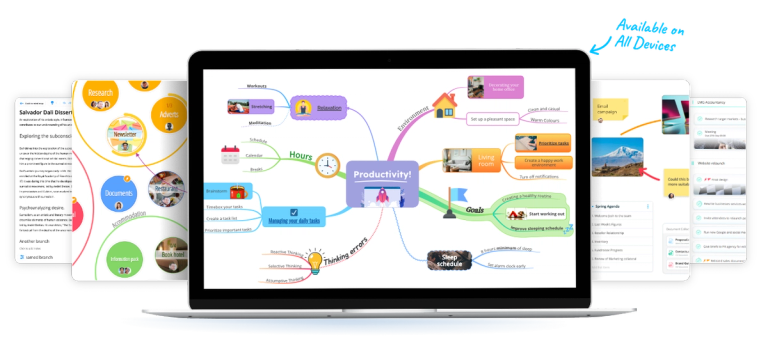
AYOA is an AI-powered productivity tool with mind mapping, task boards, and whiteboards for diverse thinking styles, boosting creativity and planning.

Introduction

AYOA is an AI-powered productivity tool with mind mapping, task boards, and whiteboards for diverse thinking styles, boosting creativity and planning.

Features
  • AI-Powered Mind Mapping — AYOA's intelligent AI assistant generates mind maps and breaks down complex projects automatically. The AI integration prompts thinking, removes guesswork from the mind mapping process, and helps users get into planning details faster. It works seamlessly with natural workflows to amplify productivity in minutes.
  • Visual Task Boards & Gantt Timelines — Inspired by traditional Kanban boards, AYOA offers visual task management with clear, linear workflow views. The Gantt Timeline feature allows users to view tasks in adaptable timeline mode for projects with multiple milestones, making deadline management and project tracking intuitive and visual.
  • Interactive Whiteboards — Freeform digital whiteboards for creative thinking and content dashboards. Users can add post-it notes, images, flowcharts, links, videos, and more to create rich, multimedia brainstorming spaces that capture ideas in their most natural, unstructured form.
  • Doc View & Outline Mode — Transforms visual mind maps and ideas into organized linear documents automatically. Perfect for essays, reports, and presentations, this feature bridges the gap between creative brainstorming and structured document creation, enhancing ease of written content production.
  • Neuro-Inclusive Design — Deliberately designed for accessibility, AYOA supports people with ADHD, Dyslexia, and Autism through customizable fonts, background colors, layouts, and visual organization tools. Awarded 'Best for Neuro-Inclusivity 2026,' it empowers diverse thinking styles and learning needs.
  • Customizable Templates & Idea Bank — Pre-built templates eliminate blank page anxiety and jumpstart productivity. The Idea Bank feature allows users to save and organize thoughts for later use, while full customization options ensure the tool adapts to individual working styles and preferences.
Use Cases
Academic Research & Essay Writing

Students and researchers use AYOA to overcome blank page anxiety by starting with AI-generated mind maps, organizing research notes visually, then transforming ideas into structured documents using Doc View. The platform helps manage complex information and meet essay deadlines efficiently. Target Audience: Students, researchers, academics, and educators

Project Planning & Team Collaboration

Teams leverage AYOA's combination of mind maps for brainstorming, task boards for workflow management, and Gantt timelines for milestone tracking. The all-in-one workspace eliminates the need for multiple apps, keeping project planning, execution, and collaboration in a single platform. Target Audience: Project managers, team leaders, and workplace professionals

Neurodivergent-Friendly Productivity

Individuals with ADHD, Dyslexia, or Autism use AYOA's customizable interface and visual organization tools to work with their natural thinking patterns. The non-linear mind mapping approach, adjustable fonts and colors, and visual task management help maintain focus and reduce overwhelm. Target Audience: People with ADHD, Dyslexia, Autism, and other SpLDs

Creative Brainstorming & Ideation

Creative professionals and entrepreneurs use AYOA's whiteboards and mind maps for freeform thinking, connecting ideas visually, and exploring alternative paths. The AI assistant helps generate initial concepts while the Idea Bank captures inspiration for future projects. Target Audience: Entrepreneurs, creative professionals, and innovation teams

Pros
  • All-in-one productivity platform combining mind maps, task boards, whiteboards, Gantt charts, and document views—eliminates the need for multiple separate applications
  • Industry-leading AI integration that generates mind maps, breaks down complex projects, and accelerates the brainstorming-to-action workflow
  • Award-winning neuro-inclusive design with customizable accessibility features for people with ADHD, Dyslexia, and Autism—recognized as 'Best for Neuro-Inclusivity 2026'
  • Seamless transformation from visual brainstorming to structured documents and presentations, bridging creative and linear thinking styles
  • Ranked #1 Best Mind Map Software 2025 with intuitive interface, customizable templates, and extensive personalization options
Cons
  • Feature-rich platform may present a learning curve for users who only need simple mind mapping or basic task management
  • Pricing details not transparently displayed on main pages—may require demo booking or sign-up to understand full cost structure
  • Heavy reliance on visual and non-linear interfaces may not suit users who prefer traditional list-based or text-heavy productivity tools
  • Mobile app availability mentioned but desktop experience appears to be the primary focus—mobile functionality may be more limited

Latest News

AI Images in AYOA Mobile

AI Images in AYOA Mobile

8/4/2026

AI Images in AYOA Mobile 1. Help Centre 2. AYOA Mobile May 8, 2026 # AI Images in AYOA Mobile ## AYOA's mobile app now includes AI image generation, bringing the full creative power of our web platform directly to your pocket. Transform ideas into stunning visuals instantly! You can now generat...

Templates are Back | AYOA

Templates are Back | AYOA

8/4/2026

Templates are Back | AYOA 1. Help Centre 2. Mind Maps May 7, 2026 # Templates are Back | AYOA ## Don't know where to start? AYOA's templates give you the structure you need whilst keeping the creative freedom you want. AYOA's Templates are back! If you don't know where to start, our templates g...

Prepare to import with AYOA's AI

Prepare to import with AYOA's AI

8/4/2026

Prepare to import with AYOA's AI May 8, 2026 # Prepare to import with AYOA's AI ## How to set up an AI import, or AI generated project To begin, click on the "AI Generate Ideas" option. This feature allows you to transform any topic into a well-structured Mind Map. Simply enter the subject you...

Canvas View in AYOA | Visual Task Management Beyond Lists

Canvas View in AYOA | Visual Task Management Beyond Lists

8/4/2026

Canvas View in AYOA | Visual Task Management Beyond Lists January 22, 2026 # Canvas View in AYOA | Visual Task Management Beyond Lists ## Canvas View gives you a visual, spatial way to organise your tasks beyond traditional lists and Kanban boards. Spread your tasks across an infinite canvas whe...

AYOA Project Creation on Mobile (iOS and Android)

AYOA Project Creation on Mobile (iOS and Android)

8/4/2026

AYOA Project Creation on Mobile (iOS and Android) 1. Help Centre 2. AYOA Mobile August 14, 2025 # AYOA Project Creation on Mobile (iOS and Android) ## AYOA's enhanced mobile project creation menu brings the full desktop experience to your phone. Create projects anywhere with the same powerful fe...

Alternatives

  • Miro

    Miro offers a versatile online whiteboard for collaborative brainstorming, mind mapping, and project planning.

  • ClickUp

    ClickUp provides an all-in-one workspace with robust task management, whiteboards, and mind maps, similar to AYOA's integrated approach.

  • Notion

    Notion is a highly flexible workspace that combines notes, tasks, wikis, and databases, allowing for diverse organizational methods.

  • MindMeister

    MindMeister is a dedicated online mind mapping tool that excels in visual brainstorming and idea organization.

  • Lucidspark

    Lucidspark is a collaborative virtual whiteboard designed for brainstorming, ideation, and real-time team collaboration.

  • Milanote

    Milanote is a creative workspace that allows users to organize ideas, notes, and files on a flexible visual board.

  • Trello

    Trello is a simple and visual Kanban-style tool for task management and project organization, suitable for agile teams.

  • Asana

    Asana is a comprehensive project management platform that helps teams organize, track, and manage their work effectively.

  • Monday.com

    Monday.com is a customizable work operating system that helps teams manage projects, workflows, and tasks with various visual tools.

  • Wrike

    Wrike is a powerful project management software offering extensive features for task tracking, collaboration, and workflow automation.

FAQ

User Reviews

4.2/5.0
(5reviews)
Click stars to rate

Pricing

Pricing Model: Freemium

AYOA Free

Enjoy our AYOA Free plan entirely for free, built to last for many happy years of using AYOA mind mapping without worrying about any payment.

Free

Ultimate

Monthly Plan for Ultimate features.

£17/month
monthly

Ultimate

Annual Plan for Ultimate features, offering savings.

£13/user/month
yearly

Ultimate

Special offer: Get 3 Years for the Price of 2 for Ultimate features.

£13/user/month
3 years

More Products

TinyPNG is Tinify’s browser-based image compressor and converter. This review explains how its web tool differs from its Developer API, what each free allowance covers, and when its compression, conversion, resizing, and cropping features may fit an image workflow.

Zamzar is an online file conversion and compression service for documents, images, video, sound, and other formats. Its free web service has daily file and upload-size limits.

iLoveIMG is a browser-based image service for compression, resizing, cropping, conversion, and editing, with a free Basic plan and paid options.

Smallpdf is an online PDF toolkit for conversion, compression, editing, merging, signing, and more. Its Free plan includes 30+ tools but limits downloads.

Convertio is a browser-based service for converting files between supported formats, with optional settings for many conversion types.

FreeConvert is an online file converter with more than 1,500 listed conversion types and a free allowance of 20 conversion minutes per day.

HiPDF is an online PDF service with conversion, editing, compression, merging, cropping, image tools, and AI features.

123apps is a browser-based suite of video, audio, PDF, and file-conversion tools. Its apps are free to use with limits on file size and daily operations.

ChatPDF summarizes PDFs and answers questions about them. Its free plan allows two document analyses per day, with no account needed to get started.

CloudConvert is a browser-based converter for more than 200 file formats, including documents, images, audio, video, archives, and specialist formats.

OCR.space provides free browser-based OCR for images and PDFs, searchable PDF creation, and a separate API for adding text recognition to software.

Free online itinerary maker with 900+ trip plans across 96 countries. Edit day-by-day in the browser; export to PDF, Excel, CSV, Google Sheets or .ics. Free account required to download/print. Optional Pro adds premium themes; AI chat helps draft plans.

Verla AI is an AI learning platform that helps teams and students learn and apply AI faster with guided courses, tools, and hands-on practice.

TasteDir is a curated directory of finished, well-crafted software from indie makers and small teams. Every listed tool is reviewed by hand.

An AI meeting copilot that combines live transcripts, screenshots, and project documents to deliver contextual answers, response drafts, and meeting recaps.

Create professional invoices free in your browser: live preview, any currency, tax and discounts, custom templates, and no-watermark PDF. No signup needed.