LogoAI Jet
icon of Outline

Outline

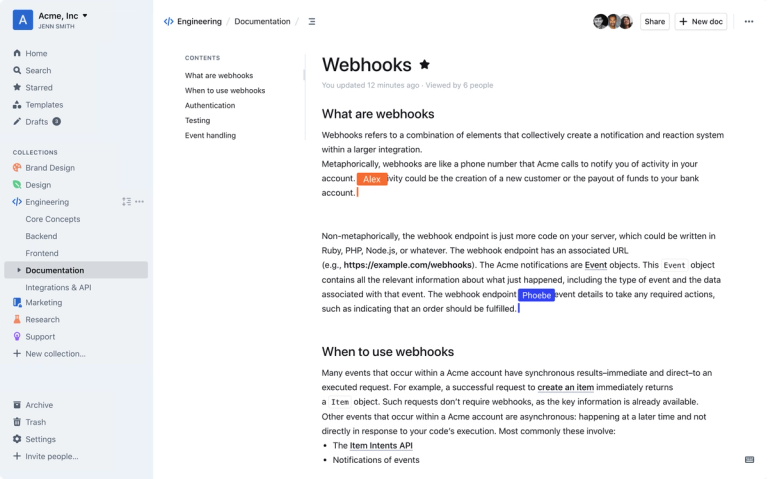
Outline is a modern team knowledge base and wiki designed for internal documentation, product specs, meeting notes, and more.

Introduction

Outline is a team knowledge base and wiki that helps organize internal documentation, product specifications, support answers, meeting notes, and onboarding materials. Key features include:

  • Intuitive Editing: A fast editor with Markdown support, slash commands, and interactive embeds.
  • Real-time Collaboration: Multiplayer collaboration with comments and threads for organized conversations.
  • Powerful Search: Instant workspace search with AI-powered question answering.
  • Slack Integration: Search, share, and ask questions from Slack; post notifications for document updates.
  • Customization: Public sharing with custom branding, logos, and domains.
  • Open Source: Self-hostable with a public source code repository.

Outline is designed for teams seeking a centralized, collaborative, and easily searchable knowledge repository. It supports various use cases, including:

  • Internal Documentation: Creating and managing company policies, procedures, and guidelines.
  • Product Specifications: Documenting product features, roadmaps, and technical details.
  • Meeting Notes: Capturing and organizing meeting discussions and action items.
  • Onboarding: Providing new employees with essential information and resources.
  • Support Answers: Building a searchable database of solutions to common customer issues.

Latest News

Changelog

Changelog

8/4/2026

Changelog – Outline – Team knowledge base & wiki ## Toggle headings June 28th, 2026 You can now insert a collapsible toggle section pre-filled with a heading in one step. Open the slash menu (`/`) and choose Big toggle heading, Medium toggle heading, or Small toggle heading to drop in a heading n...

Toggle headings – Changelog – Outline – Team knowledge base & wiki

Toggle headings – Changelog – Outline – Team knowledge base & wiki

8/4/2026

Toggle headings – Changelog – Outline – Team knowledge base & wiki ## Toggle headings June 28th, 2026 You can now insert a collapsible toggle section pre-filled with a heading in one step. Open the slash menu (`/`) and choose Big toggle heading, Medium toggle heading, or Small toggle heading to d...

Desktop app improvements – Changelog – Outline – Team knowledge base & wiki

Desktop app improvements – Changelog – Outline – Team knowledge base & wiki

8/4/2026

Desktop app improvements – Changelog – Outline – Team knowledge base & wiki ## Desktop app improvements June 24th, 2026 Two improvements have landed in the desktop app this week. - Passkey login – you can now sign in to the desktop app using a passkey. The app opens your system browser to comple...

Task list improvements – Changelog – Outline – Team knowledge base & wiki

Task list improvements – Changelog – Outline – Team knowledge base & wiki

8/4/2026

Task list improvements – Changelog – Outline – Team knowledge base & wiki ## Task list improvements June 10th, 2026 We've shipped a round of improvements to task lists and checkboxes in the editor so they're easier to use and more natural to interact with. - Quick conversion – type`[ ]` at the s...

Request access to documents – Changelog – Outline – Team knowledge base & wiki

Request access to documents – Changelog – Outline – Team knowledge base & wiki

8/4/2026

Request access to documents – Changelog – Outline – Team knowledge base & wiki ## Request access to documents June 1st, 2026 Members can now request access to documents they don’t yet have permission to view. When someone follows a link they can’t open, they’ll see a simple “request access” optio...

Alternatives

  • Confluence

    Offers a robust and widely adopted enterprise wiki and team collaboration platform for documentation and knowledge sharing.

  • Notion

    Provides an all-in-one workspace that allows teams to create flexible wikis, databases, and documents for various internal needs.

  • Coda

    Blends documents, spreadsheets, and applications into a single flexible canvas, ideal for building interactive knowledge bases and internal tools.

  • Slab

    A modern knowledge base designed for teams to organize, share, and discover information efficiently with a clean interface.

  • Guru

    Focuses on capturing and delivering verified knowledge directly within workflows, ensuring teams have access to accurate information instantly.

  • GitBook

    A documentation platform primarily used by developers and teams to build, publish, and maintain technical documentation and internal wikis.

  • Slite

    Offers a simple and collaborative knowledge base solution that helps teams centralize information, meeting notes, and documentation with ease.

  • ClickUp

    An all-in-one productivity platform that includes powerful document and wiki features for organizing team knowledge alongside project management.

  • SharePoint

    Microsoft's comprehensive platform for content management and collaboration, widely used by enterprises for internal wikis and documentation portals.

  • Quip

    A collaborative productivity suite from Salesforce that combines documents, spreadsheets, and chat to facilitate real-time team knowledge creation and sharing.

FAQ

User Reviews

4.5/5.0
(19reviews)
Click stars to rate

Pricing

Pricing Model: Subscription

Starter

A cloud-hosted plan for small teams.

$10/month

Team

A cloud-hosted plan for growing teams.

$79/month

Business

A cloud-hosted plan for larger organizations.

$249/month

Enterprise

Custom pricing for cloud-hosted teams larger than 200 users.

Contact for pricing

More Products

TinyPNG is Tinify’s browser-based image compressor and converter. This review explains how its web tool differs from its Developer API, what each free allowance covers, and when its compression, conversion, resizing, and cropping features may fit an image workflow.

Zamzar is an online file conversion and compression service for documents, images, video, sound, and other formats. Its free web service has daily file and upload-size limits.

iLoveIMG is a browser-based image service for compression, resizing, cropping, conversion, and editing, with a free Basic plan and paid options.

Smallpdf is an online PDF toolkit for conversion, compression, editing, merging, signing, and more. Its Free plan includes 30+ tools but limits downloads.

Convertio is a browser-based service for converting files between supported formats, with optional settings for many conversion types.

FreeConvert is an online file converter with more than 1,500 listed conversion types and a free allowance of 20 conversion minutes per day.

HiPDF is an online PDF service with conversion, editing, compression, merging, cropping, image tools, and AI features.

123apps is a browser-based suite of video, audio, PDF, and file-conversion tools. Its apps are free to use with limits on file size and daily operations.

ChatPDF summarizes PDFs and answers questions about them. Its free plan allows two document analyses per day, with no account needed to get started.

CloudConvert is a browser-based converter for more than 200 file formats, including documents, images, audio, video, archives, and specialist formats.

OCR.space provides free browser-based OCR for images and PDFs, searchable PDF creation, and a separate API for adding text recognition to software.

Free online itinerary maker with 900+ trip plans across 96 countries. Edit day-by-day in the browser; export to PDF, Excel, CSV, Google Sheets or .ics. Free account required to download/print. Optional Pro adds premium themes; AI chat helps draft plans.

TasteDir is a curated directory of finished, well-crafted software from indie makers and small teams. Every listed tool is reviewed by hand.

An AI meeting copilot that combines live transcripts, screenshots, and project documents to deliver contextual answers, response drafts, and meeting recaps.

Create professional invoices free in your browser: live preview, any currency, tax and discounts, custom templates, and no-watermark PDF. No signup needed.

Vidsembly is an AI video creation platform that turns PowerPoint presentations, PDFs, and documents into narrated videos. Create AI presentations, clone voices, translate slides, transcribe recordings, generate soundtracks, and host videos in one place.