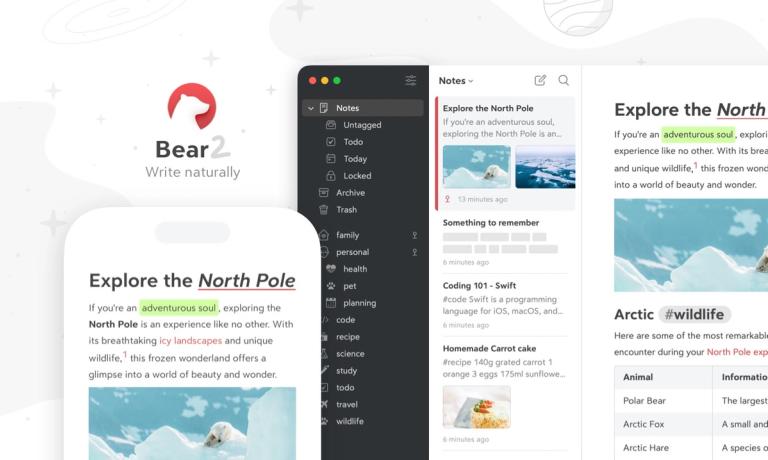
Bear is a Markdown note-taking app for capturing, writing, and organizing notes with a focus on simplicity and powerful features.
Features
- Seamless Markdown Editor — Write naturally with full Markdown support that handles text, photos, tables, and todo lists all within the same note. The simple Markdown formatting adapts to any situation, making it easy to create rich, structured content without leaving the app.
- Flexible Tag Organization — Organize notes and projects effortlessly using a powerful tagging system with over 250 icons to help tags stand out. Pin important tags for quick access and build a personalized organizational structure that works for notes, projects, books, or even a personal wiki.
- iCloud Sync & Cross-Device Access — Keep notes automatically up-to-date across Mac, iPhone, and iPad with seamless iCloud synchronization. Work offline and sync when reconnected—your notes stay with you wherever you go across all Apple devices.
- Advanced Export & Sharing — Export notes into multiple formats including PDF, HTML, DOCX, JPG, ePub, RTF, TextBundle, and plain Markdown. Share ideas with others or keep archives in your preferred format with just a few clicks.
- OCR Search & Rich Media — Search for text inside photos and PDFs across all notes using Optical Character Recognition. View rich media previews for links and PDFs, resize or crop images inline, and see more content at a glance without opening attachments.
- Privacy & Encryption — Notes are stored privately between you and iCloud—Bear cannot access your content. Add an extra layer of protection by encrypting individual notes, with full support for Apple's Advanced Data Protection for maximum security.
Use Cases
Personal Knowledge Management & Daily Journaling
Capture thoughts, ideas, and daily reflections in a beautiful, distraction-free environment. Use tags to categorize entries by topic, mood, or project, and quickly search through months of entries. The flexible Markdown editor handles everything from simple text notes to rich entries with photos, sketches, and todo lists. Target Audience: Writers, journalers, and anyone seeking a digital space for personal reflection and idea capture
Academic Research & Student Note-Taking
Organize lecture notes, research materials, and study resources using nested tags for courses and subjects. OCR search lets students find text within scanned documents and photos of whiteboards. Export notes to PDF or DOCX for sharing with study groups or submitting assignments. Target Audience: Students, researchers, and academics managing complex information across multiple subjects
Content Creation & Writing Projects
Write blog posts, articles, or entire books using the outline feature with heading-based structure and section folding for focused writing. Draft in Markdown and export to HTML or DOCX for publishing. The minimal interface stays out of the way, letting creativity flow without distractions. Target Audience: Bloggers, authors, journalists, and content creators who write in Markdown and need flexible export options
Project Planning & Team Documentation
Build lightweight wikis and project documentation using interconnected notes with tags. Create todo lists, meeting notes, and project plans all within the same ecosystem. Share specific notes with team members or export project documentation for external collaboration. Target Audience: Freelancers, small teams, and professionals managing multiple projects who need organized, accessible documentation
Pros
- Award-winning Apple Design Award interface that is polished, minimal, and beautiful with 28+ customizable themes—stays out of your way while you work
- Powerful yet simple Markdown support that handles text, photos, tables, sketches, and todo lists in a single unified note format
- Strong privacy focus with notes stored in your personal iCloud, optional note-level encryption, and Apple Advanced Data Protection support—Bear cannot see your content
- Robust organization system with flexible tags, 250+ tag icons, pinning, and fast search including OCR search inside images and PDFs
- True cross-device experience with native Mac, iPhone, and iPad apps that work offline and sync automatically via iCloud
Cons
- Apple ecosystem only—no Windows, Android, or web version available, limiting accessibility for users with mixed-platform environments
- Key features like iCloud sync, OCR search, and expanded themes require the Bear Pro subscription ($2.99/month or $29.99/year)
- No real-time collaboration features—notes cannot be simultaneously edited by multiple users, making it less suitable for team-based workflows
- Reliance on iCloud for sync means users must have an Apple ID and sufficient iCloud storage, with no alternative sync options like Dropbox or Google Drive