LogoAI Jet

Introduction

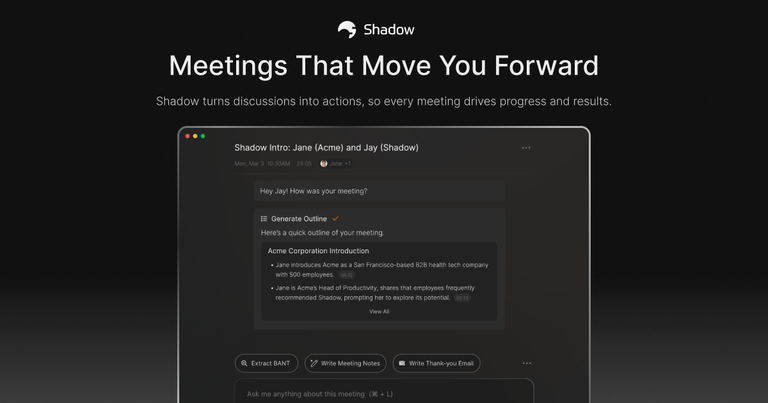
Shadow transforms meetings into actionable results with AI-powered transcription, note-taking, and workflow automation.

Features
  • Bot-Free Background Operation — Shadow operates entirely in the background without joining meetings as a visible bot participant. Unlike competitors like Otter.ai or Fireflies, there are no interruptions or awkward bot appearances — Shadow runs quietly and unobtrusively on your Mac.
  • Dual Capture: Audio & Screen — Shadow captures both what's said and what's shown. It automatically transcribes all audio while simultaneously taking screenshots of shared content, presentations, and visual materials — providing complete meeting context beyond just words.
  • Autopilot Meeting Detection — Shadow automatically detects when meetings start, begins recording discussions, and structures key takeaways without any manual intervention. No need to press start — it intelligently recognizes meeting contexts and activates seamlessly.
  • Real-Time Speaker Identification — Advanced speaker detection and labeling technology identifies and tags individual speakers in real time during transcription. Users always know exactly who said what, making follow-ups and accountability clear.
  • Post-Meeting AI Skills & Automation — Users can create custom post-meeting AI tasks that Shadow runs automatically. Outputs can be exported to Markdown or connected to other tools via Zapier webhooks, enabling powerful workflow automation from meeting insights.
  • Local-First Privacy Architecture — Transcription and data storage happen on-device by default. Shadow never uses meeting data for AI training, and data only leaves the device with explicit user permission — ensuring complete privacy and data sovereignty.
Use Cases
Automated Meeting Follow-Ups for Sales Teams

Sales professionals can end client calls and immediately receive draft follow-up emails, action items, and key discussion points. Shadow eliminates the 15-30 minutes typically spent recapping meetings, allowing reps to move deals forward faster with accurate, context-rich follow-ups. Target Audience: Sales representatives, account executives, and sales managers who conduct multiple client meetings daily and need to maintain momentum in their pipeline.

Searchable Meeting Knowledge Base for Project Managers

Every meeting becomes part of a searchable memory system where decisions, action items, and key insights are stored and retrievable on demand. Project managers can ask Shadow questions about past meetings and get instant answers from what was said and shown. Target Audience: Project managers, program managers, and team leads who need to track decisions across multiple meetings and ensure nothing falls through the cracks.

Cross-Tool Workflow Integration for Operations Teams

Operations professionals can connect Shadow to their existing toolstack via Zapier webhooks, automatically pushing meeting insights into CRMs, project management tools, or documentation systems. Custom post-meeting AI tasks can be configured to extract specific data points and route them where needed. Target Audience: Operations managers, RevOps teams, and workflow automation specialists who need meeting data to flow seamlessly into their business systems.

Privacy-First Meeting Recording for Regulated Industries

Professionals in healthcare, legal, or financial services can leverage Shadow's local-first processing architecture to capture meeting notes while maintaining strict data privacy compliance. All transcription happens on-device, and data never leaves without explicit consent. Target Audience: Healthcare providers, legal professionals, financial advisors, and compliance officers who need meeting documentation but operate under strict data privacy regulations.

Pros
  • Truly bot-free experience — Shadow doesn't join meetings as a visible participant, eliminating the awkwardness and interruptions caused by competitor tools like Otter.ai, Fireflies, or Fathom.
  • Comprehensive dual-capture technology that records both audio transcription AND screen content, providing complete meeting context that audio-only solutions miss entirely.
  • Strong privacy-first architecture with local processing, no data used for AI training, and user-controlled data permissions — addressing growing concerns about AI meeting assistant data practices.
  • Autopilot mode eliminates manual setup — Shadow automatically detects meetings and begins capturing without requiring users to remember to start recording.
  • Customizable post-meeting AI skills allow users to create tailored automation workflows, with export options to Markdown and Zapier integration for connecting to hundreds of other tools.
Cons
  • Currently Mac-only — Shadow runs on macOS, leaving Windows and Linux users without access, which significantly limits the addressable market for cross-platform teams.
  • Workflow automation feature is listed as 'Coming' — the Zapier integration and tool connections are not yet fully available, limiting current automation capabilities.
  • Requires explicit consent considerations — users must navigate consent laws for recording conversations, which varies by jurisdiction and adds complexity to adoption.
  • Limited information on language support — the FAQ mentions language capabilities but doesn't specify which languages are supported, which may concern international or multilingual teams.

Latest News

AI That Reads Your Screen on Mac: 6 Tools Compared in 2026 | Shadow

AI That Reads Your Screen on Mac: 6 Tools Compared in 2026 | Shadow

8/4/2026

The 2025-2026 trajectory is interesting. Arc development was effectively frozen as the company focused on Dia. The product left closed beta. The Pro tier launched at $20/month in August 2025 and removed rate limits on chat and Skills. The Browser Company has signaled a future pricing ladder running ...

Best AI Meeting Note Takers That Don't Join as a Bot (2026) | Shadow

Best AI Meeting Note Takers That Don't Join as a Bot (2026) | Shadow

8/4/2026

Your clients won't say no to your bot. They're too polite. But they'll give you better conversations, deeper trust, and stronger relationships when you stop making them talk to a faceless AI participant. Your team won't complain about missing screenshots. But they'll make better decisions, have fewe...

The Best AI Plugins for Obsidian (2026) - Shadow.do

The Best AI Plugins for Obsidian (2026) - Shadow.do

8/4/2026

In 2026, the architecture has been deliberately simplified. The core plugin focuses on essential semantic-search features. Smart Chat moved into its own dedicated plugin. The cloud and API-based model integrations (multi-provider routing, advanced ranking) live in the Pro tier (Smart Chat Pro and Co...

Best Gong Alternatives for 2026: 7 Bot-Free, Mac-First Picks for Sales Teams Who Want Call Intelligence Without the Enterprise Tax | Shadow

Best Gong Alternatives for 2026: 7 Bot-Free, Mac-First Picks for Sales Teams Who Want Call Intelligence Without the Enterprise Tax | Shadow

8/4/2026

What it is: A free-forever AI meeting recorder with a clean summary view. Fathom 3.0 launched in April 2026 with a bot-free desktop mode on Mac, available alongside the original bot-based mode. Reps can pick per meeting between bot-free transcript-only, bot-free audio, or the full bot plus video flo...

Voice Dictation Keeps Misspelling Names on Mac: 5 ... - Shadow.do

Voice Dictation Keeps Misspelling Names on Mac: 5 ... - Shadow.do

8/4/2026

This is not a microphone problem. It is how speech decoders weigh rare words against common ones. Here are the five fixes that work on Mac in 2026, from Apple's

Alternatives

  • Otter.ai

    Otter.ai provides real-time transcription, summaries, and action items for meetings, making it a direct competitor for AI-powered meeting assistance.

  • Fireflies.ai

    Fireflies.ai offers comprehensive AI meeting notes, transcription, and automated summaries, directly addressing Shadow's core features.

  • Fathom

    Fathom specializes in AI meeting summaries, highlights, and action items, integrating seamlessly with video conferencing platforms.

  • Grain

    Grain focuses on recording, transcribing, and easily sharing key moments from video meetings, enhancing post-meeting productivity.

  • Zoom AI Companion

    Integrated directly into Zoom, it provides meeting summaries, next steps, and content generation, offering native AI meeting support.

  • Microsoft Copilot (in Teams)

    Leverages AI within Microsoft Teams to summarize meetings, generate action items, and assist with content creation, similar to Shadow's workflow automation.

  • Fellow.app

    While primarily a meeting management platform, Fellow.app includes AI features for summarizing notes and tracking action items, streamlining meeting workflows.

  • Read.ai

    Read.ai delivers AI-powered meeting summaries, sentiment analysis, and action items to improve meeting efficiency and follow-up.

  • Avoma

    Avoma is an AI meeting assistant that transcribes, summarizes, and provides coaching insights, offering a robust solution for meeting intelligence.

  • Notion AI

    Notion AI integrates AI capabilities into a flexible workspace, allowing users to summarize meeting notes, generate action items, and automate content creation within their existing workflows.

FAQ

User Reviews

4.6/5.0
(95reviews)
Click stars to rate

Pricing

Pricing Model: Freemium

Free

Unlimited recording & transcription. AI features (Skills & Chat) for your first 25 meetings.

$0
monthly

Plus

Unlock everything. For power users who want unlimited AI features, and more.

$8 / month
monthly

Custom plan

Didn’t find a plan that fits your team? Let’s talk—We’d love to learn more about your needs.

Contact us
custom

More Products

TinyPNG is Tinify’s browser-based image compressor and converter. This review explains how its web tool differs from its Developer API, what each free allowance covers, and when its compression, conversion, resizing, and cropping features may fit an image workflow.

Zamzar is an online file conversion and compression service for documents, images, video, sound, and other formats. Its free web service has daily file and upload-size limits.

iLoveIMG is a browser-based image service for compression, resizing, cropping, conversion, and editing, with a free Basic plan and paid options.

Smallpdf is an online PDF toolkit for conversion, compression, editing, merging, signing, and more. Its Free plan includes 30+ tools but limits downloads.

Convertio is a browser-based service for converting files between supported formats, with optional settings for many conversion types.

FreeConvert is an online file converter with more than 1,500 listed conversion types and a free allowance of 20 conversion minutes per day.

HiPDF is an online PDF service with conversion, editing, compression, merging, cropping, image tools, and AI features.

123apps is a browser-based suite of video, audio, PDF, and file-conversion tools. Its apps are free to use with limits on file size and daily operations.

ChatPDF summarizes PDFs and answers questions about them. Its free plan allows two document analyses per day, with no account needed to get started.

CloudConvert is a browser-based converter for more than 200 file formats, including documents, images, audio, video, archives, and specialist formats.

OCR.space provides free browser-based OCR for images and PDFs, searchable PDF creation, and a separate API for adding text recognition to software.

Free online itinerary maker with 900+ trip plans across 96 countries. Edit day-by-day in the browser; export to PDF, Excel, CSV, Google Sheets or .ics. Free account required to download/print. Optional Pro adds premium themes; AI chat helps draft plans.

TasteDir is a curated directory of finished, well-crafted software from indie makers and small teams. Every listed tool is reviewed by hand.

An AI meeting copilot that combines live transcripts, screenshots, and project documents to deliver contextual answers, response drafts, and meeting recaps.

Create professional invoices free in your browser: live preview, any currency, tax and discounts, custom templates, and no-watermark PDF. No signup needed.

Vidsembly is an AI video creation platform that turns PowerPoint presentations, PDFs, and documents into narrated videos. Create AI presentations, clone voices, translate slides, transcribe recordings, generate soundtracks, and host videos in one place.