

Best AI Prompt Generators in 2026: Free Builders, Libraries & Developer Tools
A good prompt generator can help you get past a blank page, turn a rough idea into a reusable instruction, or find examples written for a particular AI model. But “prompt generator” covers several different kinds of tools: standalone builders, prompt libraries, chat assistants you can use to draft prompts, and developer tools that generate or optimize prompts for API workflows.
That distinction matters in 2026. Some tools that used to appear on prompt-generator lists have been retired or shut down, while others are still useful for particular jobs. This guide separates the categories, explains the tradeoffs, and points you toward a practical choice rather than treating every tool as interchangeable.
If you want a fast recommendation, start with the quick picks. If you are evaluating a tool for a team or production workflow, read the comparison table and the notes on limitations before committing.
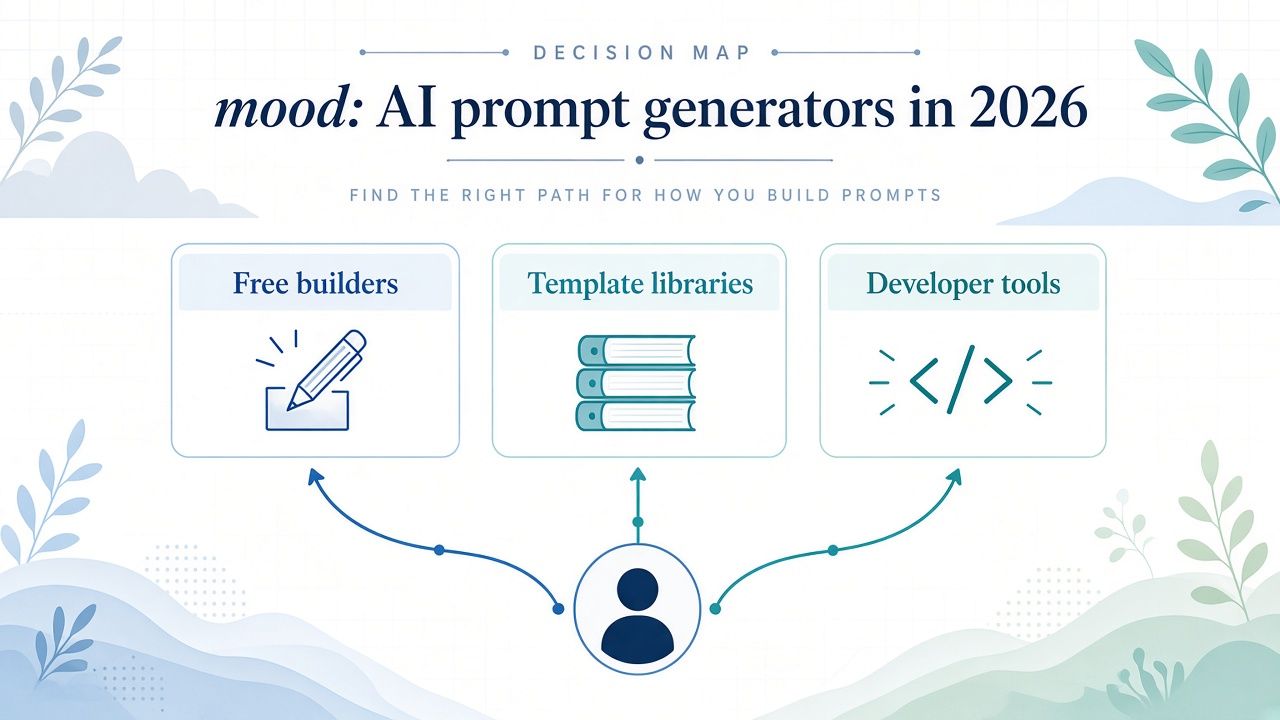
Quick picks: which prompt generator should you use?
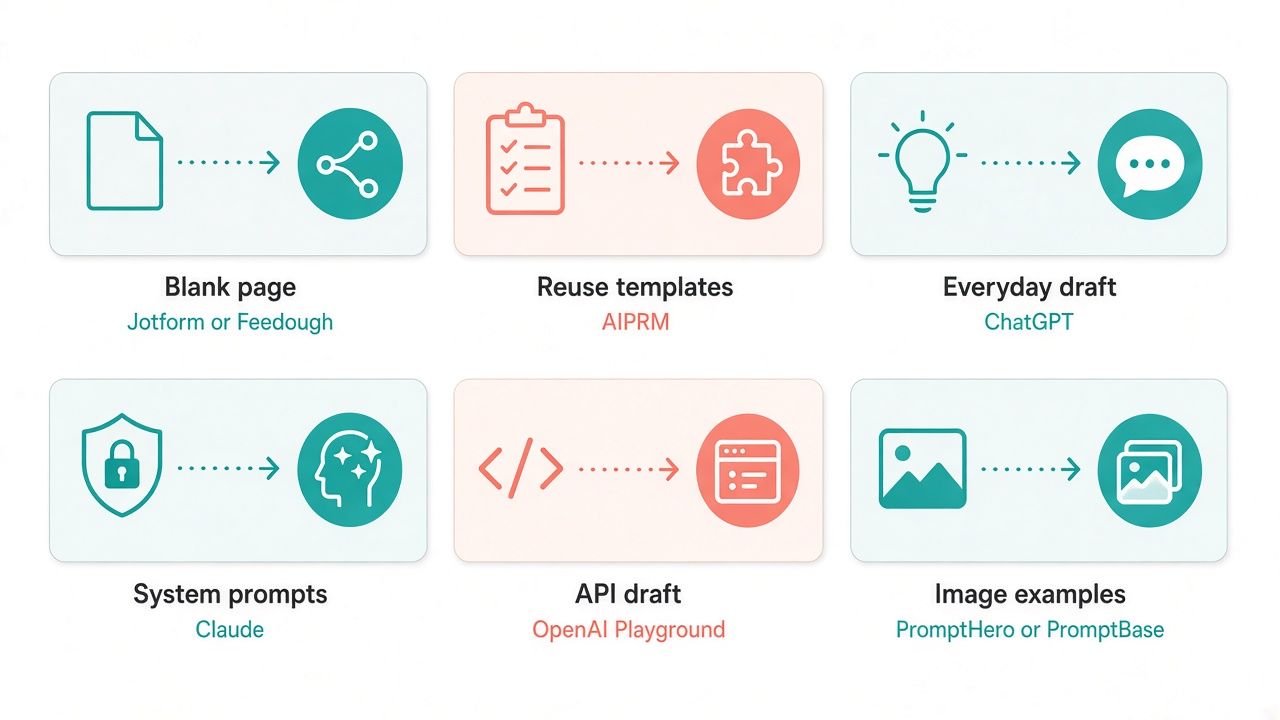
- Best free blank-page builder: Feedough if you want a free, no-login starting point with text, image, and video prompt options. Jotform is a good alternative if you want to choose a destination platform while building your prompt.
- Best for prompt frameworks: Feedough for its framework-led approach and prompt-improvement questions. It can help you organize a request, but you should still review the result for accuracy and fit.
- Best reusable template library: AIPRM if you want to browse and reuse prompts within ChatGPT or Claude. Its free version is described as unlimited-time; paid features and current plan details should be checked on its pricing page.
- Best prompt generators inside general chat tools: ChatGPT and Claude. Ask either assistant to draft, critique, and revise a prompt, then try the prompt in the same conversation. They are flexible, but they are not neutral prompt-evaluation systems.
- Best developer-oriented prompt generator: OpenAI Playground Generate for generating prompts and structured instructions in an API-oriented workflow. Do not confuse it with OpenAI’s separate dataset-backed prompt optimizer, which is being retired.
- Best for discovering image and video prompt examples: PromptHero for browsing examples, or PromptBase if you want to browse or buy marketplace prompts. Check the exact listing or plan terms before paying.
- Best for image prompts inside an image tool: Ideogram Magic Prompt is worth a look if you are already using Ideogram and want the product to expand your image prompt.
- Best for code-based optimization workflows: DSPy is a developer framework, not a simple prompt-builder website. It is relevant when you want to build and evaluate prompt-driven systems in code.
A prompt generator can make a first draft faster. It cannot guarantee that the prompt is factually correct, safe for your use case, compatible with every model, or better than a prompt you write yourself. Treat its output as a draft to inspect and test.
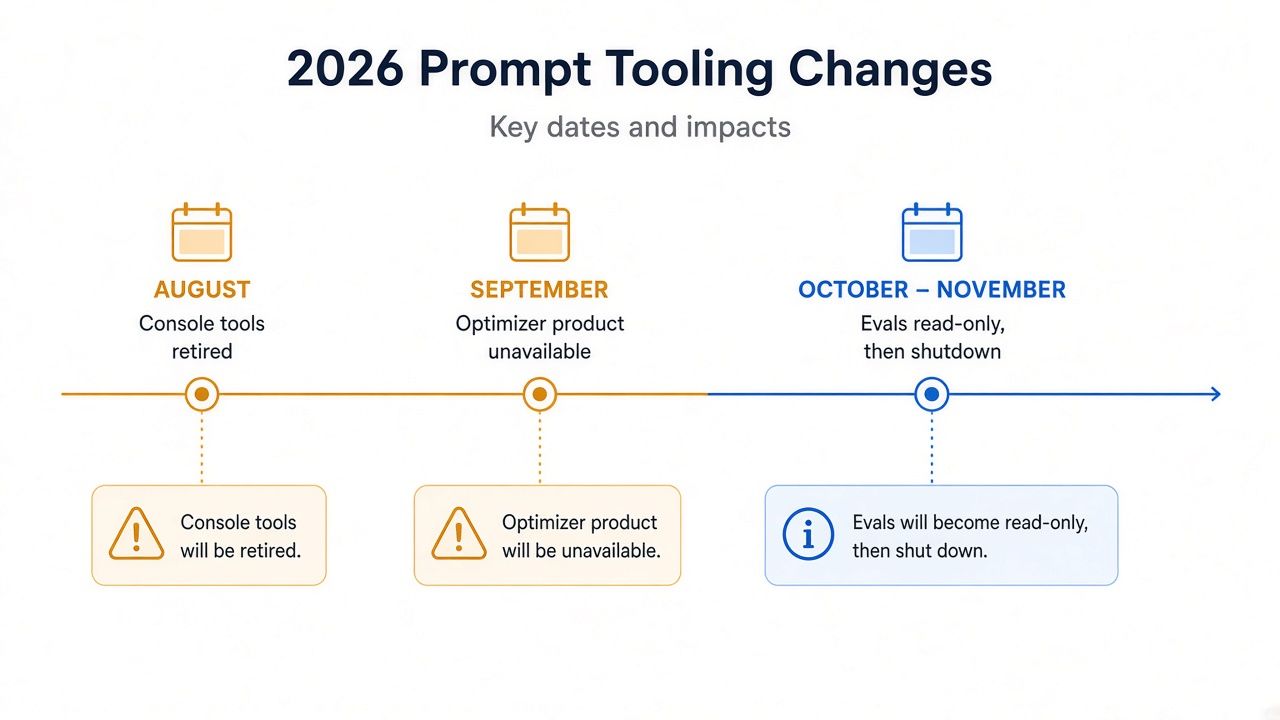
What changed in 2026?
The prompt-tool landscape changed during 2026. If you have an older list open in another tab, check whether its recommendations are still available before following them.
PromptPerfect is no longer available
The official PromptPerfect site status could not be verified directly for this guide. Based on the product notice and corroborating reports, PromptPerfect should be treated as unavailable after September 1, 2026, and it should not be counted as an active prompt-optimization option.
If an old article recommends PromptPerfect, look for a current alternative that matches the job you need. For a quick draft, try Feedough, Jotform, ChatGPT, or Claude. For a reusable library, consider AIPRM. For an API-oriented workflow, look at OpenAI Playground Generate or a code-based approach such as DSPy.
Anthropic retired its Console prompt generator and improver
Anthropic previously announced a prompt generator in its Console. According to Anthropic’s Claude Platform release notes, legacy Workbench access ended and the experimental prompt tools APIs were retired on August 17, 2026, which removed the Console prompt-generation and prompt-improvement experience.
That does not mean Claude itself stopped being useful for writing prompts. You can still ask Claude in chat to draft or revise a prompt. The important distinction is that Claude chat is not the same thing as the retired Console generator or improver.
OpenAI’s dataset-backed prompt optimizer is being retired
OpenAI’s developer documentation says its dataset-backed prompt optimizer is deprecated with Evals. The optimizer became read-only on October 31, 2026, with shutdown scheduled for November 30, 2026.
OpenAI Playground’s Generate feature is a separate capability. It can help generate a prompt, but it is not a reason to assume the retiring optimizer is still available. If you depend on prompt optimization for a production workflow, check the current OpenAI documentation and plan a replacement or migration before the shutdown date.
These changes make it especially important to distinguish between a prompt generator and a prompt optimizer. A generator helps you produce an initial prompt. An optimizer typically revises a prompt against specified examples, criteria, or evaluation data. A prompt library helps you find and reuse examples written by someone else. Those are related jobs, but they are not interchangeable.
What counts as an AI prompt generator?
For this guide, a prompt generator is any tool that helps you create, structure, discover, or refine an instruction for an AI model. The category includes four broad groups:
- Prompt builders ask for details about your task and return a drafted prompt. Jotform and Feedough fit this pattern.
- Prompt-writing assistants let you ask a general chat model to write or improve a prompt. ChatGPT and Claude can do this.
- Prompt libraries and marketplaces help you find reusable templates or examples. AIPRM, PromptHero, and PromptBase serve different versions of this need.
- Developer tools help generate prompts or build prompt-driven systems for applications. OpenAI Playground Generate and DSPy are more relevant here.
A fifth category, prompt optimization, deserves special care. Optimization may involve comparing prompt variants against examples or evaluation criteria. It is a more specific technical job than asking a chatbot to “make this prompt better.” Tools and features in this category can change, so verify that the exact optimizer you need is still available.
No prompt generator can remove the need for clear goals. If you cannot explain what a useful answer should look like, an automated builder may simply turn that uncertainty into a longer prompt.
AI prompt generators compared
The table summarizes what each option is best suited to. “Free” describes the availability stated in the cited tool pages or matrix; it does not mean that every related feature, model, API call, or subscription is free.
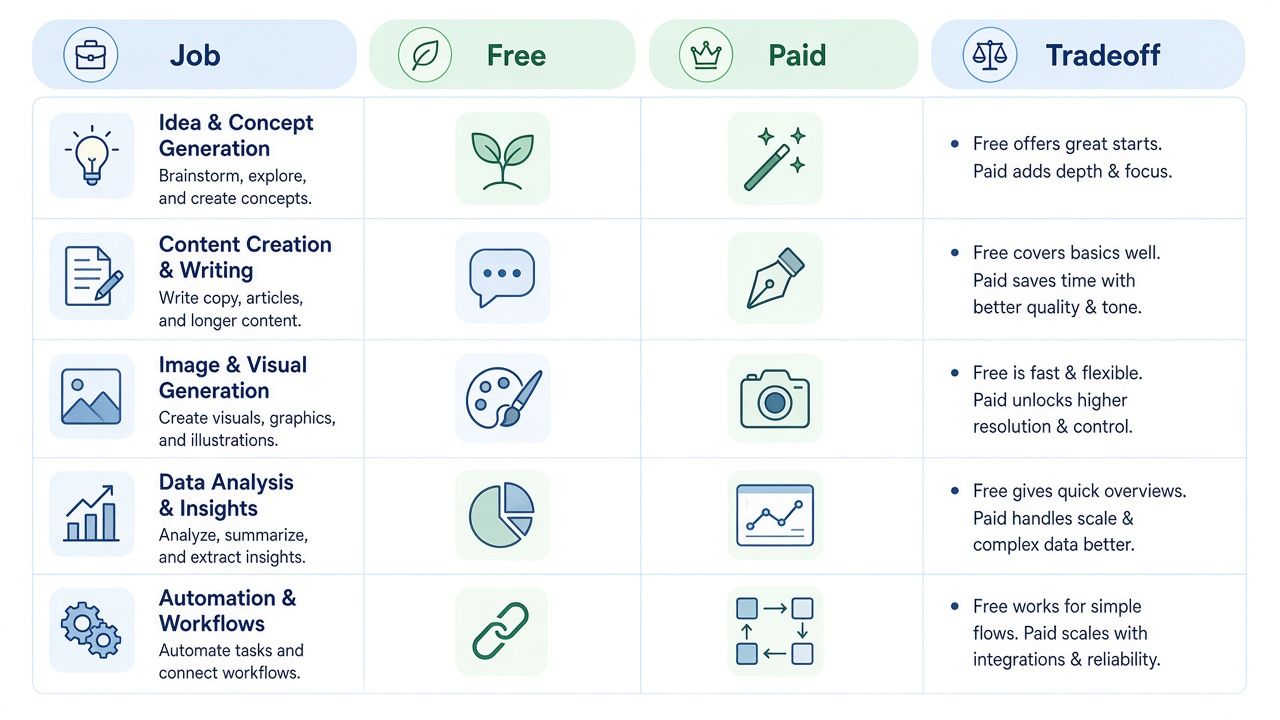
| Tool | Best-fit job | What you get | Free / trial | Paid notes | Main tradeoff |
|---|---|---|---|---|---|
| ChatGPT | Drafting and revising prompts conversationally | A general assistant that can turn a task into a prompt and iterate with you | Free tier available | ChatGPT plans and API usage are separate; confirm current plan pricing | Flexible, but the assistant’s revision is not an independent quality benchmark |
| Claude | Structured prompt drafting and revision | A general assistant suited to working through detailed instructions in chat | Free tier available | Confirm current Claude plan pricing | Claude chat is not the retired Anthropic Console generator or improver |
| Jotform AI Prompt Generator | Building a prompt for a chosen destination platform | A free prompt generator with platform choices for text and image use cases | Free as presented on its generator page | Jotform suite plans are separate; confirm current terms | A generated prompt still needs review and adaptation to your task |
| Feedough | A free, no-login prompt-building starting point | Text, image, and video options; frameworks and prompt-improvement questions | Free, unlimited, and no login as presented on the page | No paid price cited for the generator | Broad options do not guarantee that every output will suit every model |
| AIPRM | Reusing community and verified prompt templates | A prompt library integrated with ChatGPT and Claude | Free version described as unlimited-time | Pricing FAQ examples cite Plus at $10 and Pro at $33 USD; tax extra and non-refundable. Confirm current plan cards | Templates save setup time but may need editing for your context |
| OpenAI Playground Generate | Generating prompts in a developer workflow | Playground Generate uses published meta-prompts for prompt generation | Playground use is API-oriented and may incur API charges | Confirm current API billing and account terms | Separate from the dataset-backed optimizer scheduled to shut down |
| PromptHero | Discovering image and video prompt examples | Public search and a free-trial call to action | “Try PromptHero for free” is presented on the site | Paid amounts not confirmed in this source check | Discovery is not the same as a tailored prompt builder |
| PromptBase | Browsing or buying marketplace prompts | Marketplace listings and PromptBase Select | Browse the marketplace; check product terms | Listing and Select terms vary; confirm at checkout | A paid prompt is a starting recipe, not a guarantee of a specific result |
| Ideogram Magic Prompt | Expanding an image prompt inside Ideogram | In-product image-prompt expansion | Free allowance noted in the tool matrix | Confirm current Ideogram pricing | Useful in its product context rather than as a universal prompt generator |
| DSPy | Building and refining prompt-driven systems in code | An open-source framework for evaluation-driven development | Open source; model calls may still cost money | Account for model-call costs | Requires a developer workflow, not just a browser-based prompt form |
Methodology
This is a source-checked buyer guide, not a lab benchmark. The information was checked on November 1, 2026, Asia/Shanghai, using official product and documentation pages where available. Secondary reporting was used to cross-check the timing of tool retirements when an official page was historical, difficult to access, or did not clearly expose the current product status.
The guide does not claim to have run controlled tests, measured accuracy, or ranked tools based on a performance score. Features, free access, plans, and product availability can change. Where the notes did not confirm a current price or term, the guidance is to confirm at checkout or on the vendor page.
How to choose the best AI prompt generator for your job
Before choosing a tool, answer four questions.
1. Do you need a draft, a template, or an evaluation?
If you have a rough idea and want help turning it into a detailed instruction, use a prompt builder or a chat assistant. If you repeat the same task, a template library may save time. If you are building a product and need to compare prompt behavior against examples, investigate developer-oriented evaluation workflows rather than relying on a one-click “improve” button.
2. Which model or destination are you targeting?
A prompt written for a text assistant may not work well as an image prompt. A prompt for one image model may use conventions that do not transfer neatly to another. Jotform asks you to work with different destination platforms, while Feedough offers text, image, and video prompt options. ChatGPT and Claude let you draft in conversation, but you should name the model and task you intend to use when asking for a prompt.
3. Will you use the prompt once or repeatedly?
For a one-off task, a free builder may be enough. For repeat work, save the prompt, record the model and settings it was written for, and update it when your workflow changes. AIPRM can help you browse reusable templates inside supported chat tools. PromptBase is a marketplace option if you want to explore purchased prompt recipes. In either case, review the prompt before adopting it across a team.
4. How much control do you need?
A builder can get you started quickly, but it may make choices on your behalf. A chat assistant gives you more room to explain constraints and iterate. A developer tool gives you more control over how prompts are generated or evaluated, but it also asks more of you technically. Choose the lightest workflow that still lets you check the result.
ChatGPT: a flexible prompt-writing assistant
ChatGPT can act as a prompt generator without requiring you to find a separate prompt-builder page. Describe the task, tell it who the prompt is for, and ask it to return an instruction you can reuse. You can then ask for a shorter version, a version with stricter output formatting, or a version that asks the model to flag missing information instead of guessing.
A useful request might be:
Draft a reusable prompt for summarizing customer interview notes. Ask me for any missing requirements first. The final prompt should specify the audience, the output sections, how to handle contradictory comments, and that it must not invent quotations.
The advantage is flexibility. You can explain context in ordinary language, ask follow-up questions, and revise the draft in the same conversation. You can also ask ChatGPT to generate test inputs or identify ambiguous instructions.
The caveat is that a prompt written by ChatGPT is not automatically validated. If you ask it to improve a prompt, you are still relying on a model’s judgment about what “better” means. Give it concrete criteria: preserve important constraints, avoid unsupported claims, use a specified output format, or handle a defined edge case.
ChatGPT offers a free tier, while consumer plans and API usage are separate. Do not assume that a consumer subscription includes API usage. Confirm current ChatGPT plan pricing and API terms on the vendor’s pricing pages. For a broader overview of conversational assistants, see our best AI chatbot guide for 2026.
Best for: people who want to draft, revise, and test prompts conversationally.
Watch out for: treating a confident-sounding revision as proof that the prompt will behave reliably in every situation.
Claude: useful for structured prompt drafting
Claude can also write and revise prompts through chat. You can ask it to turn a task description into a system-style instruction, divide the instruction into sections, or identify places where you need to give more context.
A practical workflow is to ask Claude to produce two things: first, a prompt; second, a short list of assumptions and unresolved questions behind that prompt. This helps you spot whether the draft quietly assumes a particular audience, data source, tone, or output format.
One important 2026 distinction: Anthropic’s Console prompt generator and improver were retired with Workbench on August 17, 2026, according to Anthropic’s official Console release notes (Workbench and experimental prompt APIs). Claude remains an option for prompt writing in chat, but you should not follow older instructions that direct you to the retired Console generator as if it were still an active feature.
Claude has a free tier. Consumer plans and API billing are separate matters, so confirm current Claude plan pricing and API terms on Anthropic’s vendor pages. You can find more product context in our Claude overview.
Best for: people who want to work through a detailed prompt structure in a conversational interface.
Watch out for: confusing Claude chat with the former Console prompt-generation tools, or assuming a drafted prompt has been formally evaluated.
Jotform AI Prompt Generator: a destination-aware builder
The Jotform AI Prompt Generator is a free tool presented on Jotform’s generator page. Its platform options include text and image destinations such as ChatGPT, Gemini, Claude, Midjourney, DALL·E, Stable Diffusion, Flux, and Ollama.
That destination-focused approach is useful if you already know where you plan to use the prompt. Rather than asking for a generic “good prompt,” you can select a platform and shape the instruction around that use. This can make the first draft more concrete, especially if you are switching between text and image tasks.
The generator is not a substitute for checking compatibility. Models and their interfaces change, and a prompt that contains the right general idea may still need edits for the specific model, task, or settings you plan to use. If you are producing customer-facing work, review the result for missing constraints, privacy concerns, and unsupported claims before you paste it into another service.
The generator is presented as free. Jotform’s broader suite or other services may have separate plans, so check the relevant product page if your workflow depends on them. Our Jotform listing has more product context.
Best for: people who want a free builder that offers a choice of destination platforms.
Watch out for: assuming that choosing a model in a form guarantees a prompt will be optimized for every model version or use case.
Feedough: a free starting point with frameworks
Feedough’s AI Prompt Generator is presented as free, unlimited, and usable without logging in. Its page covers text, image, and video prompt workflows. The tool also references ORACLE and other frameworks, offers prompt-improvement questions, and includes optimization options associated with ChatGPT and Claude. The video choices named in the source notes include Kling, Seedance, and Veo 3.
That range makes Feedough a useful first stop if you want to see how a builder structures different kinds of requests without signing up. Frameworks can prompt you to include missing details such as the goal, audience, context, format, or constraints. The improvement questions can also help you notice where a rough prompt is underspecified.
However, a framework is a scaffold, not a quality guarantee. A longer prompt can be worse than a shorter one if it adds irrelevant instructions or conflicts with the job. Check that the generated prompt preserves your actual intent, and remove any detail you do not need. For video or image work, verify that the destination model supports the elements you are asking for.
Best for: a no-login prompt builder for exploring text, image, and video prompt structures.
Watch out for: treating a named framework or an “optimized” label as evidence that the result has been tested against your exact task.
AIPRM: a reusable prompt library for ChatGPT and Claude
AIPRM is better understood as a prompt library and workflow add-on than as a blank-page prompt generator. It offers Community and Verified prompts and supports ChatGPT and Claude integrations. Its main appeal is reuse: instead of writing the same kind of instruction from scratch, you can browse templates and adapt one to your task.
A library is helpful when you know what kind of job you need to do but are unsure how to structure the prompt. It can also give you examples of how other people phrase instructions. Still, a template created for a broad audience may not reflect your data, policies, preferred voice, or output requirements. Read it before using it, and replace generic directions with your actual constraints.
AIPRM’s pricing page describes a free version with unlimited time. Its FAQ gives examples of Plus at $10 and Pro at $33 USD, with tax extra and payments described as non-refundable. These are examples from the pricing FAQ, not a promise that the plan cards or amounts will remain unchanged. Confirm the current plan cards and terms on AIPRM’s pricing page before purchase.
For product details, see our AIPRM overview.
Best for: people who want to find and reuse prompts within ChatGPT or Claude.
Watch out for: using a template unchanged when your task needs specific facts, boundaries, or review requirements.
OpenAI Playground Generate: prompt generation for developers
OpenAI Playground’s Generate feature is aimed at a more developer-oriented workflow than a simple consumer prompt form. OpenAI documents it as using published meta-prompts to generate prompts. That can be useful when you are working with API prompts, instructions, or structured outputs and want help producing a starting version in the Playground.
Keep this feature separate from OpenAI’s dataset-backed prompt optimizer. The optimizer is being retired: OpenAI’s documentation says it became read-only on October 31, 2026, with shutdown scheduled for November 30, 2026. Generate and the optimizer are not the same feature, so their availability and behavior should not be conflated.
Playground and API use can involve API billing. A ChatGPT consumer plan is separate from API usage, and you should check current account and billing terms before you build a workflow around it. If your team relies on an optimizer, check the official documentation for migration guidance and make a plan before the retirement date.
Best for: developers who need to generate prompts as part of an API-focused workflow.
Watch out for: confusing prompt generation with evaluation-backed optimization, or assuming that API usage is included in a consumer chat plan.
PromptHero: discover prompts for image and video work
PromptHero is a searchable place to explore public image and video prompt examples. The site invites users to try it for free and provides a pricing link, but current paid plan amounts were not confirmed in the source check for this guide.
Discovery is its main value. Browsing examples can give you ideas about how people describe style, composition, or other creative choices. That can be more useful than starting from a blank field when you are learning the vocabulary of an image or video tool.
Treat public prompts as inspiration, not instructions to copy blindly. An example might have been created for a different model, version, or workflow. It may also leave out settings or context that mattered to the original result. Adapt the parts that fit your goal, and verify current plan details directly with the vendor if you are considering a paid option.
See our PromptHero listing for more context.
Best for: discovering examples and exploring prompt ideas for image and video tasks.
Watch out for: assuming that an example will reproduce the original result in your own model or settings.
PromptBase: marketplace prompts and Select
PromptBase gives you a marketplace route: browse prompts, inspect listings, and decide whether a ready-made prompt recipe is worth buying for your use case. It also offers PromptBase Select. Pricing and allowances can vary, and they were not confirmed directly in this source check. Confirm the current listing price, Select terms, and any download or credit allowances at checkout.
Before you buy, check what the listing actually includes and whether it fits the model and task you intend to use. A prompt is not a guaranteed result. It is a set of instructions, and its usefulness depends on the destination model, your inputs, and how closely your use case matches the seller’s description.
A marketplace can be a convenient way to find specialized starting points, but it is not necessarily the most economical option for every task. Try a free builder or write a short prompt yourself before paying for a template, especially if the task is simple or you expect to make substantial edits.
See our PromptBase listing for product context.
Best for: browsing or buying prompt recipes when you have a specific use case in mind.
Watch out for: paying for a prompt without checking the listing details, compatibility, and checkout terms.
Ideogram Magic Prompt and DSPy: two focused mentions
Ideogram Magic Prompt is an in-product image-prompt expansion feature. It may suit you if you already use Ideogram and want help elaborating an image prompt without switching to a separate tool. The tool matrix notes a free allowance, but confirm current feature availability and Ideogram pricing on the vendor page.
DSPy belongs to a different category. It is an open-source framework for building and refining AI systems through code and evaluation-oriented methods. It is not a simple browser-based prompt generator. You may want to investigate it if you are a developer building a repeatable prompt-driven application, but account for the cost of model calls and the engineering work required.
Feedough alternatives: which one should you try?
If you are searching for Feedough alternatives, first decide what you want to replace: the no-login access, the framework-led form, the image and video options, or the prompt-improvement workflow.
- Choose Jotform if you want a free generator that lets you work with a range of destination platforms. It is a natural alternative when platform selection is important.
- Choose ChatGPT or Claude if you want to explain your task, answer follow-up questions, and revise the prompt conversationally. These are flexible alternatives, but they do not replace a structured form in exactly the same way.
- Choose AIPRM if your priority is finding reusable templates rather than filling in a prompt-building form. Check the template before using it and confirm current plan details.
- Choose OpenAI Playground Generate if you are working in an API-oriented developer workflow. Remember that API use and consumer subscriptions are separate, and the dataset-backed optimizer has a scheduled shutdown.
- Choose PromptHero if you mainly need examples for image or video prompt discovery, rather than a general text prompt builder.
- Choose PromptBase if you want to browse or buy marketplace recipes. Confirm the price and terms for the specific listing or Select plan at checkout.
If you want the closest like-for-like replacement for a quick free form, start with Jotform. If you want an open-ended assistant, try ChatGPT or Claude. If you want to stop writing the same instruction repeatedly, look at a library such as AIPRM. Those are different solutions to different problems, so the best alternative depends on what you use Feedough for.
Affordable prompt optimization: practical paths that do not overpromise
“Affordable prompt optimization” can mean a few things: getting a better first draft without paying, making repeat prompts easier to reuse, or evaluating a prompt-driven product without buying a separate service. You do not necessarily need a dedicated paid optimizer for a simple task.
Start with free builders and a clear brief
Feedough and Jotform present their generators as free. They can help you structure a first draft, but the most important improvement may come from specifying the audience, goal, context, output format, constraints, and what the model should do when information is missing.
A short, specific prompt is often easier to inspect than a long prompt padded with generic instructions. Remove any section that does not change what a useful answer should look like.
Use a chat assistant as a drafting partner
Ask ChatGPT or Claude to improve a prompt against criteria you supply. For example, tell it to preserve the meaning, flag ambiguity, separate required instructions from optional style guidance, and return a concise version. Then test the draft on a few representative examples.
This approach is convenient, but it is not a substitute for a formal evaluation. The same assistant that rewrites the prompt may not reliably detect every failure mode. If the prompt is used for consequential work, review its outputs with an appropriate human process.
Reuse a template when the task repeats
If you often perform the same task, a maintained template can save time. AIPRM is one option for browsing reusable prompts. You can also keep your own prompt document with the model, version, intended use, required inputs, and known limitations. A personal template may be a better fit than a public one if your task involves internal context or specific policy constraints.
For developers, create a small evaluation set
If you are building an application, write down a handful of representative inputs and define what a satisfactory output must include or avoid. Compare prompt revisions against those examples instead of relying only on whether one response “looks better.” OpenAI’s documented dataset-backed optimizer is on a retirement timeline; check the current documentation before basing a workflow on it. DSPy may be relevant for a code-based approach, but it requires development work and model calls.
The low-cost path is often to clarify the task, test on examples you control, and keep notes about failures. That will not eliminate all risk, but it gives you a more useful basis for revision than adopting a tool’s “optimized” label without knowing what it optimized for.
A short brief that gets you better prompt drafts
Whichever tool you choose, include enough information for it to make a useful first draft. You can use this checklist:
- Goal: What should the model help you accomplish?
- Audience: Who will read or use the result?
- Context: What background information is essential?
- Inputs: What will you provide each time you reuse the prompt?
- Output: What format, sections, length, or style do you need?
- Constraints: What must the model avoid, preserve, or verify?
- Uncertainty: Should it ask questions, state assumptions, or say when it does not know?
- Examples: Can you provide a representative input and a good output?
- Destination: Which model or tool will receive the prompt?
- Review: How will you check the result before relying on it?
You do not need to include every item in every prompt. Use the checklist to identify what matters, then remove anything that does not help the model complete the task.
FAQ
Are AI prompt generators worth using?
Yes, if you use them to clarify or speed up a task rather than treat their output as guaranteed. A builder can help you get started, and a library can save you from recreating a prompt you use often. Review the draft and test it against your actual needs.
What is the best AI prompt generator for free use?
Feedough and Jotform are free prompt-builder options as presented on their generator pages. Feedough is described as unlimited and no-login; Jotform offers a destination-aware generator. Free access to a generator does not mean that the external model or every related service is free.
Is Feedough free and unlimited?
Feedough presents its prompt generator as free, unlimited, and usable without a login. Check the live vendor page for current access and terms, since product conditions can change.
What are the best Feedough alternatives?
Jotform, ChatGPT, Claude, AIPRM, and OpenAI Playground Generate are alternatives for different jobs. Jotform is another builder, ChatGPT and Claude are conversational assistants, AIPRM is a reusable prompt library, and Playground Generate is developer-oriented.
Is the Anthropic Console prompt generator still available?
No; Anthropic’s official Console release notes state that Workbench and the related experimental prompt APIs were retired on August 17, 2026, which removed the Console prompt generator and improver. You can still use Claude chat to draft or revise prompts, but that is not the same feature.
Is PromptPerfect still available in 2026?
Treat PromptPerfect as unavailable after September 1, 2026. The official site status could not be verified directly; that date rests on the product notice plus corroborating reports. Older guides may still list it, so do not rely on a legacy recommendation.
Is OpenAI’s prompt optimizer still active?
OpenAI’s dataset-backed prompt optimizer became read-only on October 31, 2026, and its documented shutdown date is November 30, 2026. OpenAI Playground Generate is a separate prompt-generation feature. Check OpenAI’s current documentation before planning a workflow around either feature.
What is the difference between a prompt generator and a prompt optimizer?
A generator helps produce a prompt, while an optimizer aims to revise prompts against some kind of criteria, examples, or evaluation process. A prompt library, by contrast, helps you find and reuse prompts. Product labels can vary, so check how the specific tool works.
Does ChatGPT have a prompt generator?
You can ask ChatGPT to create and revise prompts in chat. This is a flexible drafting workflow, not proof that a prompt has been independently tested. Consumer plans and API usage are separate; confirm current terms on the vendor pages.
Can Claude write prompts?
Yes, you can ask Claude in chat to draft, structure, or revise a prompt. Do not confuse this with Anthropic’s retired Console generator and improver. Confirm current Claude plan and API terms with Anthropic.
Are paid PromptBase prompts worth buying?
They may be useful as starting points, but value depends on how well a listing fits your task and destination model. Check the prompt’s description and the price and terms at checkout. A purchased prompt is not a guarantee of a particular output.
Is AIPRM free?
AIPRM describes a free version with unlimited time. Its pricing FAQ also gives paid-plan examples, including Plus at $10 and Pro at $33 USD, with tax extra and payments described as non-refundable. Confirm current plan cards and terms on AIPRM’s pricing page.
Final verdict: the best prompt generator depends on your workflow
- If you need a free, quick start: try Feedough or Jotform. Choose Feedough for its no-login, framework-led approach; choose Jotform if selecting a destination platform matters.
- If you prefer to work through an idea in conversation: use ChatGPT or Claude to draft and revise the prompt, then review and test the result.
- If you repeat the same task: explore AIPRM’s templates or maintain your own reusable prompt library. Confirm plan details before buying.
- If you need image or video prompt inspiration: browse PromptHero. Consider PromptBase when you want to explore marketplace recipes, but check each listing and checkout terms.
- If you are building with an API: look at OpenAI Playground Generate, keep API billing separate from consumer subscriptions, and do not mistake it for the retiring optimizer.
- If you are developing an evaluation-driven system: investigate DSPy or another code-based workflow, and plan for the engineering effort and model-call costs.
There is no single best AI prompt generator for every task. Pick the tool that fits the work you need to do, treat generated prompts as editable drafts, and verify current product availability and pricing before you depend on a feature or pay for a plan.
Sources
Sources were checked on November 1, 2026, Asia/Shanghai. Product features, access, and terms may change; confirm current details on the vendor page or at checkout.
Official and primary sources
- Jotform AI Prompt Generator: https://www.jotform.com/ai/prompt-generator/ — free generator and platform options.
- Jotform best AI prompt generator article: https://www.jotform.com/ai/best-ai-prompt-generator/ — dated August 4, 2026 in the source notes.
- Feedough AI Prompt Generator: https://www.feedough.com/ai-prompt-generator/ — free, unlimited, no-login presentation; text, image, video, and framework information.
- AIPRM pricing: https://www.aiprm.com/pricing/ — free-version description and paid-plan FAQ examples.
- PromptHero: https://prompthero.com/ — public search, free-trial call to action, and pricing link.
- PromptBase Select: https://promptbase.com/promptbase-select — current Select terms should be confirmed at checkout.
- OpenAI prompt generation documentation: https://developers.openai.com/api/docs/guides/prompt-generation — Playground Generate.
- OpenAI prompt optimizer documentation: https://developers.openai.com/api/docs/guides/prompt-optimizer — optimizer deprecation and read-only and shutdown dates.
- Anthropic / Claude Platform release notes: https://platform.claude.com/docs/en/release-notes/overview — July 17, 2026 entry: legacy Workbench access ending August 17, 2026; experimental prompt tools APIs (
generate_prompt,improve_prompt,templatize_prompt) retired the same day. August 18, 2026 entry: Workbench replaced by Console Playground. - Anthropic historical prompt-generator announcement: https://claude.com/blog/prompt-generator — historical Console feature information (later retired per Console release notes).
Secondary sources used for retirement-status cross-checks
- The Expert Ranking, updated September 26, 2026: https://theexpertranking.com/assistants/best-ai-prompt-generator/ — shutdown-timing cross-check and other 2026 tool notes.
- Taku on Claude prompt-improver retirement (secondary cross-check only): https://taku.ai/blog/claude-prompt-improver
- Preprompt PromptPerfect alternatives: https://www.preprompt.org/blog/promptperfect-alternatives




