

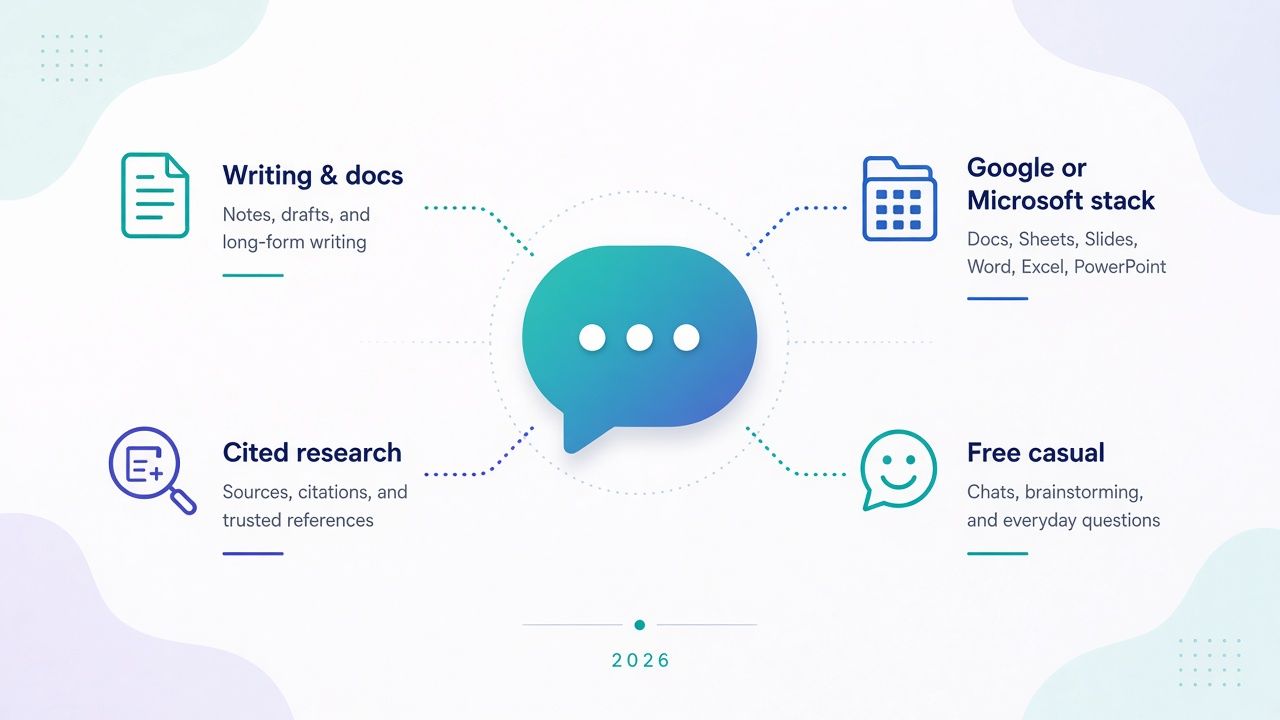
The best AI chatbot for you is the one that makes work you repeat easier—not the one that looks most impressive in a demo. A student checking sources, a consultant revising a long report, and an employee working inside Microsoft 365 may need very different things from an assistant.
This guide compares ten chatbots by the job they can help with, the limits that matter when you try them, and the workflow you would have to adopt. It is not a universal ranking or a lab benchmark. Features and allowances vary by account, region, and plan, and a polished answer still needs checking.
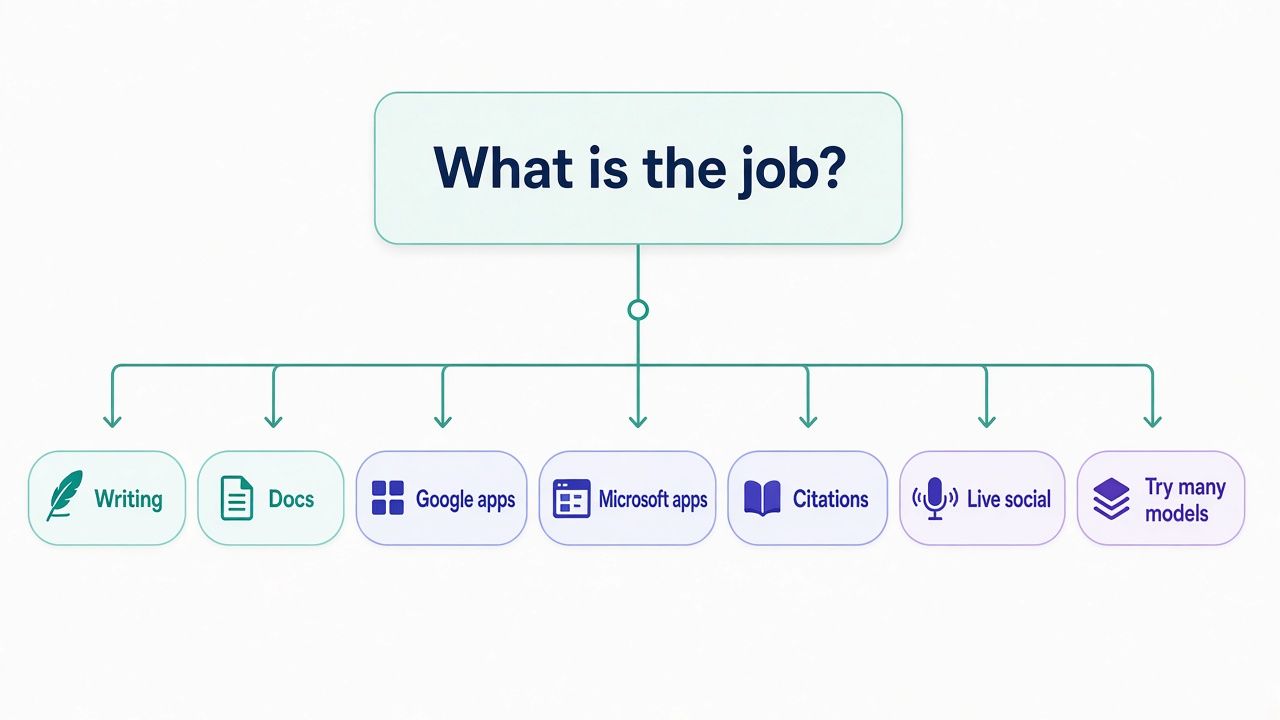
Start with the tools you already have access to. Consider ChatGPT or Claude for varied writing and document work, Gemini when your routine depends on Google, and Microsoft Copilot when the relevant feature is available in your Microsoft account or workplace license. Perplexity is worth trying when following sources is central. Poe can help you compare models in one place; Mistral Vibe pairs chat with a coding agent; Grok is a candidate for questions tied to live web and X discussion. DeepSeek and Meta AI offer other routes, including API access and casual use.
Then test two candidates on the same real task. The useful comparison is not which one produces the most confident first answer. It is which one gives you a result you can review and use, with an acceptable amount of correction, friction, and cost.
Quick picks by job-to-be-done
Everyday writing and mixed work
Start with ChatGPT or Claude if your work shifts between drafting, revising, asking questions, and working with files. ChatGPT offers a broad set of tools and plans; Claude is worth comparing for document-heavy work and iterative editing. Test both with a task you know well, such as turning notes into an update while preserving a caveat.
If most of your need is email, a general chatbot may be more than you need. See the AI email writer comparison for a more focused shortlist.
Careful work with long documents
Try Claude and ChatGPT with a document you understand. Ask each to summarize it, revise a section, and identify what it left out. Claude’s published context allowance can reach 1M tokens on some models, but context size varies by model and does not guarantee that every detail will be used correctly. ChatGPT’s limits also depend on its plan and mode.
For a workflow focused on finding and using material in documents, compare dedicated options in the AI document assistant guide.
Work in the Google stack
Try Gemini if your routine already centers on Google services and the feature you need is available to your account. Confirm which plan and app integration apply before paying. Google’s plan page cites a 1M-token context for AI Pro, but that is a model or plan specification—not proof that the assistant found or correctly used every relevant file.
If the work is primarily in Google apps, the integration may matter more than a difference between two standalone chat windows. Test with a non-sensitive task in the account you expect to use.
Work in the Microsoft stack
Start by identifying which Copilot you mean. Consumer Microsoft 365 plans with Copilot features are different from Microsoft 365 Copilot licensing for organizations. A personal plan should not be assumed to include workplace document access, company data controls, or administrator features.
If you need help with work documents, meetings, or email, ask your administrator which license is enabled and try the feature in that environment. For meeting-specific workflows, see the AI meeting assistant guide.
Research where citations matter
Try Perplexity when your task begins with a question and you want to inspect sources alongside the answer. Open the cited pages and check that each one supports the particular claim—not just that it comes from a relevant website.
A citation does not make a conclusion reliable by itself. If your research is mainly about revising material you already have, compare Perplexity with ChatGPT or Claude rather than assuming a search-oriented product is automatically the best fit.
Free, casual assistance
Try the free access you already have before adding a subscription. ChatGPT, Claude, and Gemini have free plans with limits; Meta AI offers convenience in Meta apps where available; and Mistral Vibe has a limited free tier. These are not identical offers. Uploads, memory, research features, session use, and other tools may be restricted.
For a narrower question-answering workflow, compare a general chatbot with the AI chat assistant guide.
Live social discussion and news
Consider Grok when your question begins with current web or X discussion. Its access to live material can help you locate what people are saying, but posts may be incomplete, repeated, mistaken, or missing context. Check the original source and date before treating a summary as evidence.
For news or high-stakes claims, use the chatbot to find material, not to replace primary-source review.
Trying several models in one place
Try Poe if you want to compare multiple bots through one service. Its points system matters: different bots and requests can consume different amounts, and access through Poe does not necessarily include all the features of a model provider’s own app. Check the current allowance in Poe’s help center before deciding whether it suits regular use.
Budget and API trials
Separate DeepSeek’s chat product from its API. API billing is a developer cost based on API use, not the same thing as a consumer chat plan. The API documentation lists deepseek-flash and deepseek-v4-pro models with 1M context; check current access to the chat site in your region.
For another comparatively low-cost paid route, Mistral Vibe Pro is listed at $14.99 per month, with a student price under stated eligibility. A listed price alone does not establish that its limits or features fit your workload.
Best AI chatbots compared (2026)
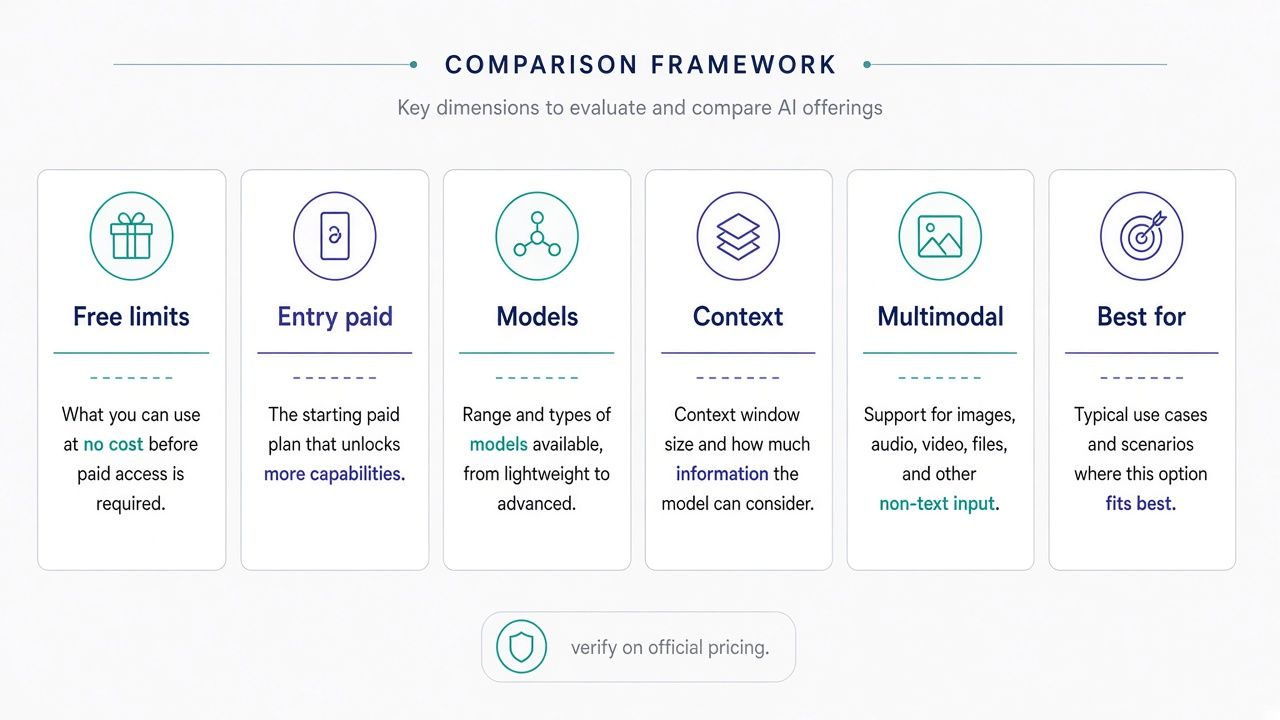
| Chatbot | Best-fit job | Free tier reality | Entry paid | Context note | Multimodal | Main tradeoff |
|---|---|---|---|---|---|---|
| ChatGPT | Mixed writing, files, and everyday tasks | Unlimited text chats listed, with limits on uploads, memory, context, and some tools | Go $8/mo; may include ads; Plus $20/mo | Published Instant context examples vary by plan; other modes differ | Text, image, voice, and files, depending on plan and mode | Breadth can mean paying for features you do not use |
| Claude | Careful writing, document work, and revision | Free chat with limits on use and available capacity | Pro $20 monthly or $17/mo billed annually | Up to 1M tokens on some models; varies | Text, files, image, and tools vary by plan | Intensive or long sessions may reach usage limits |
| Gemini | Work tied to Google services | Free access with plan- and feature-dependent limits | AI Plus $4.99/mo; AI Pro $19.99/mo | AI Pro marketing cites 1M tokens | Text, image, voice, and other features vary | Its advantage may shrink outside the Google stack |
| Microsoft Copilot | Microsoft-centered work, with the right license | Free consumer experiences exist; workplace access is separate | Confirm current personal Microsoft 365 / Copilot plans on Microsoft’s personal Copilot page; not workplace M365 Copilot | Depends on account, plan, and feature | Varies by product and app | Consumer/personal plans are not workplace Microsoft 365 Copilot |
| Perplexity | Research with source links | Standard includes basic search and limited Pro Search; help lists 3 per day | Confirm individual Pro or Max price at checkout | Depends on selected model | Features vary; paid plans include creation tools | Citations still require inspection; price and allowances need checking |
| Poe | Trying multiple bots in one service | Free access with point limits; check the current allowance | Confirm current options and point allowances in help | Varies by bot | Varies by bot | Points and non-native feature access complicate comparisons |
| Mistral Vibe | Chat and coding-agent work | Limited messages, searches, and coding | Pro $14.99/mo | No single consumer context figure emphasized here | Features vary, including image and voice capabilities | Hosted Vibe is not the same as self-hosting a model |
| Grok | Questions tied to live web and X discussion | Free to try, with access and usage limits to check | Plus $8/mo; higher tiers cost more | Not presented here as one fixed context figure | Voice, image/video generation, and other features vary | Live social material can be noisy or unverified |
| DeepSeek | Comparing chat output or building with an API | Chat access and limits vary; check availability in your region | API is billed separately; check current documentation | API models deepseek-flash and deepseek-v4-pro list 1M context | Vision is listed for Flash in API documentation | Chat and API are separate products with different billing and controls |
| Meta AI | Casual help in Meta apps | Free access may be available; verify account and region | No typical paid consumer chatbot tier listed here | No comparable single figure emphasized here | Text, image, and voice features vary | App convenience is not workplace administration or document management |
Prices and listed allowances are not a complete comparison of total cost. A yearly offer, regional eligibility, promotional price, usage cap, or account type can change what a buyer actually receives. Check the linked official plan page before subscribing.
Chatbot vs AI agent: what the difference means for buyers
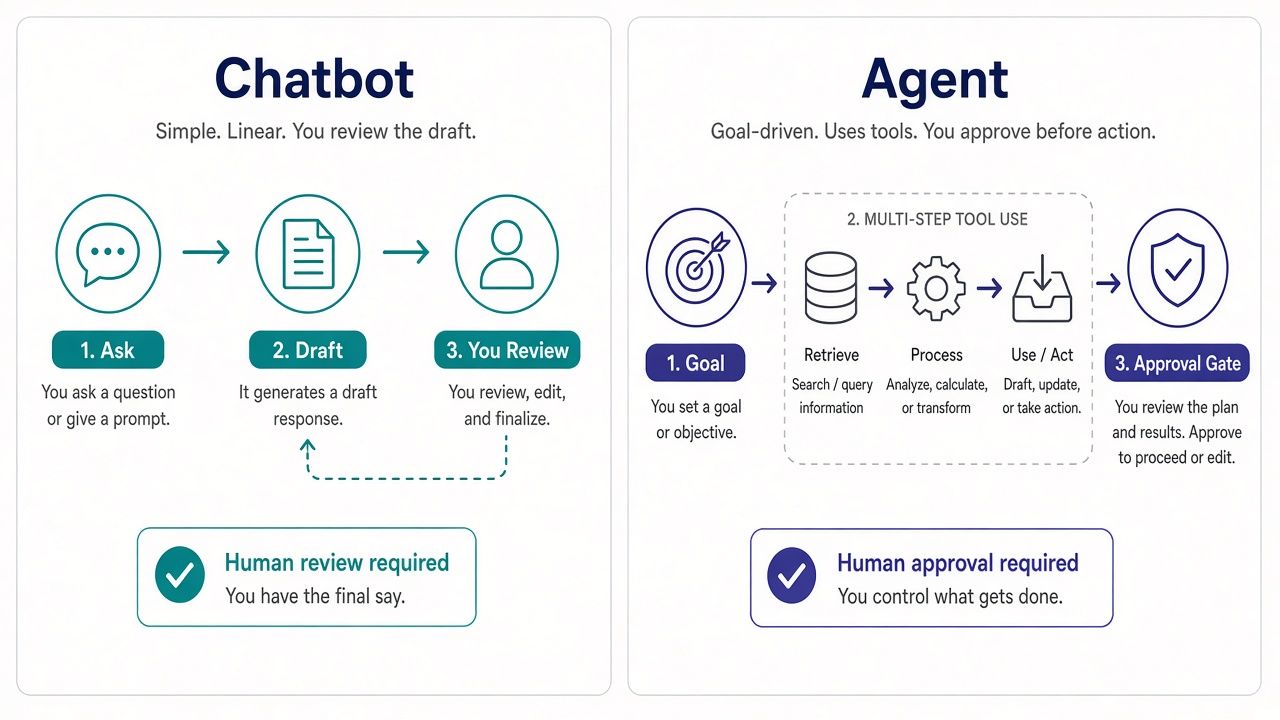
A chatbot primarily responds to what you ask in a conversation. You provide a question or instructions, review the answer, and decide what happens next. An AI agent is intended to carry out a sequence of steps toward a goal, sometimes using tools or interacting with external services along the way.
The boundary is not always clear. A chatbot may be able to search, work with files, or generate code. An agent may still ask questions and respond in a chat interface. Product labels also change, so “agent” on a pricing page does not tell you exactly what the software can do or what it is allowed to access.
For a buyer, the useful distinction is how much authority and follow-through the workflow requires. If you ask for a draft, read it, and paste it into an email yourself, a chatbot may be enough. If you want a system to inspect several sources, take actions in an application, or keep working through a sequence of steps, you need to understand what it can access, what it can change, and where it will stop for approval.
Before using an agent-like feature, check:
- What it can access: Does it see only material you provide, or can it use connected accounts and tools?
- What it can change: Does it create a draft, or can it send, edit, delete, or publish?
- Where you approve: Is there a review step before an external action?
- What it remembers: Does it retain instructions or files across sessions?
- How it handles a failure: Does it stop and explain an obstacle, or continue on a mistaken assumption?
- Which plan includes it: A feature may be limited to a specific tier, account, or region.
Try an agent feature first on a reversible task with a clear boundary, such as organizing supplied notes or preparing a draft from a small set of files. Avoid using a new assistant to send messages, change important records, or make consequential decisions without checking each step.
For a business, the difference can affect access controls and review requirements, not just convenience. A personal chatbot subscription does not automatically satisfy workplace rules. Compare the actual work setup and its permissions with the needs of the task. Our guides to AI business assistants and AI personal assistants cover those narrower buying questions.
The best AI chatbots reviewed
ChatGPT
Best fit: People who want one general assistant for a mix of writing, questions, files, and other supported tools.
ChatGPT’s main case is breadth. A single project may start as rough notes, turn into a short brief, and then require follow-up questions or a file-based check. Keeping those steps in one conversation can be convenient, provided the tools you need are available on your plan.
OpenAI lists Free at $0, Go at $8 per month, Plus at $20, and Pro at $100. Go may include ads. The pricing page lists unlimited text chats on Free, subject to limits on uploads, memory, context, and some other features. It describes the GPT-6 family and lists Astra on higher tiers. Context limits vary by plan and mode; do not assume a figure for one mode applies to every conversation.
Review the current ChatGPT pricing page for the exact tools and usage limits attached to your account. Business and Enterprise are separate work offerings; a personal subscription should not be treated as an organizational plan.
Trial method: Provide the same one-page brief you will use with another candidate. Include one unresolved decision and one important qualification. Ask for a draft, then ask it to separate confirmed facts from assumptions. Check whether the final version keeps the qualification intact.
Honest tradeoff: A broad feature set can be useful, but it can also make it easy to pay for capabilities you rarely use. Start with Free or your existing access, and upgrade when a specific limit or feature affects work you repeat. If you are evaluating workplace use, compare the relevant work offering separately; ChatGPT Enterprise is not interchangeable with an individual plan. For a task-specific writing comparison, see the AI article writer guide.
Claude
Best fit: Document-heavy work that involves careful writing, revision, and follow-up.
Claude (product overview) is a candidate when the work depends on preserving meaning while improving clarity. That might mean reorganizing a report, explaining a policy in plainer language, or turning notes into a draft that retains their uncertainties. The useful question is whether its revision process helps you make decisions, not whether one response sounds polished.
The Claude pricing page lists Free at $0, Pro at $20 monthly or $17 per month with annual billing ($200 paid upfront), and Max from $100 per month. Max offers higher usage, with 5x or 20x Pro usage indicated for its tiers. The page lists context up to 1M tokens on some models; availability varies by model. Team and Enterprise options also exist. A large context window is not a guarantee of faithful recall or accurate analysis.
Trial method: Choose a document where you know the central argument and the important exceptions. Ask for a shorter version, then compare it with the original. Look for removed conditions, altered commitments, or a conclusion that has become stronger than the source supports.
Honest tradeoff: Heavy sessions with long inputs may use capacity differently from occasional short questions. A higher tier may make sense for sustained use, but paying more does not remove the need to check the result. Compare Pro with the free tier before considering Max, and compare the Claude API separately if you are building a product rather than buying a chat subscription.
Gemini
Best fit: People whose work already uses Google services and who can access the relevant Gemini features.
Gemini’s practical appeal may be its place in a Google-centered routine. If your task depends on moving between the assistant and Google apps, account integration can matter more than a small difference in how two standalone assistants draft a paragraph. The key is to verify that the specific integration is available on your account.
Google lists Free at $0, AI Plus at $4.99 per month, AI Pro at $19.99, and AI Ultra from $99.99 or $199.99, depending on the listed option. Its subscription page discusses Flash and Pro models and mentions Gemini 4 Argon on paid access in some regions. AI Pro marketing cites a 1M-token context. Check the Google AI subscriptions page for current regional availability and plan details.
Trial method: Use a non-sensitive task that reflects your actual Google workflow. Give Gemini a short brief with a changed instruction, then check whether the answer reflects the latest version. If you are evaluating connected apps, confirm what information it actually used rather than assuming that access to an app means every relevant item was considered.
Honest tradeoff: An integration is valuable only if your account has it and it reduces steps in your real workflow. If you work outside Google apps, the advantage may be less important. A large context figure describes a capacity, not a promise to find every detail correctly. Compare it with your existing account access before adding a plan. See the Gemini product guide for a separate overview.
Microsoft Copilot
Best fit: People who need assistance in a Microsoft environment and can verify that the right feature is included in their account.
“Copilot” covers distinct consumer and workplace experiences. For personal/consumer pricing and plan names, use Microsoft’s current personal Copilot / Microsoft 365 page as the source of truth—do not treat third-party summaries as definitive. Those personal offerings are not the same as workplace Microsoft 365 Copilot licensing for organizations. A consumer or personal plan should not be assumed to include an organization’s documents, work permissions, or administrator controls.
For a work task, ask your organization which license and apps are enabled. Then test the feature using the account and materials you will actually use. Confirm personal plan details on the official page above; consult your workplace administrator for business entitlements and terms.
Trial method: Pick a task that starts in a Microsoft app, such as drafting a reply from a document you are allowed to use. Check what information the assistant could see, whether the result is easy to review, and what permissions are in effect. Do not substitute a public chat demonstration for a test of a workplace feature.
Honest tradeoff: Account and license complexity can obscure the real product being compared. The right assistant may be the one that fits a permitted workflow, but a familiar Microsoft name alone does not establish that the required work feature is included. Start with existing access and confirm the license before purchasing something for company use.
Perplexity
Best fit: Research tasks where locating and checking source material are part of the work.
Perplexity is worth trying when you want a question answered alongside links you can inspect. Its Standard free plan includes basic search and limited Pro Search; the help materials list three Pro Searches per day. The service also offers Pro, Max, Education Pro, and enterprise options. Education Pro is listed at $10 per month through SheerID verification, while Enterprise Pro starts at $40 per seat per month or $400 per seat per year.
Perplexity’s help pages do not provide a verified individual Pro or Max dollar price here, so confirm the amount at subscribe or checkout rather than relying on an older comparison article. The service routes across multiple models, and the available selection can vary. Review current plan information in the Perplexity help center and its product guide.
Trial method: Ask a narrow question with a clear date or scope. Open the sources and check whether they support the answer’s specific claims. Note whether the cited page is current and whether it discusses the same product, region, or plan you asked about.
Honest tradeoff: A citation is an invitation to verify, not a guarantee that the answer is correct. Search-oriented workflows may help with finding evidence, but they do not replace reading the evidence. Perplexity is less likely to be the only tool you need if your main work is editing your own documents or writing in a specialized application.
Poe
Best fit: People who want to compare several bots or models without managing a separate direct subscription for each one.
Poe provides access to multiple bots in one service. This can be useful while you are figuring out whether different models suit different tasks. It can also make comparisons convenient, since you may be able to give several bots a similar prompt within the same product.
The important pricing detail is that use is measured in points, and different bots or requests may consume points differently. Poe’s help center explains its bots and point system; check the current information rather than assuming that a particular subscription buys unlimited use. No point prices are stated here.
Trial method: Give two bots the same short brief and record which one you used, how much of the available allowance the task consumed, and how much correction the output needed. Check whether each is an official bot or one with additional creator instructions, since that affects what the comparison tells you.
Honest tradeoff: A model name in Poe does not mean that every tool in the provider’s native app is included. If you depend on a provider-specific file workflow, project feature, or integration, check it directly. Poe is most useful when access and comparison matter more than native feature parity.
Mistral Vibe
Best fit: People interested in a Mistral chat product that also offers a coding agent.
Mistral Vibe was formerly called Le Chat. Its current scope combines chat with a coding agent, so readers comparing older lists should check that they are looking at the current product name and plans. The Mistral pricing page lists Free, Pro at $14.99 per month, student Pro at $5.99 per month, Team at $24.99 per user per month, and custom Enterprise pricing. The student price is subject to eligibility and a maximum period.
Trial method: If your work includes both general questions and code, try one bounded task in each category. For code, use a small example that you can inspect and run in an appropriate environment. For chat, provide a short document and check whether the explanation reflects what the text actually says.
Honest tradeoff: A hosted chat product and self-hosted software are different buying decisions. Mistral’s wider model ecosystem does not mean that conversations in Vibe run in an environment you control. Confirm the current limits for the features you plan to use, especially if the coding agent is the reason you are considering a paid plan. The Mistral product overview can help clarify the product you are evaluating.
Grok
Best fit: People whose questions begin with live web or X discussion.
Grok may suit a task that involves finding and following current public discussion. Its listed features include live web and X search, Imagine image and video capabilities, voice, and multi-agent features on higher tiers. Those capabilities make it a candidate for locating discussion—not a substitute for checking primary sources or judging whether a post is accurate.
Grok is free to try, and the listed subscription ladder includes Plus at $8 per month; Premium at an introductory $15 and then $30; Super at an introductory $50 and then $100; and Ultra at an introductory $100 and then $200. Introductory pricing is not the continuing monthly price. Confirm the subscription details on the Grok subscription page before buying.
Trial method: Ask about a current topic and request the original post or source, date, and context. Check those items yourself. Pay attention to whether the assistant distinguishes a claim, a repost, and a confirmed announcement instead of presenting them as equally established.
Honest tradeoff: Fresh social material can also be noisy, repetitive, or incomplete. If your work depends on official documentation or supplied files, live social search may not be a meaningful advantage. Choose a paid tier only if the access and features you will use justify its continuing price.
DeepSeek
Best fit: People comparing another conversational assistant or developers evaluating DeepSeek’s API.
Keep consumer chat and API access separate. The API documentation lists deepseek-flash and deepseek-v4-pro with 1M context; it lists vision for Flash. The API has its own billing model and is not the same thing as a consumer chat subscription. DeepSeek’s chat site may be restricted by region or IP, so check whether it is currently accessible to you instead of assuming availability or a particular free allowance.
For API details, use the current DeepSeek API pricing documentation. Do not use an API price to estimate a consumer chat subscription, or vice versa. Likewise, a model’s published context capacity does not establish that the chat app provides the same access or settings.
Trial method: If chat is available, compare it on a small task you can verify, such as reconciling a few requirements or explaining a short code sample. For an API evaluation, test through your own intended development setup and review billing, data handling, and access controls.
Honest tradeoff: A useful answer in one trial does not establish that a hosted interface has the integrations, file handling, or organizational controls you need. If the task involves work data, review the applicable product terms and your organization’s requirements before uploading material. API billing and chat access remain separate decisions.
Meta AI
Best fit: Casual assistance through Meta apps, when the feature is available to your account and region.
Meta AI’s appeal is convenience: it may be available in familiar Meta apps without a separate paid consumer chatbot subscription. That can be enough for everyday questions or light creative tasks. Availability and capabilities can vary, so check Meta’s current assistant overview and your account rather than assuming the same experience everywhere.
Trial method: Try a non-sensitive task with a result you can easily assess, such as organizing a short itinerary you provide. See whether you can refine the answer, whether it follows your correction, and whether the experience is convenient enough to use again.
Honest tradeoff: Convenience in a social or messaging app is not the same as a managed workplace document platform. Do not assume Meta AI is approved for confidential company material or that it offers workplace administration by default. If you need a professional assistant for company work, check the relevant controls and policies first. For a different casual conversational use case, see the AI companion guide.
ChatGPT vs Meta AI: which fits which day
ChatGPT and Meta AI can both help with everyday questions, short drafts, and brainstorming, but they make different buying propositions. ChatGPT has several paid tiers, more explicitly differentiated plan features, and a broad set of tools whose availability depends on the plan and mode. Meta AI’s practical appeal is lower-friction access in Meta apps, where available, without a typical paid consumer chatbot subscription.
Choose ChatGPT when you want to test a wider set of assistant workflows in one product—for example, working with files or using features available on a specific plan. Begin with Free, which is listed at $0 and allows unlimited text chats subject to limits on uploads, memory, context, and other tools. If you need more, Go is listed at $8 per month and may include ads; Plus is $20; Pro is $100. Check the official plan comparison before paying for a feature you expect to use.
Choose Meta AI when you mainly want occasional help inside an app you already use, and its availability and capabilities suit your account. It may be easier to try without creating a separate subscription. That does not make it a substitute for a work product or a better choice for every writing task.
A fair comparison uses the same low-risk prompt in both, then asks for a correction. For example, provide a short set of travel preferences, ask each for a simple itinerary, and change one constraint. See whether it respects the update and how much editing the result needs. Do not upload sensitive information to either service for a casual trial.
If you use a chatbot for social posts or customer-facing copy, review the content and tone yourself. Teams that need a dedicated support workflow should compare an AI customer support tool, not assume that either general assistant includes the controls a support team needs.
How to trial two assistants before you subscribe for a year
A brief, repeatable comparison tells you more than trying whichever product has the most appealing demo. You do not need a formal benchmark. You do need a task you can judge.
Choose two candidates and one real task. Pick work you expect to do more than once. Keep the trial small enough that you can check the output yourself. For example, use one short project brief, a section of a document you are allowed to share, or a simple question about a source you can open.
Use the same input and the same standard. If one assistant receives a cleaner prompt or more context, the comparison is less useful. Give both candidates the same source material and instructions. Note whether a feature is unavailable on one plan rather than silently substituting a different workflow.
Test a correction, not just a first answer. Add a changed deadline, revised requirement, or qualification. Then ask for a new version. This reveals whether the assistant follows the update and whether it carries forward stale information.
Review the result against the source. Check names, dates, numbers, qualifications, and claims. If the task involves research, open cited pages. If it involves writing, compare the final draft with the material it is supposed to represent. If it involves code, inspect and run it only in an appropriate environment.
Record the practical costs. You can keep a short note for each candidate:
- Usable result: Could you use the answer after review?
- Corrections: What did you have to fix or explain again?
- Context: Did it preserve the relevant qualification or update?
- Allowance: Did normal use run into a limit or consume points unexpectedly?
- Workflow: Was it easy to move material in and out?
- Access: Did the plan include the feature you were trying to evaluate?
- Cost: Would the subscription still make sense for a typical month?
Try the free tier or existing access first when it covers the task. If you are considering an annual payment, check whether you will use the tool regularly and whether the annual terms still make sense after the trial. A low introductory price, a higher allowance, or a feature list is not a substitute for trying the actual workflow.
You may not need one assistant for every job. But do not keep several subscriptions by default. Add another only when you can name a repeated task it handles better, or a required feature the first tool lacks. If your main need is narrower, use a task-specific guide—for example, AI code assistants—rather than buying a general chatbot for a specialized workflow.
How we evaluated these tools
We checked official plan and product information on October 27, 2026, Asia/Shanghai, and used it to describe listed plans, access, and stated features. We also consulted product help materials where relevant, including Perplexity’s plan details and Poe’s help center. If an individual price or point allowance could not be verified from the relevant information, we have said to confirm it at checkout or in the provider’s help materials instead of filling the gap with an estimate. During that research pass, Meta AI official pages and chat.deepseek.com were unreachable from our research IP (HTTP 403/400), so related claims are limited to “verify availability for your account and region,” and we did not invent free-tier quotas for those products.
This is a qualitative buyer’s guide, not a lab benchmark. We do not claim that one chatbot achieved a particular accuracy percentage or that a single prompt establishes a universal winner. The trial suggestions are ways for readers to evaluate a product against their own work: use the same brief, try a correction, inspect the output, and consider the effort required to make it usable.
We compare the practical buying questions that can change the result: what the free tier limits; which plan includes the feature you want; whether a tool fits your existing apps; whether a cited source supports a claim; and whether an agent-like workflow can access or change anything important. A published context figure is included as a plan or model specification where relevant, not as evidence that the assistant will correctly use every item in a long input.
Product names and plan structures can change, and access can differ by account, region, or organization. Before buying, confirm the current terms with the provider and, for workplace use, with your administrator.
Frequently asked questions
What is the best AI chatbot in 2026?
There is no single best fit for every user. ChatGPT and Claude are reasonable starting points for varied writing and document work; Gemini is worth testing in a Google-centered workflow; Copilot may fit Microsoft work when the correct license is enabled; and Perplexity is a candidate for research that depends on following sources. Choose based on a task you repeat and check the result yourself.
Which chatbot is best for writing?
Try ChatGPT and Claude on the same piece of writing. Ask both to draft or revise material that you understand, then check whether each preserves key conditions and follows your corrections. The better choice is the one that reduces editing for your kind of writing—not necessarily the one that sounds more polished on its first attempt.
Which AI chatbot is best for research with citations?
Perplexity is designed around research questions and source links, making it a sensible candidate to try. ChatGPT and other assistants may also support research features, depending on plan and mode. In every case, open the cited pages and confirm they support the claim. A link alone does not verify a generated summary.
What is the best free AI chatbot?
That depends on which free tier includes the features you need and how often you use them. ChatGPT lists unlimited text chats with limits on uploads, memory, context, and tools. Claude, Gemini, Mistral Vibe, and other products also offer free access with their own restrictions. Meta AI may be convenient in Meta apps where available. Try the free option already associated with your workflow before paying.
Is ChatGPT better than Claude or Gemini?
Not for every task. ChatGPT offers a broad set of tools across its plans; Claude is worth comparing for careful document work and revision; Gemini may be more convenient when your work is in Google services. Use the same brief with two candidates, test a correction, and compare the amount of review and editing needed.
What is the difference between a chatbot and an AI agent?
A chatbot typically responds to instructions in a conversation. An agent-like feature may carry out several steps or use connected tools to work toward a goal. Product labels overlap, so check what the feature can access, what actions it can take, and where you approve changes before using it on important work.
Is Microsoft Copilot for consumers the same as Microsoft 365 Copilot for work?
No. Consumer Microsoft 365 plans with Copilot features and workplace Microsoft 365 Copilot licensing are different buying contexts. Do not assume a personal plan includes company document access or workplace controls. Ask your administrator which business features and licenses are enabled.
Is DeepSeek free?
Check current access to DeepSeek’s chat product in your region; availability may vary, and no consumer free-tier allowance is assumed here. DeepSeek’s API is a separate product with separate billing. Do not treat API model pricing or context information as the terms of a consumer chat account.
Is DeepSeek safe for work data?
That depends on the product, its current terms, and your organization’s rules. A hosted chat interface and an API used in your own application are not automatically the same data arrangement. Review the applicable terms and controls, and do not upload confidential work material unless it is permitted by your organization.
Does Mistral Le Chat still exist?
Mistral’s product is now called Vibe, formerly Le Chat. The current offering covers chat and a coding agent. Check Mistral’s current pricing and product pages when comparing older articles, since product names and plan details may have changed.
Do I need more than one AI chatbot subscription?
Not necessarily. Start with the free access or subscription you already have. Add another paid product only if it handles a repeated task meaningfully better or supplies a feature you actually need. If the tools overlap, a second subscription may add switching rather than value.
How should I compare Poe’s bots?
Give the bots the same task, check which bot you are using, and record how much of your available points the request consumes. Different bots and requests may use points differently, and Poe access may not include every feature of a provider’s native app. Confirm the current point system in Poe’s help center.
Should I choose ChatGPT or Meta AI?
Choose by the day you are having. ChatGPT is usually the better candidate when you need a dedicated workspace, file handling, custom GPTs, or a paid tier with broader tools. Meta AI is more relevant when free, low-friction help inside Meta apps is enough and the feature is available to your account. Compare them on a non-sensitive everyday task, and do not treat Meta AI convenience as workplace suitability.
Capabilities vary by account, region, and plan. Product and plan references checked on October 27, 2026 (Asia/Shanghai). Scenarios are evaluation suggestions, not fabricated benchmark results.




