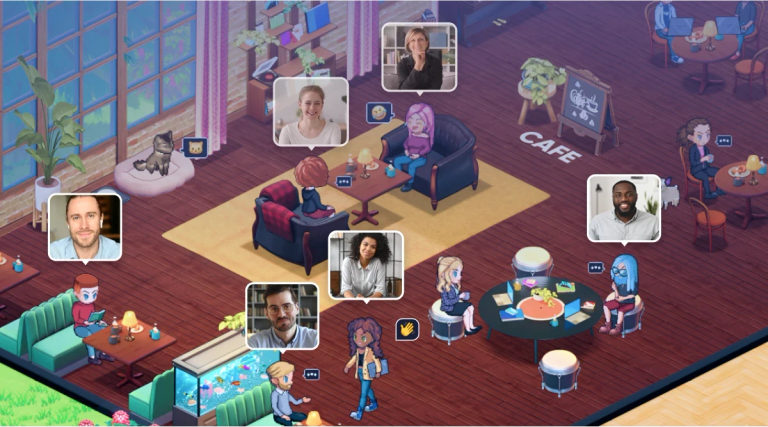
SoWork is an AI-powered virtual office platform designed to enhance remote team collaboration and productivity with spatial video, chat, and analytics.
Features
- AI-Powered Meeting Memory — Full meeting intelligence with automatic recording, transcription, summarization, and searchable archives. SoWork's AI captures every detail so teams never lose important information from conversations, enabling asynchronous review and knowledge retention across the organization.
- Spatial Presence & Instant Meetings — See who's available, focused, or in meetings at a glance with real-time presence indicators. Wave teammates over and start video conversations in one click—no scheduling, no meeting links, no calendar invites. Mimics the natural flow of walking over to a colleague's desk in a physical office.
- Customizable Virtual Office Spaces — Build and personalize your virtual workspace like designing a house in The Sims. Unlimited customization options for office layouts, rooms, and team avatars to showcase company culture, create themed spaces, and make the remote work environment genuinely engaging and fun.
- Smart Availability Management — Automatic calendar sync updates your status to 'In a Meeting' when events start. Simple Mode enables deep focus work, Mini Mode keeps you connected while using other apps, and manual status settings let teams signal availability without interruptions—balancing collaboration with productivity.
- Integrated Chat & Analytics — Topic-based chat channels organize conversations by subject for clearer collaboration. Built-in analytics provide insights into team communication patterns, meeting frequency, and collaboration health—helping leaders optimize remote work processes and identify bottlenecks.
- Unified Collaboration Hub — Consolidates fragmented remote work tools into a single platform combining video, chat, presence, and workspace management. Replaces multiple apps like Zoom, Slack, and scheduling tools with one seamless experience that reduces context-switching and tool fatigue.
Use Cases
Distributed Team Daily Operations
Remote-first companies use SoWork as their primary virtual headquarters where team members log in each day for standups, ad-hoc conversations, and collaborative work sessions. The spatial interface eliminates the need for constant Zoom scheduling and enables spontaneous 'walk-over' conversations that mirror in-office dynamics, with one customer reporting a 60% reduction in formal meetings. Target Audience: Remote-first companies, distributed startups, and fully remote teams of 10-500 employees seeking to replace fragmented communication tools with a unified virtual workspace.
Cross-Department Culture Building
Organizations struggling with remote silos use SoWork to break down departmental barriers through shared virtual spaces, customizable offices that reflect company identity, and casual interaction opportunities. The platform enables organic cross-team encounters that build culture and improve interdepartmental communication without forced team-building activities. Target Audience: HR leaders, culture managers, and executives at mid-size to enterprise companies looking to strengthen company culture, reduce silos, and improve employee engagement in remote or hybrid work models.
Async-First Meeting Intelligence
Teams across time zones leverage SoWork's AI meeting memory to record, transcribe, and summarize all conversations, enabling asynchronous participation. Team members who miss real-time discussions can catch up through searchable transcripts and AI-generated summaries, ensuring no one is left out of critical decisions regardless of their working hours. Target Audience: Global teams spanning multiple time zones, project managers coordinating distributed contributors, and organizations transitioning to async-first communication workflows.
Hybrid Office Coordination
Companies with partial in-office schedules use SoWork to maintain visibility into who's working when and where. The platform's presence indicators and availability settings help hybrid teams coordinate effectively, ensuring remote and in-office employees can collaborate seamlessly without the friction of constant status-checking messages. Target Audience: Hybrid workplaces, companies with flexible work policies, and managers overseeing teams with mixed in-office and remote schedules seeking better coordination tools.
Pros
- Dramatically reduces meeting overhead—customers report up to 60% fewer formal meetings by enabling spontaneous, walk-up conversations that replace scheduled Zoom calls.
- Exceptional ease of adoption with intuitive interface design; multiple testimonials highlight quick team onboarding and immediate daily usage without extensive training.
- Outstanding customer support consistently praised across reviews as responsive, thoughtful, and genuinely invested in user feedback—critical for team adoption success.
- Highly customizable virtual offices and avatars create genuine engagement and fun, transforming remote work from isolating to interactive while showcasing company culture.
- Seamless calendar integration with automatic status updates eliminates manual availability management, reducing interruptions and respecting deep work time.
Cons
- Requires full team buy-in and adoption to realize value—effectiveness depends on consistent daily usage across the organization, which may face resistance from teams comfortable with existing tools.
- Virtual office concept may feel unfamiliar or gimmicky to traditional corporate cultures accustomed to standard video conferencing, potentially creating initial skepticism among leadership.
- Heavy reliance on persistent presence and spatial awareness could create pressure to be 'always visible,' potentially conflicting with employees who prefer asynchronous, heads-down work styles.
- Limited information available about enterprise-grade security, compliance certifications, and data handling policies on the public website—may require additional vetting for regulated industries.