
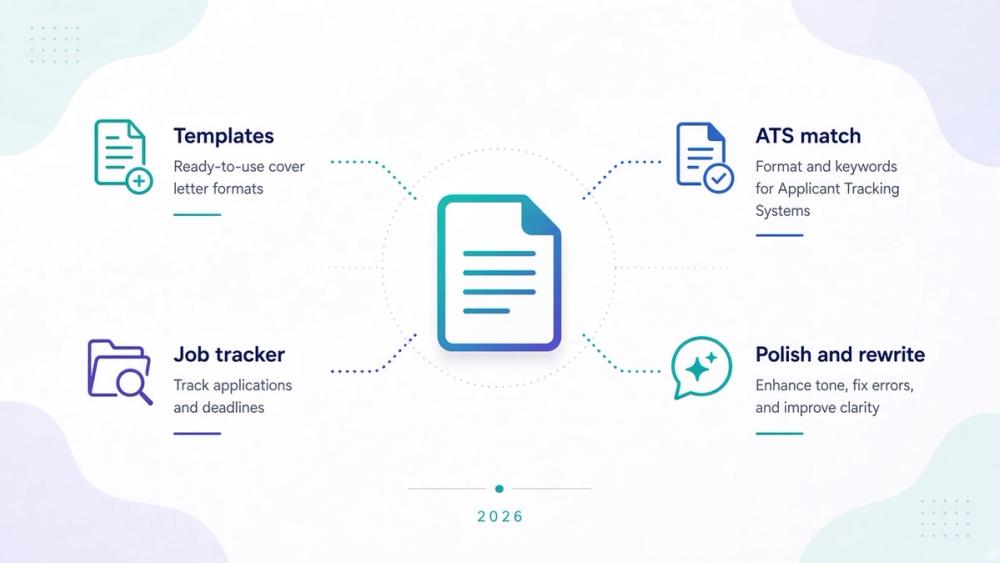
Choosing an AI cover letter writer in 2026 is less about finding a universal winner and more about matching a tool to the way you apply. You might want a designed template, a draft tied closely to a job description, a tracker for your whole search, or help improving a letter you have already written. Those are different jobs, and the best fit depends on which one is slowing you down.
This guide compares ten tools across those workflows: Kickresume, Rezi, Zety, CoverDoc.ai, Teal, Jobscan, Workzil, Novorésumé, Huntr, and Grammarly. It also explains what their free plans and paid options actually provide. Pricing was checked on official pages where available on October 29, 2026 (Asia/Shanghai). Plans and checkout terms can change, so confirm the current details before paying.
Quick picks by job-to-be-done
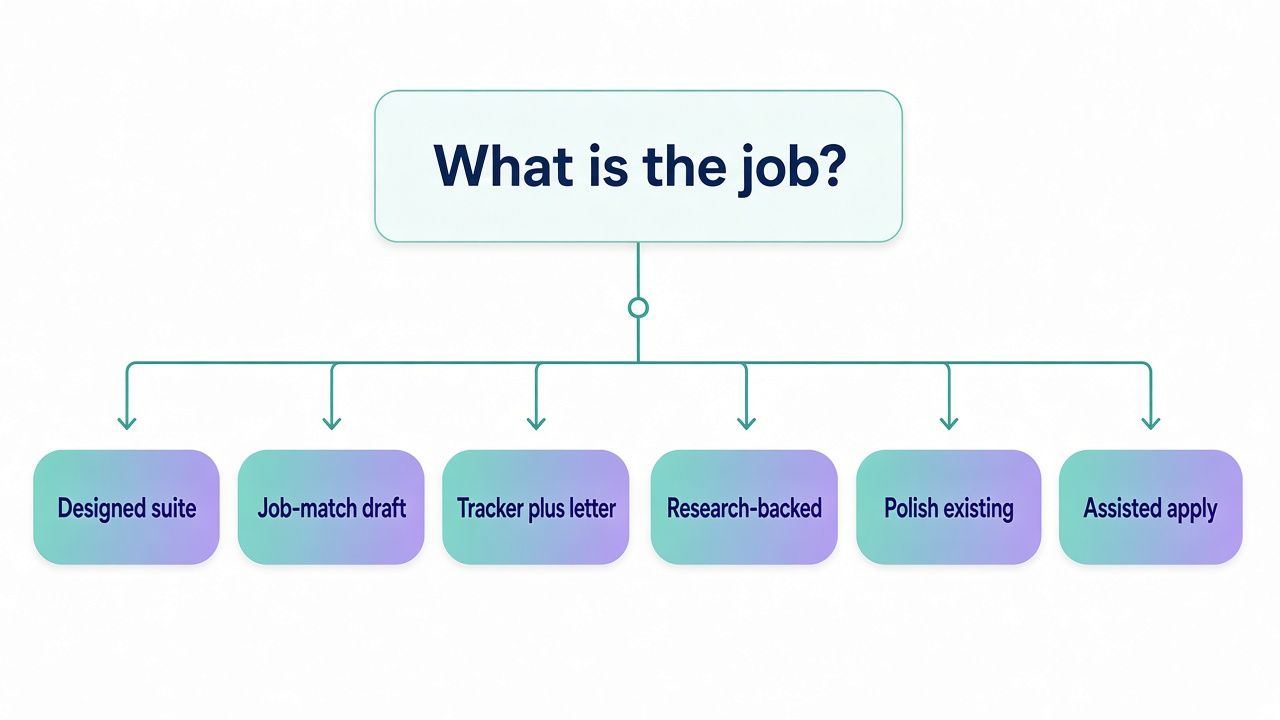
These are practical starting points, not a ranked list. Check whether the relevant feature is included in the plan you are considering before you build your workflow around it.
You want a designed template suite
Start with Kickresume or Zety if layout and guided document creation matter to you. Kickresume Premium includes more than 40 cover letter templates and its AI Writer. Zety includes a cover letter builder, but its free Basic plan only offers a TXT download. A polished template can help you present a consistent application, but you should still check that the final file is readable and that its claims are accurate.
You want job-match or ATS-oriented help
Look at Rezi or Jobscan. Rezi connects job-description analysis with resume and application writing features, while Jobscan’s cover letter generator uses a resume and job description to create a draft. These tools can help you notice relevant language, but they cannot determine what an employer’s screening system will do. Treat match suggestions as prompts to review, not instructions to stuff a letter with keywords.
You want a job-search tracker alongside cover letters
Consider Teal or Huntr. Teal combines a job tracker and a Chrome extension for saving roles; its AI Cover Letter Generator is a Teal+ feature. Huntr’s Pro plan includes unlimited AI cover letters and supports application organization. If you apply to several roles at once, the tracker may save more time than another writing control.
You want research-backed cover letter drafting
CoverDoc.ai is the most focused choice in this comparison for incorporating company research into a cover letter workflow. It also offers job guides and interview and negotiation support. Review any company detail the tool supplies against a reliable source before including it. A specific, verified observation is stronger than a generic paragraph that merely sounds researched.
You want to try a free or trial option before paying
Start by checking Rezi, Zety, Teal, or CoverDoc.ai, but read the limits carefully. Rezi’s Free plan includes one resume and three PDF downloads, and its FAQ says free users can create unlimited cover letters. Zety’s free plan limits downloads to TXT, while its trial automatically renews unless canceled. Teal has a Free Forever plan, and CoverDoc.ai includes two free job guides.
You have a draft and mainly need to polish or humanize it
Use Grammarly as a rewrite and editing companion rather than a complete cover letter builder. You can also ask a general-purpose chatbot to help with a narrow revision, then verify every fact yourself. For more on that approach, see our guide to the best AI chatbots in 2026 and our overview of Claude.
You want an assisted-apply flow
Look at Workzil if you want cover letter creation connected to an auto-tailoring and application workflow. It may be more useful when you are managing repeated applications than when you only need one standalone letter. Before committing, inspect how drafts are stored, what you can edit, and what the plan includes for your particular application process.
What counts as an AI cover letter writer in 2026
“AI cover letter writer” can describe several different kinds of product. Some tools begin with a blank page and produce a draft. Others build a letter from your resume and a job description, help you match an application to a role, or improve prose you have already written. A few sit inside a broader job-search workflow.
This guide includes four types:
- Resume and cover letter builders, such as Kickresume, Zety, and Novorésumé. These pair writing assistance with templates and document exports.
- ATS and job-match tools, such as Rezi and Jobscan. These help you compare application material with a role and can provide cover letter drafting.
- Dedicated research and job-search tools, such as CoverDoc.ai, Teal, Huntr, and Workzil. Their value can come from company research, tracking, or assisted application steps as much as from the letter itself.
- Polishers, such as Grammarly. They can revise a draft’s clarity or tone, but they are not substitutes for a purpose-built cover letter builder.
We excluded tools that did not fit the core job well enough for this comparison. Simplified, for example, is a marketing content suite, not a focused cover letter product. We also left out products whose relevant pricing or cover letter claims could not be verified sufficiently for a useful review. A tool can still be useful outside this list; inclusion here is about fit for this particular buying question.
Best AI cover letter writers compared (2026)
| Tool | Best for | Free reality | Entry paid | ATS / job match | Export | Main tradeoff |
|---|---|---|---|---|---|---|
| Kickresume | Templates and guided writing | Free plan with basic resume templates and limited customization | Premium from $8/mo billed yearly | Job-description parsing and ATS-oriented templates | Confirm available formats and limits in plan | More design choices can mean more time spent formatting |
| Rezi | Resume and job-description alignment | One resume, three PDF downloads; FAQ says unlimited cover letters | Pro $29/mo | Job-description analysis and ATS-focused features | PDF limits on Free; confirm other formats | Cover letter writer is a Pro feature |
| Zety | Guided builder and templates | TXT download | $1.95 14-day trial, then $25.95 every four weeks; annual option available | Not the main reason to choose it | Free TXT; paid download formats subject to plan | Trial renewal cadence and download paywall |
| CoverDoc.ai | Company research and tailored drafts | Two free job guides | Pro $9.99/mo | Role and company research, not a general ATS score | Confirm current export options | Verify research details and plan limits |
| Teal | Job tracking with cover letters | Free Forever plan; limited AI | Teal+ from $13/week | Job tracking and role-specific workflow | Confirm plan and export options | Cover letter generator requires Teal+ |
| Jobscan | Drafting from resume plus job description | Free plan with limited monthly scans | Premium $49.95/month or $89.95 every 3 months (7-day trial on quarterly plan only), per third-party checks Sep–Oct 2026; confirm at checkout | Job-match-oriented workflow | PDF listed on generator page | Prices from third-party checks; confirm at checkout |
| Workzil | Cover letters in an assisted-apply flow | Credit packs from $5 | Pro $19.20/mo | Auto-tailor connects profile, resume, and job | Confirm export and plan details | May be more workflow than you need for one letter |
| Novorésumé | Resume and letter documents | Basic is free, but has no cover letter builder | Pro one-time passes; confirm USD at checkout | Not primarily a job-match tool | Confirm current export options | Free Basic does not include cover letter creation |
| Huntr | Applications and unlimited Pro letters | Two job-tailored resumes and two application packets | Pro $40/mo | Job-tailored application workflow | Confirm current export details | Paid plan needed for unlimited AI cover letters |
| Grammarly | Editing an existing draft | Free plan at $0 | Pro from $12 USD; confirm billing period | Not a dedicated job-match tool | Copy or use available editor integrations | Polish companion, not a full cover letter builder |
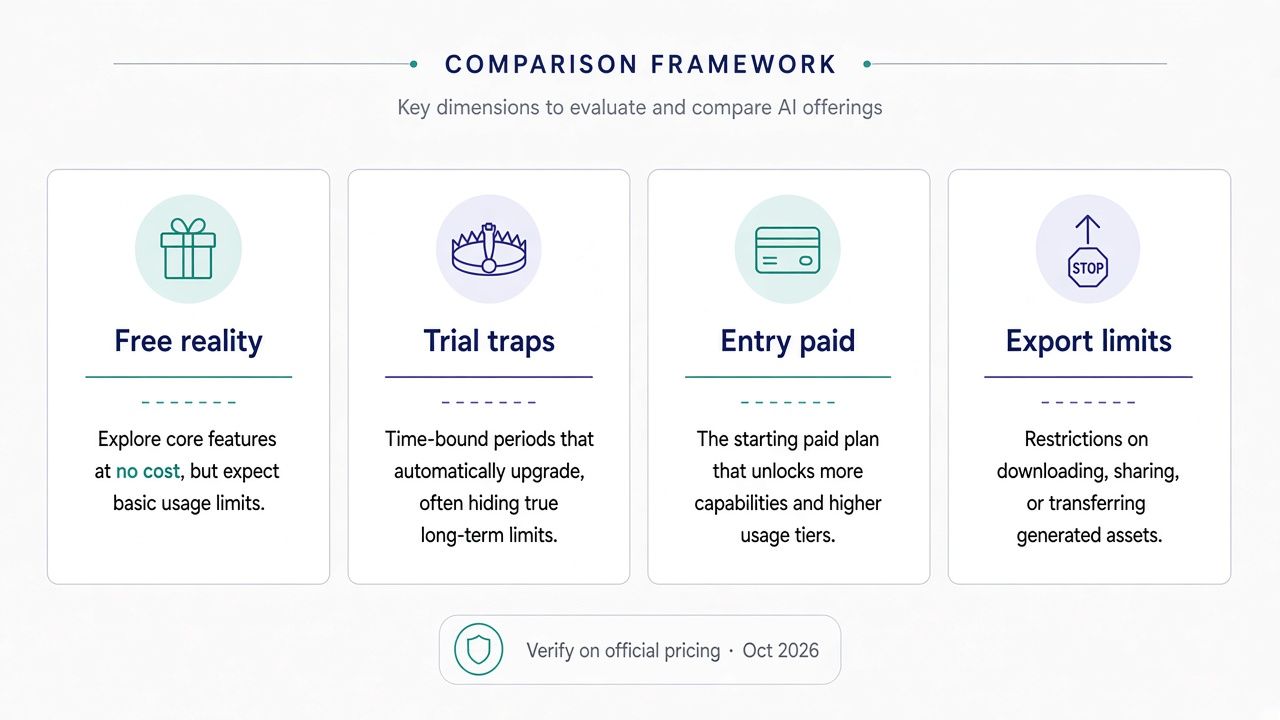
2026 pricing comparison: free tiers, trials, and paid plans
A free plan can be useful for deciding whether a workflow suits you, but “free” does not necessarily mean you can download a finished application document in the format you want. Check whether the plan limits the number of saved resumes, cover letters, exports, or AI uses. Then test the exact step you expect to use: drafting, editing, downloading, or tracking.
Kickresume offers a $0 Free plan with four basic resume templates, free downloads, and limited customization. Premium unlocks more than 40 cover letter templates and the AI Writer. Premium is listed at $24 per month, $18 per month billed quarterly ($54 every three months), or $8 per month billed yearly ($96 per year). Students can access the paid plan free with ISIC, ITIC, or UNiDAYS. Compare the billing total, not just the monthly equivalent.
Rezi has a $0 Free plan with one resume and three PDF downloads. Its FAQ says free users can create unlimited cover letters, while the AI Cover Letter Writer appears in the Pro feature grid. Pro is $29 per month; Lifetime is $149 one time; Enterprise is $99 per month per 200 users. Rezi also lists a 30-day money-back guarantee on paid plans. Because the free-plan FAQ and paid feature grid describe the cover letter experience differently, check what the current interface lets you generate and download before relying on it.
Zety is the clearest example of why trial duration and billing interval matter. Basic is free but permits a TXT download. The Pro trial costs $1.95 for 14 days and then renews automatically at $25.95 every four weeks unless you cancel. The annual option is $5.95 per month, or $71.40 per year. A four-week renewal is not the same as a calendar-month subscription, so calculate the actual schedule that applies to you and set a reminder before the trial ends.
CoverDoc.ai includes two free job guides. Pro is $9.99 per month, Plus is $14.99 per month, and pay-as-you-go costs $3 per credit. Its positioning combines cover letter research with interview and negotiation support. Confirm what a credit covers and whether the plan fits your expected application volume before purchasing.
Teal offers Free Forever, with a paid Teal+ option listed at $13 per week, $29 every 30 days, or $79 every 90 days. The AI Cover Letter Generator is a Teal+ feature. The weekly option can be convenient for a short period of active applications, but check the renewal terms and decide whether you want to keep paying after that burst of activity.
Jobscan has a live cover letter generator and a free plan with limited monthly scans; Premium is $49.95/month or $89.95 every 3 months (7-day trial on the quarterly plan only), per third-party checks in Sep–Oct 2026 — confirm at checkout. The official cover letter page describes a workflow that uses your resume and a job description to produce a draft, with rewrite and PDF options. Those figures could not be read from the official pricing page during this check, so confirm the current cost at Jobscan’s pricing page before paying.
Workzil lists credit packs from $5, Pro at $19.20 per month, and Elite at $31.20 per month. Its auto-tailor workflow writes a unique cover letter for each job. Check whether credits expire, what each plan includes, and whether the workflow requires a particular level of access to your profile or application information.
Novorésumé has a free Basic plan limited to one resume and one page; Basic does not include a cover letter builder. Pro is sold as one-time payment periods of one, three, or six months and unlocks the cover letter builder and more AI credits. The exact USD amounts were not confirmed, so check the official pricing page and checkout before purchasing.
Huntr Free includes two job-tailored resumes and two application packets. Pro costs $40 per month, $90 every three months, or $160 every six months, and includes unlimited AI cover letters. If you need only a small number of letters, start by checking what you can do on Free. If you expect to manage many applications, compare the paid plan with your likely search duration.
Grammarly has a $0 Free plan and Pro from $12 USD. The billing period needs confirmation at checkout. Grammarly is best viewed here as a polish and rewrite tool, not as a purpose-built cover letter builder. You still need to provide the relevant job details and ensure the finished letter contains your own accurate experience.
Polish and humanize cover letter rewrites (including Korean and other non-English drafts)
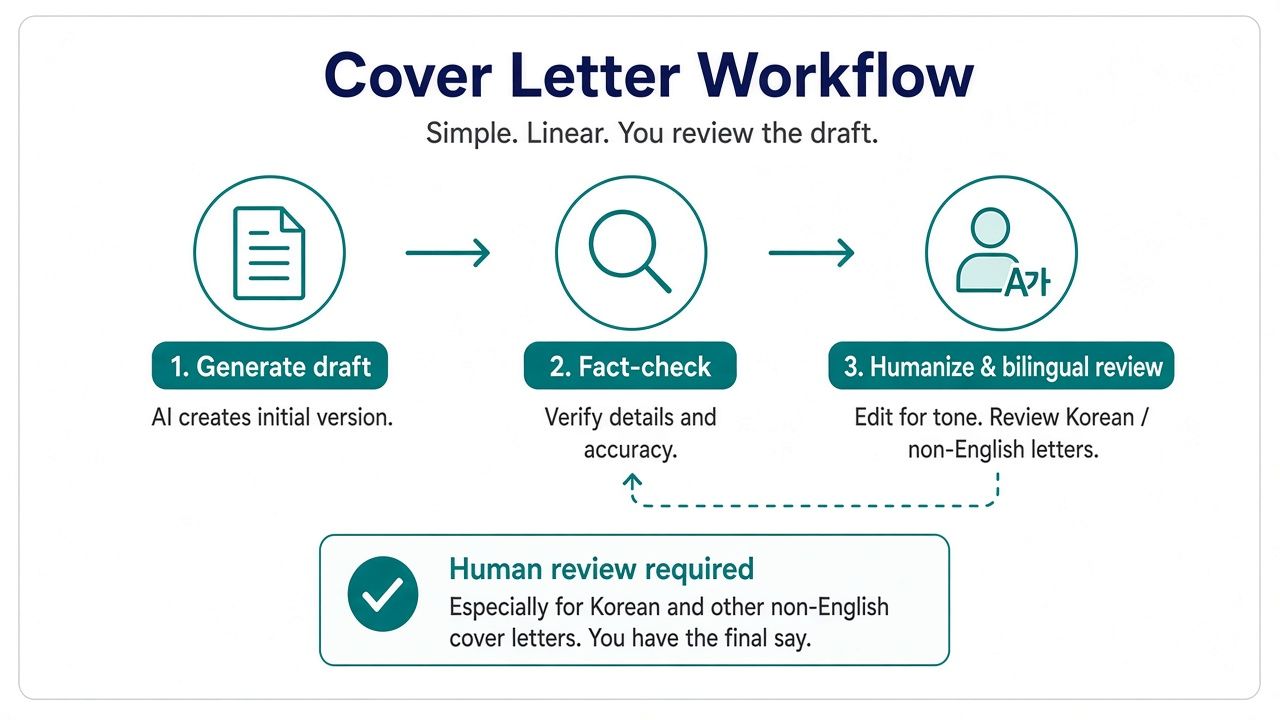
AI-generated prose often sounds polished before it sounds personal. A practical workflow is to use AI for a first pass, then make the substance yours:
- Generate a structured draft. Provide a current resume, the full job description, and a short note about why the role interests you. Ask for a concise draft based only on the supplied facts.
- Edit the facts yourself. Confirm job titles, dates, employers, project outcomes, and technical claims. Delete anything the tool added that you cannot support. Replace broad claims with a real example.
- Polish the tone. Use Grammarly or a general-purpose chatbot to shorten awkward sentences, remove repetition, and make the language sound closer to how you would speak in a professional conversation.
- Read it aloud. If you would never say a sentence in an interview, revise it. Make sure the letter does not make a promise or claim you would struggle to explain.
- Check the language and formatting. Confirm that names, punctuation, line breaks, and any translated terms are correct in the exported file.
CoverDoc.ai lists preferred languages including Spanish, French, German, Hindi, Arabic, Dutch, Japanese, Mandarin, Portuguese, Russian, and Italian. A listed language option is not a guarantee that every sentence will be idiomatic or appropriate for a specific employer. Korean is not in its listed preferred-language set, so do not assume official Korean support.
If you are polishing a Korean draft, use careful human review and, where the application matters, ask a bilingual speaker to check tone, register, and any culturally specific phrasing. Machine translation can preserve the broad meaning while missing an honorific, nuance, or natural professional expression. The same caution applies to other languages: use tools as editors, not as proof of native fluency.
For general-purpose assistance, you can compare options in our AI chatbot guide, or see Claude as one possible drafting and revision companion. Keep your resume and job description as the source of truth.
Cover letter length and formatting standards
For a typical US application, aim for roughly three to four paragraphs, around 250–400 words, and no more than one page. These are practical norms, not strict rules for every industry or employer. If the application instructions specify a format or length, follow them.
A straightforward letter can include:
- Opening: Name the role and give a specific reason you are applying.
- Evidence: Connect one or two relevant skills or accomplishments to the role.
- Employer fit: Show that you understand the work or organization, using a verified detail rather than a generic compliment.
- Close: State your interest and thank the reader, without an inflated claim or a demand for an interview.
A one-inch margin is a familiar, readable default for a standard page. Keep the type large enough to read and leave enough white space. Do not shrink the font or margins just to force a long draft onto one page; cut repetition instead.
Plain formatting is often the safer choice when an application system requests plain text or when you are unsure how it will process a designed document. Use conventional fonts, simple paragraph breaks, and no unnecessary tables, icons, or text boxes. A designed PDF can help when presentation is part of the application or when you are sending the document directly to a person, but verify that the text remains selectable and readable. Follow the employer’s stated file-format instructions.
A template can make a letter feel more finished, but layout cannot replace relevant evidence. Before you export, check the file itself—not just the preview—for page breaks, missing characters, stray placeholders, and text that has been cut off.
How we ranked these tools
This is a qualitative buying guide, not a lab benchmark or a claim that one product produces better letters by a measured percentage. We checked official product and pricing pages on October 29, 2026 (Asia/Shanghai), reviewed search-result competitors for coverage and structure, and focused the comparison on practical workflows: drafting, job matching, templates, tracking, exports, and price visibility.
We selected tools with a recognizable role in cover letter creation or review and left out products that did not fit the category well enough. Simplified, for example, is a marketing suite. We did not feature Hiration because we could not verify the relevant pricing and claims sufficiently in this check, and we did not give ResumAI a full review because the available product detail was too thin for a useful comparison. Wonsulting may be relevant to some job seekers, but this guide does not review it in depth; see Wonsulting if you want to explore that option.
There are limitations. Jobscan’s dollar pricing comes from third-party checks in Sep–Oct 2026 because it could not be read from its official pricing page. Novorésumé’s exact USD checkout amount was not confirmed. Some dynamic pricing pages may display different information by region, session, or billing choice. Enhancv’s pricing page also relied on JavaScript during verification, so we have not included it as one of the ten reviewed tools. Treat the prices in this guide as a dated snapshot, and verify the final checkout screen before subscribing.
The best AI cover letter tools reviewed
Kickresume — best for templates and guided personalization
Who it’s for: You want a resume and cover letter builder with a range of layouts, plus AI assistance to get past a blank page.
Standout features: Kickresume Premium includes more than 40 cover letter templates and its AI Writer. Its product also offers resume templates and tools that can help you bring application materials together. The platform is a reasonable fit if you value document design and want a guided interface rather than a blank editor.
A template can make it easier to get started, but it does not ensure that the writing will be distinctive. Review the draft for specifics about your experience and the employer. If the tool suggests a phrase that could describe any applicant, replace it with a relevant example from your own work.
Pricing notes: The Free plan is $0 and includes four basic resume templates with limited customization and free downloads. Premium is $24 per month, $54 billed quarterly ($18 per month), or $96 billed yearly ($8 per month). Students can access Premium for free with ISIC, ITIC, or UNiDAYS. Prices were checked on October 29, 2026 (Asia/Shanghai); confirm terms on the official pricing page.
Pros
- More than 40 cover letter templates on Premium.
- AI Writer is included with Premium.
- Free plan lets you explore basic resume templates.
Cons
- The strongest cover letter template selection is behind a paid plan.
- A well-designed draft can still sound generic without your own revisions.
- Compare the billing total and commitment, not only the monthly equivalent.
Best if: You want an all-in-one document builder and expect to use templates for multiple application materials.
Skip if: Your main need is job tracking, company research, or a plain-text letter with minimal formatting. See our Kickresume overview.
Rezi — best for job-description alignment
Who it’s for: You want to work from a resume and job description, and you value ATS-oriented prompts while preparing an application.
Standout features: Rezi brings job-description analysis and application-writing features into a resume-focused workflow. The company’s feature grid lists an AI Cover Letter Writer on Pro, while its Free FAQ says users can create unlimited cover letters. That difference makes it worth testing the current cover letter experience before you choose a plan. A prompt to consider a job’s terminology can be useful; copying every keyword into your letter is not.
Rezi also includes resume-related tools such as bullet point generation and interview preparation features. It is not an auto-apply service, so expect to review and submit applications yourself. That manual control can suit you if you prefer to handle each application individually.
Pricing notes: Free is $0 and includes one resume and three PDF downloads. Pro is $29 per month; Lifetime is $149 one time; Enterprise is $99 per month per 200 users. Paid plans include a 30-day money-back guarantee. Confirm current details on Rezi’s pricing page.
Pros
- Job-description and resume workflow in one place.
- Free tier has defined resume and PDF limits.
- Paid feature grid includes an AI Cover Letter Writer.
Cons
- The free cover letter allowance and paid feature description are not entirely self-explanatory.
- No auto-apply is included in the workflow described here.
- ATS-related feedback should not be treated as a hiring prediction.
Best if: You want help aligning your materials to a particular role while keeping control of the application.
Skip if: You primarily want decorative templates or a tracker that manages the full search. Confirm what Free includes before you depend on it.
Zety — best for a guided template builder
Who it’s for: You want step-by-step assistance building a letter and prefer a template-led process.
Standout features: Zety includes a cover letter builder and guides you through document creation. Its appeal is the guided setup: you can build the document section by section instead of starting with an empty page. That can reduce friction when you are unsure how to organize a letter.
The free plan’s TXT download is useful for reviewing or reusing text, but it is not the same as having a formatted PDF or DOCX ready to submit. If you want a designed document, make sure the plan you select includes the export you need. As with any builder, check for default language that does not reflect your actual experience.
Pricing notes: Basic is free and offers a TXT download. The Pro trial costs $1.95 for 14 days, then renews automatically at $25.95 every four weeks. The annual option is $5.95 per month, or $71.40 per year. Confirm the current terms on Zety’s official site before starting a trial.
Pros
- Guided cover letter builder.
- Free TXT option for checking the workflow.
- Annual plan offers an alternative to the four-week renewal schedule.
Cons
- The trial automatically renews unless canceled.
- Free Basic is limited to TXT download.
- Four-week billing is easy to mistake for calendar-month billing.
Best if: You want a structured builder and have checked that your chosen plan includes the export format you need.
Skip if: You are not comfortable tracking a trial renewal or want a free formatted document download.
CoverDoc.ai — best for research-backed drafts
Who it’s for: You want to connect a cover letter to research about the employer and role, rather than relying only on a resume and job description.
Standout features: CoverDoc.ai focuses on research-backed cover letters alongside interview and negotiation support. Its job guides can help structure preparation around a target role. The tool’s value depends on how useful and relevant the information is for your application, so check company facts independently before mentioning them. Do not include a recent announcement, value, or business detail unless you can verify it.
The product lists a set of preferred languages, including Spanish, French, German, Hindi, Arabic, Dutch, Japanese, Mandarin, Portuguese, Russian, and Italian. Korean is not on that list. If you are applying in another language, plan for a human review rather than assuming the output will be fluent or culturally appropriate.
Pricing notes: Free includes two job guides. Pro is $9.99 per month, Plus is $14.99 per month, and pay-as-you-go costs $3 per credit. Confirm what each plan and credit includes on CoverDoc.ai.
Pros
- Combines cover letter support with interview and negotiation preparation.
- Research can give you a starting point for a more specific letter.
- Several language options are listed.
Cons
- Research details need independent verification.
- Korean is not among the listed preferred languages.
- Check credit usage and plan limits before paying.
Best if: You want an employer-research angle and will verify details before using them.
Skip if: You want only a fast rewrite of an existing letter or need guaranteed native-quality writing in an unlisted language.
Teal — best for job tracking and cover letters together
Who it’s for: You are managing multiple roles and want your saved postings and application materials organized together.
Standout features: Teal combines a job tracker with a Chrome extension that can save job postings. Its application dashboard can help you keep track of roles, status, and deadlines. This is useful when your main problem is not just writing a letter but remembering which version belongs to which job.
The AI Cover Letter Generator is a Teal+ feature. Teal’s free plan can still be useful for exploring the tracking workflow, but do not assume the cover letter generator is included. Check your plan and confirm how documents are saved or exported.
Pricing notes: Teal offers Free Forever. Teal+ is listed at $13 per week, $29 every 30 days, or $79 every 90 days. Confirm the current terms on Teal’s pricing page.
Pros
- Job tracker and job-saving extension support an organized search.
- Helps keep application activity in one workflow.
- Multiple Teal+ billing options are listed.
Cons
- The AI Cover Letter Generator is a paid Teal+ feature.
- A tracker cannot decide which roles are worth applying to.
- Weekly pricing can add up if you keep the plan longer than intended.
Best if: You are applying to several roles and want to organize saved listings and application steps.
Skip if: You need one standalone letter and do not need a job-search dashboard.
Jobscan — best for matching a draft to an existing application
Who it’s for: You already use Jobscan or want a cover letter draft created from a resume and a specific job description.
Standout features: The live cover letter generator at Jobscan’s cover letter page describes a workflow that starts with your resume and job description, then produces a draft. The page lists Rewrite and PDF options. This can be practical if you want to use the same role information you are already reviewing for your resume.
A job-match workflow can help you notice terms or requirements you have not addressed, but it should not push you to claim skills you do not have. Check every suggested edit against your experience. Jobscan’s own pricing page should be consulted before you pay, because the Premium amounts cited here come from third-party checks rather than its official page.
Pricing notes: Free plan with limited monthly scans; Premium is $49.95/month or $89.95 every 3 months (7-day trial on the quarterly plan only), per third-party checks in Sep–Oct 2026 — confirm at checkout on Jobscan’s pricing page.
Pros
- Builds from a resume and a job description.
- Rewrite and PDF options are listed on the generator page.
- Useful if you already work with Jobscan for application alignment.
Cons
- Premium pricing ($49.95/month or $89.95 per quarter) is from third-party checks; confirm at checkout.
- Free-trial terms may differ by product or account.
- Match suggestions require judgment, not automatic acceptance.
Best if: You want to draft a letter around the same job posting you are using to prepare your resume.
Skip if: You need transparent pricing before creating an account or prefer a template-first builder.
Workzil — best for an assisted-apply flow
Who it’s for: You want cover letter writing connected to a broader process for tailoring and managing applications.
Standout features: Workzil’s auto-tailor flow is designed to create a unique cover letter for each job. That integration may be useful if you handle multiple applications and want each letter associated with the relevant role, rather than copying text between separate tools. The practical question is whether the broader workflow saves enough effort for the way you apply.
Do not assume that automation means the letter is ready to submit without review. Open each draft, compare it with the actual posting, and correct anything inaccurate. Check what information the tool uses from your profile and resume, and confirm how drafts are stored.
Pricing notes: Workzil lists credit packs from $5, Pro at $19.20 per month, and Elite at $31.20 per month. Confirm the current plan details on Workzil.
Pros
- Cover letter creation sits within an auto-tailor workflow.
- Can suit repeated applications better than a single-use generator.
- Offers credit packs as well as monthly plans.
Cons
- The integrated workflow may be unnecessary if you need just one letter.
- Check credit rules, plan features, and storage before subscribing.
- Every automated draft still needs fact-checking.
Best if: You want the letter to be one step in a larger assisted application process.
Skip if: You want a simple editor, a template library, or a one-time polish of a finished draft.
Novorésumé — best for a resume-and-letter document set
Who it’s for: You want resume and cover letter documents built in the same product and are willing to pay for a short Pro period when needed.
Standout features: Novorésumé’s Pro plan unlocks the cover letter builder and more AI credits. This can suit a job seeker who wants to prepare both documents together, particularly for a focused period of applications. Its Basic plan is limited: it supports one resume and one page, and it does not include a cover letter builder.
If you are comparing plans, check the exact features you need before entering payment details. A free resume builder is not evidence that the cover letter builder is also free. Review the finished document for formatting and make sure it follows the employer’s requested file type.
Pricing notes: Basic is free. Pro is sold as one-time payment periods of one, three, or six months. Exact USD amounts were not confirmed in this check; verify them at checkout on Novorésumé’s pricing page.
Pros
- Cover letter builder and additional AI credits are available on Pro.
- One-time payment periods may suit a defined application project.
- Resume and letter tools are part of one product.
Cons
- Basic does not include a cover letter builder.
- Exact USD pricing needs confirmation at checkout.
- The free plan’s one-resume, one-page limit may be restrictive.
Best if: You want to prepare a matched set of documents during a time-limited job search.
Skip if: You need a free cover letter builder or want a recurring job tracker. See our Novorésumé overview.
Huntr — best for organized applications and Pro cover letters
Who it’s for: You want to manage applications and create job-tailored cover letters within the same job-search workflow.
Standout features: Huntr combines application organization with tailored materials. Pro includes unlimited AI cover letters, which may matter if you are applying to many roles. The free plan has concrete limits—two job-tailored resumes and two application packets—so you can see whether the workflow suits you before moving to a paid tier.
As with any tracker, the value depends on whether you actually keep your applications up to date. Set a simple routine for saving a posting, recording the date and status, and attaching the right version of your letter. Otherwise, the tracker can become another place to maintain.
Pricing notes: Free includes two job-tailored resumes and two application packets. Pro is $40 per month, $90 every three months, or $160 every six months. Confirm current terms on Huntr’s pricing page.
Pros
- Unlimited AI cover letters on Pro.
- Free plan lets you try a bounded application workflow.
- Multiple Pro billing periods are listed.
Cons
- Unlimited letters require Pro.
- A tracker only helps if you keep it current.
- Compare the plan duration with the expected length of your search.
Best if: You want a place to organize applications as well as draft job-specific letters.
Skip if: You are only polishing one letter and do not need job-search tracking. See our Huntr overview.
Grammarly — best for editing a draft you already have
Who it’s for: You have written or generated a draft and want help improving clarity, grammar, and tone.
Standout features: Grammarly is a writing and editing companion, not a dedicated cover letter builder. It can be useful in the final pass: remove repetition, make sentences easier to read, and check whether the tone is consistent. It will not necessarily know which detail from your resume best supports a role, so provide that judgment yourself.
A useful prompt for a rewrite tool is specific and restrained: ask it to make a paragraph clearer and more concise without adding facts or changing the meaning. Then compare the new version with your original. If a revision makes you sound unlike yourself, undo it.
Pricing notes: Free is $0. Pro is listed from $12 USD; confirm the billing period and total at checkout on Grammarly’s plans page.
Pros
- Useful for proofreading and polishing an existing draft.
- Can help shorten repetitive or unclear prose.
- Free plan provides a starting point for editing.
Cons
- Not a complete cover letter builder.
- Does not replace role research or fact-checking.
- Pro billing period should be confirmed at checkout.
Best if: Your main need is a cleaner final draft rather than an end-to-end application tool.
Skip if: You want a resume-based generator, a template suite, or job tracking. For broader writing assistants beyond cover letters, see best AI writing tools in 2026.
Hands-on buying notes before you subscribe
Test one real application before committing. Use a current resume and a job description you might actually apply to. See whether the tool produces a draft you can edit, whether it retains your facts accurately, and whether the output is easy to export. A sample prompt can make almost any writing tool look capable; a real application reveals whether it fits your workflow.
Check the export before paying. Zety’s Basic plan is TXT-only. Other tools may have export limits or plan-specific file options. If an employer asks for a particular format, make sure the plan supports it and inspect the downloaded file. Do not assume that a browser preview is identical to the submitted document.
Read the billing cadence literally. Zety’s trial renews every four weeks after 14 days, while Teal lists a weekly option as well as 30- and 90-day options. A monthly-looking price can represent a different billing schedule. Check the renewal date, total due, and cancellation method before entering payment details.
Treat one-time passes and lifetime plans as distinct offers. Novorésumé’s Pro periods are one-time payments for one, three, or six months; confirm the exact USD amount at checkout. Rezi’s Lifetime option is a $149 one-time payment. Read what access the payment provides and whether features or limits differ from a recurring plan.
Do not buy an annual plan because one demo looks good. First generate and edit a letter for a real role. If the workflow saves meaningful time and the output is usable after fact-checking, then compare longer-term billing. A lower monthly equivalent is not a saving if you stop using the product after one application.
Set reminders for trials. If a plan automatically renews, put the renewal date on your calendar as soon as you sign up. Check the cancellation instructions in your account and save a confirmation. Do not assume that deleting an app, closing a browser tab, or removing a payment method cancels a subscription.
Keep a copy of your work. Save the final letter and any useful prompts or notes locally. If you stop paying or change products, you should still have access to the version you submitted. Avoid placing sensitive personal information into a tool unless you have reviewed its privacy and data-handling terms.
Frequently asked questions
What is the best free AI cover letter writer?
There is no single best free option for every workflow. Rezi’s Free plan includes one resume, three PDF downloads, and its FAQ says free users can create unlimited cover letters. Teal has a Free Forever plan, while CoverDoc.ai offers two free job guides. Zety Basic lets you download TXT but not a formatted paid-plan document. Check the current feature limits before choosing.
Is it ethical to use AI for a cover letter?
Using AI to organize your experience, improve clarity, or create a first draft is generally different from misrepresenting your qualifications. You are responsible for the final content. Do not claim experience, results, skills, or company knowledge that you cannot substantiate. Follow application instructions if an employer asks you to disclose AI assistance or prohibits it.
How long should an AI-written cover letter be?
For a typical US application, aim for about three to four paragraphs, roughly 250–400 words, and no more than one page. The letter should add context to your application, not repeat your entire resume. Follow any length or format instructions in the job posting.
Can I use AI to polish a Korean cover letter?
You can use AI to suggest edits, but do not assume that a tool will produce native-quality Korean. CoverDoc.ai’s listed preferred languages do not include Korean. Review any Korean draft carefully and, for an important application, ask a bilingual speaker to check natural phrasing, formality, and nuance.
What cover letter pricing traps should I watch for?
Check whether a free plan limits you to TXT, whether the paid feature you want is included, and how often a plan renews. Zety’s $1.95 14-day trial renews at $25.95 every four weeks unless canceled. Teal lists weekly pricing. Jobscan has a free plan with limited monthly scans; Premium is $49.95/month or $89.95 every 3 months (7-day trial on the quarterly plan only), per third-party checks in Sep–Oct 2026 — confirm at checkout. For Novorésumé, confirm the current dollar amount at checkout.
Is Jobscan better than Teal for cover letters?
They suit different workflows. Jobscan’s generator uses a resume and job description to draft a letter and lists Rewrite and PDF options; it has a free plan with limited monthly scans, and Premium is $49.95/month or $89.95 every 3 months (7-day trial on the quarterly plan only), per third-party checks in Sep–Oct 2026 — confirm at checkout. Teal combines a job tracker and job-saving extension, with its AI Cover Letter Generator on Teal+. Choose Jobscan if you want a resume-and-role drafting workflow; choose Teal if organizing your search is equally important.
Is ChatGPT alone enough to write a cover letter?
It can be enough for a first draft or a targeted rewrite if you provide accurate information and clear instructions. You will still need to supply the job description, choose which experience matters, verify the facts, and format the final document. A dedicated tool may be more convenient if you also want templates, exports, or tracking.
Do AI cover letter writers help with ATS?
Some tools provide ATS-oriented prompts or job-description comparisons, but no cover letter writer can guarantee how a particular employer’s system will process an application. Use relevant terminology naturally and follow the employer’s file and application instructions. Avoid keyword stuffing and do not include qualifications you do not have.
How do I make an AI cover letter sound human?
Replace generic claims with a concrete example, remove repeated phrases, and revise anything you would not say in a professional conversation. Ask a polishing tool to clarify or shorten sentences without adding facts, then read the letter aloud. A genuine, specific detail matters more than making the prose sound impressive.
When should I skip a cover letter?
Skip it when the employer explicitly says not to submit one, the application form does not accept it, or the role’s instructions make it optional and you have nothing meaningful to add. If a short letter would only repeat your resume, it may not help. When the posting requests one, follow the instructions.
Is Workzil better than a dedicated cover letter writer?
It depends on whether you need the surrounding application workflow. Workzil’s auto-tailor flow creates a unique letter for each job and may suit repeated applications. A dedicated builder such as Kickresume or Zety may make more sense if your priority is templates and document design. Review each draft before submitting.
How should I handle cancellations and refunds?
Before signing up, check the cancellation path, trial deadline, renewal interval, and refund terms on the official site. Set a reminder, cancel through the account or method specified by the provider, and keep confirmation. Rezi lists a 30-day money-back guarantee on paid plans; do not assume other tools offer the same policy.
Final verdict by persona
- For a template-led experience: Start with Kickresume or Zety. Compare the templates, export format, and renewal terms before paying.
- For job-description alignment: Consider Rezi or Jobscan. Check what the free plan includes and verify all suggestions against your actual experience.
- For application tracking: Look at Teal or Huntr. Their value depends on whether you want your saved jobs and application status in the same workflow. If you are comparing broader automated application suites, see also LoopCV — verify whether a cover letter step is included before you buy for that feature alone.
- For company research: Try CoverDoc.ai if you will verify the details it brings into a draft.
- For assisted applications: Consider Workzil if you want cover letters as part of a broader auto-tailor process.
- For a resume and letter set: Review Novorésumé’s Pro features and confirm the checkout amount.
- For polishing an existing draft: Grammarly or a general-purpose chatbot may be enough; you may not need a dedicated builder.
The most reliable approach is to use AI to get started, then take responsibility for the substance. A useful letter is accurate, specific to the role, readable in the required format, and something you can discuss in an interview. Pricing and product features were checked on official pages on October 29, 2026 (Asia/Shanghai). They may change; confirm current terms before purchasing.





