
Best AI Script Writers in 2026: Tools for YouTube, Screenplays, and Video Ads
The best AI script writer for you depends less on how impressive a sample sounds and more on what you need to do with the script next. A writing partner can help you shape an idea, a YouTube tool can connect research to a channel-ready draft, and screenwriting software can make pages usable in a production workflow. Those are different jobs, even when each product uses the word “AI.”
This guide compares tools for YouTube videos, screenplays, marketing copy, and finished video production. It distinguishes AI drafting from formatting and editing, explains where the handoffs happen, and highlights the practical tradeoffs: revision effort, export options, pricing, and how much you need to verify yourself. Prices and plan details below reflect official pages checked on November 3, 2026 (prices verified 2026-11-03); where a price is not stated, check current pricing.
Quick picks
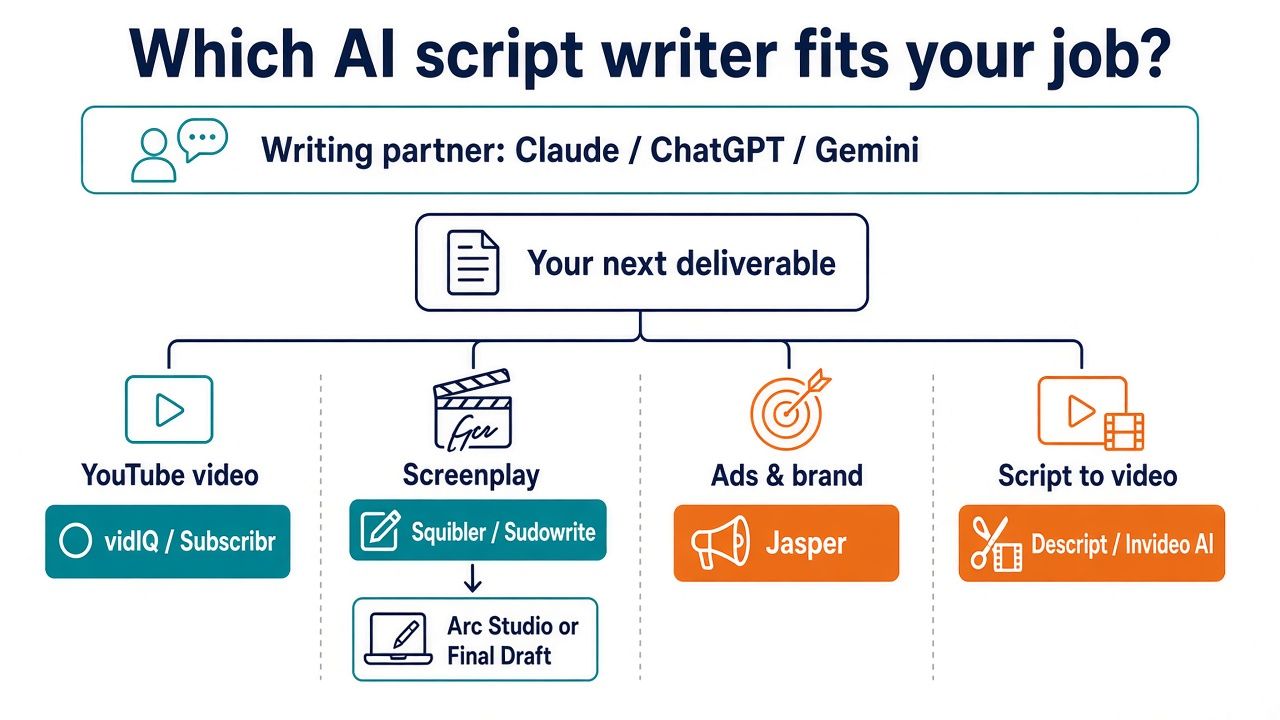
If you want one flexible starting point, choose Claude as a writing partner: it can work with project context and files, but it does not export a screenplay file for you. Pick ChatGPT if you want a flexible assistant with different plans and tools such as Projects and custom GPTs on paid tiers. For a script that lives alongside your research and drafts in Google Docs or Drive, consider Gemini.
For channel-focused work, vidIQ offers a defined YouTube script workflow, while Subscribr emphasizes YouTube research followed by scripting. If you are writing fiction, Squibler provides a screenplay mode and PDF or DOCX exports; Sudowrite is more oriented toward story development, characters, scenes, and prose. Arc Studio and Final Draft are formatting and production environments, not AI drafting tools. Descript is useful when you want to edit media through text, Jasper when scripts must fit a brand-marketing system, and Invideo AI when you want to turn a prompt or script into a video.
- Best overall writing partner: Claude
- Most flexible / budget: ChatGPT
- Google Docs research: Gemini
- YouTube long-form: vidIQ
- Faceless / research YouTube: Subscribr
- Screenplay drafting with AI: Squibler
- Story development: Sudowrite
- Formatting and export: Arc Studio or Final Draft — the writing environment, not AI drafting
- Record and edit: Descript
- Brand marketing scripts: Jasper
- Script to finished video: Invideo AI
What counts as an AI script writer (and what doesn’t)
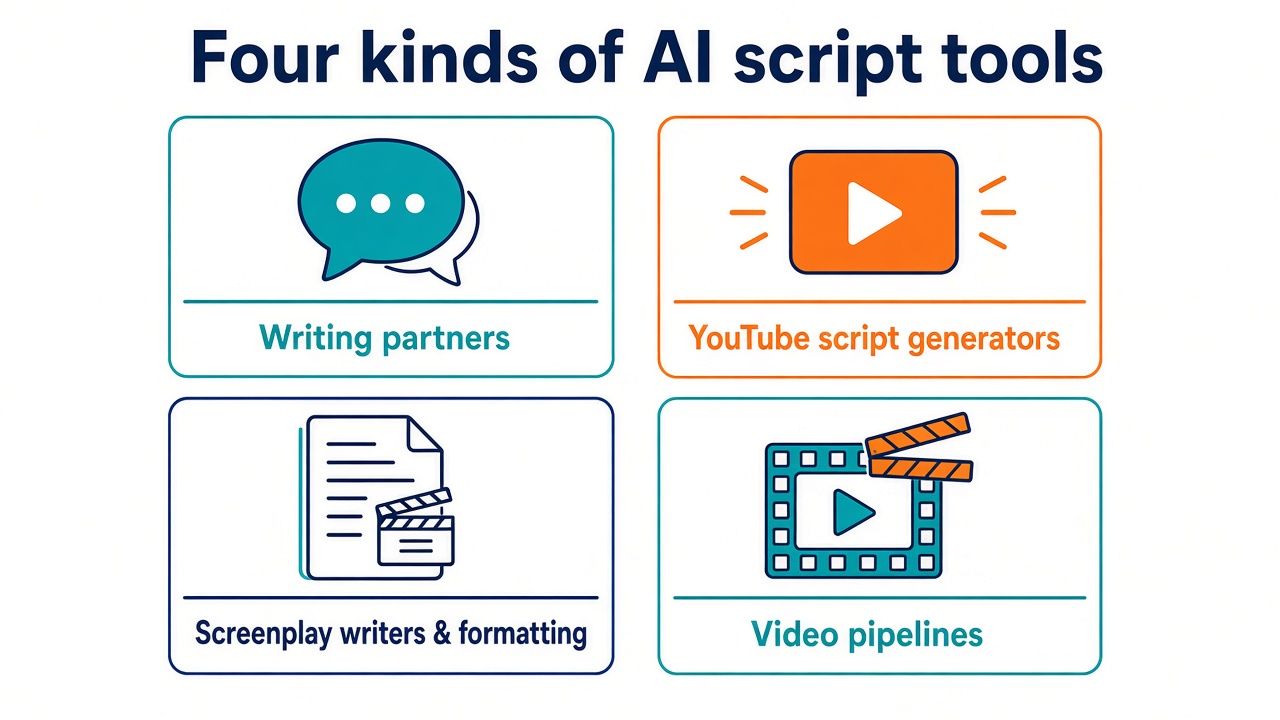
“AI script writer” can describe several products that solve different parts of a production job. Before comparing tools, decide whether you need help generating language, organizing a story, formatting pages, editing a recording, or assembling a video. If you expect one product to do all of those things equally well, you may be disappointed.
LLM writing partners take instructions and context, then help you outline, draft, rewrite, and revise. ChatGPT, Claude, and Gemini fit this category. They are flexible: you can ask for a video intro, a scene, a list of interview questions, or a revision in a new tone. That flexibility also means you need to supply the brief and judge whether the result is right. A general assistant is not automatically a reliable researcher, screenwriting-formatting tool, or production system.
YouTube script generators are organized around channel work. A product may ask for a topic, target length, tone, or research direction, then return concepts and a script. vidIQ and Subscribr are more specific to YouTube than a general-purpose assistant. That can save setup time when your deliverable is a creator script, but it does not remove the need to verify factual claims, check fit with your channel, and revise for how you actually speak.
AI screenplay writers can help you develop scenes, characters, or screenplay drafts. Squibler includes a screenplay mode and exports; Sudowrite focuses on fiction development and prose. These are not identical workflows. If your priority is a conventionally formatted screenplay file, a tool that exports to a screenplay-friendly format may matter more than a fiction assistant with strong story-development features.
Screenplay editors such as Arc Studio and Final Draft provide a structured writing environment: screenplay formatting, production-oriented documents, and file handoffs. They are useful when the work needs to live in screenwriting software, but they should not be confused with AI writers. Arc Studio is explicitly not an AI drafting tool, and Final Draft is primarily formatting and production software.
Video pipelines go beyond a script. Descript lets you work with media through text, while Invideo AI can take a prompt or script toward a finished video using stock or generated media and voiceover. Those products can help with recording or assembly, but they do not replace the editorial decisions involved in writing a good script.
In short, a tool can be part of an AI script-writing workflow without being an AI script generator. The distinction matters because the most useful next step might be export, recording, editing, or review—not another draft.
Comparison table
The table compares the products by the job they are best suited to, the shape of the handoff, and the entry-plan information available from official sources. “Inputs → outputs” describes the basic workflow rather than a guarantee about the quality or suitability of any generated result. For all products, check current terms and feature availability before choosing a plan.
| Tool | Best-fit job | Inputs → outputs | Workflow handoff | Free / entry plan | Main tradeoff | Source checked |
|---|---|---|---|---|---|---|
| ChatGPT | Flexible writing partner | Brief, files, conversation → outlines and drafts | No native screenplay export or video handoff | Free; Plus $20/month (billed monthly, no annual option), prices verified 2026-11-03 | Flexible but requires a clear brief and human review | Official pricing and OpenAI Help: What is ChatGPT Plus? |
| Claude | Long-form writing and revision partner | Project context, files, instructions → outlines and drafts | Projects retain context and files; no screenplay file export | Free with limited usage; Pro from $17/month billed annually | Useful context workflow, but separate formatting/export may be needed | Official pricing |
| Gemini | Writing alongside Google Docs and Drive | Research and prompts → drafts in a Google-centered workflow | Works with Google Docs and Drive | Free; Google AI Pro $19.99/month or $199.99/year (US), prices verified 2026-11-03 | Local prices can differ outside the US | Google One AI plans |
| vidIQ | YouTube script drafting | Topic, length, tone → concepts and script | Restore versions; download .txt | Free; Boost $19/month or $199/year in US list pricing | Shorts is not a dedicated preset; retention claims are unverified | Official pricing and Script Writer help article |
| Subscribr | YouTube research and scripting | Topic and research workflow → video script | Channel-oriented workflow; video credits billed by finished-video minute on Growth | Free start; Growth $99/month | YouTube-specific approach comes with paid plan and credit considerations | Official pricing |
| Squibler | AI-assisted screenplay drafting | Story instructions → screenplay draft | Screenplay mode; PDF and DOCX exports | Free forever, 1,000 AI credits/month | Credits and plan limits affect how much you can draft | Official pricing |
| Sudowrite | Fiction and story development | Story, characters, scenes → fiction-focused development and prose | Story-development workflow; plan credits apply | Free trial with no credit card; Hobby & Student from $10/month with yearly billing | Fiction-first rather than a dedicated video-script workflow | Official pricing |
| Arc Studio | Screenplay formatting and collaboration | Screenplay text → formatted pages and exports | FDX/Fountain export; collaboration | Free; Essentials $69/year | Not an AI drafting tool | Official pricing and export help |
| Final Draft | Screenplay formatting and production | Screenplay text → formatted, production-oriented documents | Industry-standard FDX format | Final Draft 13 list price $249.99 perpetual; annual $99.99; monthly $16.99 | Primarily formatting and production software, not AI writing | Official product and pricing |
| Descript | Record-and-edit workflow | Media and transcript text → timeline edits, captions, AI voice options | Text-based editing connects transcript and timeline | Free; Hobbyist $16/month billed annually | Editing value depends on the media workflow, not just drafting | Official pricing |
| Jasper | Brand marketing scripts | Marketing brief and brand context → marketing copy and scripts | Brand voice, knowledge, templates, and team governance | Pro $59/month billed yearly or $69 monthly | More costly than a free general assistant; business price is custom | Official pricing |
| Invideo AI | Prompt or script to video | Prompt or script → video with stock/generated media and voiceover | Video assembly and media workflow | Starter $10/seat/month annual or $20 monthly | Credits are consumed by video models | Official pricing |
How we ranked these tools
This is a buyer’s guide based on jobs-to-be-done and workflow analysis, not a ranking derived from standardized output tests. We checked official pricing, product, and help pages on November 3, 2026, then compared what each product appears designed to help you do: develop an idea, draft a script, format it, pass it to collaborators, record it, or turn it into a video. Features and plans can change, so use the official pages linked in the table to verify current terms.
We considered five practical factors:
- Job fit. Does the product focus on general writing, YouTube scripts, story development, screenplay formatting, marketing, or video production? A narrow tool can be the better choice when its workflow matches your deliverable.
- Revision cost. How much setup and rewriting might you need before the output fits your project? A flexible assistant can support many kinds of work, but you may need to explain the audience, voice, structure, and constraints in detail. A purpose-built workflow may ask for some of those inputs up front.
- Handoff and export. Does the product provide a relevant next step, such as a text download, screenplay export, transcript-based edit, or video assembly? A promising draft is less useful if moving it into the next tool creates extra work.
- Pricing transparency. We noted the published plan details in the facts available for this guide. Some prices vary by region, some tiers are custom, and some plans use credits or other limits. A listed starting plan does not mean every feature is included.
- Limits and fit. We considered what a tool does not do as well as what it does. In particular, screenplay formatting tools should not be represented as AI writers, and video-generation workflows should not be mistaken for editorial judgment.
There are important limits to this comparison. We did not run output benchmarks or assign scores to generated scripts. We do not claim to have independently verified vendor claims about retention. Prices change, regional pricing varies, and sale prices may be temporary. We list Final Draft's list prices only and have not used promotional pricing as a stable basis for comparison. The purpose here is to help you choose a workflow, not to promise that any tool will deliver a ready-to-record or production-ready script without review.
How to choose an AI script generator
Five decision paths can narrow your options faster than asking which product has the longest feature list.
1. Choose by deliverable
Start by naming the file or artifact you need at the end. For a flexible draft, begin with ChatGPT, Claude, or Gemini. For YouTube, compare vidIQ and Subscribr. For screenplay drafting, look at Squibler; for fiction-oriented story development, consider Sudowrite. If the deliverable is a formatted screenplay, compare Arc Studio and Final Draft. If you need an edited recording or assembled video, look at Descript or Invideo AI.
That distinction can prevent a common mismatch: paying for a screenplay editor when you need help generating scenes, or choosing a general assistant when your central need is a channel-specific research workflow.
2. Choose by revision cost
Think about which edits are likely to take the most time. If you often change the angle, voice, length, or structure, a conversational writing partner may be easier to redirect. If your recurring pain is building a YouTube script from a topic and research, a YouTube-focused tool may reduce repeated setup. If screenplay formatting is the recurring burden, structured screenwriting software can save work even though it does not draft with AI.
Do not judge revision cost by the first draft alone. A draft that sounds polished but contains unsupported claims, misses the intended audience, or is difficult to export can create more cleanup than a rougher draft that fits the workflow.
3. Choose by where the script goes next
A script for a solo recording may need a clean text file and clear spoken phrasing. A screenplay may need an FDX or Fountain handoff. A marketing script may need to follow brand voice and internal review. A video made directly from a prompt or script may need media selection, voiceover, and assembly. Decide what happens after writing, then choose a tool that fits that handoff.
For example, vidIQ’s Script Writer can download a .txt file, while Squibler lists PDF and DOCX exports. Arc Studio supports FDX/Fountain export. Descript connects text and media editing, and Invideo AI moves toward video assembly. These are distinct handoffs, not interchangeable export features.
4. Choose by team and brand constraints
If multiple people need to work from consistent brand guidance, examine Jasper’s brand voice, knowledge, marketing templates, and team governance. If your workflow is centered on shared Google documents and files, Gemini may suit that environment. If you are using a general assistant, consider how you will supply the approved voice, claims, and source material—and who will approve the result.
Whatever you choose, keep a human review step for brand claims and sensitive language. A generated script can sound confident without being approved, accurate, or appropriate for your organization.
5. Choose by budget
A free plan or free start can be a sensible way to see whether a workflow suits you, but check the limits before building a repeatable process around it. ChatGPT and Gemini have free access; Claude’s free plan has limited usage; Squibler has a free plan with monthly AI credits; Arc Studio has a free plan; and vidIQ offers a free plan. Sudowrite offers a free trial with no credit card. Subscribr also offers a free start.
Then compare the actual paid plan you would use, including annual billing, credits, seats, media hours, and regional pricing. The least expensive plan is not necessarily the least expensive workflow if you need another product for exporting, editing, or producing the video. Where a price is not given here, check current pricing.
Writing partners you can redirect
ChatGPT
Who it's for: You want one conversational AI script writer that can help with several kinds of scripts: a YouTube outline, an ad concept, a scene draft, or a rewrite. It is a flexible starting point if you are comfortable giving it a clear brief and evaluating the result.
Standout features: ChatGPT has Free, Go, Plus, and Pro plans, as well as Business and Enterprise plans. Paid tiers add Projects, custom GPTs, expanded deep research, and memory. Those features can support a repeatable writing process, but the right plan depends on what is available to you and what you need. Consult the official ChatGPT pricing page for current details.
Pricing notes: ChatGPT has a Free plan, and ChatGPT Plus is $20/month, billed monthly, according to OpenAI's help center; OpenAI says annual billing is not offered for Plus. Go, Pro, Business, and Enterprise tiers are listed on the official pricing page. Prices verified 2026-11-03; local taxes and currency may change what you pay, and plan features may change.
Pros: One assistant can support different formats and tasks. You can start with a brief, ask for an outline, and then request targeted revisions without committing to a single script genre. Paid-tier features can add ways to organize recurring work and context.
Cons: Flexibility is not the same as a dedicated script workflow. ChatGPT has no native screenplay export or video handoff in the facts reviewed here. You will need to manage formatting and move the draft into the tool that comes next.
Workflow notes: Treat each project like a small production brief. State the audience, purpose, runtime, tone, structure, factual claims that need sources, and desired CTA. Ask for an outline before a full draft, then revise specific sections. If you need a screenplay file, move the approved text into dedicated screenwriting software.
Best if… you want a general writing assistant that can be redirected across several script jobs and you are willing to manage the handoff.
Skip if… your main requirement is a built-in YouTube research-to-script workflow, screenplay formatting, or script-to-video assembly.
Claude
Who it's for: You want a writing partner for drafting and revision, especially when you need to keep project materials and context together. Claude is our best overall writing partner pick in this guide, not because it replaces specialized tools but because it is a straightforward fit for iterative writing work.
Standout features: Claude Projects keep context and files, which can help you work from a brief or project materials. The product offers Free, Pro, Max, Ultra, and Team plans. Its project workflow makes it easier to return to supplied context, though the writer remains responsible for deciding what the draft should say.
Pricing notes: The Free plan is $0 with limited usage that resets every five hours. Pro is $17 per month billed annually ($200 per year) or $20 month to month. Max starts at $100 per month; Ultra is $200 per month. Team standard seats are $20 per seat per month on annual billing or $25 month to month. Check the official Claude pricing page for current terms.
Pros: A project can keep relevant context and files together. Claude can serve as a drafting and revision partner for a range of script types, making it useful when you want to work through structure and wording in conversation.
Cons: Claude does not export a screenplay file. You may need a separate tool for screenplay formatting, video editing, or final production. Free usage is limited, and paid plans differ substantially.
Workflow notes: Upload or provide only materials you are allowed to use, and tell Claude what each file is for. Ask it to outline before drafting, then request a revision pass for spoken clarity, pacing, or scene intent. Check all factual statements and move the approved script into the appropriate production environment. For related comparisons, see our guide to best AI writing tools in 2026.
Best if… you want a context-aware writing partner and can handle formatting or export elsewhere.
Skip if… you need a native screenplay file export or a complete video pipeline.
Gemini
Who it's for: You already work in Google Docs and Drive and want an AI writing workflow that sits alongside those materials. Gemini is worth considering when the script is one part of a Google-centered research and drafting process.
Standout features: Gemini is available for free and through Google AI Plus, Google AI Pro, and Google AI Ultra plans. It works with Google Docs and Drive, which gives it a different workflow emphasis from writing partners that require you to move drafts between separate applications.
Pricing notes: Gemini has a free tier. Google AI Pro is $19.99/month or $199.99/year in the US on the official Google One AI plans page, with AI Plus below it and AI Ultra above it. Prices verified 2026-11-03. Local prices and features can differ by country, so confirm on the page for your region.
Pros: A Google Docs and Drive workflow can make it more convenient to keep research and drafts near existing files. Free access is available. It may be a natural fit when your team already works in Google’s environment.
Cons: Regional variation makes it important to check your local plan details. A connected document workflow does not guarantee that a draft is accurate, properly sourced, or ready for production. You still need to set the brief and review the script.
Workflow notes: Keep a clear source list and separate verified facts from ideas or creative suggestions. Draft in manageable sections, then review claims and voice before sharing. If the script will become a video, pass the approved version into a recording or editing workflow rather than expecting a document assistant to complete production.
Best if… your research and collaboration already live in Google Docs and Drive.
Skip if… you need a dedicated script generator with specific channel controls, or a dedicated screenwriting export workflow.
AI YouTube script writers
vidIQ
Who it's for: You want a YouTube-focused script workflow that starts from a topic and provides structured choices for the draft. vidIQ is our pick for YouTube long-form because its Script Writer includes target lengths up to 30 minutes.
Standout features: According to vidIQ’s official Script Writer help article (checked 2026-11-03), you open Create, then Script Writer, and choose a topic, a target length of 5, 10, 15, 20, or 30 minutes, and a tone. The tool returns three concepts. You can rewrite an opening, a section, or the full script, restore versions, and download a .txt file. Shorts is not a dedicated preset; the help article suggests writing a one-minute version manually or trimming a five-minute script.
Pricing notes: The Free plan is $0. Boost is $19 per month or $199 per year, and MAX is $49 per month or $468 per year in US list pricing. Local pricing varies. See vidIQ pricing and the Script Writer help article for current terms. Vendor claims about retention are not independently verified here.
Pros: The specified lengths and tone input make the first step clear. Three concepts give you options before settling on a full draft. Section-level rewrites and version restoration can help when you want to revise without replacing everything. The .txt download provides a straightforward handoff.
Cons: There is no dedicated Shorts preset in the facts reviewed. The downloaded text is not a finished video, and a creator still needs to fact-check, adjust voice, and prepare the recording. Do not treat vendor claims about retention as independent evidence.
Workflow notes: Choose a target length as a planning aid rather than a promise about final runtime. Review the concepts and outline before recording. A long-form draft usually benefits from a read-aloud pass and revisions to any wording that sounds unnatural. For broader channel-tool context, see our guide to the best AI YouTube SEO tool in 2026.
Best if… you want a structured YouTube script workflow with multiple long-form target lengths and text download.
Skip if… you need a dedicated Shorts setting or expect the tool to produce a finished video.
Subscribr
Who it's for: You want a YouTube-specific process that combines research and scripting, particularly for a channel built around researched or faceless video formats. It is the most research-oriented YouTube pick in this guide.
Standout features: Subscribr emphasizes a YouTube research-to-script workflow. Its plans are organized around channels, users, and video credits. That makes it worth examining if you want a focused channel workflow rather than a general assistant where you create the process yourself.
Pricing notes: Subscribr has a free start. Growth is $99 per month and includes three channels and three users. On Growth, video credits are billed per minute of finished video at $1.50 per minute. Higher Pro and Max tiers are available; check the official pricing page for their current details.
Pros: The research-to-script emphasis aligns with creators who need more than a blank-page drafting tool. The stated Growth allocation includes multiple channels and users, which may suit a small team. Its focus helps differentiate it from general writing partners.
Cons: Growth is a meaningful recurring commitment, and finished-video credits add a usage-based cost to plan around. Higher-tier prices are not stated here. You should verify what counts toward credits and what each plan includes before building a production budget around it.
Workflow notes: Define the video’s angle and audience before beginning the research workflow. Keep a record of claims that need independent sources; a research feature is not a reason to skip verification. Estimate how many finished-video minutes your process may use, then compare that with the plan’s credit terms. For image planning, a separate AI storyboard generator guide may help you think through the visual handoff.
Best if… your main job is a research-led YouTube script workflow and you have room in the budget for a specialized service.
Skip if… you only need occasional drafting or want a low-cost general-purpose assistant.
AI screenplay writers and screenwriting software
Squibler
Who it's for: You want AI-assisted screenplay drafting in a tool that includes a screenplay mode and can export your work. Squibler is the clearest choice in this group when you want both drafting support and a screenplay-oriented handoff.
Standout features: Squibler lists a screenplay mode and PDF and DOCX exports. Its free plan includes book and screenplay support, while paid plans add larger AI credit allocations. The export options give you a way to move the work beyond the generation stage.
Pricing notes: Free is $0 forever with 1,000 AI credits per month. Plus is $29.99 per month or $15.83 per month billed annually, with 10,000 credits. Pro is $89.99 per month or $49.17 per month billed annually. Check the official Squibler pricing page for current terms.
Pros: Screenplay mode makes the intended use clear. PDF and DOCX exports provide practical ways to share or continue working on a draft. The free tier gives you a way to explore the workflow before choosing a paid plan.
Cons: Credits are a meaningful constraint to understand, especially if you expect to do many rounds of AI drafting. PDF and DOCX exports are useful, but they are not the same as every production-specific screenwriting handoff you might need.
Workflow notes: Use AI for a starting draft or targeted scene work, then revise for character intent, pacing, and dialogue. If another collaborator needs a specific format, confirm that the export is suitable before you rely on it. For a broader fiction-focused alternative, compare Sudowrite; for a writing environment built around formatting, look at Arc Studio or Final Draft.
Best if… you want an AI screenplay writer with a screenplay mode and straightforward exports.
Skip if… your priority is only professional formatting or collaboration rather than AI drafting.
Sudowrite
Who it's for: You are developing fiction and want help with characters, scenes, story development, and prose. Sudowrite is a story-development tool first, not a dedicated YouTube script generator.
Standout features: Its fiction-first workflow covers story development, characters, scenes, and prose. That can be useful when the obstacle is turning a premise into narrative material rather than generating a short, tightly controlled marketing script.
Pricing notes: Hobby & Student starts at $10 per month, Professional is $22 per month, and Max is $44 per month; the lowest prices shown use yearly billing and are advertised as “up to 50% off.” There is a free trial with no credit card, and unused credits roll over for 12 months. Check the official Sudowrite pricing page for current details.
Pros: The focus on story development, scenes, and prose makes it a natural fit for fiction writers who want more than a generic rewrite. A free trial provides a way to assess whether that creative workflow suits your project. Credit rollover is a useful plan detail to verify against your expected use.
Cons: Its fiction-first focus may be a mismatch for a creator who needs a YouTube outline, researched explainer, or brand-approved ad. The plan is credit-based, so review how your intended activity uses credits before you commit.
Workflow notes: Use the tool to explore character and scene possibilities, then decide which suggestions belong in the story. Do not treat fluent prose as a substitute for structure or revision. If your project is a novel rather than a screenplay, see our guide to the best AI novel writer in 2026.
Best if… you are developing fiction and value help with story, character, scene, and prose work.
Skip if… you need channel-specific video scripting, a brand marketing workflow, or a screenwriting-formatting environment.
Arc Studio
Who it's for: You need a screenwriting environment for formatting, collaboration, and export—not an AI writer. Arc Studio is a good fit if your main workflow begins with a script you are already drafting or revising.
Standout features: Arc Studio provides automatic screenplay formatting and collaboration. Its official help center documents exporting a Final Draft .fdx file and a Fountain/Text file, and its features page also lists PDF export. It can import FDX, PDF, Fountain/Text, and Word files. The export formats matter when the next person or tool in your workflow expects a screenplay file. It is not an AI drafting tool, so do not choose it on the assumption that it will generate your screenplay.
Pricing notes: The Free plan is $0; Essentials is $69 per year and Pro is $99 per year. Every account gets a seven-day Pro trial. Students can receive $70 off Pro with a .edu address. See Arc Studio’s official pricing page for current information.
Pros: Automatic formatting reduces the burden of managing screenplay layout manually. FDX and Fountain exports support a more relevant handoff than a plain text draft when screenplay formatting matters. Collaboration can help when more than one person is working on a script.
Cons: It does not draft scripts with AI. If you want AI-generated scenes, you will need a separate writing partner or drafting product. Confirm that the export and collaboration features suit the people who need to receive the work.
Workflow notes: Draft or revise the content wherever it suits you, then use Arc Studio for formatting and collaboration as appropriate. If you use an AI tool upstream, review the text before importing and do not assume the generated structure follows screenplay conventions. Compare it with Final Draft if your workflow depends on that software’s FDX environment.
Best if… you want automatic formatting, collaboration, and FDX/Fountain export in a screenwriting environment.
Skip if… your main requirement is an AI screenplay writer.
Final Draft
Who it's for: You want established screenplay formatting and production-oriented software. Final Draft belongs in this comparison because it may be the writing environment where an AI-assisted script ends up, not because it is an AI script generator.
Standout features: Final Draft 13 uses the industry-standard FDX format and is primarily formatting and production software. It can serve as the destination for a script drafted elsewhere, especially if collaborators or a production workflow expect FDX.
Pricing notes: Final Draft 13 has a $249.99 list price for a perpetual license. An annual plan lists at $99.99, with a five-day free trial; monthly is $16.99. As of early November there is a limited-time promotion; check the official site. Current pricing and terms are on on Final Draft’s official site.
Pros: It provides a screenplay-focused environment and uses FDX, a familiar production handoff. A perpetual license and subscription options give you different purchasing approaches to compare.
Cons: It is primarily formatting and production software, not an AI writer. If you are buying it for automated drafting, the product category is a mismatch. List pricing may also differ from what checkout shows during a promotion.
Workflow notes: Use an AI writing partner or drafting product to develop material, then move the approved script into Final Draft if its formatting and production workflow suit your project. Verify the file handoff with collaborators before you settle on a process. Budget on list prices rather than a promotion.
Best if… your collaborators or production workflow need Final Draft and FDX.
Skip if… you want an AI screenplay writer to develop the story or draft the pages for you.
Scripts inside a marketing or video pipeline
Jasper
Who it's for: You write scripts as part of a brand-marketing workflow and need to work from an organization’s approved voice and knowledge. Jasper is more suitable to that setting than to fiction development or screenplay formatting.
Standout features: Jasper offers brand voice and knowledge, marketing templates, and team governance. Those features are relevant when scripts need to fit an existing marketing process rather than simply sound persuasive in isolation.
Pricing notes: Pro is $59 per month billed yearly or $69 month to month. Business pricing is custom. See the official Jasper pricing page for current terms.
Pros: Brand voice and knowledge features give marketing teams a way to organize guidance for recurring work. Templates can provide a repeatable starting point, and team governance is relevant when several people work within the same brand process.
Cons: Pro is more expensive than free general writing plans, and Business pricing requires a custom quote. Brand guidance does not guarantee that every claim is accurate, approved, or compliant with internal requirements.
Workflow notes: Supply approved product information and brand guidance, then have an appropriate reviewer check claims, wording, and CTA. Treat templates as a starting structure, not a replacement for a campaign brief. If the next step is recording and editing, move the approved script into that production workflow rather than assuming marketing copy is ready to record.
Best if… your team needs scripts tied to brand voice, marketing templates, and governance.
Skip if… you are a solo writer looking for a low-cost screenplay or fiction tool.
Descript
Who it's for: You record or edit video and want the script or transcript to connect with the media workflow. Descript is our record-and-edit pick, not a screenplay-writing environment.
Standout features: Descript uses text-based editing, where the script or transcript becomes the timeline. It also offers AI voice and captions. This can be useful when your concern is what happens to the spoken material after drafting and recording.
Pricing notes: Free is $0. Hobbyist is $16 per month billed annually and includes 10 media hours and 400 AI credits per month. Creator is $24 per month billed annually or $35 monthly, with 30 media hours and 800 credits. Business is $50 per month billed annually or $65 monthly, with 40 hours and 1,500 credits. Check the official Descript pricing page for current terms.
Pros: Text-based editing connects words with the recorded timeline, providing a practical bridge from a spoken script to media edits. AI voice and captions are part of the media workflow. The published plan details make media hours and AI credits visible for planning.
Cons: Descript’s value is in editing and media handling, not simply generating a script. Media hours and credits vary by plan, so check the allowance against your actual workload. It is not a substitute for screenplay formatting software.
Workflow notes: Draft and approve the script before recording, then use the transcript-based editing workflow to work with the recording. Check how your selected plan treats media hours and credits. If voice generation is central to your process, compare options in our guide to the best AI voice generator in 2026.
Best if… you want the script or transcript to be part of a text-based recording and editing workflow.
Skip if… you only need an AI writing partner and have no media-editing job to solve.
Invideo AI
Who it's for: You want to move from a prompt or script toward a finished video using stock or generated media and voiceover. Invideo AI is a video-production pipeline rather than a writing-only tool.
Standout features: It can take a prompt or script and create a video using stock or generated media and voiceover. That makes the product relevant when assembling a video is part of the job, not just drafting narration.
Pricing notes: Starter is $20 per seat monthly or $10 per seat per month billed annually and includes 400 credits. Plus is $60 monthly or $30 per seat per month billed annually. Max is $250 per seat per month billed annually. Credits are consumed by video models. Check the official Invideo AI pricing page for current terms.
Pros: A prompt or script can move into a video workflow with media and voiceover, reducing the number of separate steps needed to create an initial video. The different plan levels provide options to compare against your intended use.
Cons: Credits are consumed by video models, so usage needs to be part of your budget. A video assembled from a script still needs editorial review: visual choices, claims, pacing, voice, and overall fit are not automatically settled by generating a video.
Workflow notes: Start with an approved script or a carefully framed prompt. Review the video for mismatched visuals and any unsupported claims, then revise both the words and the media choices as needed. If you need a separate editing-focused workflow, see our guide to the best AI video editor in 2026.
Best if… your goal is to move from script or prompt to a video with media and voiceover.
Skip if… you need screenplay formatting or a writing partner focused on developing a story.
A reusable script brief
A better brief can improve the usefulness of any AI script generator, whether you are using a general writing partner, a YouTube tool, or a marketing product. Fill in what you know, mark what is uncertain, and avoid asking the tool to invent evidence. For spoken scripts, roughly 130–160 spoken words per minute is a common planning range; pauses, demonstrations, interviews, and visual sequences can change the final runtime.
AUDIENCE
Who is this for? What do they already know? What should they care about?

PROMISE
What will the viewer, listener, or reader understand or be able to do by the end?

RUNTIME
Target duration:
Planning range: roughly 130–160 spoken words per minute for spoken material.
Adjust for pauses, examples, demonstrations, interviews, and visuals.

STRUCTURE
What sections, scenes, beats, or turning points are required?
What must happen first, in the middle, and at the end?

CLAIMS THAT NEED SOURCES
List factual, numerical, legal, medical, product, or comparative claims.
State which sources are approved, or mark the claims for verification.
Do not invent missing evidence.

CTA
What should the audience do next? Is the action required, optional, or absent?

VOICE SAMPLES
Provide approved examples or describe the voice in concrete terms.
What should the script sound like when read aloud?

MUST-AVOID
List prohibited claims, topics, phrases, tones, spoilers, and unsupported promises.
Include formatting or platform constraints.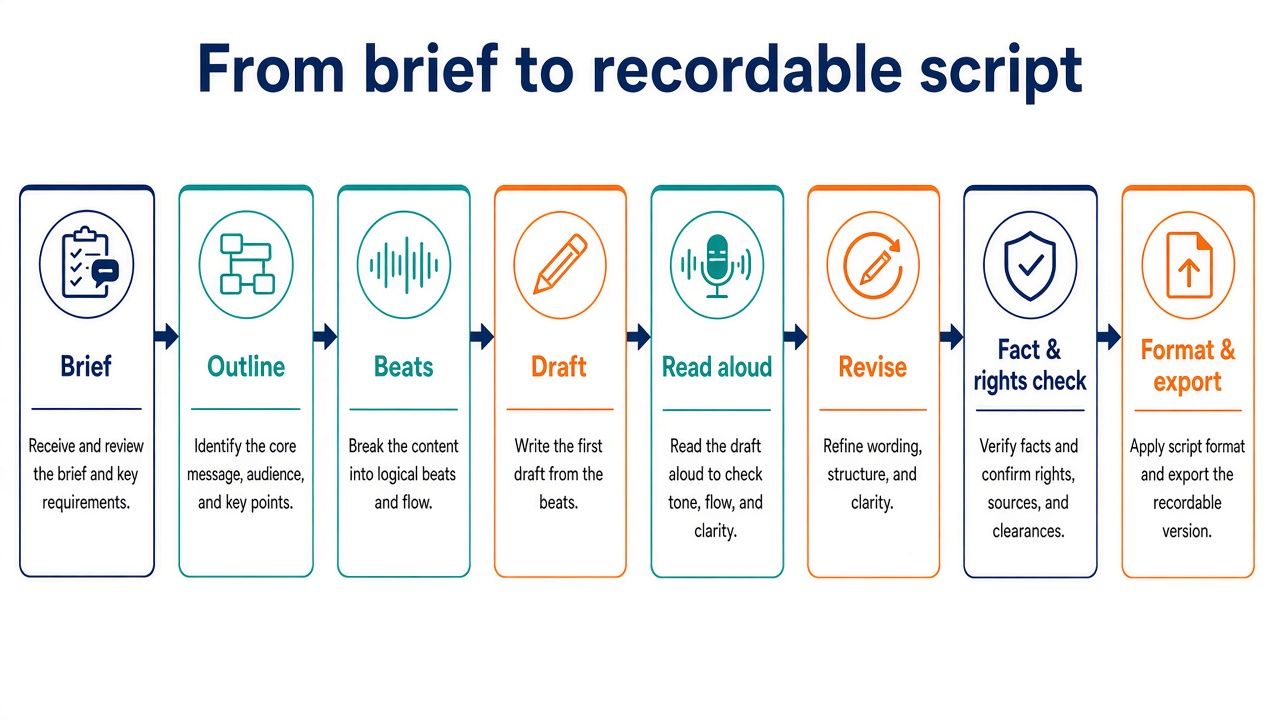
Workflow: from idea to recordable script
A reliable workflow gives you checkpoints between the idea and the final script. It also prevents a common mistake: asking an AI tool for a complete draft before you have decided what the audience needs, what the script can claim, and where the finished work will go.
- Brief. Define the audience, promise, format, runtime, CTA, tone, and restrictions. Include source material for factual work and identify claims that need checking. If you are unsure about the angle, ask for a few options rather than a full script.
- Outline. Choose a structure before drafting. For a YouTube video, that might mean an opening, the main sections, transitions, and a close. For a screenplay, it might mean story beats or a sequence of scenes. For an ad, it might mean the problem, offer, evidence, and CTA. The specific structure should fit the deliverable.
- Beat or scene list. Make the purpose of each section explicit. What changes, what does the audience learn, and what needs to happen before the next beat? A list of beats is easier to review than a long draft that already sounds finished.
- Draft. Generate the script in manageable sections. If the tool produces a complete draft, treat it as raw material. Ask it to retain approved details and identify uncertainty rather than filling gaps with invented specifics.
- Read aloud. Spoken writing needs to work in the mouth and ear, not just on the page. Read the script at a natural pace. Mark sentences that are too dense, transitions that feel abrupt, and language that does not sound like the intended speaker.
- Targeted revisions. Name the problem you want fixed: shorten the opening, clarify a transition, make the CTA more direct, or remove jargon. Avoid asking for a vague “better” draft if the current version has sections worth keeping. Compare revisions against the original brief.
- Fact and rights check. Verify factual claims against appropriate sources. Review quoted or supplied material and make sure you have the right to use it. Check brand claims, names, product details, and other sensitive statements before publication.
- Format and export. Send the script into the workflow where it will be recorded, edited, or produced. A text file may be enough for a simple video; a screenplay needs a suitable formatting environment and export.
For YouTube, runtime is a planning choice, not a guarantee that a script will take exactly the expected time to deliver. Roughly 130–160 spoken words per minute is a common planning range for spoken material, but pauses, B-roll, demonstrations, interviews, and on-screen text can change the final duration. A 10-minute script is therefore not just a word-count target; you need to account for how the video uses visuals and silence.
Shorts and long-form videos need different writing decisions. A Short has less room to establish context, so the opening, idea, and payoff have to be tightly connected. A long-form video can support a more gradual explanation, examples, and transitions. Since vidIQ does not provide a dedicated Shorts preset in the facts reviewed for this guide, you would need to set the Short’s constraints yourself or use another workflow.
For screenplays, separate the writing task from the formatting task. Develop and revise the material, then use screenwriting software when you need screenplay layout or a production handoff. Arc Studio and Final Draft support screenplay-oriented workflows; Arc Studio lists FDX/Fountain export, and Final Draft uses FDX. Confirm the needed format with your collaborators before export.
Risks and limits
AI can speed up parts of script development, but you remain responsible for the final work. A fluent paragraph is not proof that a claim is correct, a scene is original, or a script is appropriate for its audience.
- Factual errors and hallucinations: A generated script can state unsupported or false information confidently. Provide sources, ask for claims to be flagged, and verify important facts independently. Research features do not remove that obligation.
- Copyright and originality: Do not assume that generated material is automatically original, cleared, or free of rights concerns. Check the materials you supply, review the output, and follow the rules that apply to your project and jurisdiction.
- Guild and studio rules: Requirements and restrictions can vary by guild, studio, employer, and contract. Check your contract and applicable rules before using AI in a professional screenwriting or production context.
- Brand claims: Product benefits, comparisons, testimonials, legal statements, and performance claims may need approval and evidence. Have the appropriate person review them before publication.
- Voice sameness: A polished draft can still sound generic or unlike the person presenting it. Supply concrete voice guidance, revise clichés, and read the script aloud.
- Data privacy: Check each product’s privacy and data settings before uploading a script, confidential document, unreleased campaign, client materials, or personal information. Do not assume every plan treats data in the same way.
- Export and workflow gaps: A writing tool may not provide the file or media handoff you need. Check exports and collaboration requirements early, not after you have completed a large draft.
- Plan and credit limits: Free access, usage limits, credits, media hours, and regional pricing can change. Confirm current terms and estimate your expected use before committing.
FAQ
What is the best AI script writer in 2026?
Claude is the best overall writing partner in this guide if you want help drafting and revising across different script types. If your job is more specific, choose accordingly: vidIQ for YouTube long-form, Subscribr for YouTube research-to-script work, Squibler for AI-assisted screenplay drafting, and Jasper for brand-marketing scripts. There is no single best tool for every deliverable.
Is there a free AI script generator?
Yes, several products offer free access or a free starting option, including ChatGPT, Gemini, vidIQ, Squibler, Arc Studio, and Descript. Claude also has a free plan with limited usage, Sudowrite offers a free trial with no credit card, and Subscribr offers a free start. Free plans and trials have different limits, so check current terms before relying on one for ongoing work.
Can ChatGPT write a screenplay?
ChatGPT can help you draft and revise screenplay material, but it does not have a native screenplay export in the facts reviewed for this guide. You would need to manage formatting and move the approved script into a screenwriting environment if you need a screenplay file. For a tool with a screenplay mode and PDF and DOCX exports, compare Squibler; for formatting and export, consider Arc Studio or Final Draft.
Claude vs ChatGPT for scripts?
Choose Claude if you value Projects that keep context and files together; choose ChatGPT if you want a flexible assistant with a wider set of paid-plan additions such as Projects, custom GPTs, expanded deep research, and memory. Neither has a native screenplay export in the facts reviewed here. Consider your budget, plan limits, preferred workflow, and where the finished script needs to go.
Best AI YouTube script writer?
vidIQ is the best fit here for structured long-form YouTube script drafting: it offers target lengths from 5 to 30 minutes, tone selection, three concepts, rewrites, version restoration, and .txt download. Subscribr is a stronger fit if you specifically want a YouTube research-to-script workflow. Check current plan details and verify claims in either workflow.
Does Final Draft have AI writing?
Final Draft is primarily formatting and production software, not an AI drafting tool in the facts reviewed for this guide. It can be the right destination for a script developed elsewhere if your workflow needs Final Draft or its FDX format. If you want AI-assisted screenplay drafting, compare Squibler instead.
How long should a YouTube script be for a 10-minute video?
A rough planning range is about 1,300–1,600 spoken words for 10 minutes using roughly 130–160 spoken words per minute. That is only a starting estimate: pauses, demonstrations, interviews, visuals, and delivery speed can change the final runtime. Read the draft aloud and adjust it to the actual format.
Can I use AI scripts commercially?
Possibly, but you should check the product’s current terms, your rights to any material you supply, and the rules that apply to your project. Commercial use does not remove the need to verify facts, review brand claims, and check copyright or originality concerns. Guild, studio, and employer requirements vary, so check your contract.
AI screenplay writer vs screenwriting software?
An AI screenplay writer helps generate or develop story material, while screenwriting software focuses on the writing environment, screenplay formatting, collaboration, or production handoff. Squibler offers a screenplay mode and AI credits; Arc Studio and Final Draft are primarily formatting and production tools, not AI drafting tools. Some writers use both kinds of product in one workflow.
Should you use one tool for the whole script-to-video process?
Not necessarily. An AI writing partner, screenplay formatter, transcript editor, and video-generation pipeline solve different jobs. You can use one product if its workflow meets your needs, but check the handoff before you commit. Descript focuses on text-based media editing, while Invideo AI can move from a prompt or script toward a video with media and voiceover.
Final verdict
For a flexible writing partner, start with Claude and keep a separate formatting or production tool for the final handoff. For a YouTube workflow, choose vidIQ when you want a structured long-form script process, or Subscribr when research-to-script work is your priority. For an AI-assisted screenplay draft, look at Squibler; for formatted screenplay pages and export, compare Arc Studio and Final Draft instead.
Your best choice depends on the deliverable, the revisions you expect, and what happens after the words are written. Use the comparison table to compare the tools’ inputs, handoffs, entry plans, and tradeoffs before choosing a workflow.





