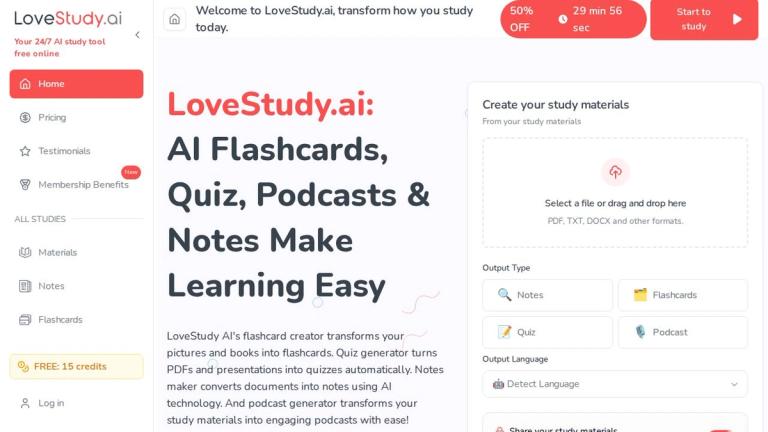
AI-powered platform offering flashcards, quizzes, notes, and podcasts to streamline and enhance the learning experience for students and educators.
Features
- AI Flashcard Creator — Transforms pictures, books, PDFs, and any text into interactive flashcards instantly. Supports multiple formats including PDF, TXT, DOCX, and image uploads. Features include language detection, Anki-compatible flashcards, and specialized sets for vocabulary, grammar, exam prep, and more across any subject or language.
- AI Quiz Generator — Automatically converts PDFs, presentations, and documents into engaging quizzes with multiple question types including multiple-choice, true/false, and open-ended questions. Includes scoring capabilities, multimedia support (images, audio, video), and instant quiz generation for exam preparation, teaching, and self-assessment.
- AI Notes Maker — Converts documents and recordings into organized, summarized notes using AI technology. Features voice command input, automatic summary generation from recordings, multi-language support, cross-platform synchronization, and offline browser-based access. Ideal for meeting notes, lecture notes, and YouTube video note-taking.
- AI Podcast Generator — Transforms study materials, documents, and text content into engaging audio podcasts with ease. Enables auditory learning by converting written educational content into listenable format, perfect for studying on-the-go, commuting, or reinforcing knowledge through audio repetition.
- Multi-Language Support — Built-in language detection and support for multiple languages including Arabic, Japanese (Hiragana), Greek, Hebrew, and many more. Enables users to create study materials in their preferred language or practice foreign language learning with specialized flashcard sets and vocabulary builders.
- Bible Study Tools — Dedicated free online Bible study tool featuring topical study capabilities, Greek and Hebrew language support for scripture analysis. Designed for religious education, seminary students, and anyone seeking deeper understanding of biblical texts with AI-powered study assistance.
Use Cases
Exam Preparation & Self-Study
Students upload lecture notes, textbooks (PDFs), or study materials to automatically generate flashcards for memorization, quizzes for self-testing, and organized notes for review. Particularly useful for competitive exams, language proficiency tests, and academic subjects requiring repetitive practice and knowledge retention. Target Audience: High school students, college/university students, competitive exam candidates, and self-learners preparing for certifications or standardized tests
Classroom Teaching & Lesson Planning
Educators create interactive quizzes, flashcard sets, and study materials from existing curriculum documents to enhance classroom engagement. Teachers can generate practice tests, vocabulary flashcards for language classes, and shareable study materials. The platform supports creating materials for diverse subjects from biology to early childhood education. Target Audience: K-12 teachers, university professors, tutors, early childhood education specialists, and training professionals
Language Learning & Vocabulary Building
Language learners utilize specialized flashcard sets for alphabet recognition (Arabic, Japanese Hiragana), vocabulary building (English vocabulary, prepositions, action verbs), pronunciation practice with sound flashcards, and grammar mastery. The multi-language detection feature supports learning across dozens of languages. Target Audience: ESL/ESOL students, foreign language learners, international students, language teachers, and polyglots
Professional Training & Knowledge Management
Corporate trainers and professionals convert training documents into quizzes for employee assessments, create podcast versions of training materials for on-the-go learning, and generate organized notes from meetings and presentations. Supports multiple training sessions management and team collaboration. Target Audience: Corporate trainers, HR departments, team leaders, professionals seeking continuing education, and organizations conducting employee development programs
Pros
- Completely free online access with no hidden costs - offers generous free tier features including flashcard creation, quiz generation, notes making, and podcast generation without requiring payment
- Versatile multi-format input support - accepts PDF, TXT, DOCX, images, and allows drag-and-drop file uploads, making it easy to convert virtually any existing study material into interactive learning tools
- All-in-one learning ecosystem - combines flashcards, quizzes, notes, and podcasts in a single platform, eliminating the need for multiple separate tools and providing a comprehensive study workflow
- Multi-language capabilities with automatic language detection - supports creating and studying materials in numerous languages including Arabic, Japanese, Greek, Hebrew, and more, making it valuable for international and multilingual learners
- Cross-platform accessibility with offline capability - browser-based access works across devices with notes synchronization, allowing students to study anywhere, anytime without mandatory app downloads
Cons
- AI-generated content quality depends heavily on input material quality - poorly formatted documents, low-resolution images, or ambiguous source materials may produce inaccurate flashcards, quizzes, or notes requiring manual review and correction
- Limited advanced customization in free tier - while basic features are free, the website hints at membership benefits and premium features that may require paid subscriptions for full functionality and advanced options
- Internet connection required for core functionality - despite offline browser access claims, the AI-powered generation features require online connectivity, which may be a limitation for users with unreliable internet access
- Potential information overload with keyword-stuffed interface - the platform attempts to cover too many use cases and keywords simultaneously, which may make navigation confusing and dilute the user experience for specific learning needs