What LALAL.AI is
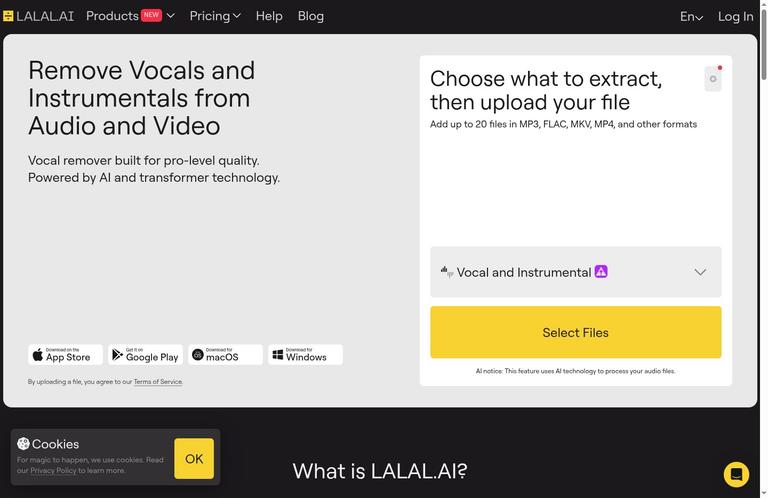
LALAL.AI is a web-based service for separating vocals and other audio stems, with a separate Voice Cleaner tool. You upload an audio or video file, choose a separation type, and process it to hear separated results. The service is useful when you want to isolate a vocal, remove or reduce a part of a recording, or clean voice audio without manually editing every track. It is not a magic repair button: separation can leave artifacts or bleed, so the result deserves a careful listen before you use it.
A central distinction is the queue, not the sound quality. LALAL.AI offers Fast and Relaxed processing, and both produce the same separation quality. Fast minutes buy queue priority; Relaxed minutes are unlimited on Lite and Pro. A slower queue is therefore a reasonable choice when the task is not urgent. Paying for a plan does not change the stated quality of separation.
The service can be used with audio and video, and its plans differ in available processing minutes, file-size limits, downloads, and additional tools. The Starter option lets you process previews but does not allow full output downloads. That makes it useful for judging whether a particular file separates acceptably, but not for obtaining finished downloadable stems. Consider that limitation before spending time on a long job.
Key features and what they mean
Vocal and stem separation
The main tool separates vocals and other stems from a recording. This can help with tasks such as listening to a vocal apart from accompaniment, isolating components for a remix, or reducing a distracting part while working on a track. The exact result depends on the recording. Parts that overlap in frequency or timing can be difficult to separate cleanly, and artifacts or bleed are normal limitations rather than proof that a setting was used incorrectly.
A useful way to judge the output is to listen for the specific problem you care about. If you need a vocal isolated, listen for instruments that remain in the vocal stem. If you want an accompaniment part, listen for vocal remnants. Check quiet sections and transitions as well as the loudest passages: unwanted sounds can be more noticeable when the arrangement thins out. Headphones make it easier to inspect these details.
Voice Cleaner
Voice Cleaner is another LALAL.AI feature, focused on cleaning voice audio. It is distinct from choosing stem separation types, so decide which task you actually need before starting. If the goal is to separate components of a song or other mixed recording, use the stem separation workflow. If the goal is voice cleanup, consider Voice Cleaner instead. Listen for remaining noise, muffled speech, and processing artifacts before using the cleaned recording.
Web, desktop, VST, and API options
The web service processes files in the cloud. Pro also includes VST/API and local processing in the desktop Pro offering. These additions can matter to people incorporating the service into a production workflow or preferring desktop processing. They are not part of the free Starter description, and the Pro plan is the tier associated with these capabilities. The choice between web and desktop should account for how you work and what kind of file handling you require, not an assumption that one route guarantees a better separation result.
How to use LALAL.AI step by step
- Choose the task. Decide whether you need vocal or stem separation, or whether Voice Cleaner better matches your voice-cleanup goal. A clear task helps you assess the output instead of judging it on a vague impression.
- Check the file and plan limits. Starter accepts files up to 200MB. Lite and Pro allow files up to 2GB. If the file exceeds the applicable limit, choose a permitted file or another workflow before beginning.
- Upload the recording. The web version processes the file in the cloud. Upload only material you have the right to process, and consider whether cloud handling is suitable for the recording, especially if it contains another person’s voice or sensitive content.
- Select the separation type. Choose the stem separation type that matches the result you want. Each type counts toward processing minutes on paid plans. Think through the job before selecting more types than you need.
- Choose an appropriate queue. Fast processing has priority; Relaxed processing uses a slower queue. Their separation quality is the same. On Lite and Pro, Relaxed minutes are unlimited, so it can be a practical choice when timing is flexible. Fast minutes have no rollover.
- Preview and inspect. Listen to the result, ideally on headphones. Check for bleed, artifacts, and unwanted remnants in both prominent and quiet passages. A preview can help you decide whether the separation suits your purpose, but a Starter preview is not a downloadable full output.
- Download only when your plan allows it. Starter provides previews only and no full output downloads. Lite and Pro include full downloads. If you need deliverable files, make sure the plan you choose includes them before uploading and processing.
Understand how minutes are counted
On the paid plans, stem minutes are calculated as file duration multiplied by the number of separation types. For example, a five-minute file processed with two types uses 10 minutes. This is why a short recording can consume more than its length in minutes when you request multiple separation types. Estimate the count before processing, especially if you expect to use Fast queue time.
The Fast allowance is a monthly balance, and unused Fast minutes do not roll over. Relaxed processing is unlimited on Lite and Pro, but it has lower queue priority. Since the two queues have the same stated separation quality, the real trade-off is how soon you need the result, not whether the slower option is a lower-quality mode.
Pricing and plan comparison
LALAL.AI has a free Starter option and two paid tiers, Lite and Pro. Pricing below is in US dollars. The annual prices are annual billing totals, with the stated monthly equivalents shown for comparison.
| Plan | Price | Processing and file limits | Downloads and additional features |
|---|---|---|---|
| Starter | Free; no paid billing period | 10 Relaxed Queue minutes; 200MB maximum per file | Previews only; no full output downloads |
| Lite | $9.99 per month, or $90 per year ($7.50 per month equivalent) | 90 Fast minutes per month, unlimited Relaxed minutes, 2GB maximum per file | Full downloads |
| Pro | $19.99 per month, or $180 per year ($15 per month equivalent) | 250 Fast minutes per month, unlimited Relaxed minutes, 2GB maximum per file | Full downloads; VST/API and local processing in desktop Pro |
Starter’s 10 Relaxed Queue minutes are not a monthly allowance: do not assume they refresh each month. The free tier is best treated as a limited preview route, not a way to download finished stems. If you only need to assess whether a recording separates well, previews may be enough. If you require output files, Lite is the lower-priced paid option described here.
Lite suits occasional or moderate work when 90 Fast minutes per month is sufficient, while the unlimited Relaxed queue provides another route when waiting is acceptable. Pro raises the monthly Fast allowance to 250 minutes and adds the Pro desktop capabilities listed above. Both paid plans allow files up to 2GB and include full downloads. Selecting Pro solely for improved separation quality would not fit the stated plan differences: Fast and Relaxed have identical separation quality, and the higher tier adds capacity and workflow features rather than a queue-specific quality improvement.
For a useful cost estimate, multiply each file’s duration by the number of separation types you intend to run. A five-minute recording with two types counts as 10 minutes. Compare that total with the monthly Fast allowance if priority matters. Otherwise, the unlimited Relaxed option on either paid tier may accommodate the job without using Fast balance. Choose based on downloadable output, file size, queue timing, monthly volume, and the desktop capabilities you need.
Real limits to plan around
The most important free-tier restriction is output access. Starter previews are not full downloadable results. If your project requires stems on your computer, the free option cannot complete that final step. Its 200MB file limit is also lower than the 2GB limit on Lite and Pro.
Paid Fast time is limited by plan and does not roll over. Because minutes count by file length times separation type, requesting multiple types increases usage. Unlimited Relaxed minutes offer flexibility, but they do not promise a particular waiting time. Fast and Relaxed differ in queue priority, not separation quality.
Separation itself has practical audio limits. Artifacts and bleed can remain, especially where sources overlap. A preview that sounds acceptable in one passage may expose unwanted remnants elsewhere. Listen to the full portions that matter before relying on a stem in a finished project. The feature can separate sources, but it should not be treated as a guarantee of studio-clean isolation or a substitute for checking the output.
Privacy, files, and rights
LALAL.AI’s web service processes uploads in the cloud, along with file metadata. Its privacy policy dated July 30, 2026 says the company does not assume rights to uploaded files, does not use user files to train AI, and does not share media files with third parties. The policy also describes processing file histories and metadata such as upload date, duration, and selected separation type. For confidential client audio, get approval for cloud processing before uploading.
You remain responsible for having permission to process the content. That matters for copyrighted music and for recordings containing other people’s voices. A tool’s ability to separate audio does not grant rights to use or distribute the resulting material. When the recording is sensitive, consider whether cloud processing is appropriate; Pro also lists local processing in the desktop Pro offering.
Who should use it, and who should look elsewhere
LALAL.AI is a good fit for someone who wants a browser-based way to separate vocals or other stems, values a preview before committing to a paid plan, and can inspect the output for artifacts. Lite or Pro may fit users who need full downloads. The Relaxed queue is attractive when timing is flexible, while the Fast allowance can suit jobs where priority matters. Pro is more relevant when the higher Fast balance or its desktop VST/API and local-processing capabilities fit the workflow.
It is a poor fit if you need free, downloadable full stems: Starter does not provide them. It may also be a poor fit if you require guaranteed artifact-free separation, cannot upload the recording to a cloud service, or need more Fast minutes than the selected plan includes. Users who only need a basic edit, rather than source separation, may find a conventional audio editor more appropriate.
Alternatives
VocalRemover.org is another option to consider for vocal-related work. Compare its current capabilities and terms directly before choosing; no specific price or feature comparison is assumed here. Audacity is a separate audio editor that can be extended with optional separation plugins. It should not be treated as having native separation built in. If you already use Audacity, a plugin-based workflow may suit editing in one application, while LALAL.AI offers a dedicated separation service with the queue and download plan structure described above.
The practical choice depends on the task. For a quick test of a particular recording, LALAL.AI Starter previews can help assess separation, though they do not provide downloadable full outputs. For downloadable LALAL.AI results, compare Lite and Pro by Fast minutes, file limit, and desktop features. For an alternative workflow, check VocalRemover.org or Audacity with optional plugins against your needs, rights, and privacy requirements.
FAQ
Is LALAL.AI free?
Yes. Starter is free and includes 10 Relaxed Queue minutes, a 200MB per-file limit, and previews only. It does not provide full output downloads, and its 10 minutes should not be treated as a monthly refresh.
Can I download full stems with the Starter plan?
No. Starter allows previews only. Full output downloads are included with Lite and Pro.
How does LALAL.AI count processing minutes?
Stem minutes equal file duration multiplied by the number of separation types. A five-minute file processed with two types uses 10 minutes.
Are Fast results better quality than Relaxed results?
No. Fast and Relaxed have identical separation quality. Fast receives queue priority; Relaxed uses a slower queue.
What do Lite and Pro cost?
Lite costs $9.99 per month or $90 per year ($7.50 per month equivalent). Pro costs $19.99 per month or $180 per year ($15 per month equivalent).
Does LALAL.AI use uploaded files to train AI?
Its privacy policy dated July 30, 2026 says user files are not used to train AI. The web service processes uploads and metadata in the cloud.