
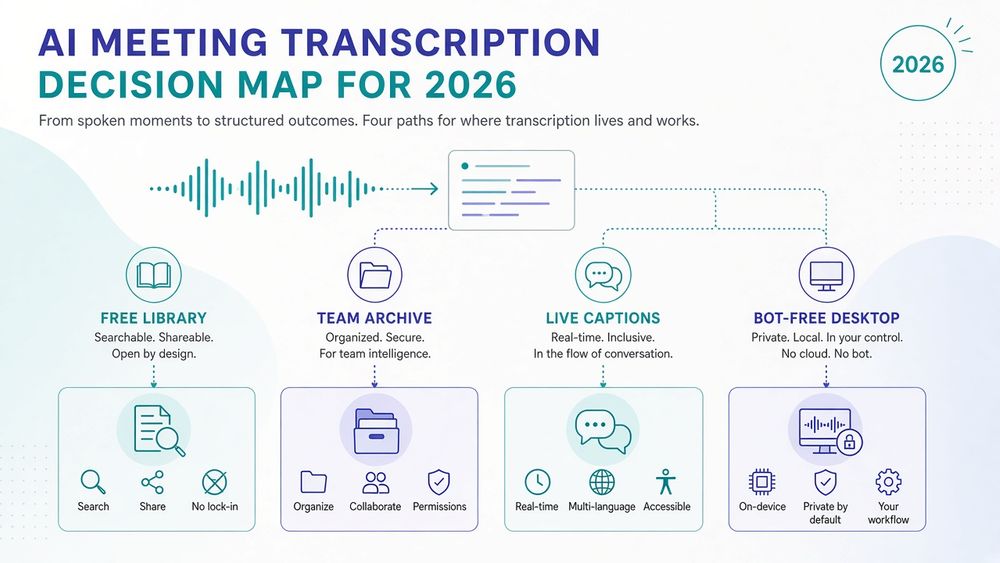
Best AI Meeting Transcription Tools in 2026: Free & Paid Compared
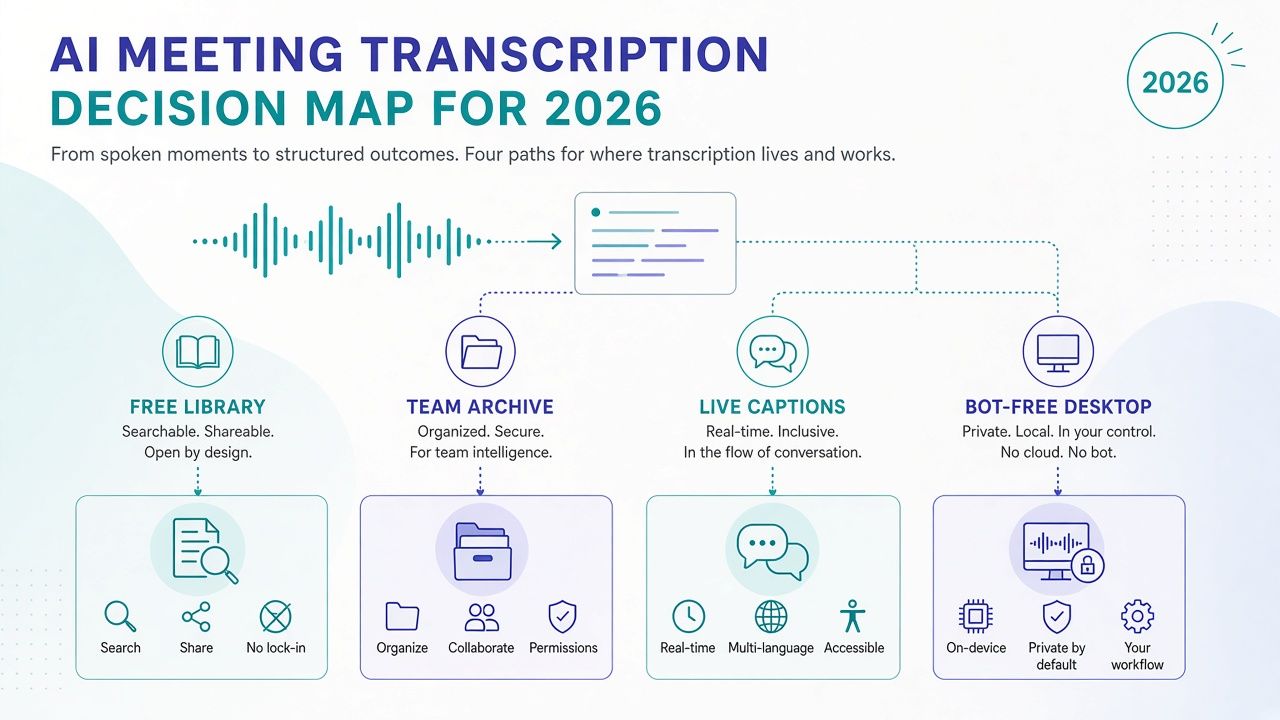
If you want a free searchable library of meeting recordings and transcripts, start with Fathom. If your team needs a searchable archive that can feed follow-up workflows, compare Fireflies.ai and MeetGeek. For live transcription with a clearly stated free monthly allowance, consider Otter.ai. If you want notes captured from your computer without a meeting bot, evaluate Granola. For browser-based captions without a bot attendee, look at Tactiq.
The right choice depends less on a headline accuracy claim than on how a tool captures your meeting, what it saves, how long it keeps the result, and who can search or share it. Free plans can be generous, but their limits differ: some cap minutes, others restrict history, storage, transcripts or AI credits. Paid prices and plan terms can also vary by billing period or checkout region.
This guide compares meeting-focused transcription tools using official documentation and pricing pages checked October 31, 2026 (Asia/Shanghai). Treat prices as starting points, confirm current limits at checkout, and test transcription on your own audio before you rely on it.
Quick picks by job-to-be-done
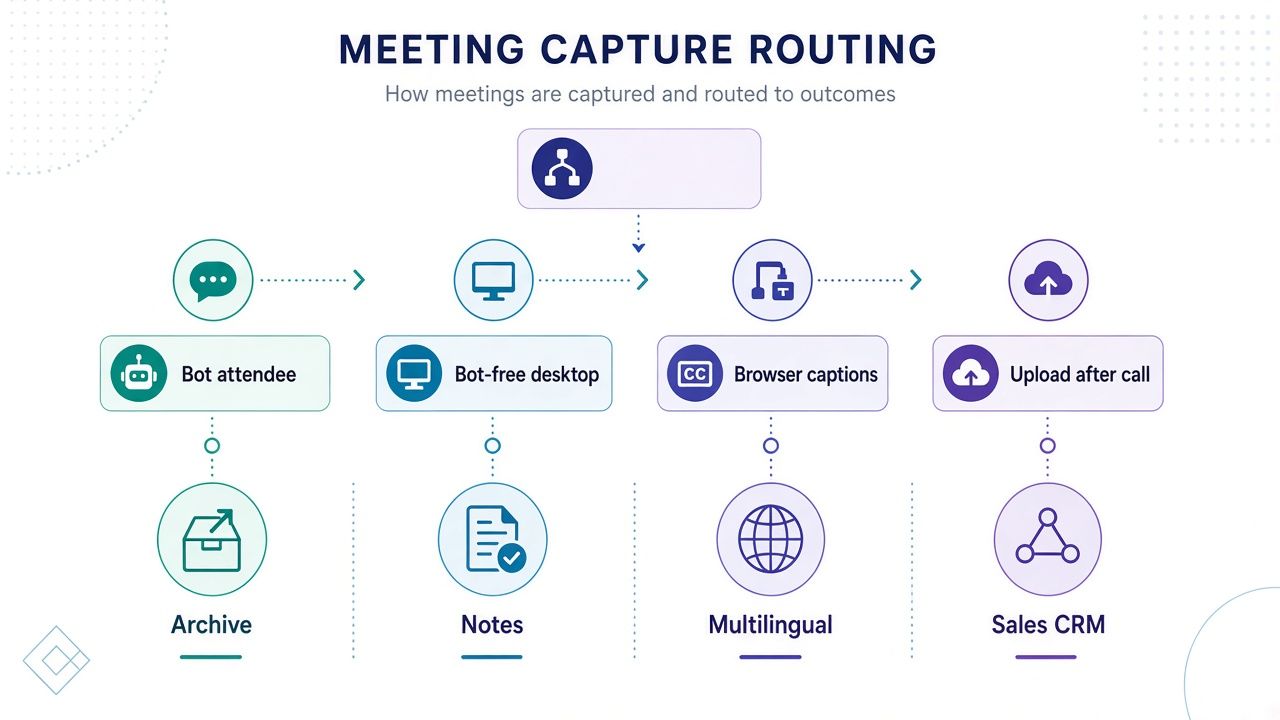
Use these as starting points, not a ranked scorecard. Match the capture style and archive needs you actually have, then confirm current plan limits before you depend on a free tier.
- Free searchable recording library: Fathom (individual Free lists unlimited recordings and transcripts).
- Team searchable archive + workflows: Fireflies.ai or MeetGeek.
- Live transcription with a clear monthly minute allowance: Otter.ai.
- Bot-free desktop notes: Granola.
- Browser captions without a bot: Tactiq.
- Multilingual meetings / uploads: tl;dv or Notta.
- Sales/CS structured notes + CRM: Avoma.
- Shared meeting insights shortlist: Read AI (confirm capture modes and access).
What counts as an AI meeting transcription tool?
An AI meeting transcription tool captures spoken meeting audio and turns it into text you can review, search or export. Many products also produce summaries, action items, speaker labels, recordings, clips or follow-up workflows. Those features can be useful, but the transcript remains the core record in this guide: a text representation of what was said, not a guarantee that the software captured every word correctly.
Capture method matters. Some services send a visible bot into a video call. Others record or listen from a desktop application, use a browser extension to capture captions, or accept an audio or video file you upload after the meeting. These methods have different technical requirements and different implications for participant notice, company policy and privacy. A workflow without a visible bot is still a recording or transcription workflow; it does not remove your responsibility to follow applicable rules.
This is a guide to meetings, including calls and meeting recordings. It is not a guide to transcribing music. If you need transcription for songs, rehearsals or other music audio, use our guide to best AI music transcription tools.
It also is not a ranking of sales conversation-intelligence platforms such as Gong or Chorus. Those products sit in a broader sales analytics category and are not primary picks here. If you care more about an assistant that writes recaps, organizes agendas and helps manage follow-ups than about a reliable transcript, see our guide to best AI meeting assistants. For general-purpose question answering and writing rather than meeting capture, compare best AI chatbots.
One distinction helps set expectations: transcription is not the same thing as meeting notes. Transcription aims to preserve the conversation in text, usually with timestamps or speaker labels. Notes condense it into selected points such as decisions, questions and tasks. A transcript can help you check whether a summary is faithful; a summary can help you find the important parts without rereading the full transcript. Treat generated notes as a convenience, not as a substitute for the source when an exact statement matters.
Comparison: meeting transcription tools at a glance
| Tool | Best-fit job | Capture | Free/trial limits | Paid from (annual) | Languages / search notes | Main tradeoff |
|---|---|---|---|---|---|---|
| Fireflies.ai | Team meeting archive and follow-up workflows | Meeting bot; Chrome extension also listed | Free transcription is unlimited, but storage and AI use are limited; confirm exact free storage on plan matrix | Pro $10/seat/mo | 100+ languages listed; searchable transcripts and meeting archive | Unlimited transcription does not mean unlimited storage or AI credits |
| Fathom | Free individual recording and transcript library | Meeting bot; bot-free Mac capture is listed as beta | Free individual plan lists unlimited recordings and transcriptions | Premium $16/mo; Team $15/user/mo, two-user minimum | Search across meetings; check language support for your needs | Team plans have minimums; bot-free capture is beta |
| Otter.ai | Live transcription and searchable meeting notes | Bot, browser, desktop and mobile options | Free: 300 minutes/month; three lifetime audio/video imports | Pro about $8.49/user/mo annual promotional price | Six listed languages; searchable transcripts | Pro has a 90-minute-per-meeting cap and other allowances |
| Granola | Desktop notes without a meeting bot | Bot-free device capture | Basic is free; meeting history is limited to 30 days | Business $14/user/mo | AI notes and history; verify language needs on the official site | Bot-free capture still requires notice and device permissions |
| tl;dv | Multilingual meeting recordings and transcript review | Meeting bot | Free plan; confirm current retention and usage limits | Pro €18/seat/mo | Multilingual transcripts and summaries; searchable meeting content | Prices are in EUR; confirm plan details and currency at checkout |
| Notta | Meeting and uploaded-media transcription | Meeting capture and file uploads | Free: 120 minutes/month; three-minute conversation cap | Pro $8.17/mo ( | Multilingual features; verify current language matrix and translation options | Free conversation cap is short; annual Pro/Business figures above |
| Avoma | Sales and customer-call transcription with structured notes | Meeting recorder and real-time transcription | 14-day Organization trial; viewers are free on listed plans | Startup $19/recorder seat/mo | Structured sales/CS notes and CRM workflow | Recorder seats, add-ons and team requirements can raise total cost |
| Tactiq | Lightweight browser-based meeting transcripts | Browser extension / captions | Free: 10 transcripts/month and five AI credits | Pro $8/user/mo | Browser-captured transcripts; check platform and browser compatibility | Extension-based capture and transcript limits may not fit every meeting |
| MeetGeek | Searchable meeting library and automation | Meeting capture; verify supported setup for your platform | Confirm current free allowance on the official plan page | Pro $15.99/mo or annual-equivalent $9.99/user/mo; Business $27/mo or annual-equivalent $17/user/mo | Searchable meeting content and automation features | Monthly and annual-equivalent figures both shown; confirm billing interval |
| Read AI | Shared meeting insights and cross-meeting review | Meeting assistant capture; confirm supported modes | Free plan available; verify current limits | Pro ~$19.75, Enterprise ~$29.75, Enterprise+ ~$39.75 (annual billed per user/mo) | Shared insights and search are part of its positioning | Confirm exact entitlements and seat totals on the plan you choose |
Prices in the table are starting prices from the verified pricing information available on October 31, 2026. Unless stated otherwise, monthly figures are per user or seat on annual billing. Currency, promotional terms, minimum seats and regional checkout details can change. Confirm the exact plan and total before purchasing.
2026 pricing and free-tier traps
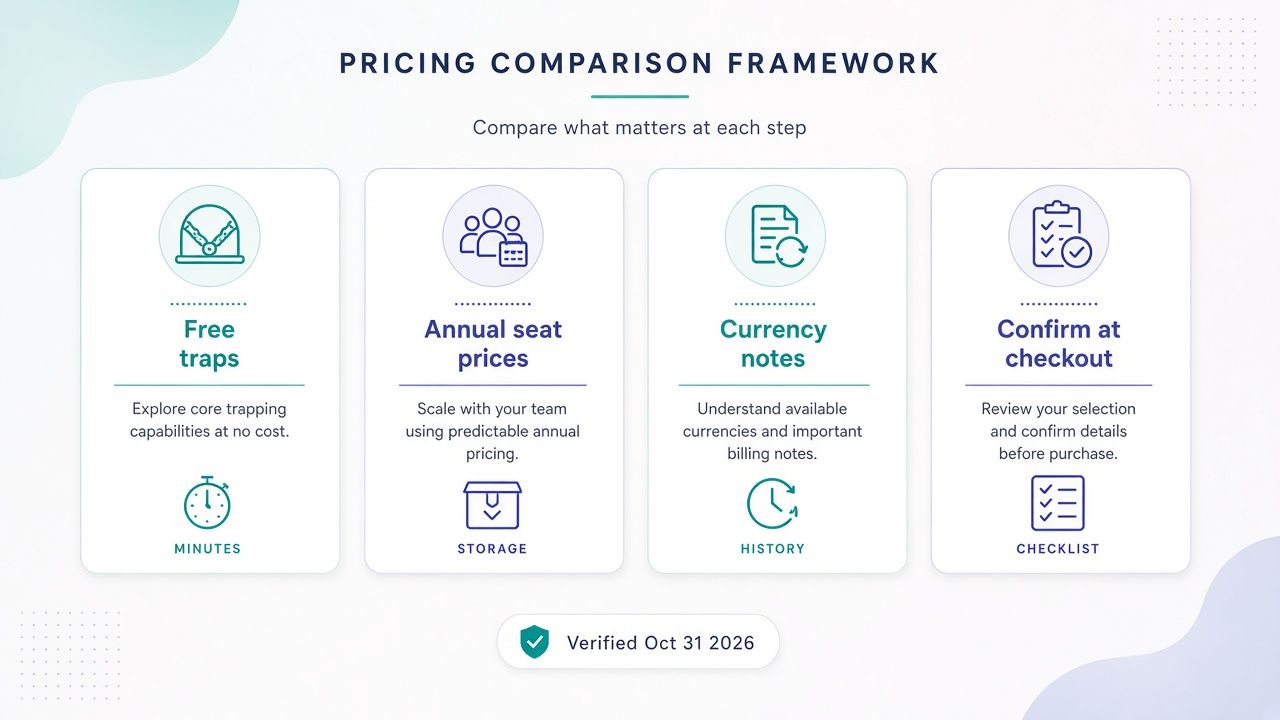
“Free” can describe very different products. A plan may let you capture a lot of meetings but restrict how long recordings remain available. Another may keep transcripts but limit monthly minutes, the length of each conversation or the number of AI-generated summaries. Before you choose a free plan, identify what you need to retain and how you will use it.
Unlimited transcription is not unlimited everything
Fireflies advertises unlimited transcription on its free plan, but storage and AI credits are limited. The exact free storage figure is not sufficiently dependable to treat as a guaranteed allowance, so check the live plan matrix. A service can transcribe many minutes while still limiting how much source audio it stores or how often you can use its AI features.
Fathom’s free individual plan is unusually broad on the dimensions most people notice first: it lists unlimited recordings and transcriptions, plus AI summaries, clips and search. That does not mean every paid team feature is included, or that all integrations, controls and administrative functions are free. Check the plan comparison for the feature your team actually needs.
Granola’s free Basic plan is limited differently: its listed meeting history is 30 days. If your purpose is to look back through a long-running project or search an older customer conversation, a short history window may matter more than a monthly minute allowance.
Minutes and conversation length can be separate limits
Otter Basic includes 300 transcription minutes per month, while Otter Pro has a 90-minute-per-meeting cap and an allowance of 1,200 in-app recording minutes. A monthly quota and a per-meeting cap answer different questions. A plan might have enough monthly minutes for your schedule but still stop or restrict a long workshop.
Notta Free lists 120 transcription minutes per month, a maximum of three minutes per conversation, 50 uploads and 10 AI summaries. That three-minute conversation cap makes the free plan useful for trying the workflow, but it is not a realistic way to transcribe an ordinary long meeting. Notta Pro lists 1,800 minutes per month and recordings up to five hours; verify the current plan matrix if those limits are central to your decision.
Transcript counts and AI credits are not the same allowance
Tactiq Free includes 10 transcripts per month and five AI credits. Its Pro plan lists unlimited transcripts but 10 AI credits, while Team lists unlimited AI credits. If your team wants a transcript for every call and only occasional AI assistance, the lower plan may be enough. If you want to generate or revise summaries frequently, count the AI actions you expect to use, not just the number of meetings.
Other plans also separate the right to transcribe from access to AI features. Read the exact plan table for summaries, chat, integrations and retention rather than assuming that an unlimited transcript allowance includes unlimited AI processing.
Annual-equivalent prices can conceal billing details
The prices in this guide are annual starting prices where available, not a promise that you can pay month by month at the same rate. Some vendors show an annual-equivalent monthly price but charge the year in advance. Others show a promotional figure that applies only to qualifying new customers.
Examples worth checking at checkout:
- Otter Pro: the verified page showed an annual promotional figure of about $8.49 per user per month, with an asterisk. Its monthly price was $16.99. Confirm whether the offer applies to your account and what renewal price will be.
- Fathom: Premium is listed at $16 per month on annual billing and $20 monthly. Team is $15 per user per month annually, with a two-user minimum; Business is $25 per user per month annually, also with a two-user minimum.
- tl;dv: the verified plan prices are in euros: Pro is €18 per seat per month annually and Business is €29. Do not compare these as though they were dollar prices. Check the currency and exchange rate at checkout.
- MeetGeek: Pro is $15.99/mo or an annual-equivalent $9.99/user/mo; Business is $27/mo or an annual-equivalent $17/user/mo. Confirm the billing interval and total.
- Read AI: Pro is about $19.75, Enterprise about $29.75, and Enterprise+ about $39.75 per user per month when billed annually.
Some displayed prices are not verified enough to quote as fixed
Notta Pro is $8.17 per month on annual billing (about $97.99 per year), and Notta Business is $16.67 per month on annual billing (about $199.99 per year). Avoma’s Organization trial and add-ons can affect the cost of a team rollout. Enterprise plans for several products use custom quotes. Where a plan is not clear, ask the vendor for a written quote and confirm the number of seats, billing period and feature entitlements.
A useful buying habit: calculate the annual total, not just the per-seat monthly equivalent. Add the number of recorder seats, any required minimum, relevant add-ons and taxes. Then compare that total with the cost of your current transcription process.
How we ranked these tools
This guide is based on official product documentation and pricing pages checked October 31, 2026 (Asia/Shanghai). We compared tools that support meeting transcription or meeting-recording review, considered their capture approaches, and noted the free and entry-level paid limits that can change a buyer’s decision. We did not conduct a vendor-independent accuracy benchmark, and we do not claim to have tested every product in controlled conditions.
The comparison gives practical weight to five questions:
- Can you capture the meetings you actually have? A bot, browser extension, desktop app and upload workflow each fit different situations. We distinguish them rather than treating “transcription” as one uniform recording method.
- Can you find the record later? Search across meetings, clear retention terms and a usable transcript library matter when the goal is to revisit decisions or locate an exact section of a call.
- Are free limits understandable? We call out minute, transcript, history, storage and AI-credit limits when they are stated in the available pricing information. If an exact limit is uncertain, we say so rather than treating a commonly repeated figure as guaranteed.
- Is the cost interpretable? We use only the pricing facts in the verified pricing review and distinguish annual-equivalent figures, monthly billing, euros, trial terms and promotional prices.
- Can you assess the risks before rollout? Consent, access, retention, model-training settings and deletion controls deserve attention alongside features.
“Best” is therefore a fit judgment, not a claim that one vendor wins every transcript or that one product has objectively superior accuracy. A tool that suits a solo consultant may be a poor fit for a company that needs centralized access controls. A product with a generous free tier may be unsuitable if its retention window is too short. Your own audio, workflow and policy should decide the final choice.
How to choose an AI meeting transcription tool in six steps
1. Choose the capture method before comparing summaries
Start with the meeting environment. Will a visible recording bot be accepted by your customers, colleagues and organization? Can a desktop app capture the audio you need? Do you want captions from a browser, or do you mostly need to upload recordings after the fact?
A meeting bot can simplify automatic capture of scheduled video calls, but it may be blocked by a host or prohibited by policy. A browser extension can be convenient for supported web meetings, but it depends on browser and platform compatibility. A desktop workflow avoids a bot attendee, yet requires local permissions and may not capture every audio source as you expect. Upload can work well for recordings you already have, but it is not the same as live note-taking.
Try the actual capture mode before buying. Confirm which meetings it can join or record, what happens when you switch devices, and whether it captures all participants clearly.
2. Map your real usage against the plan limits
Estimate the number and length of meetings you expect to transcribe in a typical month. Include long calls, interviews, workshops and meetings in which you might need to create several versions of a recap. Then check both monthly and per-meeting limits.
For example, Otter Free’s 300 minutes per month may be enough for light use, but it is still a finite allowance. Notta Free’s 120 monthly minutes and three-minute conversation cap make it particularly restrictive for full meetings. Tactiq Free’s 10 transcripts per month is a different kind of ceiling. Granola Basic’s 30-day history is a retention limit, not a minutes limit. Fireflies Free’s unlimited transcription does not remove storage or AI-credit limits.
Do not pay for unlimited use that you will not need, but do not mistake a trial-friendly limit for a sustainable team plan.
3. Test languages, terminology and speaker changes
Language lists are not a guarantee that every accent, technical term or conversation will be transcribed equally well. The verified pricing information lists 100+ languages for Fireflies, six for Otter, and multilingual transcript and summary features for tl;dv. Notta also presents multilingual capabilities, but its current language matrix should be checked directly. These counts do not establish how well a product handles your specific language pair, dialect or domain vocabulary.
Test with representative audio. Include the accents, microphones, background noise and specialist terms your team encounters. Check names, numbers, negations, speaker changes and short overlapping responses. If the product offers vocabulary customization, test it with the terms that matter to your work. For translated transcripts, compare the translation against the original-language audio or transcript; a fluent-sounding translation can still change meaning.
4. Decide whether you need a library or only a meeting recap
If you only need a quick reminder after each call, a compact summary may be sufficient. If you expect to revisit past conversations, look for a searchable meeting recording library with searchable transcripts, reliable dates and clear retention controls. Ask whether search spans all meetings or only a selected workspace, who can search, and whether results link back to the recording or transcript location.
For teams, ask about shared search for meeting notes: can colleagues find a decision without being individually invited to every meeting? Can you control access by project or team? Does a transcript remain searchable after a recording is deleted? These are product and policy questions, not assumptions you should make from a “search” feature label.
5. Choose the output you will actually use
A word-for-word transcript, a meeting recap and a list of action items serve different purposes. Consider whether you need speaker labels, timestamps, clips, editable notes or exports in formats your team can store elsewhere. If an AI summary is central to your workflow, check whether you can inspect the source transcript and jump to the relevant audio before forwarding the summary.
For exact records, retain the original recording or another approved source where policy allows. Do not make a generated recap the sole evidence for a decision, quote, commitment or compliance record without checking the underlying material.
6. Confirm consent, privacy and retention before rollout
Before recording, tell participants what is being captured and why, and follow applicable laws and organizational rules. Requirements vary by location and context. Do not assume that a meeting platform’s recording indicator or a bot’s name is sufficient notice for your situation.
Review where recordings and transcripts are stored, who can access them, how long they remain available, and how to delete or export them. For business use, ask about workspace administration, single sign-on, retention settings, data-processing terms and model-training controls. Granola’s plan information, for example, describes an individual model-training opt-out and an organization-wide opt-out on Enterprise; check the current terms and settings rather than relying on a plan summary.
Searchable meeting libraries and shared search
A transcript becomes more valuable when you can find it again. A searchable meeting recording library is a collection of meeting records that you can retrieve by terms, participants, date or other supported filters. Depending on the product, the record may include a transcript, recording, summary, clips and related follow-up data.
Before adopting a tool for a team, ask what “search” means in practice:
- Does search cover every meeting in the workspace, or just meetings you own?
- Can a teammate search content they are allowed to access without being given blanket access to all recordings?
- Does a search result open at the relevant transcript section or recording moment?
- Can users search summaries as well as full transcripts?
- How are duplicate meetings, imported files and renamed events handled?
- Can an administrator set retention and deletion policies?
- If a recording is removed, does the transcript remain, and can that behavior be configured?
- Can the team export the information it needs if it changes providers?
Those questions distinguish a personal archive from shared meeting knowledge. A searchable library can save time when you need to find what a client said about a deadline or check whether a project decision was already made. But broad search also makes access control more important. If a whole organization can search every call, sensitive conversations may become easier to discover than intended.
Fireflies, Fathom and MeetGeek are reasonable starting points for buyers focused on searchable records, while Otter also emphasizes searchable meeting content. Their plans and workflows differ, so test search with a small, approved set of meetings. Verify that the result includes enough context to understand the conversation rather than presenting a phrase without its surrounding discussion.
For shared search for meeting notes, define who is expected to search and what they are permitted to see. Sales, support and project teams may need different access rules. A team member who needs decisions from a meeting may not need access to the complete recording. If the product offers workspace, team or folder permissions, test those settings before inviting a broad group.
A useful pilot is to create a few consented test meetings with predictable terms: a project name, a decision, an owner and a date. Search for each term from the accounts that will use the library. Confirm that the results are accurate, understandable and appropriately restricted. Then test deletion and export. This evaluates the practical library, not just the transcript editor.
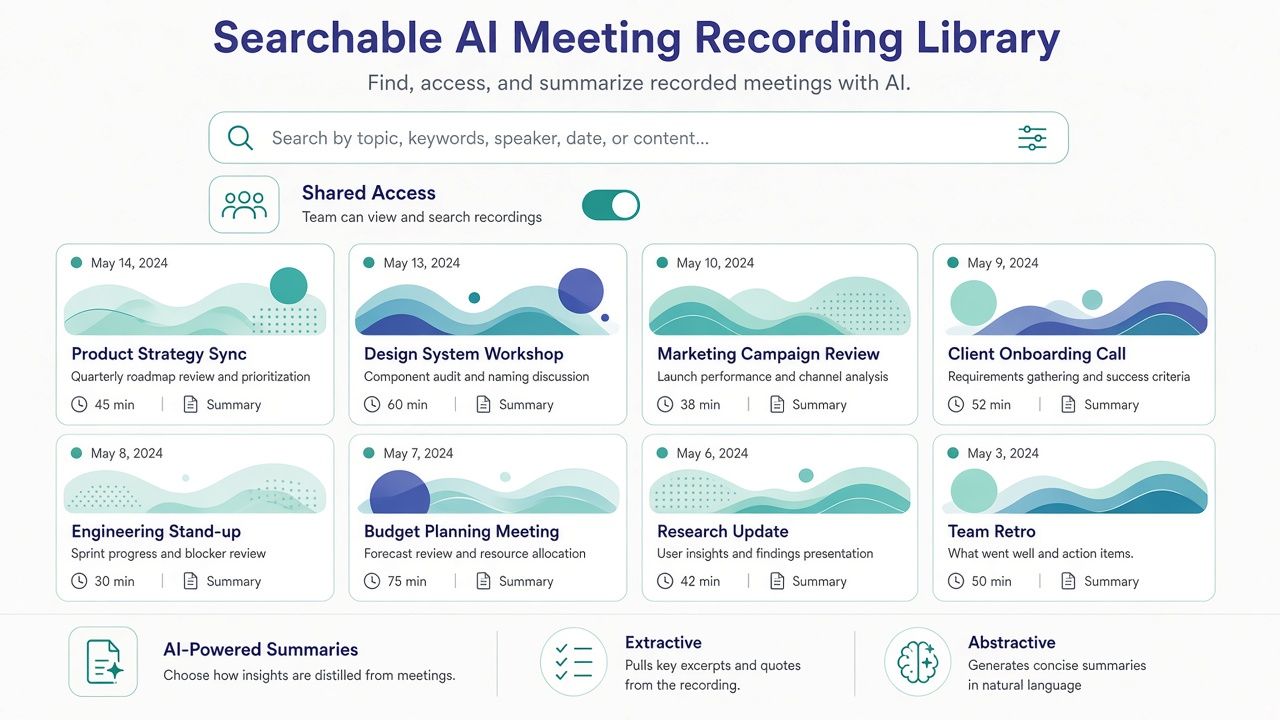
Extractive vs. abstractive summarization from transcripts
When you ask AI to summarize a meeting, the result may be extractive, abstractive, or a mixture. These terms describe different ways of producing a shorter account.
An extractive summary selects or rearranges material already present in the transcript. It might surface a sentence that appears to state a decision or preserve a key phrase. Because the wording is drawn from the source, it can be easier to verify, although the selection can still omit context or choose the wrong sentence.
An abstractive summary generates new wording that condenses or interprets the discussion. It can make a long conversation easier to read and group related ideas, but it may paraphrase imprecisely, connect comments that were not related or turn a tentative statement into a firm conclusion. A polished sentence is not proof that the meeting reached that conclusion.
Many products do not label every summary element as purely extractive or abstractive. A summary may use generated language while linking back to transcript passages or recording clips. Check the product’s output rather than assuming that “AI summary” means a particular method.
For either style, verify:
- Decisions: Was a decision actually made, or was it only proposed?
- Owners: Did the named person accept the task?
- Dates and quantities: Are deadlines, prices and measurements transcribed correctly?
- Negation and uncertainty: Did “we may not launch” become “we will launch”?
- Attribution: Did the right speaker make the statement?
- Context: Is a quoted phrase representative, or does surrounding discussion change its meaning?
If your priority is a faithful record, begin with the transcript and use summaries as navigation. If you need a short recap for colleagues, review the generated notes before sharing them. For important decisions, open the source section or recording and confirm the wording. A transcript itself can contain errors, so verification should go back to the audio when exactness matters.
Detailed tool reviews
Fireflies.ai: a team archive with follow-up workflows
Overview
Fireflies.ai is a meeting transcription and archive product for people who want conversations to become searchable records. Its listed capture options include a meeting bot and a Chrome extension. The product also describes uploads, a desktop/mobile app, AskFred and integrations. That combination makes it worth considering when you want more than a one-time transcript: the goal may be to search previous calls and connect meeting output to later work.
The central buying distinction is that the free plan’s “unlimited transcription” is not the same as unlimited storage, unlimited AI features or unlimited retention. If you are evaluating Fireflies for a team library, ask which plan covers the number of meetings and how long you need to keep them.
Standout features
- Searchable meeting archive: useful when finding a past discussion matters as much as capturing the next one.
- More than one capture route: a bot-based workflow and a Chrome extension are listed. Check which route supports your meeting platform and policy.
- Follow-up features: AskFred and integrations can help connect the transcript to other work, but verify the current plan entitlements.
- Broad language listing: Fireflies lists 100+ languages, with English identified as its primary language and others subject to beta status in its FAQ. Test the languages you need rather than treating the count as an accuracy guarantee.
Pricing (verified)
Fireflies lists a free plan with unlimited transcription, but storage and AI use are limited. The exact free storage allowance should be confirmed on the live plan matrix; do not rely on an unverified number.
Paid annual prices are $10 per seat per month for Pro, $19 for Business and $39 for Enterprise. The listed monthly prices for Pro and Business are higher, and Enterprise is annual-only according to the verified pricing information. Confirm the billing period, storage allowance, AI credits and seat count at checkout.
Pros and cons
Pros
- Search and archive workflows are central to the product.
- Multiple capture approaches give you options to evaluate.
- Pricing is stated clearly for the listed annual paid tiers.
- The free transcription allowance can be useful for trying the core workflow.
Cons
- Free transcription does not eliminate storage or AI-credit limits.
- The exact free storage figure needs confirmation.
- A bot-based workflow requires attention to participant notice and meeting policy.
- Language availability does not promise equal performance across languages.
Best if: you want a searchable team archive and plan to connect transcripts to follow-up work.
Skip if: you need a guaranteed free, long-term recording library without checking storage limits, or your organization will not permit the capture method you intend to use.
Fathom: a generous free starting point for recordings and transcripts
Overview
Fathom brings together meeting recordings, transcription, summaries, clips and search. Its free individual plan lists unlimited recordings and transcriptions, along with AI summaries and search. That makes it a strong place to begin if you want to compare the value of a complete recording library before paying for individual use.
Fathom also lists bot-free capture for Mac as a beta alongside a meeting-bot workflow. Beta availability and behavior can change, so test it on your own device before making it part of a routine. Teams should pay special attention to the two-user minimum on the listed Team and Business plans.
Standout features
- Free individual recording and transcription: attractive if you need a personal archive and want to explore summaries and search.
- Recordings, transcripts and clips: gives you more than a text-only result to review.
- Search: helps you revisit older meeting content.
- Bot-free Mac beta: potentially useful if you prefer not to add a visible bot attendee, subject to current availability and permissions.
Pricing (verified)
Fathom Free for individuals lists unlimited recordings and transcriptions, AI summaries, clips and search. Premium is $16 per month on annual billing and $20 monthly. Team is $15 per user per month annually, with a two-user minimum; Business is $25 per user per month annually, also with a two-user minimum. Enterprise pricing is by sales conversation.
Confirm which team features are included at each level, especially integrations, analytics and administrative controls. A free individual plan should not be assumed to include every paid team function.
Pros and cons
Pros
- Broad free individual plan for recordings, transcripts and search.
- Combines source recordings with transcript and summary workflows.
- Offers a bot-free Mac option in beta.
- Pricing and team minimums are available to compare.
Cons
- Bot-free capture is a beta feature, not a universal replacement for the standard workflow.
- Team and Business plans require at least two users.
- Free individual access and paid team controls are different needs; check the plan matrix.
- Verify language support on the official product pages for your use case.
Best if: you are an individual who wants to build a searchable recording and transcript library without starting with a paid plan.
Skip if: you need a fully established bot-free workflow on every platform, or you want to buy one team seat without a minimum.
See Fathom’s official pricing page.
Otter.ai: live transcription with explicit minute limits
Overview
Otter.ai is a familiar option for live meeting transcription and searchable notes. Its listed capture routes include a bot, browser, desktop and mobile options. Otter may fit people who want to follow a live transcript and then search or export meeting content afterward.
Its plan limits deserve close attention. Otter Basic provides a stated monthly allowance, while Pro includes both a per-meeting limit and a monthly recording allowance. A team with occasional short calls may have a very different experience from one that records long workshops every day.
Standout features
- Live transcription: useful when you want text to appear during or soon after a conversation.
- Multiple capture options: check which app or workflow suits your actual meeting setup.
- Searchable meeting content: supports revisiting notes and transcript material.
- Exports on Pro: the verified details list TXT, PDF, DOCX and SRT exports.
- Six listed languages: English, Spanish, French, German, Japanese and Chinese are included in the verified pricing notes.
Pricing (verified)
Otter Basic is free and includes 300 transcription minutes per month, three lifetime audio/video imports and the listed integrations for Zoom, Teams and Meet. Pro is shown at about $8.49 per user per month on annual billing as a first-time promotional figure, with an asterisk; the monthly price is $16.99. The Pro details list a 90-minute-per-meeting cap, 1,200 in-app recording minutes and 10 monthly imports. Confirm the annual offer and renewal terms at checkout.
Business pricing appeared in a roughly $24–$30 per user per month annual band in the verified page information. Enterprise is custom, with a HIPAA add-on noted. Confirm the exact current quote and feature set before relying on either figure.
Pros and cons
Pros
- A clear free monthly transcription allowance.
- Live capture and multiple listed recording routes.
- Useful export formats on Pro.
- A defined list of six supported languages in the verified plan information.
Cons
- Free minutes can run out with frequent meetings.
- The Pro meeting cap may affect long calls.
- The annual Pro figure is promotional and must be confirmed.
- Business pricing needs verification at checkout.
Best if: you want live transcription, a searchable record and transparent limits you can compare with your expected monthly usage.
Skip if: your meetings regularly exceed the per-meeting limit, or you need broad language coverage beyond the listed languages without confirming availability.
See Otter’s official pricing page.
Granola: desktop note capture without a meeting bot
Overview
Granola is designed for a bot-free desktop workflow. It captures meeting audio on the device and turns it into AI notes, without adding a meeting bot as an attendee. That may suit people who prefer a clean attendee list or whose meeting platform makes bots inconvenient.
Bot-free does not mean capture-free. The application still needs access to audio, and you still need to handle notice, consent and organizational rules. Test the app’s platform support and permissions with the device you intend to use.
Standout features
- Bot-free by design: capture comes from the desktop workflow rather than a visible meeting attendee.
- AI notes: the product centers on turning captured conversation into organized notes.
- History and integrations vary by plan: the paid Business tier lists unlimited notes and history plus advanced integrations and MCP/API.
- Training controls: the plan information lists an individual model-training opt-out, with organization-wide training opt-out on Enterprise.
- Audio handling: the plan table says audio is deleted after transcription; verify current policy and settings directly.
Pricing (verified)
Granola Basic is $0 and includes limited meeting history of 30 days. Business is $14 per user per month and lists unlimited notes/history and advanced integrations. Enterprise is $35 per user per month, with SSO described for organizations typically using 50 or more users, a HIPAA workspace and organization-wide training opt-out. Confirm the current billing cadence and feature terms on the official page.
Pros and cons
Pros
- No meeting bot attendee is required for its desktop capture approach.
- Free Basic offers a way to evaluate the workflow.
- Business expands history and integration options.
- Published plan information includes model-training and audio-handling details to investigate.
Cons
- Basic history is limited to 30 days.
- Device permissions and operating-system compatibility are central to the experience.
- Bot-free capture still requires appropriate participant notice.
- Teams needing central administration should review Enterprise requirements and costs.
Best if: you want desktop-based notes without adding a bot participant and can work within the supported device setup.
Skip if: you need a conventional bot that automatically joins a wide range of scheduled meetings, or need older history on the free plan.
See Granola’s official pricing page.
tl;dv: multilingual transcripts and meeting review
Overview
tl;dv combines meeting recording, transcription and AI summaries. Its listed workflow uses a bot that joins video meetings. The product emphasizes multilingual transcripts and summaries, making it worth comparing if your team works across languages or needs to revisit moments from recorded calls.
A multilingual feature description is a reason to test, not a guarantee that every language, accent or translation will work equally well. Confirm the supported platforms and current plan limits. If your team relies on stored recordings, verify free-plan retention directly rather than assuming an older limit still applies.
Standout features
- Meeting recording and transcript review: useful for returning to a specific discussion after the call.
- Multilingual transcript and summary features: relevant for teams whose meetings are not all in one language.
- Bot-based meeting capture: check how the bot behaves in each platform your organization uses.
- Free entry point: allows an initial evaluation before paying, subject to the current terms.
Pricing (verified)
The verified pricing source lists prices in EUR. Free is €0. Pro is €18 per seat per month on annual billing (€29 monthly), and Business is €29 per seat per month on annual billing (€39 monthly). Do not convert these to dollars in a comparison without checking the exchange rate and checkout currency.
Pros and cons
Pros
- Combines recordings, transcripts and summaries.
- Multilingual features may suit cross-language teams.
- Free tier allows evaluation.
- Annual and monthly prices are stated in euros.
Cons
- A bot joins meetings, which may not fit every policy or host setting.
- Currency conversion and billing details need attention for US buyers.
- Confirm free retention and platform-specific limitations on the live page.
- Multilingual claims still need evaluation on representative audio.
Best if: your team wants recorded calls with multilingual transcript and summary workflows and is comfortable with a meeting bot.
Skip if: you need bot-free capture or a US-dollar price that can be compared without currency conversion.
See tl;dv’s official pricing page.
Notta: meeting and uploaded-media transcription
Overview
Notta supports meeting transcription as well as audio and video uploads. That makes it relevant if your team needs to transcribe both live calls and recordings already stored elsewhere. Its multilingual and translation features may also suit cross-language workflows, but you should confirm the current language matrix and any translation add-ons before choosing a plan.
The free plan has two distinct constraints: a monthly minute allowance and a very short conversation cap. If you need full-meeting transcripts, judge the product using a paid plan or a trial rather than assuming Free will cover normal calls.
Standout features
- Meeting and upload workflows: useful when you need to process existing recordings as well as new meetings.
- Multilingual positioning: check exact language and translation support for your combinations.
- AI summaries: free and paid allowances differ.
- Longer paid recordings: Pro lists recordings up to five hours.
Pricing (verified)
Notta Free is $0 and lists 120 transcription minutes per month, a three-minute maximum per conversation, 50 uploads, 10 AI summaries and one seat. Pro is $8.17 per month on annual billing (about $97.99 per year) and lists 1,800 minutes per month, recordings up to five hours, 100 uploads and 100 AI summaries.
Business is $16.67 per month on annual billing (about $199.99 per year) and is positioned as a higher tier with unlimited transcription; verify current allowances on the plan matrix. Enterprise is custom, with a listed starting point from 51 seats.
Pros and cons
Pros
- Supports both meetings and uploaded audio/video.
- Pro has substantially more monthly minutes than Free.
- Long recordings are supported on the listed Pro plan.
- Potentially useful for multilingual transcription workflows.
Cons
- The free three-minute conversation cap is too short for most full meetings.
- Current language and translation details should be checked for your combinations.
- Translation availability may depend on plan or add-on.
- Upload counts and AI summaries have separate limits.
Best if: you need one service for meeting capture and uploaded recordings, and the paid-minute allowance fits your volume.
Skip if: you expect the free tier to transcribe full-length meetings or need Enterprise custom quoting before starting evaluation.
See Notta’s official pricing page.
Avoma: structured transcription for sales and customer calls
Overview
Avoma is aimed at sales and customer-facing teams that want transcription alongside structured notes and CRM workflows. Its verified plan information describes real-time transcription and meeting recording, while the broader product positioning includes conversation intelligence and revenue-related features.
Avoma is a better fit to evaluate as a team workflow than as a simple free personal transcription app. Check whether your organization needs recorder seats, whether viewers can work without a paid seat, and whether add-ons are required for the analysis features you want.
Standout features
- Structured notes: can help teams review sales or customer conversations consistently.
- CRM orientation: relevant if meeting records need to connect to customer workflows.
- Recorder and viewer distinction: viewers are free on the listed Startup plan, while recorder seats are paid.
- Organization trial: the verified information lists a 14-day Organization trial.
Pricing (verified)
Startup is $19 per recorder seat per month on annual billing ($29 monthly), with viewers free and unlimited real-time transcription listed. Organization is $29 per recorder seat per month annually. Enterprise is $39 per recorder seat per month annually, with a 10-seat minimum and SSO/HIPAA noted.
Conversation Intelligence and Revenue Intelligence add-ons are listed at about $29 per seat annually in the verified information. Confirm whether the add-on price is monthly-equivalent on annual billing, which seats it applies to and whether it is necessary for your use case.
Pros and cons
Pros
- Built around structured sales and customer-call workflows.
- Free viewers can reduce the cost of sharing outputs with a wider audience.
- CRM connections may help teams link calls to customer records.
- A 14-day Organization trial provides a way to evaluate a team workflow.
Cons
- Recorder seats and add-ons can make total cost higher than the entry price suggests.
- The tool may be more than a general-purpose transcription buyer needs.
- Enterprise has a 10-seat minimum.
- CRM setup and team process are part of the evaluation, not optional details.
Best if: you need consistent call records for sales or customer success and want to connect them to CRM workflows.
Skip if: you only need occasional transcripts or do not want to manage recorder seats, CRM setup and possible add-ons.
See Avoma’s official pricing page.
Tactiq: browser-based transcripts without a meeting bot
Overview
Tactiq uses a browser extension to capture captions for supported online meetings. This can be a lightweight option if you prefer not to add a bot attendee and primarily join calls through a supported browser. It is important to verify browser, platform and account compatibility because an extension-based workflow is not the same as recording every meeting on every device.
The plan separates monthly transcripts from AI credits. Consider both if you want to generate summaries or use AI features after each call.
Standout features
- Browser-extension capture: suits supported web-based meetings.
- No meeting bot attendee in the listed capture style: still review notice and policy requirements.
- Share and export workflows: useful when transcript text needs to move into team documents.
- Different AI-credit allowances: plan selection can depend on how often you use AI features, not just how many transcripts you create.
Pricing (verified)
Free includes 10 transcripts per month and five AI credits per month. Pro is $8 per user per month on annual billing and lists unlimited transcripts with 10 AI credits. Team is $16.67 per user per month annually for 1–20 users and lists unlimited AI credits. Business is $29.17 per user per month annually for 20–200 users.
Confirm exact plan boundaries, seat counts and browser support on the live pricing page before rollout.
Pros and cons
Pros
- Browser-based workflow can avoid a visible meeting bot.
- Entry-level Pro pricing is relatively easy to compare.
- Plan details distinguish transcript and AI allowances.
- Useful for teams that primarily meet in supported browsers.
Cons
- Free is limited to 10 transcripts monthly.
- Browser and platform support are essential dependencies.
- A browser extension does not mean every audio source or device is captured.
- Team pricing and AI-credit terms should be checked against expected usage.
Best if: you mostly use supported browser-based meetings and want a lightweight transcript workflow without a bot attendee.
Skip if: your meetings routinely happen in unsupported apps or you need a tool that automatically captures all calls across devices.
See Tactiq’s official pricing page.
MeetGeek: searchable meeting content and automation
Overview
MeetGeek is a meeting-recording and transcription option to consider when search and automation are part of the buying decision. Its position in this comparison reflects the value of meeting records that can be revisited and used in follow-up workflows. As with any service that captures meetings, verify the supported meeting platforms, capture behavior, retention and sharing controls on the current product pages.
The pricing page presents both monthly and annual-equivalent figures. Compare the total billed amount and plan entitlements rather than choosing on the basis of the lowest displayed monthly equivalent alone.
Standout features
- Searchable meeting content: relevant if you need to find past discussions rather than keep isolated transcripts.
- Automation positioning: may fit teams that want meeting output to flow into subsequent work.
- Paid tiers: the pricing page shows distinct Pro and Business figures, but confirm their exact included limits.
- Team evaluation: test access settings and shared search with the people who will use the library.
Pricing (verified)
Pro is $15.99/mo or an annual-equivalent $9.99/user/mo. Business is $27/mo or an annual-equivalent $17/user/mo. Confirm the annual billing total, features, taxes and current free-plan allowance on the official page.
Pros and cons
Pros
- Worth comparing when you value searchable meeting content and automation.
- Displays monthly and annual-equivalent starting figures.
- A dedicated team trial can test whether search and follow-up fit your workflow.
Cons
- Free-tier limits need confirmation.
- Annual-equivalent pricing can obscure the amount charged upfront.
- Verify platform compatibility, recording access and retention before rollout.
- Do not assume that search access and recording access have identical permissions.
Best if: your team wants meeting records to be searchable and connected to follow-up workflows.
Skip if: you need fully confirmed free limits or a simple, no-automation transcript-only product.
See MeetGeek’s official pricing page.
Read AI: a short-list option for shared meeting insights
Overview
Read AI is included as a shorter review because its shared meeting insights and search angle may interest teams comparing searchable records. It is not the primary pick in this guide. Use it as a candidate to evaluate when your team wants a common view of meeting information, then confirm that its capture methods and access controls fit your environment.
Shared insights can make meeting information easier to discover, but they also raise questions about who can see what. Test the permissions and verify whether the features you want are available on the plan you are considering.
Standout features
- Shared meeting insights: potentially useful for teams that want meeting information available beyond the person who hosted the call.
- Search and review angle: relevant to the searchable-library use case.
- Free plan: available, with exact limits to verify.
- Paid tiers: Pro, Enterprise and Enterprise+ with annual per-user rates listed below.
Pricing (verified)
Annual billed rates are about Pro ~$19.75, Enterprise ~$29.75, and Enterprise+ ~$39.75 per user per month. Confirm the billing total, seat count and feature entitlements for the plan you choose.
Pros and cons
Pros
- A candidate for teams exploring shared meeting insights.
- Free plan provides a starting point for evaluation.
- Its search angle fits teams interested in cross-meeting review.
Cons
- Confirm capture modes and plan limits before relying on it.
- Confirm seat totals and feature entitlements on the plan you choose.
- Shared search requires careful access-control testing.
Best if: you are comparing shared meeting insights and want to test how the tool organizes team-wide information.
Skip if: you have no need for shared meeting analysis or prefer a primary transcription archive tool instead.
See Read AI’s official pricing page.
Related option: Krisp for noise reduction alongside meetings
Krisp is related to meeting workflows, but it is not a primary transcription pick in this comparison. Its noise-cancellation and meeting-assistant features may be worth considering if background noise is a major problem, but do not assume that noise reduction alone gives you the searchable transcript library or meeting transcription workflow you need. Check its current product and pricing details directly, and evaluate it alongside—not instead of—a transcription tool if you need a transcript record.
Hands-on buying checklist
Use this checklist before choosing an annual plan or inviting a transcription service into a work meeting.
Capture and compatibility
- Which meeting platforms, browsers and devices must the tool support?
- Does it use a bot, local desktop capture, a browser extension or uploads?
- Can it capture the kind of meeting you actually run, including calls outside your main calendar?
- What happens when a meeting starts late, changes host or exceeds the expected duration?
- Can you stop capture promptly if a meeting changes from public to sensitive?
- Does the tool require an administrator to authorize the bot, extension or app?
Transcript quality and review
- Does the transcript distinguish speakers well enough for your use?
- Are names, numbers, dates, acronyms and negations captured correctly in representative audio?
- Does it handle overlapping speech, poor microphones and the accents your team uses?
- Can a user correct transcript text, and do corrections remain available to others?
- Can you jump from a transcript passage to the recording or relevant moment?
- Can your team review uncertainty rather than treating the output as authoritative?
No vendor-independent accuracy percentage in this guide resolves those questions for your audio. Run a consented pilot and compare the transcript with the recording. Pay special attention to the facts that would cause harm if wrong: commitments, names, deadlines, figures and decisions.
Search, sharing and retention
- Does search cover the whole team library or only one user’s meetings?
- Can access be limited by workspace, project, team or meeting?
- Can someone search a transcript without receiving permission to play the full recording?
- How long do recordings and transcripts remain available on the plan?
- Can an administrator change retention or delete records?
- What happens to a transcript if the audio recording is deleted?
- Can you export the data in a usable format before ending the subscription?
- Does the free plan retain information long enough for your real workflow?
A searchable library is only useful if people can find what they are allowed to find and cannot access what they should not. Test both sides of that rule with non-sensitive meetings before rollout.
Pricing and limits
- Is the displayed price monthly or annual-equivalent?
- Is annual billing charged upfront?
- Is the price promotional, and what is the renewal price?
- Is there a minimum number of seats?
- Are prices shown in dollars or another currency?
- Are storage, recording minutes, transcript counts and AI credits separate?
- Does the plan include the integrations or administrative controls you need?
- What is the annual total for the expected number of recorder seats?
- Is a trial available, and does it include the features you are evaluating?
Privacy and policy
- Have you told participants that the meeting may be recorded or transcribed?
- Have you checked applicable consent rules and your organization’s policy?
- Who can access recordings, transcripts, summaries and search results?
- What are the vendor’s retention, deletion and data-processing terms?
- Can you control whether meeting data is used for model training?
- Is there a process for handling sensitive conversations or requests for deletion?
- Are your organization’s security or compliance requirements supported on the plan you will buy?
Frequently asked questions
1. What is the best free AI meeting transcription tool?
Fathom is a strong first choice if you want an individual plan with unlimited recordings and transcripts listed for free. Its free plan also lists summaries, clips and search. Fireflies offers unlimited transcription on Free but limits storage and AI use, while Otter Basic provides 300 minutes per month. The best option depends on whether you value a broad free library, a stated monthly minute allowance or a particular capture method. Confirm current limits on the official plan pages.
2. Can I transcribe a meeting without a bot joining?
Yes: Granola uses bot-free desktop capture, and Tactiq uses a browser-extension workflow rather than a meeting bot. Fathom lists bot-free Mac capture as a beta feature, and Fireflies lists a Chrome extension in addition to its bot workflow. Check platform support and permissions before relying on any of these methods. Bot-free does not mean that no audio is captured or that participant notice is unnecessary.
3. Which AI meeting transcription tool is most accurate?
There is no vendor-independent accuracy result in this guide that establishes one tool as universally most accurate. Results vary with audio quality, microphone setup, accents, overlapping speech, language and specialist vocabulary. Test the same representative, consented audio in the tools you are considering. Compare names, numbers, speaker attribution, negation and action owners, and verify consequential details against the recording.
4. Is AI meeting transcription legal?
It depends on where participants are and the rules and policies that apply to the meeting. Requirements can differ by jurisdiction, workplace and context. Tell participants what you are recording or transcribing, follow your organization’s policy and obtain any consent required. Do not treat a bot appearing in the attendee list or a platform indicator as a substitute for checking your obligations.
5. What is the difference between meeting notes and a transcript?
A transcript is text representing the spoken conversation; meeting notes condense it into selected points such as decisions and tasks. A transcript is useful for checking what was said, while notes are faster to scan. Many tools produce both, but summaries can omit context or misattribute a statement. If you need exact wording, consult the transcript and, when necessary, the source recording.
6. What is a searchable meeting recording library?
It is a collection of meeting recordings and related text that you can search to find past conversations. Depending on the service, the library may include transcripts, summaries, clips and other meeting information. Before choosing a tool, verify what search covers, who can use it, how results link to the source, and how long the content is retained.
7. Can my team use shared search for meeting notes?
Often, but the scope and permissions depend on the product and plan. Ask whether colleagues can search a shared workspace, whether access is limited by team or project, and whether a search result exposes the transcript, the recording or both. Pilot shared search with approved meetings and test that users can find the information they need without gaining access to unrelated sensitive calls.
8. What is extractive summarization from a transcript?
Extractive summarization selects important material from the source transcript rather than relying only on newly written paraphrases. It may preserve source wording, which can make a result easier to check, but it can still select a misleading passage or omit context. Abstractive summaries generate condensed wording and may be easier to read, but you should verify decisions, owners, dates and figures against the transcript or audio.
9. Otter vs. Fireflies vs. Fathom: which should I choose?
Choose Otter for a clear monthly-minute structure and live transcription, Fireflies for a team archive and workflow integrations, and Fathom for a generous free individual recording library. Otter Basic lists 300 minutes per month and Pro has a 90-minute meeting cap. Fireflies Free offers unlimited transcription but limits storage and AI use. Fathom Free lists unlimited individual recordings and transcripts. Compare capture compatibility, sharing, retention and paid-plan needs before deciding.
10. Which free plan has the fewest confusing limits?
Fathom’s free individual offer is the clearest starting point if your priority is recordings and transcripts, but you should still check its feature and team boundaries. Other plans have limits that are easy to overlook: Otter Free has a monthly minute allowance, Notta Free has a three-minute conversation cap, Tactiq Free limits transcript count, and Granola Basic limits history to 30 days. No free tier should be treated as unlimited in every respect.
11. Do AI meeting transcripts work well for multiple languages?
Some tools advertise multilingual transcription, but you should test each language and language pair you rely on. Fireflies lists 100+ languages, Otter lists six, and tl;dv lists multilingual transcripts and summaries. Notta also presents multilingual and translation capabilities; verify the current language matrix and plan terms. Language availability alone does not prove accuracy for your accents, jargon or recording conditions.
12. Should I trust an AI summary as the official meeting record?
Not without reviewing it against the transcript or recording when the details matter. A summary can omit a condition, confuse a proposal with a decision, assign a task to the wrong person or misstate a date. Use it to navigate a meeting, then verify consequential claims in the source. Follow your organization’s rules about what counts as the official record.
Final verdict by persona
- You want a free personal recording and transcript library: Start with Fathom. Its free individual plan lists unlimited recordings and transcriptions, plus summaries, clips and search. Check whether its current capture options suit your device and whether you need team features.
- You want a searchable archive connected to team workflows: Compare Fireflies and MeetGeek. With Fireflies, check storage and AI limits instead of stopping at “unlimited transcription.” With MeetGeek, verify free limits and the annual billing total.
- You want live transcription and a defined free allowance: Try Otter if 300 monthly free minutes and the listed capture options fit your needs. If you consider Pro, account for the 90-minute meeting cap and confirm the promotional annual price.
- You want desktop notes without a bot attendee: Evaluate Granola. Its free history is limited to 30 days, and you still need to check device permissions and consent.
- You need browser-based capture without a meeting bot: Look at Tactiq for supported web meetings. Confirm browser compatibility and decide whether the transcript and AI-credit limits fit your volume.
- You need multilingual meeting transcripts and summaries: Compare tl;dv and Notta, then test the actual languages and audio you use. Keep tl;dv’s EUR pricing in view and confirm Notta’s current language matrix; Notta Pro is about $8.17/mo annually (
$97.99/year) and Business about $16.67/mo annually ($199.99/year). - You run sales or customer-success calls with CRM workflows: Evaluate Avoma if structured notes and CRM connections are worth the recorder-seat and add-on costs.
- You are exploring shared meeting insights: Add Read AI to a shortlist; its annual rates are about Pro ~$19.75, Enterprise ~$29.75 and Enterprise+ ~$39.75 per user/mo. Confirm capture modes and access settings before making a purchase decision.
The practical winner is the tool that captures your meetings under an approved workflow, produces text you can verify, keeps records for the right amount of time and gives the right people access. Start with a small, consented pilot. Test real meeting audio, search, exports, deletion and the complete annual cost before you roll it out broadly.
Sources
Pricing and product details below were checked against official pages on October 31, 2026 (Asia/Shanghai). Plans can change; confirm current terms and prices at checkout.
- Fireflies pricing: https://fireflies.ai/pricing — accessed October 31, 2026
- Otter pricing: https://otter.ai/pricing — accessed October 31, 2026
- Fathom pricing: https://fathom.video/pricing — accessed October 31, 2026
- Granola pricing: https://granola.ai/pricing — accessed October 31, 2026
- tl;dv pricing: https://tldv.io/app/pricing/ — accessed October 31, 2026
- Notta pricing: https://www.notta.ai/en/pricing — accessed October 31, 2026
- Avoma pricing: https://www.avoma.com/pricing — accessed October 31, 2026
- Tactiq pricing: https://tactiq.io/pricing — accessed October 31, 2026
- MeetGeek pricing: https://meetgeek.ai/pricing — accessed October 31, 2026
- Read AI pricing: https://www.read.ai/pricing — accessed October 31, 2026
- Krisp pricing: https://krisp.ai/pricing/ — accessed October 31, 2026





