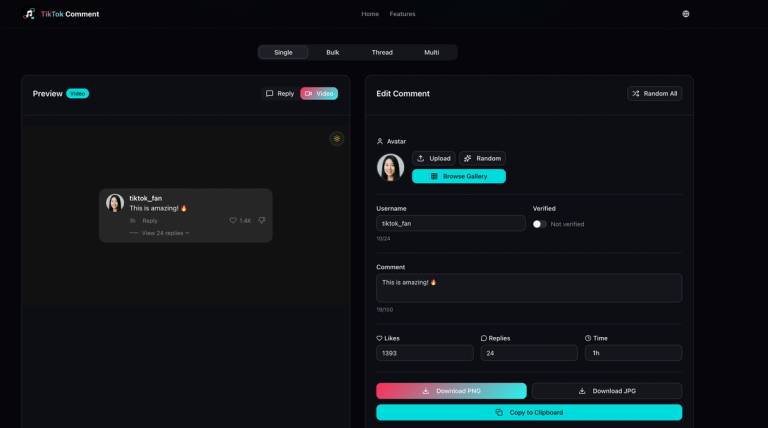
What the TikTok Comment Generator does
TikTok Comment Generator is a browser-based tool for making simulated TikTok-style comment images. Its website describes options for a custom avatar, username, likes, and timestamp, as well as reply mockups and image export. These are visual mockups: the available documentation does not say the tool posts comments to TikTok, connects to TikTok accounts, or increases real engagement. It is not an AI comment-writing tool on the evidence available here. The site’s description and title identify it as a comment maker for creating mockups, not as an official TikTok product. See the tool’s website.
The source available for this listing is the website’s title and metadata. The page returned successfully, but its main content requires JavaScript and was not interactively tested. Accordingly, this guide sticks to the features named in that metadata and does not assume particular editing modes, extra controls, file formats, or privacy behavior. The site describes the service as free and says no signup is required; those statements do not establish that use is unlimited or that no data is collected.
How to prepare a mockup
- Open the generator at tiktokcommentgenerator.net.
- Decide what the image is meant to explain: for example, a fictional interface example, a classroom discussion prompt, or a draft for a content presentation.
- Prepare the comment text and any intended username, avatar, like count, timestamp, or reply content. The website’s metadata identifies customization of avatar, username, likes, and timestamp, and mentions reply mockups. It does not document every available field or the exact editing sequence.
- Review the finished image for clarity and context before sharing. Make sure a viewer can tell it is a mockup, particularly if it includes realistic-looking account details or engagement numbers.
- Use the site’s described image export if you need a shareable visual. The available documentation does not specify export formats, dimensions, or whether transparent backgrounds are supported, so check the result before relying on it in a layout.
Illustrative examples
A teacher could prepare a clearly labeled fictional comment image to discuss how online conversations are presented. A creator could place a labeled sample reply in a presentation to show a proposed response style. A design team could use a mockup to review how a comment might fit into a campaign storyboard. These are examples of possible uses, not tested workflows or claims about the site’s built-in templates.
Do not present invented comments, usernames, likes, or timestamps as genuine audience activity. A convincing-looking image can mislead even when it was made for a harmless presentation. Keep labels such as “mockup” or “fictional example” visible wherever the image might be separated from its explanation. Avoid using real people’s identities or profile images without permission, and do not impersonate users or imply that TikTok endorsed the image.
Pricing and limits
The site’s metadata describes the generator as free and says no signup is required. No price is stated in that description. It does not verify unlimited use, a particular export format, or the absence of usage limits. Check the live site for current terms before depending on it for repeated or commercial work.
Limitations and safe use
This tool creates an image mockup; it is not documented as a way to publish a real comment, manage a TikTok account, or generate authentic social proof. Since the site’s interactive editor could not be verified from the available source, specific controls and output behavior may differ from the description. Treat the image as designed content, not evidence of a real conversation. Before distribution, review the site’s current terms and ensure you have rights to any text, avatar, or identifying material you include. Use clear disclosure and avoid deceptive, harassing, or impersonating material.