LogoAI Jet
Icon for Summernote

Summernote

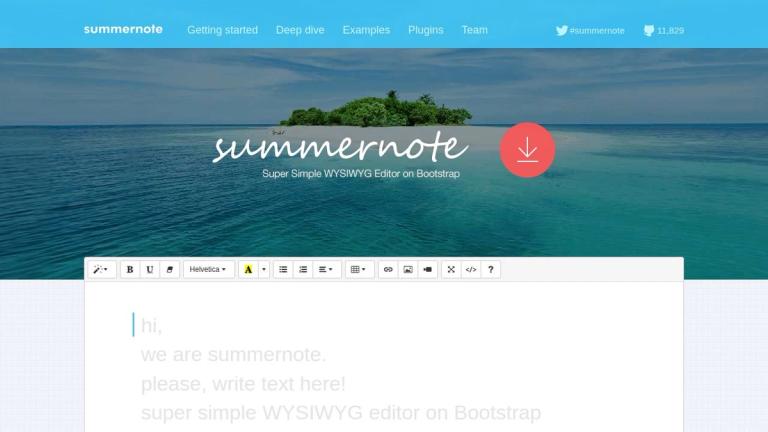
Super simple WYSIWYG editor built on Bootstrap and jQuery, offering a lightweight and easy-to-integrate rich text editing solution for web applications.

Introduction

Summernote

Summernote is a super simple WYSIWYG (What You See Is What You Get) editor built on top of Bootstrap and jQuery. It provides developers with a lightweight, easy-to-install rich text editing solution that can be seamlessly integrated into any web application.

Overview

Summernote stands out for its simplicity and ease of use. With just a few lines of code, developers can add a full-featured text editor to their web projects. The editor supports all major browsers (Safari, Chrome, Firefox, Edge) and operating systems (Windows, macOS, Linux), making it a versatile choice for diverse development environments.

Key Highlights
  • Open Source: Licensed under MIT and maintained by an active community
  • Framework Compatibility: Supports Bootstrap versions 3.x.x through 5.x.x
  • Backend Integration: Works with popular frameworks including Django, Rails, and Angular
  • Lightweight: At only 100KiB, it won't bloat your application
  • Rich Formatting: Supports headers, quotes, code blocks, text styling, alignment, lists, links, images, and videos
Getting Started

Simply download Summernote and attach the JavaScript and CSS files alongside Bootstrap. The editor can be customized by initializing various options and modules to fit specific project requirements.

Target Audience

Web developers, frontend engineers, full-stack developers, and teams building content management systems or web applications requiring rich text editing capabilities.

Key Features
  • Simple and Easy to Use UI
  • Lightweight: 100KiB
  • Supports Major Browsers: Safari, Chrome, Firefox, Edge
  • Cross-Platform: Windows, macOS, Linux
  • Bootstrap Compatible: 3.x.x to 5.x.x
  • Rich Text Formatting (Bold, Italic, Underline, Strikethrough)
  • Multiple Heading Levels (H1-H6)
  • Text and Background Color Customization
  • Link and Image Insertion
  • Video Embedding (YouTube, Vimeo, etc.)
  • List Management (Ordered and Unordered)
  • Text Alignment Options
  • Keyboard Shortcuts for Efficient Editing
  • Open Source MIT License
Use Cases
  • Blog and CMS content editing
  • Email composition interfaces
  • Comment and feedback forms
  • Documentation tools
  • Forum and community platforms
  • E-commerce product descriptions
  • Internal admin panels
  • Educational platforms
  • Any web application requiring rich text input
Pros
  • Extremely lightweight at 100KiB
  • Simple installation and setup
  • Open source with MIT license
  • Active community support
  • Wide browser and OS compatibility
  • Supports multiple Bootstrap versions
  • Easy backend integration
  • Customizable with various options and modules
Cons
  • Depends on jQuery and Bootstrap
  • May require additional plugins for advanced features
  • Limited built-in collaboration features
Pricing

Free and open source under MIT license

Latest News

Getting started

Getting started

8/4/2026

Get the latest Summernote LESS and Javascript source code by downloading it directly from GitHub. Download ### Clone or Fork via Github Visit us on GitHub to clone or fork the Summernote project. project ## Installation ### Requires HTML5 doctype Bootstrap uses certain HTML elements and CSS properti...

Plugins

Plugins

8/4/2026

this. initialize = function(){// This is how we can add a Modal Dialog to allow users to interact with the Plugin.// get the correct container for the plugin how it's attached to the document DOM.// Using the current latest development branch, you can now use $.summernote.interface;// to return whic...

Deep dive

Deep dive

8/4/2026

Summernote allows to add Notifications with Contextual Colouring to indicate the type of Notifcation, or to use the area for Informational Purposes. The area appears at the bottom of Summernote when used in Normal Mode, and at the top of the editing area when Summernote is used in Air Mode. To use t...

Summernote - Super Simple WYSIWYG editor

Summernote - Super Simple WYSIWYG editor

8/4/2026

### Open Source Summernote is licensed under MIT and maintained by the community. ### Integration Integrate it with any back-end. 3rd parties available in django, rails, angular. ### Features Simple and Easy to Use UI Lightweight: 100KiB Supports Browser: Safari, Chrome, Firefox, Edge Supports OS: W...

Examples

Examples

8/4/2026

## Hint Summernote supports autocomplete features, hint to help typing. You can define custom hints with options. Hint options can be an object or array for multiple hints. [...] Select a text to reveal the toolbar. Edit rich document on-the-fly, so elastic! End of air-mode area ## Themes with boots...

FAQ

More Products

TinyPNG is Tinify’s browser-based image compressor and converter. This review explains how its web tool differs from its Developer API, what each free allowance covers, and when its compression, conversion, resizing, and cropping features may fit an image workflow.

Zamzar is an online file conversion and compression service for documents, images, video, sound, and other formats. Its free web service has daily file and upload-size limits.

iLoveIMG is a browser-based image service for compression, resizing, cropping, conversion, and editing, with a free Basic plan and paid options.

Smallpdf is an online PDF toolkit for conversion, compression, editing, merging, signing, and more. Its Free plan includes 30+ tools but limits downloads.

Convertio is a browser-based service for converting files between supported formats, with optional settings for many conversion types.

FreeConvert is an online file converter with more than 1,500 listed conversion types and a free allowance of 20 conversion minutes per day.

HiPDF is an online PDF service with conversion, editing, compression, merging, cropping, image tools, and AI features.

123apps is a browser-based suite of video, audio, PDF, and file-conversion tools. Its apps are free to use with limits on file size and daily operations.

ChatPDF summarizes PDFs and answers questions about them. Its free plan allows two document analyses per day, with no account needed to get started.

CloudConvert is a browser-based converter for more than 200 file formats, including documents, images, audio, video, archives, and specialist formats.

OCR.space provides free browser-based OCR for images and PDFs, searchable PDF creation, and a separate API for adding text recognition to software.

Free online itinerary maker with 900+ trip plans across 96 countries. Edit day-by-day in the browser; export to PDF, Excel, CSV, Google Sheets or .ics. Free account required to download/print. Optional Pro adds premium themes; AI chat helps draft plans.

TasteDir is a curated directory of finished, well-crafted software from indie makers and small teams. Every listed tool is reviewed by hand.

An AI meeting copilot that combines live transcripts, screenshots, and project documents to deliver contextual answers, response drafts, and meeting recaps.

Create professional invoices free in your browser: live preview, any currency, tax and discounts, custom templates, and no-watermark PDF. No signup needed.

Vidsembly is an AI video creation platform that turns PowerPoint presentations, PDFs, and documents into narrated videos. Create AI presentations, clone voices, translate slides, transcribe recordings, generate soundtracks, and host videos in one place.