LogoAI Jet
Icon for Lucidchart

Lucidchart

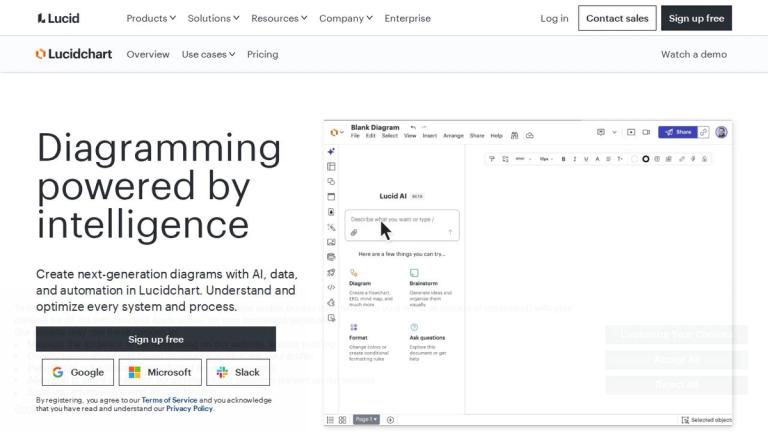
AI-powered intelligent diagramming platform for creating, understanding, and optimizing systems and processes with data and automation.

Introduction

Lucidchart

Lucidchart is a cloud-based intelligent diagramming application that enables users to create next-generation diagrams powered by AI, data, and automation. As part of the broader Lucid Suite (which includes Lucidspark for virtual whiteboarding and airfocus for product management), Lucidchart serves as a comprehensive visual workspace for teams to understand, document, and optimize every system and process.

The platform is designed to replace traditional diagramming tools like Microsoft Visio, offering modern cloud-native capabilities with real-time collaboration. It supports a wide range of diagram types including flowcharts, org charts, UML diagrams, network diagrams, wireframes, and more.

Lucidchart caters to diverse teams across IT, engineering, product & UX, project management, and operations, serving industries from healthcare and education to financial services and public sector organizations. The platform emphasizes enterprise-grade security and offers specialized accelerators for cloud infrastructure planning and process governance.

Target Audience

IT teams, engineering teams, product & UX designers, project managers, operations teams, educators, and enterprises across industries including healthcare, financial services, public sector, and consulting.

Key Features
  • AI-powered diagramming assistance
  • Real-time team collaboration
  • Data linking and visualization
  • Process documentation and mapping
  • Technical diagramming (UML, network, architecture)
  • Org chart and team visualization
  • Cloud infrastructure visualization
  • Automation capabilities
  • Template library
  • Integrations with popular tools
  • Developer platform access
  • Enterprise security controls
Use Cases
  • Process documentation and mapping
  • Visualizing team structures and organizations
  • Technical diagramming for engineering teams
  • Documenting systems architecture and infrastructure
  • AI-assisted diagram creation
  • Interactive learning and education
  • Microsoft Visio replacement
  • Cloud migration planning
  • Digital transformation initiatives
  • Agile workflow visualization
Pros
  • Cloud-based with real-time collaboration
  • AI-powered features for faster diagramming
  • Extensive template library
  • Strong enterprise security options
  • Integrates with popular platforms (Google, Microsoft, Slack)
  • Free tier available for individual users
  • Scalable for teams of all sizes
Cons
  • Advanced features require paid subscription
  • May have learning curve for complex diagrams
  • Enterprise features may be costly for small teams
Pricing

Free tier available with sign-up; paid plans for teams and enterprises with additional features and security controls.

Latest News

FAQ

User Reviews

4.0/5.0
(33reviews)
Click stars to rate

Pricing

Pricing Model: Freemium

Free

Basic plan with limited features including 3 editable documents and 100 templates.

Free
free

Individual

Everything on Free, plus unlimited documents, premium features, and 1 GB storage.

$9/month
monthly

Team

Everything on Individual, plus collaboration tools, integrations, and advanced controls.

$10/user/month
monthly

Enterprise

Everything on Team, plus enterprise security, compliance, and advanced integrations.

Contact sales
custom

More Products

TinyPNG is Tinify’s browser-based image compressor and converter. This review explains how its web tool differs from its Developer API, what each free allowance covers, and when its compression, conversion, resizing, and cropping features may fit an image workflow.

Zamzar is an online file conversion and compression service for documents, images, video, sound, and other formats. Its free web service has daily file and upload-size limits.

iLoveIMG is a browser-based image service for compression, resizing, cropping, conversion, and editing, with a free Basic plan and paid options.

Smallpdf is an online PDF toolkit for conversion, compression, editing, merging, signing, and more. Its Free plan includes 30+ tools but limits downloads.

Convertio is a browser-based service for converting files between supported formats, with optional settings for many conversion types.

FreeConvert is an online file converter with more than 1,500 listed conversion types and a free allowance of 20 conversion minutes per day.

HiPDF is an online PDF service with conversion, editing, compression, merging, cropping, image tools, and AI features.

123apps is a browser-based suite of video, audio, PDF, and file-conversion tools. Its apps are free to use with limits on file size and daily operations.

ChatPDF summarizes PDFs and answers questions about them. Its free plan allows two document analyses per day, with no account needed to get started.

CloudConvert is a browser-based converter for more than 200 file formats, including documents, images, audio, video, archives, and specialist formats.

OCR.space provides free browser-based OCR for images and PDFs, searchable PDF creation, and a separate API for adding text recognition to software.

Free online itinerary maker with 900+ trip plans across 96 countries. Edit day-by-day in the browser; export to PDF, Excel, CSV, Google Sheets or .ics. Free account required to download/print. Optional Pro adds premium themes; AI chat helps draft plans.

TasteDir is a curated directory of finished, well-crafted software from indie makers and small teams. Every listed tool is reviewed by hand.

An AI meeting copilot that combines live transcripts, screenshots, and project documents to deliver contextual answers, response drafts, and meeting recaps.

Create professional invoices free in your browser: live preview, any currency, tax and discounts, custom templates, and no-watermark PDF. No signup needed.

Options research platform with live data. Scan for puts and calls, compare strikes in a yield matrix, model strategies, and journal every trade.