

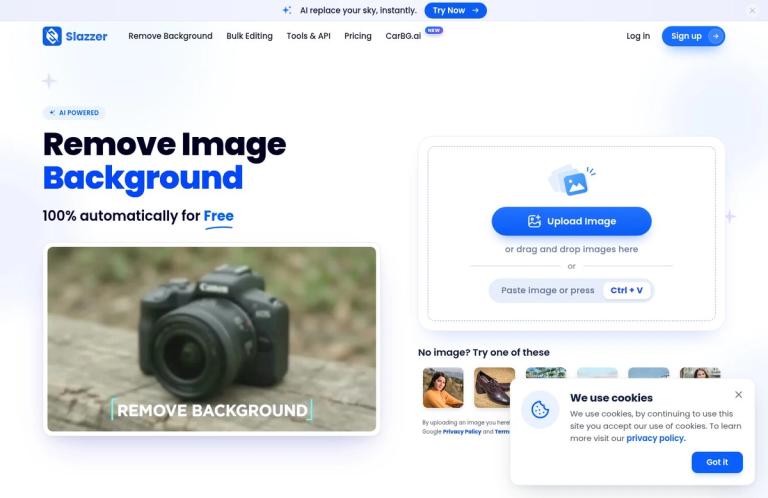
What Slazzer does
Slazzer is an online background-removal tool. Its official website lets you upload an image and process it into a cutout, with a preview and editing and download options shown in the workflow. The service is focused on separating a foreground subject from its background. That makes it relevant when you want to prepare a product photo, portrait, vehicle image, graphic, or other clear subject for use in a different design. It is not necessary to begin with a complicated editing workflow: the site presents upload and background removal as the central task.
The most important purchasing distinction is between a website preview and a higher-resolution image. Slazzer says previews on slazzer.com are free and have a resolution of up to 0.25 megapixels. Its pricing page gives 625 × 400 pixels as an example. Full-HD images use credits. The website therefore provides a way to inspect a cutout without making the preview equivalent to a free, full-resolution export. If you need a finished image for a particular platform or layout, check the dimensions available to you before treating a preview as the final file.
The homepage upload area lists JPG, PNG, and WebP inputs and a maximum of 50 megapixels. Those are the specifications shown beside the current uploader; they describe accepted inputs, not the dimensions of a free preview or a guarantee that every image will produce the same result. The pricing page also has a separate FAQ with different file specifications. If file size or maximum input resolution is critical to your task, check the live upload interface and current terms for the relevant workflow before preparing a large batch.
Slazzer also presents features beyond background removal, including AI Upscale, AI Enhance, AI Sky Replacement, AI Shadow, and AI De-oldify. Its pricing page lists these features and gives separate credit costs for several preview and HD operations. They make the service more than a single-purpose upload page, but they should be treated as distinct jobs with their own costs—not as free extras included in every background-removal preview. The site also offers a web editor with options including backgrounds, paint and erase, text, and logos. Check the interface and credit requirements for the particular edit you intend to make.
The free boundary
Slazzer’s website previews are the clearest free starting point. The official pricing page describes unlimited free previews on slazzer.com only, at up to 0.25 megapixels. “Unlimited” here refers to the website preview offer; it does not mean unlimited free high-resolution downloads, API use, desktop-app processing, or full access to every feature. The pricing page says previews through the API cost 0.20 credit each. Website and API allowances are different, so someone planning an integration should not use the website preview offer as an estimate of API costs.
The same pricing page lists a Free plan with two free credits, and says that signing up provides two free high-resolution images. These are signup-related credits, not a promise of recurring free full-HD downloads. The page does not explain every eligibility condition. If you want to use them, check the account and pricing screens during signup and confirm which output they cover before relying on them for a job.
A useful way to assess the free offer is to try a representative image and decide whether the preview is sufficient for your purpose. For example, if you only want to see whether the subject has been separated from its background before choosing an editing approach, a small preview may be useful. If you are preparing a product image for a listing with specific pixel requirements, check whether the preview meets those requirements; if it does not, budget for a higher-resolution option. These are workflow suggestions, not claims based on tests of particular images.
Credits, plans, and output differences
Slazzer’s pricing page says that one full-HD image uses one credit. It also lists credit-based costs for other functions. For background removal, the pricing breakdown assigns 0.20 credit to a preview image and one credit to an HD image; the FAQ clarifies that website previews are free only on slazzer.com and cost 0.20 credit through the API. This distinction matters if you use Slazzer outside the website or combine background removal with other tools. Check the price attached to the exact workflow you are using rather than assuming that every preview is free in every product.
The page lists a subscription starting at 100 credits per month for $11, alongside larger monthly tiers. It also lists top-up purchases starting at 10 credits for $6. Subscription and top-up credits serve different needs: the official FAQ describes top-ups as an option for one-time jobs, while subscriptions are intended for ongoing requirements. Subscription credits can roll over up to six times the monthly allowance while subscribed. Purchased top-up credits can be used within two years of purchase. Prices exclude VAT where applicable for subscriptions; the pricing page notes that VAT may be included for top-ups. Confirm the current total and terms on the official pricing page before purchasing.
For a small one-off task, estimate the number of HD images you need and compare that with a top-up. For repeated work, consider whether a monthly subscription and its rollover terms suit your expected volume. A simple planning example: if you have a collection of product photos, count the images that actually need HD output, rather than counting previews as if they were HD downloads. Then check whether other actions, such as AI Shadow or AI Upscale, will add credits. The pricing page lists separate costs for those operations; the background-removal rate alone will not describe the total cost of an edited image.
Slazzer also promotes apps for Windows, Mac, and Linux, a Photoshop extension, and integrations. Its pricing FAQ says credits can be used across Slazzer products for full-HD downloads, with one image generally costing one credit, while preview images are free only on the website. If you are choosing a desktop or plugin workflow, check its applicable preview and download rules rather than assuming the web offer applies unchanged. The homepage says its desktop app supports bulk work, and the current web uploader says you can upload up to 10 images at a time. The homepage directs users who need bulk image processing to the desktop app.
A practical workflow
- Open the Slazzer background-removal page and choose an image in a listed format. The uploader currently displays JPG, PNG, and WebP, with a 50 MP maximum.
- Upload a representative image. The site allows up to 10 images at a time in its web uploader; if you are planning a larger batch, review the desktop-app option and its terms.
- Inspect the preview before deciding on an HD download. Look around the subject’s edges and check whether the cutout suits its intended use. This is a recommended quality check, not a claim that every image will produce a particular result.
- Decide whether the preview’s resolution is adequate. Slazzer states that website previews are up to 0.25 MP. For a specific design or listing, compare the image dimensions with the destination’s requirements.
- If you need HD output or want to use another feature, check the credits required in the current interface and your available balance. The pricing page states one credit per HD image and lists separate costs for tools such as AI Upscale and AI Shadow.
- Download the result and check it in the destination where you plan to use it. Confirm that the file’s appearance, dimensions, and format meet your needs. If you need further edits, use the Slazzer editor options shown in the interface or another editor that offers the controls you require.
Who may find it useful
Slazzer is a reasonable fit when background removal is the main job and you want to evaluate a cutout before paying for higher-resolution output. Its examples and official descriptions emphasize subjects such as products, people, cars, and animals, while the pricing FAQ says images should have a clearly foregrounded subject. A seller could use a preview to assess whether a product is separated cleanly before preparing an HD listing image. A designer could use a cutout as one component in a larger composition. These examples describe possible workflows; they are not guarantees about the result for a specific file.
The site’s additional features may also suit users who want several image operations in one service. AI Upscale is presented as a way to enlarge images, AI Shadow adds shadows, AI Sky Replacement changes the sky, AI Enhance adjusts image quality, and AI De-oldify colorizes old black-and-white photos. The pricing page assigns credit costs to these operations. If you need a particular combination, review the relevant operation and cost before starting, since background-removal pricing does not automatically cover every enhancement.
For regular or large-scale use, Slazzer advertises a desktop application, API, and integrations. The official pricing FAQ says the REST API can be used to integrate background removal into a website or app, and gives a capacity of up to 500 images per minute, with higher rate limits available on request. That API figure is not a web-uploader allowance or a free quota. If you are planning automated processing, review the API documentation and pricing separately. The homepage’s up-to-10-images web upload and bulk-oriented desktop app are different entry points for different job sizes.
Slazzer may be less suitable if you require an entirely free, full-resolution service, because its pricing distinguishes free website previews from credit-based HD images. It may also be a poor fit if your workflow depends on a specific output format, exact dimensions, or detailed manual masking controls that you have not confirmed in the current editor. Check those requirements before processing a large set or using the output in a client deliverable.
Limits and privacy
A 50 MP input allowance is not the same as a 50 MP free result. The homepage lists the input maximum, while the pricing page sets the free website preview at up to 0.25 MP and charges credits for HD images. The pricing FAQ describes different input limits for its stated upload conditions, so check the current uploader and applicable workflow if exact file size or resolution is essential. Do not infer output dimensions from the input limit.
The official site describes Slazzer as an automatic background remover and says it works well with clear foreground subjects, including products, people, and cars. That description is not an accuracy guarantee for every image. As practical advice, inspect complex edges and any areas where subject and background are difficult to distinguish before using a cutout as a finished asset. If the result needs corrections, determine whether the editor controls available to you are sufficient.
Slazzer says on its pricing page that it is GDPR compliant and links to its Privacy Policy. That is the vendor’s statement, not an independent safety assessment. If an image contains personal, confidential, or client information, read the current Privacy Policy and terms before uploading it. The official text also presents an optional image-contribution choice for quality improvement. Review that choice and its conditions if it appears in your workflow.
Alternatives and verdict
If you want to compare dedicated background-removal services, remove.bg is a relevant alternative. Compare current preview and HD terms rather than assuming its free boundary or pricing matches Slazzer. If you need broader image editing after making a cutout, Photopea may be worth considering; Photoroom is another option to investigate for product-image preparation. These alternatives address related workflows, but are not claims of identical features or plans.
Slazzer’s strengths are its direct background-removal workflow, free website previews, listed image inputs, and options for HD downloads, editing, and bulk or developer use. Its principal free-use limit is clear: website previews are free up to 0.25 MP, while higher-resolution output and some other workflows use credits. The pricing page lists two free credits for the Free plan and two signup-related HD images, but those should not be mistaken for recurring free downloads.
For occasional work, try a representative image on the website, check whether the preview is useful, and confirm the cost of any HD output before proceeding. For ongoing work, compare the subscription and top-up terms with your actual image volume; for API use, account separately for its preview charges. Slazzer is worth considering when background removal is the task and its preview-and-credit model fits. Verify dimensions, costs, and privacy terms for your specific workflow before relying on it for production.


