

HEICtoJPG.com
HEICtoJPG.com is a service for uploading HEIC photos and converting them to JPEG. Its homepage labels the web conversion free, says no account or software installation is required, and advertises conversion of up to 200 photos. The site says conversion starts automatically after users choose or drop photos. These are the published descriptions of the web flow; they do not independently establish how a particular file will convert or how long processing takes.
There are important qualifications. The FAQ says converted JPEGs are automatically optimized using JPEGmini, but the official site does not specify image-quality controls or output settings. The homepage says files are deleted immediately after conversion, while the FAQ says content is removed from Beamr’s systems within 48 hours after upload. Those statements are not reconciled. The Terms also prohibit commercial use and grant Beamr a broad license to submitted content in connection with providing the service, including internal use to improve it. Consider these points before uploading sensitive material or using the service for work.
This review is based on official descriptions and terms, not hands-on testing. The official site does not confirm whether a particular file will convert successfully or exactly how the download process works. The homepage promotes JPEGmini as a way to unlock unlimited HEIC-to-JPEG conversions, but does not provide a price or plan terms. The free web conversion flow is the clearly advertised free offering; the terms of the unlimited-conversion offer remain unspecified.
What HEICtoJPG.com does
The stated conversion task is narrow: upload HEIC photos and convert them to JPEG. The FAQ says the service currently converts HEIC to JPEG images only, not JPEG to HEIC. Based on that description, it is a one-way converter rather than a general image-format converter.
The homepage describes the service as powered by JPEGmini. The FAQ says a converted JPEG is automatically optimized using JPEGmini. The Terms describe the service more broadly as enabling users to convert and optimize photos and videos and reduce their size while maintaining quality to the extent possible. However, the homepage says video conversion is coming soon. The broader Terms wording should not be taken as confirmation that video conversion is currently available through the web flow.
The FAQ says HEIC is the file extension for HEIF format and describes HEIF as a format for HEVC-encoded images. It also associates the .heic extension with photos exported from iOS 11. This provides context for the stated conversion use: converting HEIC photos to JPEG. The official site does not confirm compatibility with other input extensions or explain how the service handles unusual files.
How the web workflow is described
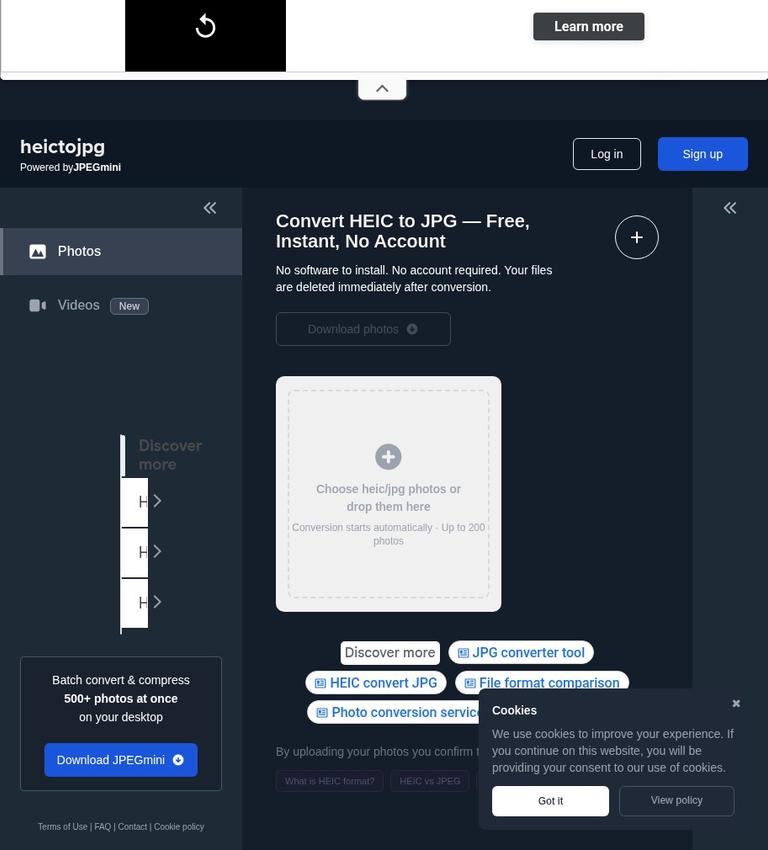
The homepage presents an upload flow in which users choose or drop photos and conversion starts automatically. Its selection area says, “Choose heic/jpg photos or drop them here,” and the homepage advertises a limit of up to 200 photos. The official site does not explain why the chooser label mentions JPG when the FAQ describes conversion as HEIC to JPEG only. The FAQ’s stated conversion direction is HEIC to JPEG; the material does not support assuming that JPG files can be converted back to HEIC.
The service says no software needs to be installed and no account is required for the web flow. The homepage also displays a “Download photos” control. That confirms the presence of a download control, but the official site does not explain when converted files become downloadable, whether they are downloaded individually or together, or what happens if a conversion fails.
If the practical details matter to you, consider trying the flow with a non-sensitive file before relying on it for an important batch. This is a general precaution, not a claim that the service has a test mode or preview feature. No published official description establishes a preview mode or says whether a preview differs from a downloadable result.
The homepage advertises up to 200 photos for the web conversion flow. The official site does not specify a maximum file size, total upload size, or other technical restrictions. The 200-photo figure should not be read as a guarantee that any 200 files, whatever their size or condition, will process. For larger batches, the homepage separately advertises a desktop option for batch conversion and compression of 500 or more photos at once. The supported desktop operating systems and the relationship between that option and the web service are not specified.
Free use and the JPEGmini offer
The homepage calls the web conversion free, says no account is required, invites users to select or drop photos, and says conversion starts automatically for up to 200 photos. This supports describing the advertised free value as the web conversion flow rather than merely a preview. It does not independently verify successful downloads or establish every operational detail.
The homepage also promotes JPEGmini with the message “Unlock unlimited HEIC to JPEG conversions.” This is distinct from the web flow’s stated limit of up to 200 photos, but it is not enough to describe a specific paid plan. The official site does not give a price, billing frequency, purchase conditions, or an exact list of what a JPEGmini purchase includes. It also does not say whether the unlimited-conversion offer applies to the desktop product, the web converter, or both. Treat “unlimited” as an advertised claim whose terms are unspecified.
The homepage advertises a downloadable JPEGmini product and a desktop workflow for batch conversion and compression of 500 or more photos at once. These are separate product descriptions; the official site does not confirm that either is included in the free web flow. The available material does not confirm the price or terms of the downloadable product or desktop option.
Limits, accounts, and platform
For the web converter, the stated numerical boundary is up to 200 photos. The separate desktop promotion says 500 or more photos at once, but does not identify supported operating systems. No published official quote establishes a mobile app, API, or specific browser compatibility. “No software to install” describes the web workflow; it does not confirm which devices or browsers are supported.
The homepage says an account is not required for conversion, although it also displays “Log in” and “Sign up” options. The official site does not explain what those options are for. They should not be treated as a conversion requirement or as proof of a particular account feature.
The official site does not specify controls for JPEG quality, output encoding, metadata, or compression settings. Since the FAQ says JPEGmini optimization happens automatically, the official description does not confirm that users can select an optimization level. If specific metadata or output settings matter, the official site does not show whether the service can meet those requirements.
Privacy, content terms, and commercial use
The homepage says files are deleted immediately after conversion. The FAQ gives a different time frame, saying content is removed from Beamr’s systems within 48 hours from upload. Both are official statements, and the official site does not reconcile them. It would be inaccurate to present immediate deletion as a settled account of the retention period. If the timing matters, review the current policy and terms before uploading.
The Terms identify Beamr Imaging Ltd. as the company entering into the service agreement. They grant Beamr a nonexclusive, worldwide, royalty-free, perpetual, irrevocable, sublicensable, and transferable right to use, process, store, copy, reproduce, reformat, translate, modify, and create derivative works of submitted content in connection with providing the service. The Terms also say Beamr may use content internally to improve the service. The same passage says this does not affect the user’s ownership or ability to grant additional licenses. That qualification does not remove the license granted to Beamr.
The Terms prohibit using or accessing the service for commercial purposes. This is a material limitation for business workflows: the official terms do not confirm that the service is permitted for commercial use. If you are considering it for work, a client, or a commercial project, the prohibition is relevant and should not be overlooked.
The cookie policy says the site uses cookies to distinguish visitors and provide a browsing experience unique to them. It says automatically collected information may include IP address, login information, device and browsing details, and page interactions. It also warns that blocking cookies may prevent access to some areas or cause some functions and pages not to work as usual. These statements concern the website’s cookie practices; they do not resolve the separate questions about uploaded-file handling or the differing deletion statements.
The Terms say the service and site are intended for individuals aged 13 or older, require users accessing and using them to represent that they are at least 18, and direct users aged 13 to 18 to review the Terms with a parent or guardian. These are the age conditions stated in the Terms.
Who should consider it—and who should look elsewhere
HEICtoJPG.com may suit someone who has HEIC photos, wants JPEG output, and prefers a web flow the homepage describes as free and account-free. The advertised limit is up to 200 photos, and the site says conversion starts automatically after users choose or drop photos. These descriptions make the intended use clear, although they do not confirm that a particular batch will process successfully.
It is a weaker fit if you need reverse conversion, documented output controls, or a firm account of download behavior. The FAQ says the current conversion direction is HEIC to JPEG only, and the official site does not specify quality controls, metadata handling, or support beyond the stated conversion. The Terms prohibit commercial use, so the official site does not support recommending the service for commercial work.
Avoid uploading photos if the content license or uncertainty around deletion timing is unacceptable to you. The homepage’s immediate-deletion wording and the FAQ’s within-48-hours statement leave a material question unanswered. For sensitive material, consider whether the documented terms and unresolved timing suit your needs before uploading.
If you want to compare other image workflows, you can also review iLoveIMG and FreeConvert. These links are to related listings, not claims that either service supports a particular format, has a particular price, or offers better privacy or controls. Compare their current official details against your requirements.
Verdict
HEICtoJPG.com has a plainly stated purpose and an advertised web workflow: convert HEIC photos to JPEG without installing software or creating an account, for up to 200 photos. The homepage labels the conversion free, and a separate desktop option is promoted for larger batches. Important details remain unspecified, including download behavior, file-size limits, output controls, desktop platform support, and the terms behind the JPEGmini unlimited-conversion offer.
The most consequential caveats concern the terms and data handling. The deletion statements differ in timing, the Terms grant Beamr a broad license over submitted content, and commercial use is prohibited. The web converter may be worth considering for a non-commercial HEIC-to-JPEG task if those conditions suit you, but this review does not test its results. If you need certainty about privacy, business permissions, or specific output settings, the official site does not resolve those questions.
Frequently asked questions
Is HEICtoJPG.com free?
The homepage labels the web conversion service free and says no account is required. It also promotes JPEGmini for unlimited HEIC-to-JPEG conversions, but the official site does not state a price or purchase terms. The advertised free value is the web conversion flow; the unlimited offer’s terms are unspecified.
How many photos can you convert on the website?
The homepage says the web flow handles up to 200 photos. It separately advertises a desktop option for batch conversion and compression of 500 or more photos at once. Supported desktop operating systems are not specified.
Can it convert JPEG back to HEIC?
No, according to the FAQ. It says HEICtoJPG can currently convert HEIC to JPEG images only and does not convert JPEG to HEIC.
Do you need an account or software?
The homepage says no account is required and no software needs to be installed for the web conversion flow. It also displays “Log in” and “Sign up” options, but does not say they are necessary for converting photos.
When are uploaded files deleted?
The homepage says files are deleted immediately after conversion. The FAQ says content is removed from Beamr’s systems within 48 hours after upload. The official site does not reconcile those statements, so the precise timing is unclear.
Can you use the service for commercial work?
The Terms prohibit using or accessing the service for commercial purposes. The official terms therefore do not support treating it as permitted for business or client work.


