LogoAI Jet
Icon for Akkadu

Akkadu

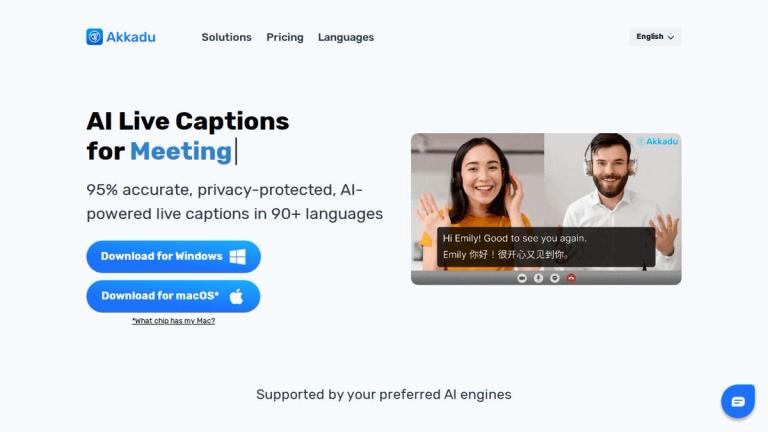
AI-powered live captions software supporting 90+ languages with 95% accuracy for meetings, events, and live streams.

Introduction

Akkadu AI Live Captions

Akkadu is a professional-grade AI live captioning solution that delivers real-time translated captions in over 90 languages with 95% accuracy. Designed for global businesses and organizations, it seamlessly integrates with popular video conferencing platforms, event venues, and live streaming services.

Key Capabilities

The software supports multiple leading AI engines including Microsoft, Google, iFlytek, OpenAI Whisper, and Deepseek, allowing users to select the optimal translation engine for their specific needs. Akkadu prioritizes privacy protection and offers extensive customization options including custom glossaries, accent recognition, and visual styling controls.

Trusted by Industry Leaders

Akkadu is trusted by over 50,000 professionals globally, with notable clients including Lenovo, Nvidia, IBM, PwC, Siemens, General Motors, and Harvard University, demonstrating its reliability for enterprise-level multilingual communication needs.

Platform Availability

Available for both Windows and macOS (supporting both Intel and Apple Silicon chips), Akkadu provides flexible deployment options for diverse organizational environments.

Target Audience

Global enterprises, event organizers, international conference hosts, remote teams, educational institutions, content creators, and professionals requiring multilingual communication

Key Features
  • AI Model Selection - Choose from multiple translation engines (Google, Microsoft, iFlytek, OpenAI, Deepseek)
  • 90+ Language Support with 95% accuracy
  • Accent Recognition - Specify speaker origin for improved translation quality
  • Custom Glossaries - Upload unique terminology and proper names
  • Safety Filter - Filter sensitive or profane words in real-time
  • Visual Control - Customize font styles, colors, and backgrounds
  • Privacy-Protected Processing
  • Cross-Platform Support (Windows & macOS)
  • Compatible with major video conferencing platforms (Zoom, Teams, Webex, Google Meet)
  • Live streaming integration (Facebook, YouTube, LinkedIn, Instagram, TikTok, WeChat)
Use Cases
  • Virtual Meetings & Webinars - Real-time captions for video conferences
  • Events & Conferences - Multilingual captions displayed on screens during international events
  • Live Streams - Translated captions for streaming platforms
  • Corporate Communications - International town halls and team meetings
  • Educational Institutions - Academic conferences and lectures
  • Global Business Collaboration - Cross-border team communication
Pros
  • Supports 90+ languages with high 95% accuracy
  • Multiple AI engine options for flexibility
  • Privacy-focused solution
  • Extensive customization options
  • Compatible with all major platforms
  • Trusted by Fortune 500 companies
  • Free tier available to start
Cons
  • Requires download and installation
  • macOS version has separate downloads for Intel and Apple chips
  • Advanced features may require paid subscription
Pricing

Free tier available with "Start for Free" option; paid plans available (specific pricing details on website)

Latest News

AI Live Captions: 90+ Languages, Accurate & Secure Software

AI Live Captions: 90+ Languages, Accurate & Secure Software

8/4/2026

Lenovo improves global team collaboration using Akkadu AI live captionsNvidia utilizes Akkadu real-time translation for multilingual tech conferencesIBM streamlines international webinars with Akkadu AI-powered live captioningPwC enhances accessibility for global financial events with real-time subt...

5 Steps To Live Translate Teams Meetings | AI Live Captions

5 Steps To Live Translate Teams Meetings | AI Live Captions

8/4/2026

If the problem still persists, contact us at (/cdn-cgi/l/email-protection#e0838f8e94818394a0818b8b818495cd9485818dce838f8d) ### Problem 3: Akkadu app is not updating to the latest version After you click “Update”, the app is not updating and the blue button always keeps showing: Notion image To avoi...

5 Steps To Translate Your Live Stream | AI Live Captions

5 Steps To Translate Your Live Stream | AI Live Captions

8/4/2026

For low performance computers you may have to do this every 2 hours. We recommend you use a computer with at least 16 GB RAM memory. If the problem still persists, contact us at (/cdn-cgi/l/email-protection#670408091306041327060c0c0603124a1302060a4904080a) ### Problem 3: Akkadu app is not updating t...

5 Steps: Translate Your YouTube Live Stream | AI Live Captions

5 Steps: Translate Your YouTube Live Stream | AI Live Captions

8/4/2026

1. Start your YouTube live stream with live captions Real Case News channels use Akkadu to provide Spanish live captions during White House press conferences: In addition, we share Problems you may encounter & how to solve them How to obtain the transcription How to improve the accuracy Why Akkadu i...

Get Real Time Chinese Translation for Your Meetings

Get Real Time Chinese Translation for Your Meetings

8/4/2026

Download Akkadu software here ➡️ Download Now! New registrations will get 10 minutes of FREE real time Chinese translation. How to improve the

FAQ

More Products

TinyPNG is Tinify’s browser-based image compressor and converter. This review explains how its web tool differs from its Developer API, what each free allowance covers, and when its compression, conversion, resizing, and cropping features may fit an image workflow.

Zamzar is an online file conversion and compression service for documents, images, video, sound, and other formats. Its free web service has daily file and upload-size limits.

iLoveIMG is a browser-based image service for compression, resizing, cropping, conversion, and editing, with a free Basic plan and paid options.

Smallpdf is an online PDF toolkit for conversion, compression, editing, merging, signing, and more. Its Free plan includes 30+ tools but limits downloads.

Convertio is a browser-based service for converting files between supported formats, with optional settings for many conversion types.

FreeConvert is an online file converter with more than 1,500 listed conversion types and a free allowance of 20 conversion minutes per day.

HiPDF is an online PDF service with conversion, editing, compression, merging, cropping, image tools, and AI features.

123apps is a browser-based suite of video, audio, PDF, and file-conversion tools. Its apps are free to use with limits on file size and daily operations.

ChatPDF summarizes PDFs and answers questions about them. Its free plan allows two document analyses per day, with no account needed to get started.

CloudConvert is a browser-based converter for more than 200 file formats, including documents, images, audio, video, archives, and specialist formats.

OCR.space provides free browser-based OCR for images and PDFs, searchable PDF creation, and a separate API for adding text recognition to software.

Free online itinerary maker with 900+ trip plans across 96 countries. Edit day-by-day in the browser; export to PDF, Excel, CSV, Google Sheets or .ics. Free account required to download/print. Optional Pro adds premium themes; AI chat helps draft plans.

AI manga translator that re-letters your language into the art

TasteDir is a curated directory of finished, well-crafted software from indie makers and small teams. Every listed tool is reviewed by hand.

An AI meeting copilot that combines live transcripts, screenshots, and project documents to deliver contextual answers, response drafts, and meeting recaps.

Create professional invoices free in your browser: live preview, any currency, tax and discounts, custom templates, and no-watermark PDF. No signup needed.