LogoAI Jet
Icon for Canary Mail

Canary Mail

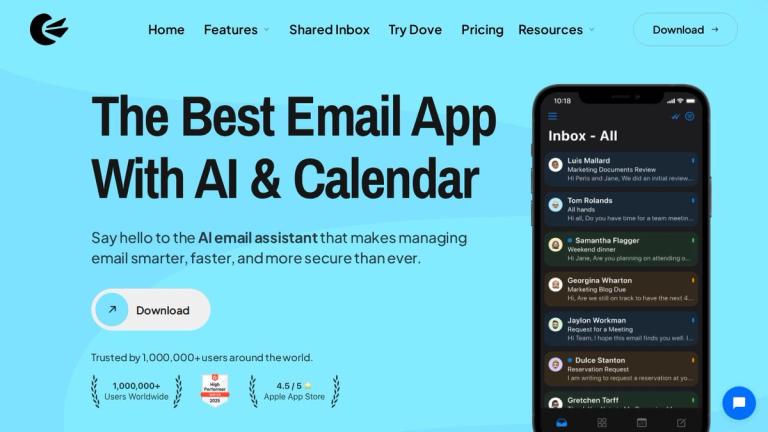
AI-powered email app with calendar integration that unifies multiple email accounts into one smart, secure inbox for individuals and teams.

Introduction

Canary Mail

Canary Mail is a premium email client that combines artificial intelligence with robust security features to deliver a superior email management experience. Trusted by over 1,000,000 users worldwide and backed by Sequoia Capital, Canary Mail is used by teams at leading organizations including Netflix, NVIDIA, Stanford University, MIT, Okta, GitHub, Atlassian, Pepsi, and Oxford University.

The app serves as a unified email hub, allowing users to manage multiple email accounts from providers like Gmail, Outlook, Exchange, iCloud, ProtonMail, and Zoho Mail through a single, intuitive interface. With its built-in AI email assistant, Canary Mail helps users write better emails, manage their inbox more efficiently, and achieve Inbox Zero faster than ever.

Canary Mail also features integrated calendar functionality, making it a comprehensive productivity tool that goes beyond traditional email clients. The platform emphasizes security with end-to-end encryption and privacy-focused features, ensuring that sensitive communications remain protected.

Target Audience

Professionals, teams, and individuals who manage multiple email accounts and value security, AI assistance, and productivity features

Key Features
  • AI email assistant for smart composing and email management
  • Unified inbox for multiple email accounts (Gmail, Outlook, Exchange, iCloud, ProtonMail, Zoho)
  • Built-in calendar integration
  • End-to-end encryption and advanced security features
  • Inbox Zero tools and smart email organization
  • Team collaboration and shared inbox capabilities
  • Cross-platform availability
Use Cases
  • Managing multiple personal and work email accounts from one app
  • Achieving Inbox Zero with AI-powered email prioritization
  • Secure email communication for privacy-conscious users
  • Team email collaboration with shared inbox features
  • Professional email writing with AI assistance
  • Scheduling and calendar management alongside email
Pros
  • Backed by Sequoia Capital with strong enterprise credibility
  • Trusted by 1M+ users and major organizations
  • Strong security and encryption features
  • AI-powered email assistance
  • Unified inbox for all major email providers
  • Integrated calendar functionality
Cons
  • Premium features may require paid subscription
  • May have a learning curve for users switching from simpler email clients
Pricing

Free download available with premium plans; visit canarymail.io/pricing for details

Latest News

What’s New in Canary Mail | Latest Updates & Release Notes - ...

What’s New in Canary Mail | Latest Updates & Release Notes - ...

8/5/2026

Read more about our commitment to reliability and scale and our enterprise-grade infrastructure. Recent Canary Mail updates have focused on stability improvements, crash fixes, Todoist integration reliability, compose suggestion controls, folder management, calendar behavior, screenshot and video sh...

Recent Announcements from Canary Mail | Frill.co

Recent Announcements from Canary Mail | Frill.co

8/5/2026

A maintenance-focused update to address a few key issues and improve overall stability. Fixed: 📥 Gmail Account Setup - Resolved a crash that could occur while adding a Gmail account. Fixed: 📎 PDF Email Loading - Emails with PDF attachments now load correctly. Fixed: 🛠️ Stability Improvements - Inclu...

Canary Mail Updates 2025: Timeline and Key Improvements - Canary ...

Canary Mail Updates 2025: Timeline and Key Improvements - Canary ...

8/5/2026

Explore all Canary Mail updates from 2025, organized by date and platform.

All Canary Mail Updates in 2026 - Canary Mail Blog

All Canary Mail Updates in 2026 - Canary Mail Blog

8/5/2026

Explore every Canary Mail update from 2026, organized by platform and version. From smarter compose controls on iOS and macOS to draft handling fixes on Android and PDF loading improvements on Windows, this page tracks all releases in one place. Optional AI features continue to improve alongside cor...

Product Updates - Canary Mail Blog

Product Updates - Canary Mail Blog

8/5/2026

Stay up to date with the latest innovations in Canary Mail. Here you’ll find detailed release notes, product updates, and new feature announcements designed to make your email experience smarter, faster, and more secure. From AI Copilot improvements to privacy enhancements and performance upgrades, ...

FAQ

User Reviews

4.0/5.0
(8reviews)
Click stars to rate

Pricing

Pricing Model: Freemium

Free

Core inbox for students & personal use

Free
Free

Growth

AI Copilot & smart features for individuals & growth teams

$36/year
yearly

Growth

AI Copilot & smart features for individuals & growth teams

Lifetime purchase
one-time

Pro+

Advanced security for professionals & larger teams

$100/year
yearly

Pro+

Advanced security for professionals & larger teams

Lifetime purchase
one-time

More Products

TinyPNG is Tinify’s browser-based image compressor and converter. This review explains how its web tool differs from its Developer API, what each free allowance covers, and when its compression, conversion, resizing, and cropping features may fit an image workflow.

Zamzar is an online file conversion and compression service for documents, images, video, sound, and other formats. Its free web service has daily file and upload-size limits.

iLoveIMG is a browser-based image service for compression, resizing, cropping, conversion, and editing, with a free Basic plan and paid options.

Smallpdf is an online PDF toolkit for conversion, compression, editing, merging, signing, and more. Its Free plan includes 30+ tools but limits downloads.

Convertio is a browser-based service for converting files between supported formats, with optional settings for many conversion types.

FreeConvert is an online file converter with more than 1,500 listed conversion types and a free allowance of 20 conversion minutes per day.

HiPDF is an online PDF service with conversion, editing, compression, merging, cropping, image tools, and AI features.

123apps is a browser-based suite of video, audio, PDF, and file-conversion tools. Its apps are free to use with limits on file size and daily operations.

ChatPDF summarizes PDFs and answers questions about them. Its free plan allows two document analyses per day, with no account needed to get started.

CloudConvert is a browser-based converter for more than 200 file formats, including documents, images, audio, video, archives, and specialist formats.

OCR.space provides free browser-based OCR for images and PDFs, searchable PDF creation, and a separate API for adding text recognition to software.

Free online itinerary maker with 900+ trip plans across 96 countries. Edit day-by-day in the browser; export to PDF, Excel, CSV, Google Sheets or .ics. Free account required to download/print. Optional Pro adds premium themes; AI chat helps draft plans.

TasteDir is a curated directory of finished, well-crafted software from indie makers and small teams. Every listed tool is reviewed by hand.

An AI meeting copilot that combines live transcripts, screenshots, and project documents to deliver contextual answers, response drafts, and meeting recaps.

Create professional invoices free in your browser: live preview, any currency, tax and discounts, custom templates, and no-watermark PDF. No signup needed.

Vidsembly is an AI video creation platform that turns PowerPoint presentations, PDFs, and documents into narrated videos. Create AI presentations, clone voices, translate slides, transcribe recordings, generate soundtracks, and host videos in one place.