LogoAI Jet
Icon for CKEditor

CKEditor

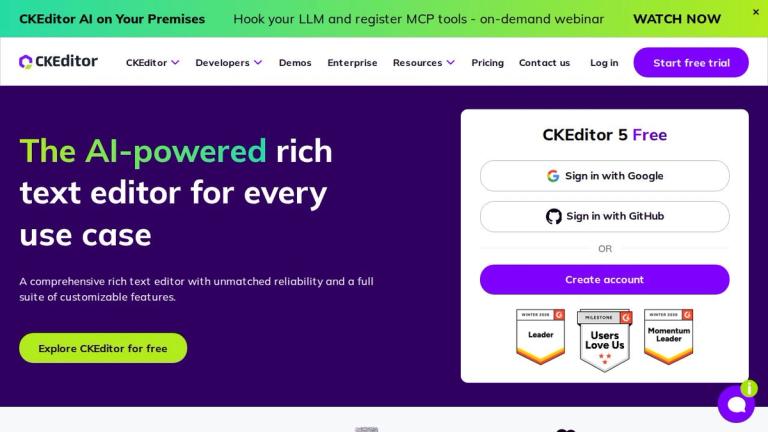
AI-powered WYSIWYG rich text editor with collaborative editing, real-time tracking, and extensive customization for web applications.

Introduction

CKEditor

CKEditor is a comprehensive, AI-powered rich text editor designed for modern web applications. It provides developers with a reliable and feature-rich WYSIWYG (What You See Is What You Get) editing solution that can be easily integrated into any web project.

Overview

CKEditor 5 represents the latest evolution of this popular open-source editor, offering unmatched reliability and a full suite of customizable features. The editor supports a wide range of content creation needs, from simple text formatting to complex document management with real-time collaboration capabilities.

Key Capabilities
  • Core Editing: Provides an intuitive, versatile content creation environment with rich formatting options
  • AI Integration: Built-in AI features for intelligent writing, editing, and reviewing assistance directly within the editor
  • Real-time Collaboration: Track Changes, Comments, and History features that work in real time or asynchronously
  • Content Conversion: Seamless import, embed, transform, and export capabilities for business use
  • File Management: Streamlined uploading, storing, managing, and displaying of media content
  • Compliance: Standards compliance features enhancing content integrity and accessibility
Trusted by Industry Leaders

CKEditor is trusted by major companies like Zendesk, where it improves the product experience for millions of customer service agents worldwide. The editor has earned recognition as a G2 Leader with strong user satisfaction ratings.

Target Audience

Web developers, enterprise teams, SaaS companies, content platform builders, and organizations requiring rich text editing capabilities

Key Features
  • AI-powered writing assistance with AI Chat for content generation
  • Real-time collaboration with Track Changes and Comments
  • WYSIWYG editing with rich formatting capabilities
  • Content conversion and embedding for seamless import/export
  • Customizable builder for tailored editor experiences
  • File management for media content handling
  • Compliance features for accessibility and standards
  • Page management for structured content creation
  • Extensive API and developer documentation
  • Free tier available with enterprise options
Use Cases
  • Web application content editing
  • Customer service platforms (e.g., Zendesk)
  • Content management systems (CMS)
  • Collaborative document editing
  • Enterprise content creation workflows
  • Blog and article publishing platforms
  • Email composition interfaces
  • Knowledge base and documentation systems
Pros
  • Comprehensive feature set covering editing, collaboration, and AI
  • Highly customizable to fit specific application requirements
  • Strong enterprise support and documentation
  • Proven reliability used by millions of users
  • Free tier available for getting started
  • Active development with regular updates
  • G2 Leader recognition with high user satisfaction
Cons
  • Learning curve for advanced customization
  • Enterprise features require paid licensing
  • Complex configuration for specific use cases
Pricing

Free tier available (CKEditor 5 Free); Enterprise pricing available upon request; various licensing options for different needs

Latest News

CKEditor 5 v48.3.0 Release Highlights & New Features  | CKEditor

CKEditor 5 v48.3.0 Release Highlights & New Features | CKEditor

8/5/2026

CKEditor 5 v48.3.0 Release Highlights & New Features | CKEditor WEBINAR: Beyond Disjointed Text Boxes Orchestrating Every Piece of Content and Its Metadata with CKEditor AI 00 days 00 hours 00 min 00 s # CKEditor 5 v48.3.0 Release Highlights: Programmatic API for CKEditor AI 5min read ...

CKEditor 5 v48.2.0 Release Highlights  | CKEditor

CKEditor 5 v48.2.0 Release Highlights | CKEditor

8/5/2026

CKEditor 5 v48.2.0 Release Highlights | CKEditor WEBINAR: Beyond Disjointed Text Boxes Orchestrating Every Piece of Content and Its Metadata with CKEditor AI 00 days 00 hours 00 min 00 s # CKEditor 5 v48.2.0 Release Highlights: AI Chat Improvements, Media Embed, and More By Gökçe Tosun ...

CKEditor 5 v48.1.0 Release Highlights  | CKEditor

CKEditor 5 v48.1.0 Release Highlights | CKEditor

8/5/2026

CKEditor 5 v48.1.0 Release Highlights | CKEditor WEBINAR: Beyond Disjointed Text Boxes Orchestrating Every Piece of Content and Its Metadata with CKEditor AI 00 days 00 hours 00 min 00 s # CKEditor 5 v48.1.0 Release Highlights: CKEditor AI Chat Improvements and AI in Multi-root Setups B...

Update to version 48.x | CKEditor 5 Documentation

Update to version 48.x | CKEditor 5 Documentation

8/5/2026

# Update to CKEditor 5 v48.x > **Note** > > When updating your CKEditor 5 installation, ensure **all the packages are the same version** to avoid errors. > > You may try removing the `package-lock.json` or `yarn.lock` files (if applicable) and reinstalling all packages before rebuilding the editor.....

CKEditor 5 v48.0.0 Release Highlights  | CKEditor

CKEditor 5 v48.0.0 Release Highlights | CKEditor

8/5/2026

CKEditor 5 v48.0.0 Release Highlights | CKEditor WEBINAR: Beyond Disjointed Text Boxes Orchestrating Every Piece of Content and Its Metadata with CKEditor AI 00 days 00 hours 00 min 00 s # CKEditor 5 v48.0.0 Release Highlights: Installation Methods Transition Completed By Gökçe Tosun 5...

FAQ

User Reviews

4.6/5.0
(17reviews)
Click stars to rate

Pricing

Pricing Model: Freemium

Free

For basic rich text editing needs

$0/month
monthly

Essential

For small projects with standard rich text editing needs

$144/month
monthly

Professional

For larger projects needing advanced functionality

$289/month
monthly

Custom

For large-scale or compliance-sensitive projects needing greater control and alternative deployment or licensing options.

Get quote
one-time

More Products

TinyPNG is Tinify’s browser-based image compressor and converter. This review explains how its web tool differs from its Developer API, what each free allowance covers, and when its compression, conversion, resizing, and cropping features may fit an image workflow.

Zamzar is an online file conversion and compression service for documents, images, video, sound, and other formats. Its free web service has daily file and upload-size limits.

iLoveIMG is a browser-based image service for compression, resizing, cropping, conversion, and editing, with a free Basic plan and paid options.

Smallpdf is an online PDF toolkit for conversion, compression, editing, merging, signing, and more. Its Free plan includes 30+ tools but limits downloads.

Convertio is a browser-based service for converting files between supported formats, with optional settings for many conversion types.

FreeConvert is an online file converter with more than 1,500 listed conversion types and a free allowance of 20 conversion minutes per day.

HiPDF is an online PDF service with conversion, editing, compression, merging, cropping, image tools, and AI features.

123apps is a browser-based suite of video, audio, PDF, and file-conversion tools. Its apps are free to use with limits on file size and daily operations.

ChatPDF summarizes PDFs and answers questions about them. Its free plan allows two document analyses per day, with no account needed to get started.

CloudConvert is a browser-based converter for more than 200 file formats, including documents, images, audio, video, archives, and specialist formats.

OCR.space provides free browser-based OCR for images and PDFs, searchable PDF creation, and a separate API for adding text recognition to software.

Free online itinerary maker with 900+ trip plans across 96 countries. Edit day-by-day in the browser; export to PDF, Excel, CSV, Google Sheets or .ics. Free account required to download/print. Optional Pro adds premium themes; AI chat helps draft plans.

TasteDir is a curated directory of finished, well-crafted software from indie makers and small teams. Every listed tool is reviewed by hand.

An AI meeting copilot that combines live transcripts, screenshots, and project documents to deliver contextual answers, response drafts, and meeting recaps.

Create professional invoices free in your browser: live preview, any currency, tax and discounts, custom templates, and no-watermark PDF. No signup needed.

Vidsembly is an AI video creation platform that turns PowerPoint presentations, PDFs, and documents into narrated videos. Create AI presentations, clone voices, translate slides, transcribe recordings, generate soundtracks, and host videos in one place.