LogoAI Jet
Icon for Clean Email

Clean Email

Email inbox management tool that helps organize, unsubscribe, and delete unwanted emails efficiently while keeping your data safe and private.

Introduction

Clean Email

Clean Email is a powerful email inbox management application designed to help users overwhelmed by unread and unwanted emails regain control of their mailbox. The tool focuses on organizing emails into smart folders and bundles rather than requiring users to manage emails one by one, making the process of cleaning up an inbox significantly faster and more efficient.

How It Works

Clean Email simplifies email management through a three-step process:

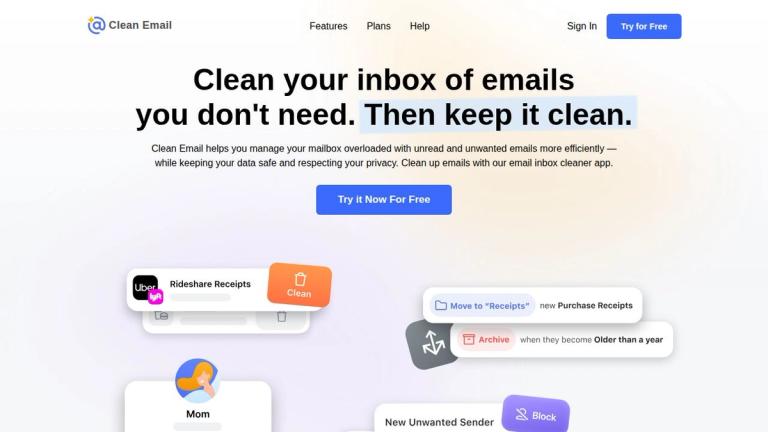
  1. Email Clean Up: The app organizes all emails into easy-to-review bundles, combining emails into Cleaning Suggestions and Smart Folders such as "Old emails" or "Emails from social networks." Users can then remove, archive, move, or label groups of emails with a single click.

  2. Unsubscribe: Clean Email sends unsubscribe requests on behalf of users and blocks mailing lists and senders who don't respect such requests. This feature works even for emails that don't have an unsubscribe link. Users can also choose to Read Later, Pause, or Keep Newest for their subscriptions.

  3. Auto Clean Rules: Users can set up automated rules to handle incoming emails without manual work. For example, automatically archive and mark as read all social network notifications, or archive emails as they reach a certain age.

Privacy & Security

Clean Email emphasizes data privacy and security. As noted by Daring Fireball: "Clean Email looks like a good choice: They don't have to sell your personal email data." The tool is designed to respect user privacy while providing powerful email management capabilities.

Recognition

Clean Email has received positive coverage from major publications including The Wall Street Journal, Mashable, and Daring Fireball, with users reporting dramatic reductions in unread email counts.

Target Audience

Users with overloaded inboxes, professionals managing high email volumes, anyone seeking to achieve Inbox Zero, newsletter subscribers wanting better subscription management

Key Features
  • Smart Folders - Organize emails into intelligent categories using rules and filters
  • Cleaning Suggestions - AI-powered recommendations for emails to clean
  • Unsubscriber - Send unsubscribe requests and block non-compliant senders
  • Auto Clean Rules - Automate email actions without manual work
  • Bulk Actions - Remove, archive, move, and label groups of emails at once
  • Read Later - Save subscriptions for later reading
  • Pause Subscriptions - Temporarily stop receiving emails from specific senders
  • Keep Newest - Only keep the latest email from a subscription
  • Daily/Weekly Summaries - Review skipped emails on a schedule
Use Cases
  • Achieving Inbox Zero - Clean out accumulated unread emails
  • Managing Newsletter Overload - Unsubscribe from unwanted mailing lists
  • Freeing Up Storage Space - Remove old and unnecessary emails
  • Finding Important Emails - Organize mailbox to locate critical messages
  • Automating Email Management - Set rules for automatic email handling
  • Reducing Email Clutter - Group and batch process similar emails
Pros
  • Privacy-focused - does not sell personal email data
  • Saves time by allowing bulk email operations
  • Works with automated rules for hands-free management
  • Smart organization into intuitive folders and bundles
  • Can unsubscribe from emails even without unsubscribe links
  • Positive reviews from WSJ, Mashable, and other publications
Cons
  • Requires access to email account which may concern privacy-conscious users
  • Free trial available but full features likely require paid subscription
Pricing

Free trial available; paid plans offered (specific pricing not listed on homepage)

Latest News

News — The Clean Email Blog

News — The Clean Email Blog

8/5/2026

Check out what is new in Clean Email, and learn more about our new features, updates, and next releases. New Interview With A Clean Email Founder For WebsitePlanet · In an interview with WebsitePlanet, the founder of Clean Email shares the inspiration behind Clean Email, its features, and how it com...

What’s New and Improved in Clean Email

What’s New and Improved in Clean Email

8/5/2026

How Can I Prevent Clean Email from Deleting My Starred Messages or Messages That Are in Folders? Does Blocking an Email Address Stop the Sender from Emailing Me? Possible Issues Using Clean Email with a POP3-Enabled Email Account · The Messages (and the Number of Messages) in Clean Email Do Not Matc...

Email Tips, News, Security and more - The Clean Email Blog

Email Tips, News, Security and more - The Clean Email Blog

8/5/2026

Explore how Gmail’s new AI-powered inbox sorting and cleanup tools work—and how Clean Email helps users stay organized and spam-free. ... Concerned about digital hoarding?

Clean Email Inbox – Organize, Unsubscribe, Delete Emails Easily

Clean Email Inbox – Organize, Unsubscribe, Delete Emails Easily

8/5/2026

Clean Email will send unsubscribe requests on your behalf and block mailing lists and senders who do not respect such requests (this allows you to unsubscribe from unwanted email lists that don’t even have an Unsubscribe link!) You can also manage your subscriptions more efficiently by choosing to R...

Clean Email: Official Information

Clean Email: Official Information

8/5/2026

Clean Email delivers a complete productivity suite that includes email cleanup tools, automated workflows, email spam protection, newsletters pausing, Read Later rollups, and the ability to open, read, and reply to emails inside the app—all while maintaining strict privacy standards and avoiding dat...

FAQ

User Reviews

4.0/5.0
(16reviews)
Click stars to rate

Pricing

Pricing Model: Freemium

Free Tier

Free account with limited cleaning capabilities.

$0
N/A

1 Account Monthly

Subscription for 1 email account with full features.

$9.99/month
monthly

1 Account Annual

Annual subscription for 1 email account with full features and savings.

$29.99/year
yearly

5 Accounts Monthly

Subscription for 5 email accounts with full features.

$19.99/month
monthly

5 Accounts Annual

Annual subscription for 5 email accounts with full features and savings.

$49.99/year
yearly

10 Accounts Monthly

Subscription for 10 email accounts with full features.

$29.99/month
monthly

10 Accounts Annual

Annual subscription for 10 email accounts with full features and savings.

$99.99/year
yearly

More Products

TinyPNG is Tinify’s browser-based image compressor and converter. This review explains how its web tool differs from its Developer API, what each free allowance covers, and when its compression, conversion, resizing, and cropping features may fit an image workflow.

Zamzar is an online file conversion and compression service for documents, images, video, sound, and other formats. Its free web service has daily file and upload-size limits.

iLoveIMG is a browser-based image service for compression, resizing, cropping, conversion, and editing, with a free Basic plan and paid options.

Smallpdf is an online PDF toolkit for conversion, compression, editing, merging, signing, and more. Its Free plan includes 30+ tools but limits downloads.

Convertio is a browser-based service for converting files between supported formats, with optional settings for many conversion types.

FreeConvert is an online file converter with more than 1,500 listed conversion types and a free allowance of 20 conversion minutes per day.

HiPDF is an online PDF service with conversion, editing, compression, merging, cropping, image tools, and AI features.

123apps is a browser-based suite of video, audio, PDF, and file-conversion tools. Its apps are free to use with limits on file size and daily operations.

ChatPDF summarizes PDFs and answers questions about them. Its free plan allows two document analyses per day, with no account needed to get started.

CloudConvert is a browser-based converter for more than 200 file formats, including documents, images, audio, video, archives, and specialist formats.

OCR.space provides free browser-based OCR for images and PDFs, searchable PDF creation, and a separate API for adding text recognition to software.

Free online itinerary maker with 900+ trip plans across 96 countries. Edit day-by-day in the browser; export to PDF, Excel, CSV, Google Sheets or .ics. Free account required to download/print. Optional Pro adds premium themes; AI chat helps draft plans.

TasteDir is a curated directory of finished, well-crafted software from indie makers and small teams. Every listed tool is reviewed by hand.

An AI meeting copilot that combines live transcripts, screenshots, and project documents to deliver contextual answers, response drafts, and meeting recaps.

Create professional invoices free in your browser: live preview, any currency, tax and discounts, custom templates, and no-watermark PDF. No signup needed.

Free online auto redaction tool with AI for PDFs, images, Word, PowerPoint, Excel, text and audio. Files are never stored.