

Hemingway Editor
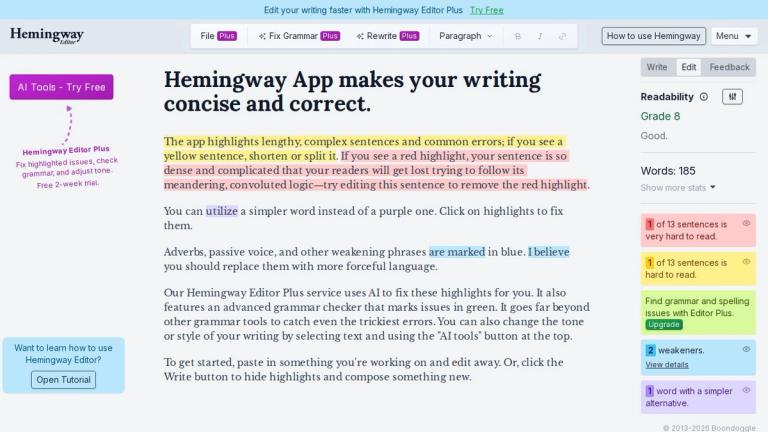
Hemingway Editor is a powerful writing improvement tool designed to help writers create clear, concise, and impactful content. Named after the famously direct prose style of Ernest Hemingway, this application provides real-time feedback on your writing through an intuitive color-coded highlighting system.
The app analyzes your text and identifies areas for improvement:
- Yellow highlights indicate lengthy, complex sentences that should be shortened or split
- Red highlights flag extremely dense and complicated sentences that readers will struggle to follow
- Purple highlights suggest simpler word alternatives for complex vocabulary
- Blue highlights mark adverbs, passive voice, and other weakening phrases that could be replaced with more forceful language
For users seeking advanced assistance, Hemingway Editor Plus leverages AI technology to automatically fix these highlighted issues. It also includes an advanced grammar checker (marked in green) that catches even the trickiest errors, going far beyond standard grammar tools. Users can also adjust the tone or style of their writing using the AI tools feature.
Whether you're editing existing work or composing something new, Hemingway Editor provides the tools to elevate your writing to professional standards.
Target Audience
Writers, bloggers, students, professionals, content creators, and anyone looking to improve writing clarity and conciseness
Key Features
- Color-coded sentence complexity highlighting (yellow for complex, red for very dense)
- Simpler word alternative suggestions (purple highlights)
- Adverb and passive voice detection (blue highlights)
- AI-powered automatic fixes with Hemingway Editor Plus
- Advanced grammar checker (green highlights)
- Tone and style adjustment via AI tools
- Write mode to hide highlights for distraction-free composing
- One-click fix on highlighted text
Use Cases
- Editing and improving blog posts and articles
- Academic essay writing and proofreading
- Business communication and email drafting
- Content creation for marketing materials
- Book and manuscript editing
- Professional report writing
- Student writing assignments
Pros
- Intuitive color-coded highlighting system for easy identification of issues
- AI-powered automatic corrections with Plus version
- Advanced grammar checking beyond basic tools
- Tone and style customization capabilities
- Simple paste-and-edit workflow
- Free version available for basic use
Cons
- Full AI features require Hemingway Editor Plus subscription
- Focused primarily on conciseness rather than comprehensive writing assistance
- May oversimplify complex technical or academic writing
Pricing
Free version available; Hemingway Editor Plus with AI features requires subscription (pricing not specified on page)


