LogoAI Jet
Icon for JotBot

JotBot

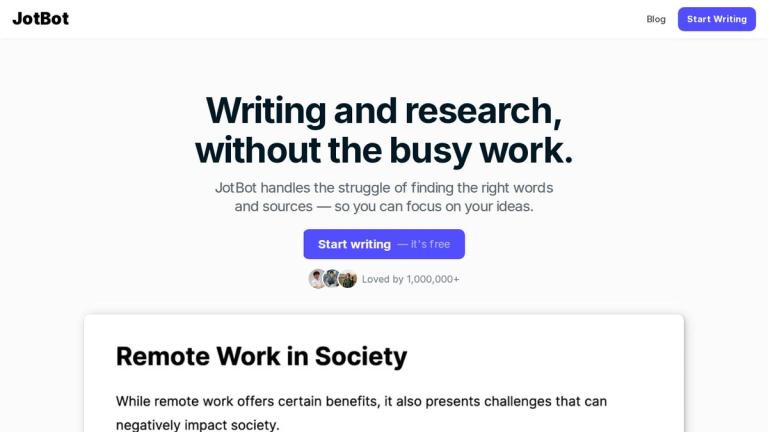
AI writing assistant that helps with writing, research, and source citation — eliminating busy work so you can focus on your ideas.

Introduction

JotBot

JotBot is an AI-powered writing and research assistant designed to streamline the writing process. Trusted by over 1,000,000 users and endorsed by top universities and businesses, JotBot helps writers, students, teams, and researchers overcome writer's block, find and cite sources, and generate drafts that match their unique writing style.

The platform integrates directly into your document workflow, offering intelligent autocomplete, source discovery, and conversational AI assistance — all without leaving your document. Whether you're working on academic papers, professional reports, or creative writing, JotBot acts as your personal document assistant to help you write more, better, and faster.

Target Audience

Writers, students, researchers, teams, and professionals seeking AI-assisted writing and research tools

Key Features
  • AI Autocomplete — picks up writing where you left off to overcome writer's block
  • Find and Cite Sources — research and add citations without leaving your document
  • Generate Drafts in Your Voice — analyzes your writing style to create personalized drafts
  • Ask JotBot Anything — in-document chat for research, writing, and editing help
  • Write & Edit with AI Commands — prompt JotBot to make revisions or generate text directly
  • Chat with Your Sources — ask questions, clarify points, or get summaries of PDFs, websites, or text
Use Cases
  • Academic writing and essay composition for students
  • Research paper development with integrated source citation
  • Professional document drafting and editing
  • Overcoming writer's block with AI-powered autocomplete
  • Summarizing and analyzing PDF documents and web sources
  • Collaborative writing projects for teams
Pros
  • Free to start with no upfront commitment
  • Trusted by top universities and businesses
  • Over 1 million active users
  • Integrates research and citation directly into the writing workflow
  • Learns and mimics your unique writing style
  • Versatile use across academic, professional, and creative writing
Cons
  • AI-generated content may require manual review for accuracy
  • Relies on internet connectivity for full functionality
  • Writing style replication may not be perfect for all users
Pricing

Free to start — premium plans available (details on app.myjotbot.com)
Latest News

10 Best AI For Research (2024) | JotBot AI

10 Best AI For Research (2024) | JotBot AI

8/4/2026

Jotbot isn’t just a theoretical tool; it’s making a difference in real-world scenarios. Graduate students, for instance, are using it to draft research papers more efficiently. By generating outlines and finding relevant sources, they cut down on the time spent on initial drafts. Undergraduate stude...

How to Tell if a Source Is Scholarly | JotBot AI

How to Tell if a Source Is Scholarly | JotBot AI

8/4/2026

News articles can be a great way to stay updated on recent happenings and breaking news. #### General Information Blogs and websites can offer interesting perspectives and insights on various topics, sparking curiosity and exploration. #### Accessibility Non-scholarly sources are often written in a ...

All You Need To Know About Consensus AI Tool | JotBot AI

All You Need To Know About Consensus AI Tool | JotBot AI

8/4/2026

Another standout feature is real-time data analysis. Staying updated with the latest trends is crucial in fast-paced sectors like finance, healthcare, or politics. Consensus AI provides up-to-date insights, helping you make informed decisions quickly. The tool tackles bias head-on, comparing data ac...

10 Of The Best Research Tools For Students & Tips For Better Results | JotBot AI

10 Of The Best Research Tools For Students & Tips For Better Results | JotBot AI

8/4/2026

that updates are accessible to everyone on the team without emailing documents back and forth. [...] Jotbot has already gained the trust of over half a million users worldwide. Writers, students, teams, and researchers use Jotbot to write better, faster, and smarter. Its AI-driven capabilities make ...

How to Find Sources for Essay AI Writing and 10 Best Practices for Effective | JotBot AI

How to Find Sources for Essay AI Writing and 10 Best Practices for Effective | JotBot AI

8/4/2026

Subscribe to relevant journals or newsletters to keep up with current research. Refrain from relying on old sources to inform your research. Failing to consider the context can lead to misinterpretation of data. Regularly check for the latest research periodically. Follow relevant news and developme...

FAQ

More Products

TinyPNG is Tinify’s browser-based image compressor and converter. This review explains how its web tool differs from its Developer API, what each free allowance covers, and when its compression, conversion, resizing, and cropping features may fit an image workflow.

Zamzar is an online file conversion and compression service for documents, images, video, sound, and other formats. Its free web service has daily file and upload-size limits.

iLoveIMG is a browser-based image service for compression, resizing, cropping, conversion, and editing, with a free Basic plan and paid options.

Smallpdf is an online PDF toolkit for conversion, compression, editing, merging, signing, and more. Its Free plan includes 30+ tools but limits downloads.

Convertio is a browser-based service for converting files between supported formats, with optional settings for many conversion types.

FreeConvert is an online file converter with more than 1,500 listed conversion types and a free allowance of 20 conversion minutes per day.

HiPDF is an online PDF service with conversion, editing, compression, merging, cropping, image tools, and AI features.

123apps is a browser-based suite of video, audio, PDF, and file-conversion tools. Its apps are free to use with limits on file size and daily operations.

ChatPDF summarizes PDFs and answers questions about them. Its free plan allows two document analyses per day, with no account needed to get started.

CloudConvert is a browser-based converter for more than 200 file formats, including documents, images, audio, video, archives, and specialist formats.

OCR.space provides free browser-based OCR for images and PDFs, searchable PDF creation, and a separate API for adding text recognition to software.

Free online itinerary maker with 900+ trip plans across 96 countries. Edit day-by-day in the browser; export to PDF, Excel, CSV, Google Sheets or .ics. Free account required to download/print. Optional Pro adds premium themes; AI chat helps draft plans.

TasteDir is a curated directory of finished, well-crafted software from indie makers and small teams. Every listed tool is reviewed by hand.

An AI meeting copilot that combines live transcripts, screenshots, and project documents to deliver contextual answers, response drafts, and meeting recaps.

Create professional invoices free in your browser: live preview, any currency, tax and discounts, custom templates, and no-watermark PDF. No signup needed.

Vidsembly is an AI video creation platform that turns PowerPoint presentations, PDFs, and documents into narrated videos. Create AI presentations, clone voices, translate slides, transcribe recordings, generate soundtracks, and host videos in one place.