LogoAI Jet
Icon for LanguageTool

LanguageTool

Free AI-powered grammar, spelling, and style checker supporting 30+ languages with browser extensions and desktop integrations for Windows and macOS.

Introduction

LanguageTool

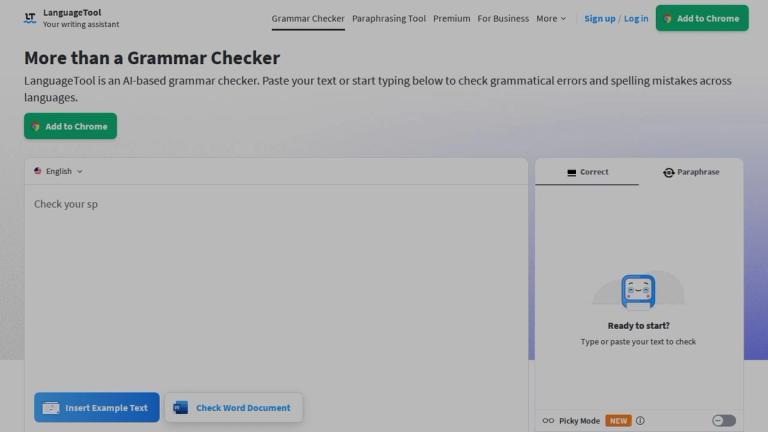
LanguageTool is a comprehensive AI-based writing assistant that helps users improve their writing by detecting and correcting grammar, spelling, punctuation, and style errors. Trusted by over 4 million users and 2,000+ organizations including BMW Group, European Union, and JetBrains, LanguageTool stands out as one of the most international writing tools available.

Key Highlights
  • Multi-language Support: Works across 30+ languages and dialects, automatically detecting the language you're writing in
  • Cross-platform Integration: Available as browser extensions (Chrome, Firefox, Edge, Safari), desktop apps for Windows and macOS, and add-ons for Google Docs and Microsoft Word
  • Privacy-focused: The browser add-on doesn't store any text, respecting user privacy
  • AI-powered Paraphrasing: Includes an intelligent paraphrasing tool that can rephrase sentences to be more formal, fluent, simple, or concise
  • Writing Statistics: Tracks productivity, languages used, errors made, and suggestions applied to help users improve over time
How It Works

LanguageTool integrates seamlessly into your writing workflow. Whether you're composing emails, writing blog posts, crafting tweets, or working on academic papers, it provides real-time suggestions to enhance your text. The tool underlines spelling mistakes in red, grammar issues with appropriate markers, and style suggestions in blue, making it easy to identify and correct different types of errors.

The "Picky Mode" offers advanced suggestions for punctuation, style, and typography for users who want more detailed feedback on their writing.

Target Audience

Writers, students, professionals, bloggers, content creators, multilingual users, and anyone who wants to improve their writing quality

Key Features
  • Real-time grammar, spelling, and punctuation checking
  • AI-powered paraphrasing tool
  • Support for 30+ languages and dialects
  • Browser extensions for Chrome, Firefox, Edge, and Safari
  • Desktop apps for Windows and macOS
  • Google Docs and Microsoft Word integration
  • Personal dictionary
  • Writing statistics and productivity tracking
  • Picky Mode for advanced style suggestions
  • Dark and light appearance modes
  • Automatic language detection
  • Distraction-free writing editor
Use Cases
  • Email composition and proofreading
  • Blog post writing and editing
  • Academic papers and dissertations
  • Social media content creation
  • Professional document preparation
  • Multilingual writing assistance
  • Book and manuscript editing
  • Business correspondence
  • Essay writing for students
  • Content creation for websites
Pros
  • Free tier available with robust features
  • Supports 30+ languages
  • Wide range of platform integrations
  • Privacy-focused with no text storage in browser extension
  • Trusted by major organizations worldwide
  • AI-powered paraphrasing capabilities
  • Clean, distraction-free interface
  • Over 4 million users with excellent reviews
Cons
  • Advanced features may require premium subscription
  • Picky Mode only available with account
  • Some features limited to specific platforms
Pricing

Free account available with core features; premium plans available for advanced features including Picky Mode and enhanced suggestions

Latest News

What features are available in the new premium-only version ...

What features are available in the new premium-only version ...

8/5/2026

What features are available in the new premium-only version of the LanguageTool browser extension? – EN Skip to main content The LanguageTool browser extension is now exclusively available for LanguageTool Premium subscribers. Free users can access the Grammar Checker and Paraphrasing Tool via the.....

ANN: LanguageTool 6.7 - LanguageTool Forum

ANN: LanguageTool 6.7 - LanguageTool Forum

8/5/2026

ANN: LanguageTool 6.7 - LanguageTool Forum # ANN: LanguageTool 6.7 SteVio1989 (Stefan Viol) October 10, 2025, 7:57am 1 Hi, LanguageTool 6.7 has been released and can now be downloaded from Maven Central. It includes error detection rule updates for Catalan, English, German, Portuguese, Spanish...

Important: Upgrade Required - LanguageTool

Important: Upgrade Required - LanguageTool

8/5/2026

Important: Upgrade Required - LanguageTool Time left: 14 days We have made the difficult decision to limit the use of LanguageTool’s browser extension to Premium users only. The rise of generative AI has made it more challenging to sustainably monetize our offering. A majority of users use our pro.....

New emacs support in the app? - LanguageTool Forum

New emacs support in the app? - LanguageTool Forum

8/5/2026

New emacs support in the app? - LanguageTool Forum Back to LanguageTool Homepage- Privacy- Imprint # New emacs support in the app? reinoutvanrees(Reinout) April 22, 2026, 1:47pm 1 A couple of days ago, I noticed “emacs” showing up in the LanguageTool app as supported. Well, beta support Hurray! ...

LanguageTool - Insights into Good Writing

LanguageTool - Insights into Good Writing

8/5/2026

LanguageTool - Insights into Good Writing ### Language The English language is said to have a simple grammar. We'll look into the matter and try to find out whether it's possible to get through the diffuse and seemingly endless rules. Soon you will know that adverbs are not the same as adverbials .....

FAQ

More Products

TinyPNG is Tinify’s browser-based image compressor and converter. This review explains how its web tool differs from its Developer API, what each free allowance covers, and when its compression, conversion, resizing, and cropping features may fit an image workflow.

Zamzar is an online file conversion and compression service for documents, images, video, sound, and other formats. Its free web service has daily file and upload-size limits.

iLoveIMG is a browser-based image service for compression, resizing, cropping, conversion, and editing, with a free Basic plan and paid options.

Smallpdf is an online PDF toolkit for conversion, compression, editing, merging, signing, and more. Its Free plan includes 30+ tools but limits downloads.

Convertio is a browser-based service for converting files between supported formats, with optional settings for many conversion types.

FreeConvert is an online file converter with more than 1,500 listed conversion types and a free allowance of 20 conversion minutes per day.

HiPDF is an online PDF service with conversion, editing, compression, merging, cropping, image tools, and AI features.

123apps is a browser-based suite of video, audio, PDF, and file-conversion tools. Its apps are free to use with limits on file size and daily operations.

ChatPDF summarizes PDFs and answers questions about them. Its free plan allows two document analyses per day, with no account needed to get started.

CloudConvert is a browser-based converter for more than 200 file formats, including documents, images, audio, video, archives, and specialist formats.

OCR.space provides free browser-based OCR for images and PDFs, searchable PDF creation, and a separate API for adding text recognition to software.

Free online itinerary maker with 900+ trip plans across 96 countries. Edit day-by-day in the browser; export to PDF, Excel, CSV, Google Sheets or .ics. Free account required to download/print. Optional Pro adds premium themes; AI chat helps draft plans.

TasteDir is a curated directory of finished, well-crafted software from indie makers and small teams. Every listed tool is reviewed by hand.

An AI meeting copilot that combines live transcripts, screenshots, and project documents to deliver contextual answers, response drafts, and meeting recaps.

Create professional invoices free in your browser: live preview, any currency, tax and discounts, custom templates, and no-watermark PDF. No signup needed.

Vidsembly is an AI video creation platform that turns PowerPoint presentations, PDFs, and documents into narrated videos. Create AI presentations, clone voices, translate slides, transcribe recordings, generate soundtracks, and host videos in one place.