LogoAI Jet
Icon for Mailstrom

Mailstrom

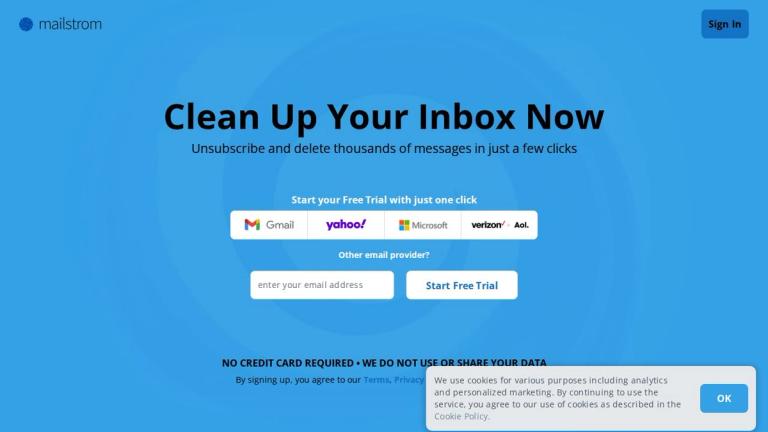
Email cleanup tool that helps users unsubscribe and delete thousands of messages in just a few clicks, enabling quick achievement of Inbox Zero.

Introduction

Mailstrom

Mailstrom is a powerful email management tool designed to help users clean up their overloaded inboxes quickly and efficiently. Unlike AI-based solutions that try to guess what's important, Mailstrom takes a different approach by putting users in direct control of their email management.

How It Works

Mailstrom identifies bundles of related emails and makes it easy for users to act on them as a group. Whether you need to delete, archive, or move emails, you can slice through tens, hundreds, or thousands of messages at once with simple, satisfying clicks.

Key Differentiators
  • Human-Centric Approach: Rather than relying on artificial intelligence algorithms, Mailstrom amplifies your human intelligence, giving you powerful yet simple tools to manage your inbox your way.
  • Privacy First: The service does not use or share your data, and no credit card is required to start.
  • Multi-Provider Support: Works with major email providers including Google, Yahoo, Microsoft, and AOL.
  • Proven Results: Users have reported eliminating anywhere from 500 to over 100,000 emails, with some achieving Inbox Zero in as little as 30 minutes.
Recognition

Mailstrom has been featured in major publications including The New York Times, TechCrunch, TIME, Inc., Wall Street Journal, and Lifehacker. The service is certified by Google and powered by IBM infrastructure.

Target Audience

Email users with overloaded inboxes, professionals dealing with high email volumes, email hoarders looking to achieve Inbox Zero, and anyone wanting to quickly clean up years of accumulated emails.

Key Features
  • Bulk email deletion and management
  • Batch unsubscribe from email lists
  • Group related emails for mass actions
  • Support for Google, Yahoo, Microsoft, AOL and other providers
  • Delete, archive, or move emails in bulk
  • No credit card required for free trial
  • Privacy-focused - no data sharing
  • Human-controlled interface (not AI-dependent)
  • Achieve Inbox Zero quickly
Use Cases
  • Cleaning up overloaded inboxes with thousands of unread emails
  • Mass unsubscribing from marketing and notification emails
  • Managing email hoarding habits
  • Achieving and maintaining Inbox Zero
  • Quickly processing backlog of old emails
  • Organizing and archiving important emails while deleting the rest
Pros
  • Extremely fast - users report clearing 22,000+ emails in 30 minutes
  • Simple, intuitive interface
  • Privacy-focused with no data sharing
  • No credit card required to start
  • Works with major email providers
  • User-controlled rather than AI-dependent
  • Featured in major tech publications
  • Certified by Google, powered by IBM
Cons
  • Primarily focused on cleanup rather than ongoing email management
  • May require manual decision-making for each email group
  • Limited information about pricing on homepage
Pricing

Free trial available with no credit card required. Specific pricing details not displayed on the main page.

FAQ

User Reviews

4.7/5.0
(22reviews)
Click stars to rate

Pricing

Pricing Model: Subscription

Basic

Entry-level plan for basic email management

$9/month
monthly

Plus

Mid-tier plan with enhanced features

$14/month
monthly

Pro

Premium plan with maximum features

$29.95/month
monthly

Annual

Annual billing option for basic tier

$59.95/year
yearly

Pro Annual

Annual billing option for Pro tier

$199.95/year
yearly

More Products

TinyPNG is Tinify’s browser-based image compressor and converter. This review explains how its web tool differs from its Developer API, what each free allowance covers, and when its compression, conversion, resizing, and cropping features may fit an image workflow.

Zamzar is an online file conversion and compression service for documents, images, video, sound, and other formats. Its free web service has daily file and upload-size limits.

iLoveIMG is a browser-based image service for compression, resizing, cropping, conversion, and editing, with a free Basic plan and paid options.

Smallpdf is an online PDF toolkit for conversion, compression, editing, merging, signing, and more. Its Free plan includes 30+ tools but limits downloads.

Convertio is a browser-based service for converting files between supported formats, with optional settings for many conversion types.

FreeConvert is an online file converter with more than 1,500 listed conversion types and a free allowance of 20 conversion minutes per day.

HiPDF is an online PDF service with conversion, editing, compression, merging, cropping, image tools, and AI features.

123apps is a browser-based suite of video, audio, PDF, and file-conversion tools. Its apps are free to use with limits on file size and daily operations.

ChatPDF summarizes PDFs and answers questions about them. Its free plan allows two document analyses per day, with no account needed to get started.

CloudConvert is a browser-based converter for more than 200 file formats, including documents, images, audio, video, archives, and specialist formats.

OCR.space provides free browser-based OCR for images and PDFs, searchable PDF creation, and a separate API for adding text recognition to software.

Free online itinerary maker with 900+ trip plans across 96 countries. Edit day-by-day in the browser; export to PDF, Excel, CSV, Google Sheets or .ics. Free account required to download/print. Optional Pro adds premium themes; AI chat helps draft plans.

TasteDir is a curated directory of finished, well-crafted software from indie makers and small teams. Every listed tool is reviewed by hand.

An AI meeting copilot that combines live transcripts, screenshots, and project documents to deliver contextual answers, response drafts, and meeting recaps.

Create professional invoices free in your browser: live preview, any currency, tax and discounts, custom templates, and no-watermark PDF. No signup needed.

Vidsembly is an AI video creation platform that turns PowerPoint presentations, PDFs, and documents into narrated videos. Create AI presentations, clone voices, translate slides, transcribe recordings, generate soundtracks, and host videos in one place.