LogoAI Jet
icon of MathType

MathType

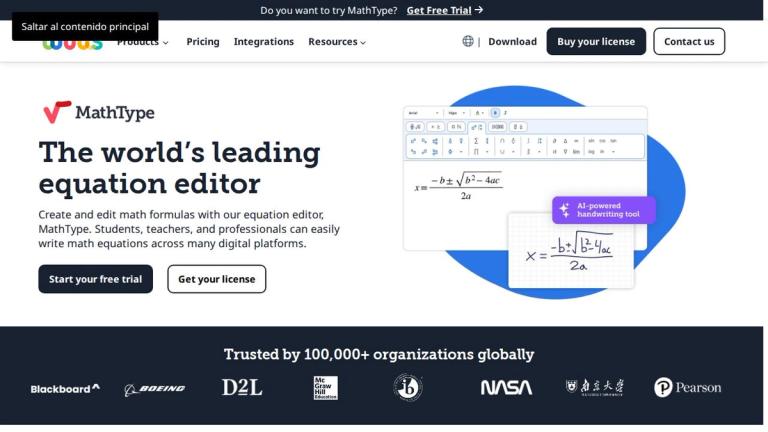
MathType is a latex equation editor for writing quality math equations and formulas, integrating with Office, Google Workspace, and LMS.

Introduction

MathType is a powerful equation editor that enables users to create and edit mathematical notations for various digital platforms. It caters to students, teachers, and professionals, offering seamless integration with Microsoft Office, Google Workspace, Learning Management Systems (LMS), and XML editors.

Key Features:

  • AI-Powered Handwriting Tool: Converts handwritten equations into editable digital formulas.
  • Extensive Symbol Library: Provides over 500 symbols, supporting matrices, multiline equations, and specialized notations.
  • ChemType Integration: Allows switching between math and chemistry notations with a built-in toolbar for chemical formulas.
  • Seamless Integration: Works with Word, PowerPoint, Google Docs, Slides, and various LMS platforms.

Use Cases:

  • Education: Enhances digital STEM learning by creating clear and precise mathematical content.
  • Technical Writing: Supports the creation of high-quality technical and scientific documentation.
  • Publishing: Facilitates the generation of scientific content on web platforms through HTML editors.

Alternatives

  • Microsoft Word's Equation Editor

    This built-in editor provides basic to advanced equation writing directly within Microsoft Word, making it readily accessible for many users.

  • Google Docs Equation Editor

    Integrated directly into Google Docs, this tool allows users to insert and edit mathematical equations within the Google Workspace environment.

  • LibreOffice Math

    As part of the LibreOffice suite, this open-source component is dedicated to creating and editing mathematical formulas for documents.

  • Overleaf

    An online collaborative LaTeX editor, Overleaf provides a full environment for writing complex scientific documents with integrated equations.

  • TeXstudio

    A powerful desktop LaTeX editor, TeXstudio offers a comprehensive environment for typesetting mathematical documents with advanced features.

  • LyX

    This document processor simplifies LaTeX by providing a graphical "what you see is what you mean" interface for creating mathematical content without direct LaTeX coding.

  • Mathpix Snipping Tool

    Mathpix converts images of mathematical equations, including handwritten ones, into editable LaTeX code, streamlining the input process.

  • Mathcha

    An online WYSIWYG LaTeX editor, Mathcha allows users to visually create and edit complex mathematical expressions with real-time rendering.

  • Typora

    A minimalist Markdown editor, Typora supports LaTeX math rendering, making it suitable for technical notes and documentation.

  • AxMath

    A commercial equation editor, AxMath offers a user-friendly interface for creating and integrating mathematical equations into various document types.

FAQ

User Reviews

4.8/5.0
(6reviews)
Click stars to rate

Pricing

Pricing Model: Subscription

Professional Plan

One subscription, all office tools included. Up to 3 devices per user. Compatible with Windows, Microsoft 365, Google Workspace and WPS.

$66.5 USD per user/year
yearly

MathType for XML Editors

Integrate with your preferred XML Editor. Customized plans designed specifically for your company needs. Full customer support dedicated to you.

$307.99 per user/year
yearly

MathType for HTML Editors

Integrate with your preferred web text editor. Customized plans designed specifically for your company needs. Full customer support dedicated to you.

Custom
yearly

WirisQuizzes

Onboarding training session. Full integration guidance. Full customer support dedicated to you.

Custom
yearly

More Products

TinyPNG is Tinify’s browser-based image compressor and converter. This review explains how its web tool differs from its Developer API, what each free allowance covers, and when its compression, conversion, resizing, and cropping features may fit an image workflow.

Zamzar is an online file conversion and compression service for documents, images, video, sound, and other formats. Its free web service has daily file and upload-size limits.

iLoveIMG is a browser-based image service for compression, resizing, cropping, conversion, and editing, with a free Basic plan and paid options.

Smallpdf is an online PDF toolkit for conversion, compression, editing, merging, signing, and more. Its Free plan includes 30+ tools but limits downloads.

Convertio is a browser-based service for converting files between supported formats, with optional settings for many conversion types.

FreeConvert is an online file converter with more than 1,500 listed conversion types and a free allowance of 20 conversion minutes per day.

HiPDF is an online PDF service with conversion, editing, compression, merging, cropping, image tools, and AI features.

123apps is a browser-based suite of video, audio, PDF, and file-conversion tools. Its apps are free to use with limits on file size and daily operations.

ChatPDF summarizes PDFs and answers questions about them. Its free plan allows two document analyses per day, with no account needed to get started.

CloudConvert is a browser-based converter for more than 200 file formats, including documents, images, audio, video, archives, and specialist formats.

OCR.space provides free browser-based OCR for images and PDFs, searchable PDF creation, and a separate API for adding text recognition to software.

Free online itinerary maker with 900+ trip plans across 96 countries. Edit day-by-day in the browser; export to PDF, Excel, CSV, Google Sheets or .ics. Free account required to download/print. Optional Pro adds premium themes; AI chat helps draft plans.

Verla AI is an AI learning platform that helps teams and students learn and apply AI faster with guided courses, tools, and hands-on practice.

TasteDir is a curated directory of finished, well-crafted software from indie makers and small teams. Every listed tool is reviewed by hand.

An AI meeting copilot that combines live transcripts, screenshots, and project documents to deliver contextual answers, response drafts, and meeting recaps.

Create professional invoices free in your browser: live preview, any currency, tax and discounts, custom templates, and no-watermark PDF. No signup needed.