LogoAI Jet
Icon for Missive

Missive

Collaborative inbox platform for teams that run on email, enabling shared email management, team coordination, and seamless integrations.

Introduction

Missive

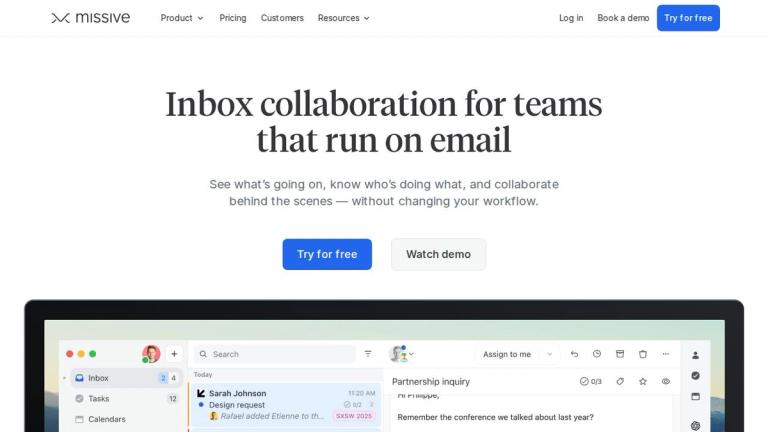
Missive is a collaborative inbox platform designed for teams that rely heavily on email for their daily operations. It transforms traditional email into a team-friendly workspace where colleagues can collaborate on emails in real-time, assign conversations, and coordinate work without the chaos of forwarding, CC'ing, or using separate tools.

Core Value Proposition

Email wasn't originally designed for team collaboration, but it remains critical to business operations. Missive bridges this gap by providing a shared inbox experience where teams can:

  • See what's going on across all team inboxes
  • Know who's doing what with clear assignment and tracking
  • Collaborate behind the scenes with internal comments and discussions within email threads
Key Differentiators

Missive stands out by allowing teams to work together on emails without changing their existing workflow. Rather than replacing email, it enhances it with collaborative features that make team email management efficient and transparent.

The platform is trusted by over 5,000 companies worldwide, including notable brands like Buffer, Everlane, WeTransfer, and Canny.

Target Audience

Teams and businesses that rely heavily on email for daily operations, including professional services firms, sales teams, customer support teams, and organizations in accounting, law, real estate, and logistics industries.

Key Features
  • Shared team inboxes for collaborative email management
  • Email assignment and tracking to coordinate work
  • Internal comments and discussions within email threads
  • AI assistant for email productivity
  • Integrations with third-party tools and services
  • Multi-device support (desktop and mobile)
  • Email delegation system for firm owners
  • Real-time collaboration without workflow disruption
Use Cases
  • Team email management for professional services firms
  • Customer support inbox coordination
  • Sales team email collaboration and lead management
  • Contracted services communication management
  • Accounting firm client correspondence
  • Law firm case-related email handling
  • Real estate transaction communication
  • Logistics and transportation coordination
Pros
  • Enables true team collaboration on email without changing workflows
  • Trusted by 5,000+ companies including well-known brands
  • Available across all devices for remote work flexibility
  • Built-in AI assistant for enhanced productivity
  • Suitable for multiple industries and use cases
Cons
  • May require team adoption and workflow adjustment
  • Pricing details not immediately visible on homepage
Pricing

Free trial available; detailed pricing available on the pricing page

Latest News

Changelog

Changelog

8/5/2026

## 11.20.0 February 23, 2026 New AI within Missive gets a major upgrade with new providers, a smarter assistant, and faster one-click actions. New AI Assistant [Beta] -> Read more There's a new Assistant in your inbox. Ask it to draft a reply in your tone, find any email, check your calendar for ava...

Productivity · Missive Blog

Productivity · Missive Blog

8/5/2026

Missive is a collaborative email client built for teams that work out of shared inboxes. With built-in AI rules, internal chat on every conversation, and support for Gmail, Outlook, and any IMAP account, Missive handles the team email workflow that Fyxer wasn’t designed for. Try Missive free for 30 ...

What we released in 2025 · Missive Blog

What we released in 2025 · Missive Blog

8/5/2026

## AI Rules This year we introduced AI-powered rules that let automations understand message content rather than rely on static conditions. We expanded them with multi-channel support, model selection, and practical actions like AI labeling, draft creation, and pre-send checks for outgoing messages,...

Features · Missive

Features · Missive

8/5/2026

.jpg) David Friedman Ficks Music · 10-25 Read Story "Missive keeps our communication unified and our team coordinated." David Price Avenue Systems · 10-25 Read Story "I don’t have a separate calendar app anymore. I don’t have all these separate apps. I just have Missive for everything to do with wor...

Tasks in Missive: Your Inbox is Now Your Command Center · Missive Blog

Tasks in Missive: Your Inbox is Now Your Command Center · Missive Blog

8/5/2026

‍ Oh, one more thing, we gave Missive a fresh coat of paint too! We hope you like it.✨ ‍ # Related articles Explore more Shared Inbox Latest November 3, 2022 10 best shared inbox software for teams in 2026 The 10 best shared inbox software for teams in 2026, with current pricing: Missive, Front, Hel...

FAQ

User Reviews

4.2/5.0
(21reviews)
Click stars to rate

Pricing

Pricing Model: Subscription

Starter

For teams with simple needs

$14/user/month (yearly) or $18/user/month (monthly)
monthly or yearly

Productive

For teams with workflow needs

$24/user/month (yearly) or $30/user/month (monthly)
monthly or yearly

Business

For teams with advanced needs

$36/user/month (yearly) or $45/user/month (monthly)
monthly or yearly

More Products

TinyPNG is Tinify’s browser-based image compressor and converter. This review explains how its web tool differs from its Developer API, what each free allowance covers, and when its compression, conversion, resizing, and cropping features may fit an image workflow.

Zamzar is an online file conversion and compression service for documents, images, video, sound, and other formats. Its free web service has daily file and upload-size limits.

iLoveIMG is a browser-based image service for compression, resizing, cropping, conversion, and editing, with a free Basic plan and paid options.

Smallpdf is an online PDF toolkit for conversion, compression, editing, merging, signing, and more. Its Free plan includes 30+ tools but limits downloads.

Convertio is a browser-based service for converting files between supported formats, with optional settings for many conversion types.

FreeConvert is an online file converter with more than 1,500 listed conversion types and a free allowance of 20 conversion minutes per day.

HiPDF is an online PDF service with conversion, editing, compression, merging, cropping, image tools, and AI features.

123apps is a browser-based suite of video, audio, PDF, and file-conversion tools. Its apps are free to use with limits on file size and daily operations.

ChatPDF summarizes PDFs and answers questions about them. Its free plan allows two document analyses per day, with no account needed to get started.

CloudConvert is a browser-based converter for more than 200 file formats, including documents, images, audio, video, archives, and specialist formats.

OCR.space provides free browser-based OCR for images and PDFs, searchable PDF creation, and a separate API for adding text recognition to software.

Free online itinerary maker with 900+ trip plans across 96 countries. Edit day-by-day in the browser; export to PDF, Excel, CSV, Google Sheets or .ics. Free account required to download/print. Optional Pro adds premium themes; AI chat helps draft plans.

TasteDir is a curated directory of finished, well-crafted software from indie makers and small teams. Every listed tool is reviewed by hand.

An AI meeting copilot that combines live transcripts, screenshots, and project documents to deliver contextual answers, response drafts, and meeting recaps.

Create professional invoices free in your browser: live preview, any currency, tax and discounts, custom templates, and no-watermark PDF. No signup needed.

Vidsembly is an AI video creation platform that turns PowerPoint presentations, PDFs, and documents into narrated videos. Create AI presentations, clone voices, translate slides, transcribe recordings, generate soundtracks, and host videos in one place.