LogoAI Jet
Icon for Noteshelf

Noteshelf

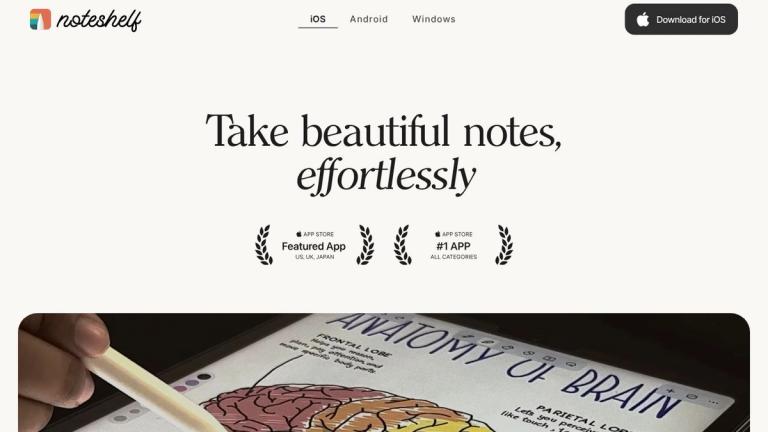
An award-winning AI-powered note-taking app that lets you take beautiful handwritten notes, annotate PDFs, record audio, and organize your thoughts across Apple

Introduction

Noteshelf

Noteshelf is a premium digital note-taking application designed for Apple devices (iOS and macOS) that combines the natural feel of handwriting with powerful digital features. The app offers realistic pen styles that beautify your handwriting and elevate the note-taking experience.

Key Highlights
  • AI-Powered Features: Noteshelf AI helps bring handwritten notes to life, assisting with studying and task completion
  • Cross-Device Sync: Seamlessly access your notes anytime, anywhere across iOS and macOS devices
  • Versatile Note-Taking: From PDF annotation to audio recording, image editing to shape drawing, all your note-taking needs are in one place
  • Customization: Personalize your experience with customizable toolbars, notebook covers, stickers, emojis, and 200+ templates
  • Enterprise & Education: Special pricing available for schools and businesses through Apple School Manager and Apple Business Manager

The app has received recognition from major publications including The New York Times and Paperlike, praised for its intuitive interface that feels similar to writing in a real notebook while offering the advantages of digital organization and storage.

Target Audience

Students, professionals, educators, and anyone who needs a comprehensive digital note-taking solution on Apple devices

Key Features
  • Realistic pen styles for beautiful handwriting
  • PDF annotation with highlighting, underlining, and sticky notes
  • Audio recording for lectures and meetings
  • Image annotation and editing
  • Perfect shape drawing tools
  • Type notes or convert handwriting to text
  • Dark mode for low-light environments
  • Fully customizable toolbar
  • Smart note organization
  • Focus mode to minimize distractions
  • Handwriting search functionality
  • Apple Watch recording support
  • Personalized notebook covers
  • Noteshelf AI assistant
  • Web clip saving
  • Stickers and emojis collection
  • Fancy headers for notes
  • Unsplash and Pixabay stock image integration
  • Digital diaries and planners
  • 200+ templates
  • Cross-device sync across iOS and macOS
Use Cases
  • Student note-taking and study organization
  • Meeting notes and lecture recording
  • PDF annotation and document review
  • Creative sketching and visual note-taking
  • Personal journaling and planning
  • Professional document creation
  • Academic research and study
  • Project planning and task management
Pros
  • Natural handwriting experience that mimics real notebooks
  • Comprehensive feature set covering all note-taking needs
  • AI-powered features enhance productivity
  • Cross-device synchronization
  • Extensive customization options
  • Recognized by major publications like NYT
  • Special pricing for education and enterprise
Cons
  • Primarily designed for Apple ecosystem (iOS/macOS)
  • May require learning curve for advanced features
  • Premium features may require subscription
Pricing

Special offers available for schools and enterprises through Apple School Manager and Apple Business Manager. Individual pricing details not specified on the main page.

Latest News

Noteshelf | Note-taking app | AI-powered handwriting

Noteshelf | Note-taking app | AI-powered handwriting

8/5/2026

Take notes, organize, and focus on the things that matter. ... Realistic pens to beautify your handwriting and elevate your note-taking experience. “Revolutionising Digital Note-Taking: An Exclusive Interview with Noteshelf on Innovation and User-Centric Design”

Noteshelf: Our accomplishments so far into 2021 - Noteshelf Club

Noteshelf: Our accomplishments so far into 2021 - Noteshelf Club

8/5/2026

This has been a fantastic, exciting, and thrilling year here at Noteshelf. There will be a lot of updates and new features in the coming months. Stay tuned for more and subscribe to our Medium Newsletter to get updates on all the latest features.

FAQs

FAQs

8/5/2026

Noteshelf currently supports iOS and Android devices. iOS users you will need to have either an iPhone (iOS v15 or higher) or an iPad (iPad OS 15 or higher). Android supports 10 or higher. ... This program is entirely free. We are exclusively looking for your valuable feedback to help us enhance the...

Top 8 Improvements in Noteshelf 2 - Noteshelf Club

Top 8 Improvements in Noteshelf 2 - Noteshelf Club

8/5/2026

For all the iPhone X users, we have some good news. We worked closely with Apple to perfectly optimize Noteshelf 2 for the gorgeous full-screen experience of the iPhone X. And yes, we do support Face ID to open password protected notebooks. With these enhancements, we hope to make your note-taking e...

Get the new Noteshelf today! - Noteshelf Club

Get the new Noteshelf today! - Noteshelf Club

8/5/2026

We had released the first version of Noteshelf in 2010, and it received more than 25 major updates since then. Like any software, we had come to a point where making further upgrades to the app was not technically feasible, and we had to redesign and recode the app from the ground up.

FAQ

More Products

TinyPNG is Tinify’s browser-based image compressor and converter. This review explains how its web tool differs from its Developer API, what each free allowance covers, and when its compression, conversion, resizing, and cropping features may fit an image workflow.

Zamzar is an online file conversion and compression service for documents, images, video, sound, and other formats. Its free web service has daily file and upload-size limits.

iLoveIMG is a browser-based image service for compression, resizing, cropping, conversion, and editing, with a free Basic plan and paid options.

Smallpdf is an online PDF toolkit for conversion, compression, editing, merging, signing, and more. Its Free plan includes 30+ tools but limits downloads.

Convertio is a browser-based service for converting files between supported formats, with optional settings for many conversion types.

FreeConvert is an online file converter with more than 1,500 listed conversion types and a free allowance of 20 conversion minutes per day.

HiPDF is an online PDF service with conversion, editing, compression, merging, cropping, image tools, and AI features.

123apps is a browser-based suite of video, audio, PDF, and file-conversion tools. Its apps are free to use with limits on file size and daily operations.

ChatPDF summarizes PDFs and answers questions about them. Its free plan allows two document analyses per day, with no account needed to get started.

CloudConvert is a browser-based converter for more than 200 file formats, including documents, images, audio, video, archives, and specialist formats.

OCR.space provides free browser-based OCR for images and PDFs, searchable PDF creation, and a separate API for adding text recognition to software.

Free online itinerary maker with 900+ trip plans across 96 countries. Edit day-by-day in the browser; export to PDF, Excel, CSV, Google Sheets or .ics. Free account required to download/print. Optional Pro adds premium themes; AI chat helps draft plans.

Verla AI is an AI learning platform that helps teams and students learn and apply AI faster with guided courses, tools, and hands-on practice.

TasteDir is a curated directory of finished, well-crafted software from indie makers and small teams. Every listed tool is reviewed by hand.

An AI meeting copilot that combines live transcripts, screenshots, and project documents to deliver contextual answers, response drafts, and meeting recaps.

Create professional invoices free in your browser: live preview, any currency, tax and discounts, custom templates, and no-watermark PDF. No signup needed.