LogoAI Jet

Introduction

Onyx Boox Note Air Series

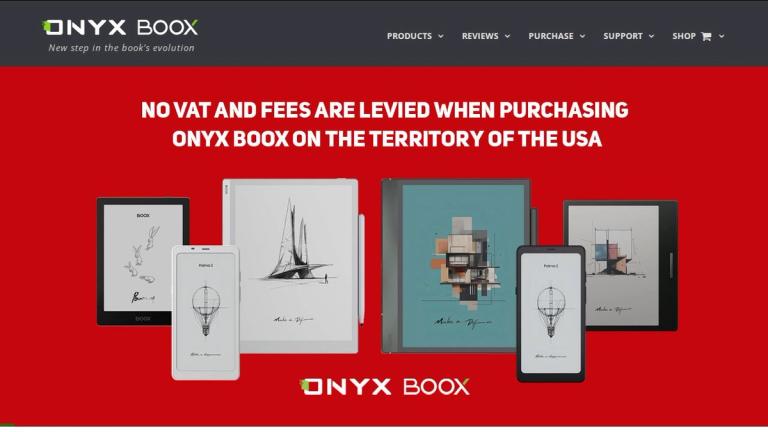
The Onyx Boox Note Air series represents the flagship line of large-screen E Ink devices from ONYX BOOX, designed for readers, students, and professionals who need a versatile digital reading and note-taking experience.

Series Overview

The Note Air series combines the eye-friendly E Ink display technology with the flexibility of Android operating systems, creating a powerful tool for both consumption and creation of written content. These devices feature:

  • 10.3-inch E Ink displays - Large enough for comfortable PDF reading, academic papers, and manga
  • Stylus support - Enables natural handwriting, annotations, and sketching
  • Android OS - Access to a wide range of apps via Google Play Store
  • Advanced processors - Smooth performance for multitasking and app usage
Current Models
Note Air 4 C

The latest addition to the Note Air lineup, featuring:

  • 10.3" E Ink Kaleido 3 color screen
  • 8-core processor for enhanced performance
  • Built-in fingerprint scanner for security
  • Integrated speakers and microphone
  • Color display capability for comics, magazines, and color-coded notes
Note Air 2 Plus

A proven performer in the series, offering:

  • 10.3" E Ink Carta display
  • Wacom-compatible stylus support
  • Android 11 OS
  • Expandable storage options
  • Currently available at special sale pricing
Design Philosophy

The Note Air series is engineered with a focus on:

  1. Reading comfort - Front light systems (MOON Light 2) for reading in any lighting condition
  2. Productivity - Split-screen capabilities and multi-window support
  3. Portability - Slim, lightweight design despite the large screen size
  4. Versatility - From e-books to academic papers to handwritten notebooks
Target Audience

Academics, researchers, students, professionals who read extensively, digital artists, writers, and anyone seeking a premium E Ink device for reading and note-taking.

Key Features
  • 10.3-inch E Ink display for comfortable reading
  • Stylus support with pressure sensitivity for natural handwriting
  • Android operating system with Google Play Store access
  • MOON Light 2 front light system for adjustable lighting
  • Color display option (Kaleido 3) on Note Air 4 C
  • 8-core processor for smooth performance
  • Fingerprint scanner for device security
  • Built-in speakers and microphone
  • Split-screen and multi-window functionality
  • PDF reflow and annotation capabilities
  • Bluetooth and Wi-Fi connectivity
  • Long battery life typical of E Ink devices
Use Cases
  • Reading e-books, novels, and long-form content
  • Academic research and reading scholarly papers
  • Student note-taking and textbook annotation
  • Professional document review and markup
  • Digital sketching and drawing
  • Reading comics and manga (color model)
  • Organizing and managing digital notebooks
  • Web browsing and app usage via Android
  • Meeting notes and brainstorming sessions
  • Reading sheet music or technical documents
Pros
  • Eye-friendly E Ink display reduces eye strain during extended reading
  • Large 10.3-inch screen ideal for PDFs and academic materials
  • Stylus enables natural handwriting and precise annotations
  • Android OS provides access to extensive app ecosystem
  • Color display option available for multimedia content
  • Long battery life compared to traditional tablets
  • Lightweight and portable despite large screen size
  • Front light allows reading in various lighting conditions
Cons
  • Higher price point compared to basic e-readers
  • E Ink refresh rate slower than LCD/OLED tablets
  • Color display (Kaleido 3) not as vibrant as traditional screens
  • Limited processing power compared to full tablets
  • App compatibility may vary with E Ink display technology
Pricing

Note Air 2 Plus is currently on sale. Note Air 4 C is a newer premium model. Pricing varies by region and retailer - check official ONYX BOOX website for current pricing.

Latest News

Firmware Updates :: ONYX BOOX electronic books

Firmware Updates :: ONYX BOOX electronic books

8/4/2026

Firmware Updates :: ONYX BOOX electronic books ## Current products - ONYX BOOX Go 10.3(no updates) - ONYX BOOX Go 6(no updates) - ONYX BOOX Go 7(no updates) - ONYX BOOX Go Color 7(no updates) - ONYX BOOX Go Color 7 (Gen II)(no updates) - ONYX BOOX Mira Pro Color(no updates) - ONYX BOOX Note Air 2 .....

ONYX BOOX Note Air 2 Plus E Reader :: ONYX BOOX electronic books

ONYX BOOX Note Air 2 Plus E Reader :: ONYX BOOX electronic books

8/4/2026

ONYX BOOX Note Air 2 Plus E Reader :: ONYX BOOX electronic books # ONYX BOOX Note Air 2 Plus - Description - Photos - Specifications - Reviews The ONYX BOOX Note Air 2 Plus is the newest e-book reader with a 10,3” screen with a dual touch control in a thin metal case. The model is equipped with a...

Onyx Boox Note Air 2 :: ONYX BOOX electronic books

Onyx Boox Note Air 2 :: ONYX BOOX electronic books

8/4/2026

Onyx Boox Note Air 2 :: ONYX BOOX electronic books # Onyx Boox Note Air 2 --- - Source: pcmag.com - Author: Sascha Segan , 11.17.2021 - All rights reserved #### Pros - Top-notch build quality - Built-in reading and note-taking apps work well - Good battery life #### Cons - Taking notes in thi...

ONYX BOOX Note Air 4 C E Reader :: ONYX BOOX electronic books

ONYX BOOX Note Air 4 C E Reader :: ONYX BOOX electronic books

8/4/2026

ONYX BOOX Note Air 4 C E Reader :: ONYX BOOX electronic books # ONYX BOOX Note Air 4 C - Description - Photos - Specifications - Reviews ONYX BOOX Note Air 4 C a high-performance large-format E Reader with the E Ink Kaleido 3 color screen. The model is equipped with a 10.3” display with front lig...

Onyx launches two new E Ink tablets with 13.3 inch and 10.3 inch displays :: ONYX BOOX electronic books

Onyx launches two new E Ink tablets with 13.3 inch and 10.3 inch displays :: ONYX BOOX electronic books

8/4/2026

Onyx launches two new E Ink tablets with 13.3 inch and 10.3 inch displays :: ONYX BOOX electronic books # Onyx launches two new E Ink tablets with 13.3 inch and 10.3 inch displays --- - All rights reserved - Author: Brad Linder, 09.21.2020 - Source: liliputing.com Amazon may not make eReaders wi...

FAQ

More Products

TinyPNG is Tinify’s browser-based image compressor and converter. This review explains how its web tool differs from its Developer API, what each free allowance covers, and when its compression, conversion, resizing, and cropping features may fit an image workflow.

Zamzar is an online file conversion and compression service for documents, images, video, sound, and other formats. Its free web service has daily file and upload-size limits.

iLoveIMG is a browser-based image service for compression, resizing, cropping, conversion, and editing, with a free Basic plan and paid options.

Smallpdf is an online PDF toolkit for conversion, compression, editing, merging, signing, and more. Its Free plan includes 30+ tools but limits downloads.

Convertio is a browser-based service for converting files between supported formats, with optional settings for many conversion types.

FreeConvert is an online file converter with more than 1,500 listed conversion types and a free allowance of 20 conversion minutes per day.

HiPDF is an online PDF service with conversion, editing, compression, merging, cropping, image tools, and AI features.

123apps is a browser-based suite of video, audio, PDF, and file-conversion tools. Its apps are free to use with limits on file size and daily operations.

ChatPDF summarizes PDFs and answers questions about them. Its free plan allows two document analyses per day, with no account needed to get started.

CloudConvert is a browser-based converter for more than 200 file formats, including documents, images, audio, video, archives, and specialist formats.

OCR.space provides free browser-based OCR for images and PDFs, searchable PDF creation, and a separate API for adding text recognition to software.

Free online itinerary maker with 900+ trip plans across 96 countries. Edit day-by-day in the browser; export to PDF, Excel, CSV, Google Sheets or .ics. Free account required to download/print. Optional Pro adds premium themes; AI chat helps draft plans.

Verla AI is an AI learning platform that helps teams and students learn and apply AI faster with guided courses, tools, and hands-on practice.

TasteDir is a curated directory of finished, well-crafted software from indie makers and small teams. Every listed tool is reviewed by hand.

An AI meeting copilot that combines live transcripts, screenshots, and project documents to deliver contextual answers, response drafts, and meeting recaps.

Create professional invoices free in your browser: live preview, any currency, tax and discounts, custom templates, and no-watermark PDF. No signup needed.