LogoAI Jet

Introduction

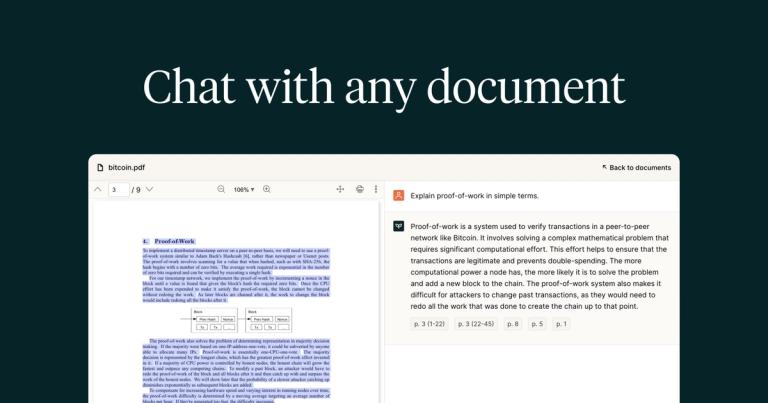
PDF.ai is an AI-powered ChatPDF application designed to allow users to interact with PDF documents in a conversational manner. Key features include:

  • Chat Interface: Enables users to ask questions and receive answers directly from the PDF content.
  • Summarization: Provides quick summaries of lengthy documents.
  • Information Retrieval: Facilitates efficient searching and finding of specific information within PDFs.

Use cases include:

  • Research: Quickly extract key findings from research papers.
  • Legal: Review and understand legal documents efficiently.
  • Education: Summarize textbooks and study materials.
  • Business: Analyze reports and extract relevant data.

Latest News

PDF.ai | Chat with PDFs & PDF API (parse, extract, split)

PDF.ai | Chat with PDFs & PDF API (parse, extract, split)

8/5/2026

Chat with any PDF using AI: ask questions, get summaries, and find answers. Use our API to parse documents, extract data, and split PDFs in your own workflows.

Welcome to PDF.ai API | PDF.ai

Welcome to PDF.ai API | PDF.ai

8/5/2026

Welcome to PDF.ai API v2! Released on 11/28/2025, this version includes advanced endpoints: parse, extract, split, and ask. These features are designed to streamline and enhance your workflow. Below, you will find all the necessary documentation to get started with our API. ... Parses a PDF into Mar...

10 Top-notch AI PDF Analyzer Tools in 2024

10 Top-notch AI PDF Analyzer Tools in 2024

8/5/2026

AI PDF analyzers should offer robust security features to protect confidential information. Depending on your needs, ensure the tool complies with industry standards for data encryption and privacy, such as GDPR or HIPAA. Look for features that allow administrators to control access and set permissi...

PDF.ai | Chat with your PDF documents

PDF.ai | Chat with your PDF documents

8/5/2026

Simply ask a question, and PDF.ai will use AI to pick up the answer from all of your documents. Receive your answer, along with the document it came from. No matter how many PDFs you have, hundreds or even more, transform your files into your personal knowledge base.

2025 PDF Software Comparison: Top Tools Reviewed

2025 PDF Software Comparison: Top Tools Reviewed

8/5/2026

Robust enterprise deployment and management features make it ideal for larger organizations. Kofax provides a good balance of features and performance. A one-time purchase option offers a predictable cost model. ... Updates may be less frequent compared to competitors. Mobile capabilities are limite...

Alternatives

  • ChatPDF

    ChatPDF offers a very similar service, allowing users to upload PDF documents and interact with them using AI to ask questions and get summaries.

  • Humata AI

    Humata AI provides advanced AI capabilities for analyzing, summarizing, and extracting information from various document types, including PDFs, making it a powerful research tool.

  • AskYourPDF

    AskYourPDF is another dedicated platform that enables users to upload PDFs and engage in AI-powered conversations to quickly find information and generate summaries.

  • Adobe Acrobat Pro (AI Assistant)

    Adobe Acrobat Pro, a leading PDF editor, now integrates an AI Assistant for summarizing, chatting, and extracting insights directly from PDF documents.

  • PDFgear

    PDFgear is a free PDF editor that includes AI features for summarizing, rewriting, and chatting with PDF content, offering a comprehensive solution without cost.

  • DocuChat

    DocuChat specializes in AI-powered chat with documents, allowing users to upload files and quickly retrieve answers and summaries from their content.

  • Filechat.io

    Filechat.io allows users to upload various file types, including PDFs, and engage in AI-powered conversations to extract information and insights efficiently.

  • ChatGPT Plus

    ChatGPT Plus, with its advanced data analysis capabilities, can upload and analyze PDF documents, providing summaries and answering complex questions.

  • Google Gemini

    Google Gemini offers similar AI-powered document analysis and summarization features for uploaded PDFs, integrating with the broader Google ecosystem.

  • Microsoft Copilot

    Microsoft Copilot integrates AI assistance directly into Microsoft 365, enabling users to chat with and summarize PDFs within their familiar productivity environment.

FAQ

User Reviews

4.3/5.0
(21reviews)
Click stars to rate

Pricing

Pricing Model: Freemium, Subscription

Free

Provides basic features, allows uploading 1-3 PDF files per month (max 10MB per file), and up to 500 questions per month. Option to upload 2 PDF files daily without registration.

Free

Pro

Extended document processing features suitable for regular users.

$10/month
yearly

Ultimate

Provides advanced features for users with higher document processing needs, including Capture & Ask functionality. Chatbot widget available as an additional paid plan.

$20/user/month
yearly

Enterprise

Provides comprehensive features for organizations.

$30/user/month
yearly

More Products

TinyPNG is Tinify’s browser-based image compressor and converter. This review explains how its web tool differs from its Developer API, what each free allowance covers, and when its compression, conversion, resizing, and cropping features may fit an image workflow.

Zamzar is an online file conversion and compression service for documents, images, video, sound, and other formats. Its free web service has daily file and upload-size limits.

iLoveIMG is a browser-based image service for compression, resizing, cropping, conversion, and editing, with a free Basic plan and paid options.

Smallpdf is an online PDF toolkit for conversion, compression, editing, merging, signing, and more. Its Free plan includes 30+ tools but limits downloads.

Convertio is a browser-based service for converting files between supported formats, with optional settings for many conversion types.

FreeConvert is an online file converter with more than 1,500 listed conversion types and a free allowance of 20 conversion minutes per day.

HiPDF is an online PDF service with conversion, editing, compression, merging, cropping, image tools, and AI features.

123apps is a browser-based suite of video, audio, PDF, and file-conversion tools. Its apps are free to use with limits on file size and daily operations.

ChatPDF summarizes PDFs and answers questions about them. Its free plan allows two document analyses per day, with no account needed to get started.

CloudConvert is a browser-based converter for more than 200 file formats, including documents, images, audio, video, archives, and specialist formats.

OCR.space provides free browser-based OCR for images and PDFs, searchable PDF creation, and a separate API for adding text recognition to software.

Free online itinerary maker with 900+ trip plans across 96 countries. Edit day-by-day in the browser; export to PDF, Excel, CSV, Google Sheets or .ics. Free account required to download/print. Optional Pro adds premium themes; AI chat helps draft plans.

Verla AI is an AI learning platform that helps teams and students learn and apply AI faster with guided courses, tools, and hands-on practice.

TasteDir is a curated directory of finished, well-crafted software from indie makers and small teams. Every listed tool is reviewed by hand.

An AI meeting copilot that combines live transcripts, screenshots, and project documents to deliver contextual answers, response drafts, and meeting recaps.

Create professional invoices free in your browser: live preview, any currency, tax and discounts, custom templates, and no-watermark PDF. No signup needed.