

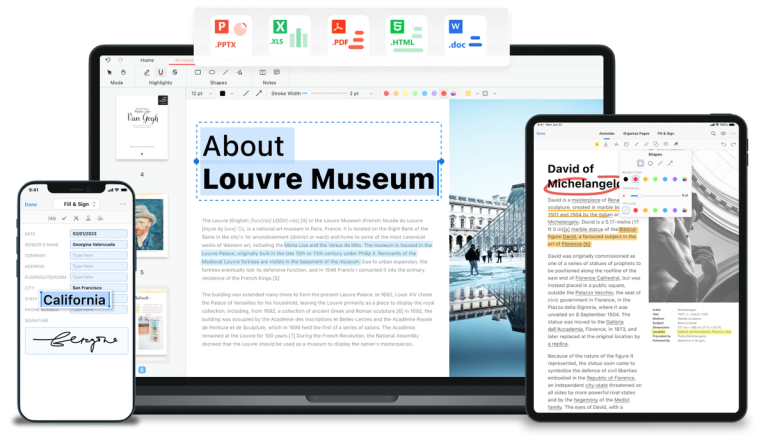
Free PDF editor software and online tools to edit, convert, merge, split, and sign PDF files across devices without signing up.
Features
- AI-Powered PDF Intelligence — PDFgear integrates cutting-edge AI technology, including ChatGPT, to summarize PDF documents, extract key information through natural language queries, and intelligently assist with document tasks — making it the first AI-powered PDF software of its kind.
- Comprehensive PDF Editing Suite — Edit PDFs as easily as Microsoft Word documents. Users can freely modify text, images, shapes, signatures, links, and fillable form fields directly within PDF files, with full annotation tools including highlights, underlines, strikethroughs, notes, comments, stamps, and text boxes.
- Multi-Format PDF Conversion — Convert seamlessly between PDF and Word, TXT, JPG, Excel, PPT, and more with lossless quality. Supports batch conversion mode for processing multiple files simultaneously without compatibility issues.
- Advanced OCR Technology — Precisely extract text from image-based documents or convert scanned PDFs into fully editable Word or TXT files. Supports over 30 languages, making it ideal for multilingual document processing and digitization workflows.
- Cross-Platform Accessibility — Work with PDFs anywhere — seamlessly switch between Windows, Mac, iPhone, iPad, Android devices, and web browsers. Includes dozens of free online tools for quick tasks like merging, splitting, compressing, and signing PDFs directly in the browser.
- 100% Free with No Sign-Up Required — All features are available completely free without requiring account creation or subscription. Educational and business features are included at no cost, with a 4.9-star rating from over 10,000 reviews validating its quality and trustworthiness.
Use Cases
Business Document Management & Signing
Professionals can edit contracts, fill out forms, add legally-binding signatures, convert documents between formats for client delivery, and use AI to quickly summarize lengthy reports or extract key clauses from legal documents — all without paying for expensive enterprise software. Target Audience: Small business owners, freelancers, legal professionals, and office workers who need robust PDF management without Adobe-level costs
Academic Research & Study Workflow
Students and researchers can annotate academic papers with highlights and notes, use OCR to digitize scanned textbook pages, leverage AI to summarize research papers or find specific information, and convert PDFs to editable formats for citation and editing purposes. Target Audience: University students, academic researchers, educators, and librarians handling large volumes of academic PDF documents
Quick Browser-Based PDF Tasks
Users who need fast, one-off PDF operations — such as merging multiple JPEGs into a single PDF, compressing files below email size limits, splitting large documents, or converting formats — can accomplish these tasks instantly through free online tools without downloading any software. Target Audience: Casual users, remote workers, and anyone needing quick PDF conversions or edits on shared or public computers
Scanned Document Digitization & Editing
Organizations and individuals can convert stacks of scanned paper documents into searchable, editable digital files using OCR technology with 30+ language support. This enables text extraction from receipts, invoices, historical documents, and multilingual paperwork for archiving and data entry. Target Audience: Administrative staff, archivists, accounting professionals, and organizations transitioning to paperless workflows
Pros
- Completely free with no hidden costs, subscriptions, or sign-up requirements — a rare offering in the PDF software market dominated by expensive alternatives like Adobe Acrobat.
- AI-powered features with ChatGPT integration enable intelligent document summarization, information extraction, and natural language interaction with PDFs, significantly boosting productivity.
- True cross-platform availability across Windows, Mac, iOS, Android, and web browsers with seamless device switching, plus dozens of free online tools for quick browser-based tasks.
- Advanced OCR supporting 30+ languages converts scanned and image-based PDFs into fully editable documents, rivaling premium OCR solutions at no cost.
- Highly trusted by users with a 4.9-star rating from 10,000+ reviews, and endorsed by reputable tech publications and reviewers for its feature completeness and ease of use.
Cons
- Being completely free raises sustainability questions — users may wonder about the long-term business model, potential future monetization, or how user data might be utilized to support the free offering.
- As a relatively newer entrant compared to Adobe Acrobat, PDFgear may lack some advanced enterprise features, granular permission controls, or deep integrations that established premium solutions offer.
- The free model and online availability have attracted misleading claims and misinformation about security, requiring the company to issue official security statements — which may create hesitation among risk-averse enterprise users.
- Mobile app functionality, while available on iOS and Android, may not match the full feature set of the desktop software, potentially limiting complex editing tasks on smaller screens.


