LogoAI Jet
Icon for Powerusers AI

Powerusers AI

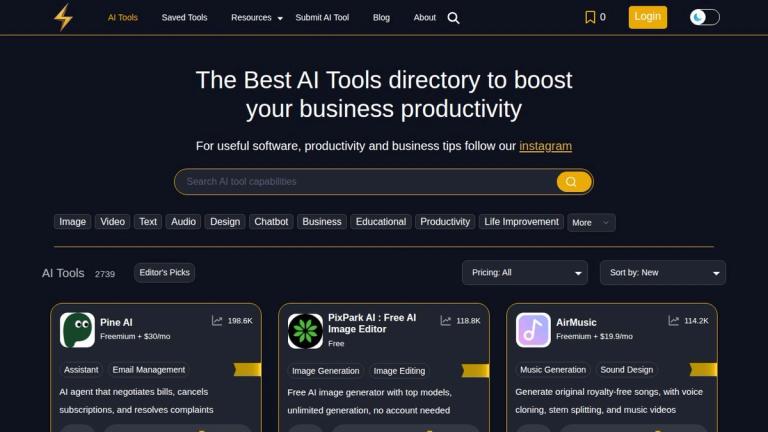
A comprehensive AI tools directory featuring 2739+ curated AI tools across multiple categories, designed to help users discover and compare AI solutions for bus

Introduction

Powerusers AI

Powerusers AI is a leading AI tools directory and resource platform that helps users discover, compare, and save the best AI tools available in the market. With a curated collection of over 2,739 AI tools, the platform serves as a one-stop destination for individuals and businesses looking to leverage artificial intelligence to boost their productivity.

Key Highlights
  • Extensive Tool Database: Browse through thousands of AI tools organized across 20+ categories including Image, Video, Text, Audio, Design, Chatbot, Business, Educational, and Productivity tools
  • Editor's Picks: Curated selection of top-performing AI tools highlighted by the editorial team
  • Save & Organize: Free account feature allowing users to save and organize their favorite AI tools
  • Resource Hub: Includes specialized tools like the MidJourney Prompt Builder and various ToolKits
  • Community Driven: Platform allows developers to submit their AI tools for inclusion in the directory
  • Regular Updates: Blog section with latest AI news, tips, and productivity insights

The platform caters to a wide range of users from casual AI enthusiasts to business professionals seeking to integrate AI solutions into their workflows.

Target Audience

Business professionals, AI enthusiasts, developers, content creators, marketers, educators, and anyone looking to discover and leverage AI tools for productivity and creativity.

Key Features
  • 2739+ curated AI tools directory
  • 20+ organized categories (Image, Video, Text, Audio, Design, Chatbot, Business, etc.)
  • Editor's Picks for top AI tools
  • Free account to save favorite tools
  • MidJourney Prompt Builder resource
  • ToolKits for specialized use cases
  • Submit AI Tool feature for developers
  • Blog with AI tips and productivity content
  • Tool comparison and discovery
  • Regular updates with new AI tools
Use Cases
  • Discovering new AI tools for specific tasks
  • Comparing AI solutions across categories
  • Finding AI tools for business productivity
  • Exploring AI tools for creative projects (image, video, audio)
  • Researching AI chatbots and assistants
  • Finding educational AI tools
  • Locating development and coding AI tools
  • Staying updated on latest AI tool releases
Pros
  • Large database of 2739+ AI tools
  • Well-organized categories for easy navigation
  • Free to use with optional account features
  • Editor's picks help identify quality tools
  • Regular updates with new tools
  • Community-driven with tool submission feature
  • Includes specialized resources like prompt builders
Cons
  • Some featured tools may be paid services
  • Quality of listed tools may vary
  • Limited detailed reviews for each tool
  • Relies on external links to access tools
Pricing

Free to browse and use. Account creation is free and enables saving favorite tools.

FAQ

More Products

TinyPNG is Tinify’s browser-based image compressor and converter. This review explains how its web tool differs from its Developer API, what each free allowance covers, and when its compression, conversion, resizing, and cropping features may fit an image workflow.

Zamzar is an online file conversion and compression service for documents, images, video, sound, and other formats. Its free web service has daily file and upload-size limits.

iLoveIMG is a browser-based image service for compression, resizing, cropping, conversion, and editing, with a free Basic plan and paid options.

Smallpdf is an online PDF toolkit for conversion, compression, editing, merging, signing, and more. Its Free plan includes 30+ tools but limits downloads.

Convertio is a browser-based service for converting files between supported formats, with optional settings for many conversion types.

FreeConvert is an online file converter with more than 1,500 listed conversion types and a free allowance of 20 conversion minutes per day.

HiPDF is an online PDF service with conversion, editing, compression, merging, cropping, image tools, and AI features.

123apps is a browser-based suite of video, audio, PDF, and file-conversion tools. Its apps are free to use with limits on file size and daily operations.

ChatPDF summarizes PDFs and answers questions about them. Its free plan allows two document analyses per day, with no account needed to get started.

CloudConvert is a browser-based converter for more than 200 file formats, including documents, images, audio, video, archives, and specialist formats.

OCR.space provides free browser-based OCR for images and PDFs, searchable PDF creation, and a separate API for adding text recognition to software.

Free online itinerary maker with 900+ trip plans across 96 countries. Edit day-by-day in the browser; export to PDF, Excel, CSV, Google Sheets or .ics. Free account required to download/print. Optional Pro adds premium themes; AI chat helps draft plans.

TasteDir is a curated directory of finished, well-crafted software from indie makers and small teams. Every listed tool is reviewed by hand.

An AI meeting copilot that combines live transcripts, screenshots, and project documents to deliver contextual answers, response drafts, and meeting recaps.

Create professional invoices free in your browser: live preview, any currency, tax and discounts, custom templates, and no-watermark PDF. No signup needed.

Vidsembly is an AI video creation platform that turns PowerPoint presentations, PDFs, and documents into narrated videos. Create AI presentations, clone voices, translate slides, transcribe recordings, generate soundtracks, and host videos in one place.