LogoAI Jet
icon of Presenti AI

Presenti AI

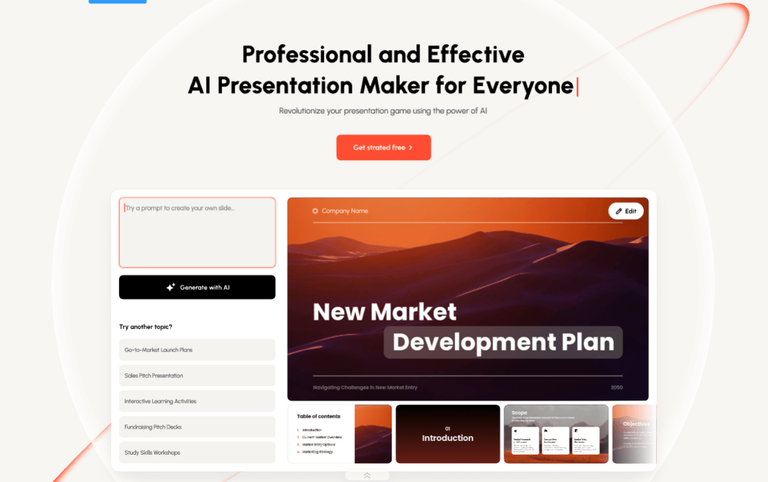
Presenti AI is an AI presentation maker for quick, professional slides, enabling design and customization in minutes.

Introduction

Presenti AI is an AI-powered presentation maker designed to streamline the creation of professional-looking slides. It caters to users who need to quickly generate presentations from various input formats, including text, Word documents, PDFs, and Markdown.

Key Features:

  • AI-Powered Slide Generation: Automatically creates presentation slides from text input, topic keywords, or uploaded files.
  • Automated Design Optimization: Ensures visually balanced slides with optimized layouts, color schemes, and typography.
  • Structured Outline Analysis: Generates PPT outline content with AI, allowing for dynamic analysis, customization, and editing.
  • Extensive Template Library: Offers a wide range of customizable templates for diverse industries and styles.
  • Multiple Input Formats: Supports text, Word documents, PDFs, and Markdown files as input.

Use Cases:

  • Marketing Presentations: Quickly transform marketing content into engaging AI-powered slides.
  • Business Pitches: Create professional pitch decks with AI-generated content and design.
  • Educational Content: Develop visually appealing educational presentations from text or documents.
  • Report Summarization: Convert lengthy reports (PDFs, Word docs) into concise and visually digestible presentations.
  • Rapid Prototyping: Quickly generate presentation drafts from outlines or notes for faster iteration.

Latest News

Presenti AI Changelog & Release Notes | Latest Updates

Presenti AI Changelog & Release Notes | Latest Updates

8/4/2026

Presenti AI Changelog & Release Notes | Latest Updates Release History - V1.14 - V1.13 - V1.12 - V1.11 - V1.10 - V1.9 - V1.8 - V1.7 - V1.6 - V1.5 - V1.4 - V1.3 - V1.2 - V1.1 - V1.0 July 8, 2025 V1.14 Optimize product features to enhance user experience. New Features - Added link-generated pre...

Exciting New Features to Elevate Your Presenti AI ...

Exciting New Features to Elevate Your Presenti AI ...

8/4/2026

Exciting New Features to Elevate Your Presenti AI Experience! At Presenti AI, we strive to make your presentation creation smoother, smarter, and more visually stunning. In our latest update, we’re introducing a range of powerful new tools and enhancements that will take your presentations to the n....

New Features to Supercharge Your Presentations

New Features to Supercharge Your Presentations

8/4/2026

Presenti AI Update: New Features to Supercharge Your Presentations At Presenti AI, we’re always working to enhance your presentation experience. Our latest update introduces a host of exciting new features designed to make creating professional presentations even easier and more efficient. From imp....

[Updates] 15 New AI Image Editing Styles Just Landed in Presenti

[Updates] 15 New AI Image Editing Styles Just Landed in Presenti

8/4/2026

[Updates] 15 New AI Image Editing Styles Just Landed in Presenti Your slides are only as strong as the visuals inside them. A great layout with a flat, generic image still loses the room. That gap between “functional” and “genuinely impressive” is exactly what Presenti’s expanded AI image editing s....

[Updates] Smarter Layout Switching in Presenti AI: Standard & Professional Layouts

[Updates] Smarter Layout Switching in Presenti AI: Standard & Professional Layouts

8/4/2026

[Updates] Smarter Layout Switching in Presenti AI: Standard & Professional Layouts Building a presentation that feels right isn’t just about the content. The way information is arranged on each slide shapes how clearly your audience receives it. A process explanation lands differently as a flowchar....

Alternatives

  • Gamma App

    Gamma App offers AI-powered presentations, documents, and webpages, allowing for quick creation and beautiful designs.

  • Tome

    Tome provides an AI-powered storytelling format that helps users create engaging and interactive presentations quickly.

  • Beautiful.ai

    Beautiful.ai utilizes AI to automatically apply design best practices, ensuring professional-looking presentations with minimal effort.

  • Canva

    Canva is a versatile design platform with AI features and extensive templates, making it easy to create visually appealing presentations quickly.

  • Plus AI

    Plus AI integrates directly with Google Slides to generate presentations from text prompts, streamlining the creation process.

  • Simplified

    Simplified is an all-in-one AI platform that includes tools for generating presentations, alongside other content creation features.

  • Designs.ai

    Designs.ai offers an AI-powered design assistant that helps create various visual content, including presentations, with smart templates.

  • Slidebean

    Slidebean focuses on AI-powered presentation design, allowing users to generate professional slides from their content in minutes.

  • Visme

    Visme is an all-in-one visual content creation tool that includes presentation design with smart templates and some AI assistance for quick creation.

  • Microsoft PowerPoint (with Copilot)

    The industry standard presentation software now enhanced with AI Copilot features to assist in content generation and design.

FAQ

More Products

TinyPNG is Tinify’s browser-based image compressor and converter. This review explains how its web tool differs from its Developer API, what each free allowance covers, and when its compression, conversion, resizing, and cropping features may fit an image workflow.

Zamzar is an online file conversion and compression service for documents, images, video, sound, and other formats. Its free web service has daily file and upload-size limits.

iLoveIMG is a browser-based image service for compression, resizing, cropping, conversion, and editing, with a free Basic plan and paid options.

Smallpdf is an online PDF toolkit for conversion, compression, editing, merging, signing, and more. Its Free plan includes 30+ tools but limits downloads.

Convertio is a browser-based service for converting files between supported formats, with optional settings for many conversion types.

FreeConvert is an online file converter with more than 1,500 listed conversion types and a free allowance of 20 conversion minutes per day.

HiPDF is an online PDF service with conversion, editing, compression, merging, cropping, image tools, and AI features.

123apps is a browser-based suite of video, audio, PDF, and file-conversion tools. Its apps are free to use with limits on file size and daily operations.

ChatPDF summarizes PDFs and answers questions about them. Its free plan allows two document analyses per day, with no account needed to get started.

CloudConvert is a browser-based converter for more than 200 file formats, including documents, images, audio, video, archives, and specialist formats.

OCR.space provides free browser-based OCR for images and PDFs, searchable PDF creation, and a separate API for adding text recognition to software.

Free online itinerary maker with 900+ trip plans across 96 countries. Edit day-by-day in the browser; export to PDF, Excel, CSV, Google Sheets or .ics. Free account required to download/print. Optional Pro adds premium themes; AI chat helps draft plans.

Contextual nofollow link exchanges for sites you control, handled with your coding agent and your approval.

TasteDir is a curated directory of finished, well-crafted software from indie makers and small teams. Every listed tool is reviewed by hand.

An AI meeting copilot that combines live transcripts, screenshots, and project documents to deliver contextual answers, response drafts, and meeting recaps.

SpriteGen is a free online sprite creator. Describe your character, pick a perspective and style, and the AI generates a game-ready pixel-art sprite sheet.