LogoAI Jet
icon of ProximityLock

ProximityLock

Automatically locks your Mac when you step away using Bluetooth monitoring for enhanced security in coworking and open office environments.

Introduction

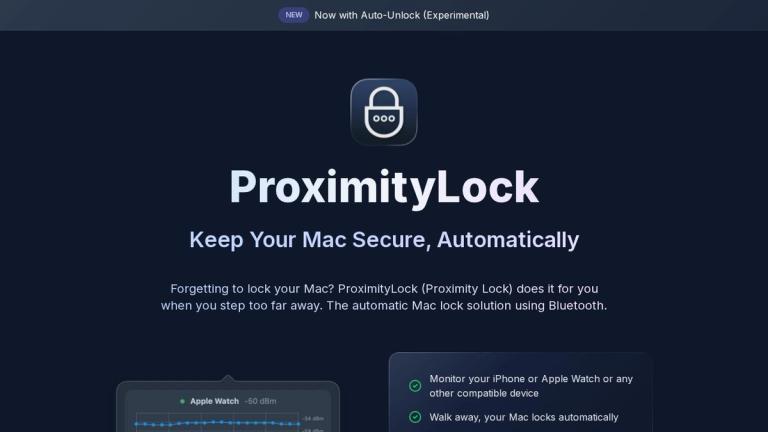
ProximityLock is a macOS security application that automatically locks your computer when you move away from it, using Bluetooth Low Energy (BLE) technology to monitor the distance between your Mac and your Apple Watch or iPhone. This eliminates the need for manual locking or relying on potentially insecure screen lock timers.

Key Features
  • Automatic Mac Locking: Locks your Mac when you step beyond Bluetooth range
  • Bluetooth Device Monitoring: Works with iPhone, Apple Watch, and other BLE devices
  • Adjustable Sensitivity: Customizable proximity thresholds and lock delays
  • Low Resource Usage: Minimal CPU and energy consumption
  • Security PIN Protection: Optional PIN requirement for changing settings or quitting the app
  • Background Operation: Runs continuously without needing the app open
  • Auto-start Capability: Can launch automatically at login
Use Cases
  • Coworking Spaces: Prevent unauthorized access when stepping away from your desk
  • Open Offices: Maintain security in shared work environments
  • Home Offices: Ensure privacy when leaving your workstation temporarily
  • Security-Conscious Users: Add an extra layer of protection beyond standard screen locks

The app is signed and notarized by Apple, requires only local Bluetooth permissions, and operates with a one-time purchase model after a 14-day free trial.

Latest News

Automate Your Mac When You Walk Away | ProximityLock Blog

Automate Your Mac When You Walk Away | ProximityLock Blog

8/4/2026

Automate Your Mac When You Walk Away | ProximityLock Blog # Automate Your Mac When You Walk Away Locking your screen when you leave is good security practice. But what if you want your Mac to do more than just lock? Maybe you want to pause Music when you leave and resume it when you return....

Changelog - ProximityLock

Changelog - ProximityLock

8/4/2026

Changelog - ProximityLock # Changelog Release History & Updates ## Version 1.17.4 2026-04-04 - Auto-Unlock is now possible (Experimental) - Requires Accessibility permission and storing your login password in Keychain - Automatically unlocks your Mac when your device returns to proximity - Wakes ...

Blog | ProximityLock - Technical Insights & Development Stories

Blog | ProximityLock - Technical Insights & Development Stories

8/4/2026

Blog | ProximityLock - Technical Insights & Development Stories # ProximityLock Blog Technical insights, development stories, and security thoughts ## Bluetooth Beacon Experiment Every so often I've been asked if ProximityLock and ProximityShortcuts apps support any other devices aside from the ...

ProximityLock | Keep Your Mac Secure, Automatically

ProximityLock | Keep Your Mac Secure, Automatically

8/4/2026

ProximityLock | Keep Your Mac Secure, Automatically NEW Now with Auto-Unlock (Experimental) - Monitor your iPhone or Apple Watch or any other compatible device - Walk away, your Mac locks automatically - Optionally trigger a macOS Shortcut when you leave or return - Auto-Unlock (Experimental): you.....

Terms and Conditions - ProximityLock

Terms and Conditions - ProximityLock

8/4/2026

Terms and Conditions - ProximityLock # Terms and Conditions Last Updated: October 31, 2024 ## Acceptance of Terms By downloading, installing, or using ProximityLock, you agree to these Terms and Conditions. If you disagree with any part of these terms, please do not use the application. ## Licen...

Alternatives

  • Near Lock

    This app uses your iPhone or Apple Watch to automatically lock and unlock your Mac based on proximity, similar to ProximityLock's Bluetooth functionality.

  • AuthMate

    AuthMate provides proximity-based locking for your Mac using your iPhone or Apple Watch, offering a comparable hands-free security experience.

  • Keycard

    Keycard offers a unique approach to automatic locking by using a physical USB key as a proximity sensor for your Mac.

  • ControlPlane

    This powerful automation tool allows users to define rules for their Mac, including locking the screen based on various contexts like Bluetooth device presence.

  • BlueSense

    BlueSense enables your Mac to react to the presence or absence of Bluetooth devices, allowing for custom actions like screen locking.

  • macOS built-in 'Require password after sleep'

    The native macOS security setting automatically locks your Mac after a period of inactivity or when it goes to sleep, providing a fundamental layer of security.

  • Alfred (with Powerpack)

    Alfred, a popular productivity app, can be configured with custom workflows to quickly lock your Mac's screen with a simple keyboard command.

  • BetterTouchTool

    BetterTouchTool allows for extensive customization of input devices and can be used to create custom triggers for actions like locking your Mac's screen.

  • Jamf Pro

    An enterprise-grade mobile device management solution, Jamf Pro allows IT administrators to enforce security policies, including automatic screen locking, on managed Macs.

  • Lock Me Now

    This simple utility provides a quick and easy way to manually lock your Mac's screen with a single click or keyboard shortcut.

FAQ

More Products

TinyPNG is Tinify’s browser-based image compressor and converter. This review explains how its web tool differs from its Developer API, what each free allowance covers, and when its compression, conversion, resizing, and cropping features may fit an image workflow.

Zamzar is an online file conversion and compression service for documents, images, video, sound, and other formats. Its free web service has daily file and upload-size limits.

iLoveIMG is a browser-based image service for compression, resizing, cropping, conversion, and editing, with a free Basic plan and paid options.

Smallpdf is an online PDF toolkit for conversion, compression, editing, merging, signing, and more. Its Free plan includes 30+ tools but limits downloads.

Convertio is a browser-based service for converting files between supported formats, with optional settings for many conversion types.

FreeConvert is an online file converter with more than 1,500 listed conversion types and a free allowance of 20 conversion minutes per day.

HiPDF is an online PDF service with conversion, editing, compression, merging, cropping, image tools, and AI features.

123apps is a browser-based suite of video, audio, PDF, and file-conversion tools. Its apps are free to use with limits on file size and daily operations.

ChatPDF summarizes PDFs and answers questions about them. Its free plan allows two document analyses per day, with no account needed to get started.

CloudConvert is a browser-based converter for more than 200 file formats, including documents, images, audio, video, archives, and specialist formats.

OCR.space provides free browser-based OCR for images and PDFs, searchable PDF creation, and a separate API for adding text recognition to software.

Free online itinerary maker with 900+ trip plans across 96 countries. Edit day-by-day in the browser; export to PDF, Excel, CSV, Google Sheets or .ics. Free account required to download/print. Optional Pro adds premium themes; AI chat helps draft plans.

TasteDir is a curated directory of finished, well-crafted software from indie makers and small teams. Every listed tool is reviewed by hand.

An AI meeting copilot that combines live transcripts, screenshots, and project documents to deliver contextual answers, response drafts, and meeting recaps.

Create professional invoices free in your browser: live preview, any currency, tax and discounts, custom templates, and no-watermark PDF. No signup needed.

Vidsembly is an AI video creation platform that turns PowerPoint presentations, PDFs, and documents into narrated videos. Create AI presentations, clone voices, translate slides, transcribe recordings, generate soundtracks, and host videos in one place.