LogoAI Jet
Icon for QRCode Monkey

QRCode Monkey

A free QR code generator that allows users to create custom QR codes with logos, custom colors, and unique shapes for professional and personal use.

Introduction

QRCode Monkey

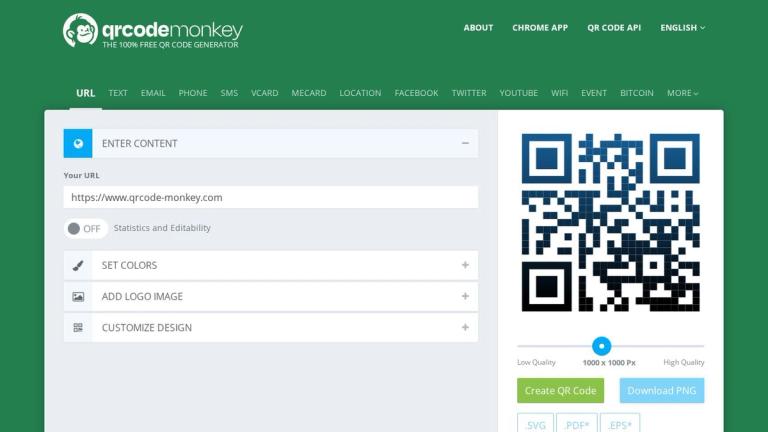
QRCode Monkey is a free online QR code generator that enables users to create highly customized QR codes with logos, unique colors, and distinctive shapes. The platform stands out for its extensive design customization options while maintaining QR code scannability.

Key Capabilities
  • Logo Integration: Upload your own logo (PNG, JPG, GIF, SVG formats, max 2MB) or select from a built-in gallery to brand your QR codes
  • Advanced Color Customization: Choose from single colors, color gradients, and custom eye colors for both foreground and background
  • Shape Customization: Customize body shape, eye frame shape, and eye ball shape to create unique designs
  • Template Gallery: Start with pre-designed templates for quick creation
  • High-Quality Output: Generate QR codes at 1000 x 1000 pixels resolution
  • Multiple Content Types: Create QR codes for URLs, text, email, and other content types
How It Works
  1. Set QR Content: Select a content type and enter the required information
  2. Customize Design: Apply custom colors, shapes, and logos to make your QR code unique
  3. Generate & Download: Create and download your custom QR code

The platform also offers a premium upgrade path through QR Code Generator PRO for users who need dynamic QR codes, scan statistics, bulk creation, and campaign management features.

Target Audience

Small business owners, marketers, designers, event organizers, and individuals who need custom-branded QR codes for professional or personal use.

Key Features
  • Custom logo upload and gallery selection
  • Advanced color customization with gradients
  • Custom eye frame and body shapes
  • Template gallery for quick designs
  • High-quality 1000x1000px output
  • Multiple QR code content types
  • Free to use
  • No account required for basic generation
Use Cases
  • Business card QR codes with company branding
  • Marketing materials and print advertisements
  • Restaurant menus and contactless ordering
  • Event tickets and registration
  • Product packaging and labels
  • Social media profile links
  • Wi-Fi network sharing
  • Personal portfolio and website links
Pros
  • Completely free for basic QR code generation
  • Extensive design customization options
  • Logo integration for brand recognition
  • No registration required
  • High-quality output resolution
  • User-friendly interface
Cons
  • Color gradients not supported for all QR code readers
  • Requires sufficient contrast between foreground and background
  • Maximum logo file size of 2MB
  • Static QR codes only (dynamic requires PRO upgrade)
Pricing

Free for basic QR code generation. Premium features available through QR Code Generator PRO subscription.

FAQ

More Products

TinyPNG is Tinify’s browser-based image compressor and converter. This review explains how its web tool differs from its Developer API, what each free allowance covers, and when its compression, conversion, resizing, and cropping features may fit an image workflow.

Zamzar is an online file conversion and compression service for documents, images, video, sound, and other formats. Its free web service has daily file and upload-size limits.

iLoveIMG is a browser-based image service for compression, resizing, cropping, conversion, and editing, with a free Basic plan and paid options.

Smallpdf is an online PDF toolkit for conversion, compression, editing, merging, signing, and more. Its Free plan includes 30+ tools but limits downloads.

Convertio is a browser-based service for converting files between supported formats, with optional settings for many conversion types.

FreeConvert is an online file converter with more than 1,500 listed conversion types and a free allowance of 20 conversion minutes per day.

HiPDF is an online PDF service with conversion, editing, compression, merging, cropping, image tools, and AI features.

123apps is a browser-based suite of video, audio, PDF, and file-conversion tools. Its apps are free to use with limits on file size and daily operations.

ChatPDF summarizes PDFs and answers questions about them. Its free plan allows two document analyses per day, with no account needed to get started.

CloudConvert is a browser-based converter for more than 200 file formats, including documents, images, audio, video, archives, and specialist formats.

OCR.space provides free browser-based OCR for images and PDFs, searchable PDF creation, and a separate API for adding text recognition to software.

Free online itinerary maker with 900+ trip plans across 96 countries. Edit day-by-day in the browser; export to PDF, Excel, CSV, Google Sheets or .ics. Free account required to download/print. Optional Pro adds premium themes; AI chat helps draft plans.

Contextual nofollow link exchanges for sites you control, handled with your coding agent and your approval.

TasteDir is a curated directory of finished, well-crafted software from indie makers and small teams. Every listed tool is reviewed by hand.

An AI meeting copilot that combines live transcripts, screenshots, and project documents to deliver contextual answers, response drafts, and meeting recaps.

SpriteGen is a free online sprite creator. Describe your character, pick a perspective and style, and the AI generates a game-ready pixel-art sprite sheet.