LogoAI Jet
Icon for Raindrop.io

Raindrop.io

All-in-one bookmark manager for organizing, saving, and accessing bookmarks across all devices with powerful search, collaboration, and backup features.

Introduction

Raindrop.io

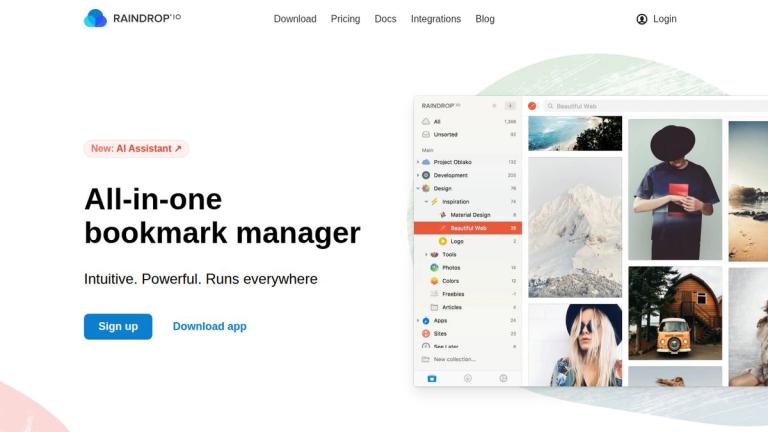
Raindrop.io is a modern, all-in-one bookmark manager designed for creatives and coders alike. It provides a comprehensive solution for saving, organizing, and accessing all your favorite books, songs, articles, and other web content from anywhere.

Key Highlights
  • Organize with Ease: Use collections, tags, and filters to keep bookmarks organized. The platform also helps identify duplicates and broken links.
  • Rich Content Experience: Annotate web pages with highlights, get instant previews of articles and videos, and choose from multiple view modes (Grid, Headlines, Masonry, List).
  • Powerful Search: Full-text search across all saved web pages and PDFs, going beyond just titles and tags.
  • Automatic Backups: Web archive preserves copies of saved pages even if they're taken down. Supports automatic backups to Dropbox and Google Drive.
  • Collaboration: Share collections with coworkers, family, or make them public. Control access with granular permissions.
  • Cross-Platform: Available as browser extensions (Chrome, Firefox, Safari, Edge) and native apps (Windows, Mac, iOS, Android).
  • Security & Privacy: SSL encryption, cloud-based architecture behind VPC, no ads or trackers, and open-source applications.
  • AI Assistant: New AI-powered assistant (Stella) for enhanced bookmark management.
Pricing

Free to use indefinitely with unlimited bookmarks, collections, and devices. Premium features available with paid plans.

Target Audience

Researchers, designers, developers, content creators, teams, and anyone who needs to organize and access web bookmarks across multiple devices.

Key Features
  • Collections with predefined icons for organizing bookmarks
  • Tags and filters for classification and efficient search
  • Duplicate and broken link detection
  • Web highlights and annotations
  • Instant preview of articles, videos, and web pages
  • Multiple view modes (Grid, Headlines, Masonry, List)
  • Full-text search across web pages and PDFs
  • Automatic web archive backups
  • Dropbox and Google Drive backup integration
  • Team collaboration with permission controls
  • Public pages for sharing collections
  • Browser extensions (Chrome, Firefox, Safari, Edge)
  • Native apps (Windows, Mac, iOS, Android)
  • Integrations and API access
  • AI Assistant (Stella)
  • SSL encryption and VPC-secured architecture
Use Cases
  • Saving and organizing research articles and references
  • Bookmarking favorite books, songs, and media
  • Team collaboration on shared resource collections
  • Creating public curated collections for sharing
  • Archiving web pages for future reference
  • Annotating and highlighting key passages from web content
  • Cross-device bookmark synchronization
  • Full-text search across saved content and PDFs
Pros
  • Free tier with unlimited bookmarks and collections
  • Cross-platform availability (browser extensions and native apps)
  • Powerful full-text search including PDF content
  • Automatic web archiving preserves saved content
  • Clean, intuitive interface with multiple view modes
  • Strong privacy focus - no ads, no trackers, open-source apps
  • Team collaboration features with granular permissions
  • AI-powered assistant for enhanced productivity
Cons
  • Premium features require paid subscription
  • Cloud-based only - no local-only option
  • May be overkill for users with simple bookmarking needs
Pricing

Free tier available with unlimited bookmarks, collections, and devices. Premium plans available for additional features.

Latest News

Changelog - Raindrop.io Help

Changelog - Raindrop.io Help

8/4/2026

Raindrop.io Help home page · Search or ask... Navigation · Changelog · Changelog · Changelog · Contact us · Stay up to date with the latest updates across all Raindrop.io platforms · Contact us · Was this page helpful? YesNo · Troubleshooting · Previous · Web app ·

Raindrop.io Blog

Raindrop.io Blog

8/4/2026

Ask for the gist, pull the key points, or jump to the one thing that was said, without watching a minute. Stella already chatted with your articles, PDFs, and web pages. Your bookmarks were meant for more than collecting dust · For a long time, one of the most requested features has been full suppor...

Raindrop.io — All-in-one bookmark manager

Raindrop.io — All-in-one bookmark manager

8/4/2026

Raindrop.io is not just a pretty interface, it can help you untangle your bookmarks mess. ... Group related bookmarks within the same context. Thousands of predefined icons. Learn more ... Add tags to classify items. Search efficiently by type, tags, or domain. Learn more ... Keep it clean. We help ...

Updates – Raindrop.io Blog

Updates – Raindrop.io Blog

8/4/2026

Smart — Last major update of web apps happen many years ago, internally they aged really bad: slow, inflexible and hard to extend. They need complete refresh! Today I’m very excited to launch what I have been working on for the past half of the year! Say hi for brand new Web… ... Connect your Raindr...

iOS/iPadOS App 5.0

iOS/iPadOS App 5.0

8/4/2026

Ask for the gist, pull the key points, or jump to the one thing that was said, without watching a minute. Stella already chatted with your articles, PDFs, and web pages. Your bookmarks were meant for more than collecting dust · For a long time, one of the most requested features has been full suppor...

FAQ

User Reviews

4.4/5.0
(22reviews)
Click stars to rate

Pricing

Pricing Model: Freemium

Free

Unlimited bookmarks, collections, devices, and essential features with limited storage and advanced tools.

Free
N/A

Pro Monthly

Everything in Free plus advanced AI, storage, search, and tools.

$3/month
monthly

Pro Yearly

Same as Pro Monthly but billed annually for savings.

$28/year (20% discount)
yearly

More Products

TinyPNG is Tinify’s browser-based image compressor and converter. This review explains how its web tool differs from its Developer API, what each free allowance covers, and when its compression, conversion, resizing, and cropping features may fit an image workflow.

Zamzar is an online file conversion and compression service for documents, images, video, sound, and other formats. Its free web service has daily file and upload-size limits.

iLoveIMG is a browser-based image service for compression, resizing, cropping, conversion, and editing, with a free Basic plan and paid options.

Smallpdf is an online PDF toolkit for conversion, compression, editing, merging, signing, and more. Its Free plan includes 30+ tools but limits downloads.

Convertio is a browser-based service for converting files between supported formats, with optional settings for many conversion types.

FreeConvert is an online file converter with more than 1,500 listed conversion types and a free allowance of 20 conversion minutes per day.

HiPDF is an online PDF service with conversion, editing, compression, merging, cropping, image tools, and AI features.

123apps is a browser-based suite of video, audio, PDF, and file-conversion tools. Its apps are free to use with limits on file size and daily operations.

ChatPDF summarizes PDFs and answers questions about them. Its free plan allows two document analyses per day, with no account needed to get started.

CloudConvert is a browser-based converter for more than 200 file formats, including documents, images, audio, video, archives, and specialist formats.

OCR.space provides free browser-based OCR for images and PDFs, searchable PDF creation, and a separate API for adding text recognition to software.

Free online itinerary maker with 900+ trip plans across 96 countries. Edit day-by-day in the browser; export to PDF, Excel, CSV, Google Sheets or .ics. Free account required to download/print. Optional Pro adds premium themes; AI chat helps draft plans.

TasteDir is a curated directory of finished, well-crafted software from indie makers and small teams. Every listed tool is reviewed by hand.

An AI meeting copilot that combines live transcripts, screenshots, and project documents to deliver contextual answers, response drafts, and meeting recaps.

Create professional invoices free in your browser: live preview, any currency, tax and discounts, custom templates, and no-watermark PDF. No signup needed.

Vidsembly is an AI video creation platform that turns PowerPoint presentations, PDFs, and documents into narrated videos. Create AI presentations, clone voices, translate slides, transcribe recordings, generate soundtracks, and host videos in one place.