LogoAI Jet
Icon for Ready to Send

Ready to Send

AI-powered Gmail assistant that automatically generates personalized email replies, helping professionals and teams respond faster with prewritten, editable dra

Introduction

Ready to Send

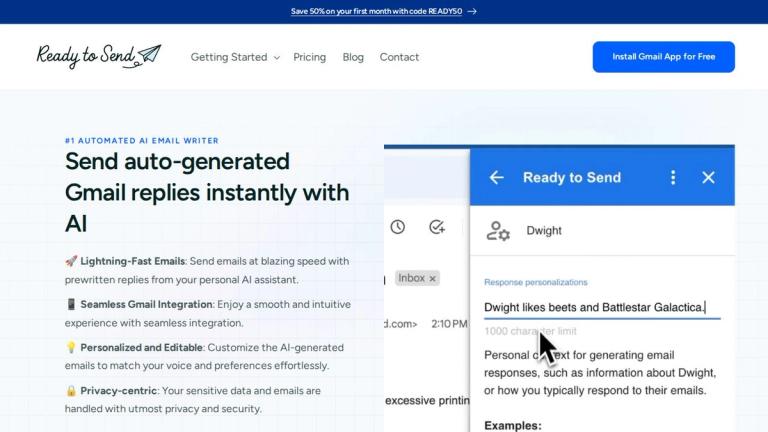
Ready to Send is an AI-powered email automation tool designed specifically for Gmail users. It acts as a personal email assistant that works 24/7, automatically generating contextual, personalized replies for incoming emails.

How It Works

Ready to Send integrates seamlessly with Gmail through the Google Workspace Marketplace. Once installed, it monitors your inbox and generates complete prewritten responses for emails that need a reply. These drafts appear in your inbox, ready for your review, editing, or immediate sending.

Key Capabilities
  • Personalized Voice: The AI learns your communication style and tone, crafting responses that sound like you wrote them.
  • Intelligent Snippets: A powerful knowledge base feature that automatically inserts relevant reusable content—perfect for FAQs, product information, policies, and common phrases.
  • Cross-Device Compatibility: Works with the native Gmail app as well as third-party email clients like Apple Mail and Microsoft Outlook.
  • Privacy-First Approach: Your sensitive data and emails are handled with utmost privacy and security.
Trusted Partners

Ready to Send is built on trusted platforms including Google, Gmail, Stripe, Meta, OpenAI, and Anthropic, and is available to over 1.8 billion Gmail users worldwide with a perfect 5/5 rating on the Google Marketplace.

Target Audience

Professionals, customer support teams, sales teams, and anyone managing high email volumes who wants to automate and accelerate their Gmail responses.

Key Features
  • AI-generated email replies that match your personal style and tone
  • Seamless Gmail integration via Google Workspace Marketplace
  • Intelligent Snippets knowledge base for reusable content insertion
  • Editable and regenerable drafts before sending
  • Cross-device compatibility (Gmail app, Apple Mail, Outlook)
  • Privacy-centric data handling
  • 24/7 automated inbox monitoring and draft generation
  • Customizable instructions for different contacts and scenarios
Use Cases
  • Customer support automation with consistent FAQ responses
  • Sales and marketing outreach with personalized follow-ups
  • Internal communications and employee onboarding
  • Personal productivity for managing high email volumes
  • Professional communication acceleration for business teams
Pros
  • Perfect 5/5 rating on Google Marketplace
  • Generates contextual, personalized responses automatically
  • Works across multiple email clients and devices
  • Intelligent Snippets feature for knowledge-based replies
  • Free tier available (200 emails)
  • Strong privacy and security focus
  • Backed by major tech partners (Google, OpenAI, Anthropic)
Cons
  • Limited to Gmail ecosystem only
  • AI-generated drafts still require human review
  • Effectiveness depends on quality of training/instructions provided
Pricing

Free tier available with 200 email replies. Additional pricing details available on the Google Workspace Marketplace.

Latest News

Introducing Snippets: Your AI-Powered Knowledge Base for Smarter Email
 – Ready to Send

Introducing Snippets: Your AI-Powered Knowledge Base for Smarter Email – Ready to Send

8/4/2026

Introducing Snippets: Your AI-Powered Knowledge Base for Smarter Email – Ready to Send Save 50% on your first month with code READY50 Email Automation Guides› Automation, Email, Productivity Ready to Send just got even smarter. We're thrilled to announce the launch of Intelligent Snippets, a revo...

How Ready to Send Creates Your Email Replies

How Ready to Send Creates Your Email Replies

8/4/2026

How Ready to Send Creates Your Email Replies Save 50% on your first month with code READY50 Email Automation Guides› Automation, Email, Productivity Ever wonder what happens when Ready to Send turns a blank email into a response that sounds like you? Although it's a magical experience, the proce...

Ready to Send: Generate Gmail Replies Automatically with AI

Ready to Send: Generate Gmail Replies Automatically with AI

8/4/2026

Ready to Send: Generate Gmail Replies Automatically with AI Save 50% on your first month with code READY50 #1 Automated AI email writer # Send auto-generated Gmail replies instantly with AI 🚀 Lightning-Fast Emails: Send emails at blazing speed with prewritten replies from your personal AI assist...

The Ultimate Guide to AI-Powered Email Management

The Ultimate Guide to AI-Powered Email Management

8/4/2026

The Ultimate Guide to AI-Powered Email Management – Ready to Send Save 50% on your first month with code READY50 AI-powered email tools make managing your inbox faster and easier by automating tasks like sorting, prioritizing, and writing responses. Here’s what you need to know: - Contact - Save ...

Introducing Smart Reply: Automate Only the Emails That Matter
 – Ready to Send

Introducing Smart Reply: Automate Only the Emails That Matter – Ready to Send

8/4/2026

Introducing Smart Reply: Automate Only the Emails That Matter – Ready to Send Save 50% on your first month with code READY50 Email Automation Guides› Productivity Smart Reply is a new feature in Ready to Send, which will auto-generate an email reply only for messages that require a response. - C...

FAQ

More Products

TinyPNG is Tinify’s browser-based image compressor and converter. This review explains how its web tool differs from its Developer API, what each free allowance covers, and when its compression, conversion, resizing, and cropping features may fit an image workflow.

Zamzar is an online file conversion and compression service for documents, images, video, sound, and other formats. Its free web service has daily file and upload-size limits.

iLoveIMG is a browser-based image service for compression, resizing, cropping, conversion, and editing, with a free Basic plan and paid options.

Smallpdf is an online PDF toolkit for conversion, compression, editing, merging, signing, and more. Its Free plan includes 30+ tools but limits downloads.

Convertio is a browser-based service for converting files between supported formats, with optional settings for many conversion types.

FreeConvert is an online file converter with more than 1,500 listed conversion types and a free allowance of 20 conversion minutes per day.

HiPDF is an online PDF service with conversion, editing, compression, merging, cropping, image tools, and AI features.

123apps is a browser-based suite of video, audio, PDF, and file-conversion tools. Its apps are free to use with limits on file size and daily operations.

ChatPDF summarizes PDFs and answers questions about them. Its free plan allows two document analyses per day, with no account needed to get started.

CloudConvert is a browser-based converter for more than 200 file formats, including documents, images, audio, video, archives, and specialist formats.

OCR.space provides free browser-based OCR for images and PDFs, searchable PDF creation, and a separate API for adding text recognition to software.

Free online itinerary maker with 900+ trip plans across 96 countries. Edit day-by-day in the browser; export to PDF, Excel, CSV, Google Sheets or .ics. Free account required to download/print. Optional Pro adds premium themes; AI chat helps draft plans.

TasteDir is a curated directory of finished, well-crafted software from indie makers and small teams. Every listed tool is reviewed by hand.

An AI meeting copilot that combines live transcripts, screenshots, and project documents to deliver contextual answers, response drafts, and meeting recaps.

Create professional invoices free in your browser: live preview, any currency, tax and discounts, custom templates, and no-watermark PDF. No signup needed.

Vidsembly is an AI video creation platform that turns PowerPoint presentations, PDFs, and documents into narrated videos. Create AI presentations, clone voices, translate slides, transcribe recordings, generate soundtracks, and host videos in one place.