LogoAI Jet
icon of reMarkable

reMarkable

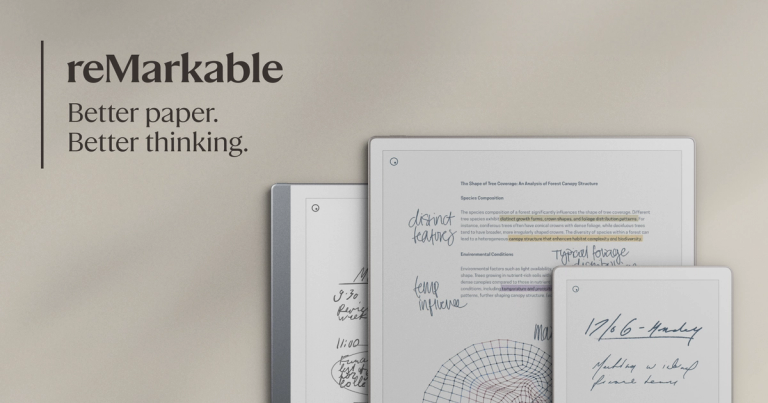
Paper tablets designed for focused work, offering a distraction-free digital notebook experience that feels like writing on paper.

Introduction

Paper tablets designed for focused work, offering a distraction-free digital notebook experience that feels like writing on paper.

Features
  • Paper-Like Writing Experience — Provides an unmatched feeling of pen on paper with a natural, tactile writing surface that mimics traditional paper, allowing users to write, mark up, and sketch with precision and comfort.
  • Distraction-Free Environment — Designed for focused work without pop-ups, notifications, or digital distractions, creating a dedicated space for deep thinking and concentration.
  • Digital Organization Tools — Offers powerful digital features including handwriting-to-text conversion, folders, tags, and search functionality to easily organize, edit, and retrieve notes and documents.
  • Cloud Integration & Connectivity — Seamlessly connects with popular productivity tools including Google Drive, Microsoft Word, OneDrive, and more through the reMarkable Connect subscription for cross-platform workflow continuity.
  • ScreenShare Technology — Built-in ScreenShare capability allows users to display and share their work in real-time, facilitating collaboration and presentations directly from the paper tablet.
  • Portable Design — The reMarkable Paper Pro is designed as the most portable paper tablet in the lineup, optimized for work on the go with a lightweight, travel-friendly form factor.
Use Cases
Executive Decision-Making & Strategic Planning

CEOs and business leaders use reMarkable to capture strategic thoughts, brainstorm ideas, and review documents without digital distractions. The paper-like experience helps executives think more clearly while the digital tools keep their notes organized and searchable. Target Audience: C-suite executives, entrepreneurs, and business founders

Academic Research & Writing

Professors, researchers, and authors leverage reMarkable to annotate academic papers, draft manuscripts, and distill complex research into organized notes. The handwriting conversion feature streamlines the transition from handwritten notes to digital text for publication. Target Audience: University professors, researchers, and published authors

Mobile Professional Workflows

On-the-go professionals use the portable reMarkable Paper Pro to take meeting notes, review contracts, and sketch ideas during travel or client visits, then seamlessly continue work on desktop or mobile apps. Target Audience: Consultants, sales professionals, and remote workers

Creative Ideation & Brainstorming

Creative professionals use reMarkable for sketching concepts, mind mapping, and visual brainstorming sessions. Integration with tools like Miro allows ideas to flow from pen to laptop seamlessly. Target Audience: Designers, creative directors, and innovation teams

Pros
  • Industry recognition as one of Time magazine's Best Inventions of 2025, validating its innovative approach to digital note-taking
  • 50-day risk-free trial period allows users to fully experience the product before committing, reducing purchase anxiety
  • Eliminates digital distractions common on tablets and laptops, promoting deeper focus and more productive work sessions
  • Comprehensive ecosystem with mobile and desktop apps plus integrations with Google Drive, Microsoft Word, and OneDrive for seamless workflow continuity
  • Free shipping and buy now, pay later options make the product more accessible to a wider range of customers
Cons
  • Limited geographic shipping availability - does not ship to all countries, restricting access for many potential international customers
  • Full feature set requires a reMarkable Connect subscription, adding ongoing costs beyond the initial hardware purchase
  • Limited cloud storage included without subscription, potentially requiring additional investment for users with extensive note-taking needs
  • Premium pricing positioning may put the product out of reach for budget-conscious students or casual users who could benefit from the distraction-free experience

Latest News

The reMarkable blog | reMarkable

The reMarkable blog | reMarkable

8/4/2026

reMarkable continues to impress, as the satisfying and familiar feel of digital paper reaches more hands around the globe. Software releases ## Software update 1.8: Improved brushes, better syncing and a smoother reading experience We have some exciting news! [...] Sometimes it’s the little things t...

Big changes are coming to the reMarkable ecosystem | reMarkable

Big changes are coming to the reMarkable ecosystem | reMarkable

8/4/2026

These updates will transform the way our software ecosystem works to support the best of analog and digital note-taking. We think this will help you maintain focus as you go about your day and move between different settings and devices as needed. [...] News ## Meet reMarkable Paper Pro Move, the gr...

reMarkable OS 3.15 | reMarkable

reMarkable OS 3.15 | reMarkable

8/4/2026

Our paper tablets get five years of updates from the time they’re no longer available through our webshop. This keeps them useful for an exceptionally long time for a technology product. So, if you’re a reMarkable 2 user, you can look forward to years of software updates that will make your paper ta...

Release 3.7: Transform your annotations | reMarkable

Release 3.7: Transform your annotations | reMarkable

8/4/2026

Thanks for following our software releases. To learn more about our latest software and how to use the new features, you can read the full release notes for version 3.7. Learn how reMarkable rolls out software updates ## Recommended reading Software releases ## reMarkable OS 3.16 Improvements to tag...

Meet reMarkable Paper Pro Move, the groundbreaking paper tablet made for work on the go | reMarkable

Meet reMarkable Paper Pro Move, the groundbreaking paper tablet made for work on the go | reMarkable

8/4/2026

The new paper tablet received one of the highest scores for any product tested, embodying design principles that help reduce distractions, fostering clearer thinking and calm productivity. News ## Introducing reMarkable Paper Pro, the world's thinnest paper tablet with a color display See big ideas ...

Alternatives

  • Supernote

    Supernote offers e-ink tablets with a focus on writing feel and robust note-taking features, often praised for its ceramic nib and software updates.

  • Onyx Boox Note Air series

    These Android-based e-ink tablets provide more versatility with app support and a similar paper-like writing experience to reMarkable.

  • Kindle Scribe

    Amazon's e-reader with integrated note-taking allows users to read and write on a large e-ink display, offering a distraction-free environment for both.

  • Kobo Elipsa 2E

    This e-reader with stylus support provides a comfortable e-ink experience for reading, annotating, and taking notes directly on the device.

  • iPad Pro with Apple Pencil

    While not e-ink, the iPad Pro offers a highly versatile digital note-taking and drawing experience with a vast app ecosystem and powerful performance.

  • Samsung Galaxy Tab S series with S Pen

    These Android tablets provide a premium digital note-taking and drawing experience with excellent stylus integration and a vibrant display.

  • Microsoft Surface Pro

    A full-fledged Windows tablet that supports digital inking, offering a powerful and versatile platform for both productivity and note-taking.

  • Rocketbook

    Rocketbook offers reusable physical notebooks that allow users to digitize their handwritten notes and drawings using a smartphone app.

  • Wacom Bamboo Folio

    This smartpad digitizes handwritten notes and sketches from physical paper, bridging the gap between analog and digital note-taking.

  • Moleskine Smart Writing Set

    This set combines a special notebook and pen to instantly digitize notes and drawings as you write, offering a hybrid analog-digital experience.

FAQ

User Reviews

4.2/5.0
(12reviews)
Click stars to rate

Pricing

Pricing Model: Freemium

Freemium

- **Paper-Like Writing Experience** — Provides an unmatched feeling of pen on paper with a natural, tactile writing surface that mimics traditional paper, allowing users to write, mark up, and sketch with precision and comfort. - **Distraction-Free Environment** — Designed for focused work without pop-ups, notifications, or digital distractions, creating a dedicated space for deep thinking and concentration. - **Digital Organization Tools** — Offers powerful digital features including handwritin

Free

More Products

TinyPNG is Tinify’s browser-based image compressor and converter. This review explains how its web tool differs from its Developer API, what each free allowance covers, and when its compression, conversion, resizing, and cropping features may fit an image workflow.

Zamzar is an online file conversion and compression service for documents, images, video, sound, and other formats. Its free web service has daily file and upload-size limits.

iLoveIMG is a browser-based image service for compression, resizing, cropping, conversion, and editing, with a free Basic plan and paid options.

Smallpdf is an online PDF toolkit for conversion, compression, editing, merging, signing, and more. Its Free plan includes 30+ tools but limits downloads.

Convertio is a browser-based service for converting files between supported formats, with optional settings for many conversion types.

FreeConvert is an online file converter with more than 1,500 listed conversion types and a free allowance of 20 conversion minutes per day.

HiPDF is an online PDF service with conversion, editing, compression, merging, cropping, image tools, and AI features.

123apps is a browser-based suite of video, audio, PDF, and file-conversion tools. Its apps are free to use with limits on file size and daily operations.

ChatPDF summarizes PDFs and answers questions about them. Its free plan allows two document analyses per day, with no account needed to get started.

CloudConvert is a browser-based converter for more than 200 file formats, including documents, images, audio, video, archives, and specialist formats.

OCR.space provides free browser-based OCR for images and PDFs, searchable PDF creation, and a separate API for adding text recognition to software.

Free online itinerary maker with 900+ trip plans across 96 countries. Edit day-by-day in the browser; export to PDF, Excel, CSV, Google Sheets or .ics. Free account required to download/print. Optional Pro adds premium themes; AI chat helps draft plans.

Verla AI is an AI learning platform that helps teams and students learn and apply AI faster with guided courses, tools, and hands-on practice.

TasteDir is a curated directory of finished, well-crafted software from indie makers and small teams. Every listed tool is reviewed by hand.

An AI meeting copilot that combines live transcripts, screenshots, and project documents to deliver contextual answers, response drafts, and meeting recaps.

Create professional invoices free in your browser: live preview, any currency, tax and discounts, custom templates, and no-watermark PDF. No signup needed.