LogoAI Jet
Icon for RemNote

RemNote

An AI-powered note-taking and learning platform that combines notes, flashcards, PDF annotation, and AI study tools to help students learn more effectively and

Introduction

RemNote – The All-in-One Tool for Thinking and Learning

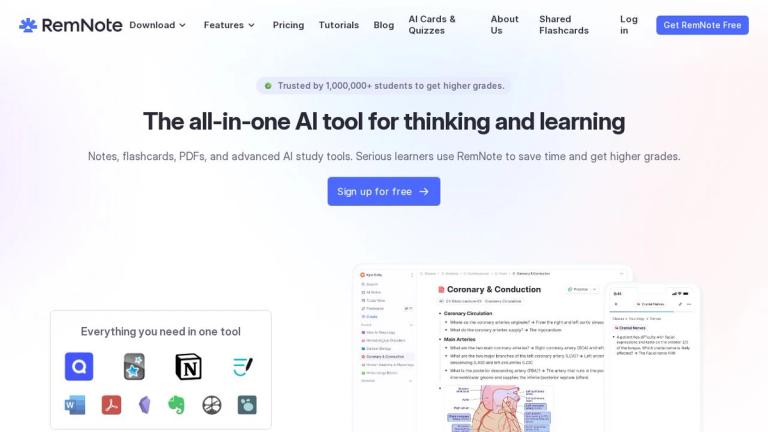
RemNote is a comprehensive AI-powered study tool trusted by over 1,000,000 students worldwide. It seamlessly integrates note-taking, flashcard creation, PDF annotation, and advanced AI tutoring into a single platform designed to maximize learning efficiency.

Core Philosophy

RemNote bridges the gap between note-taking and active recall. Rather than separating your notes from your study materials, RemNote allows you to create flashcards directly within your notes, enabling a continuous learning cycle. The platform leverages spaced repetition algorithms to ensure you review material at optimal intervals for long-term retention.

Key Capabilities
Notes That Build Understanding
  • Typed Notes: A powerful outlining editor for structuring thoughts and connecting ideas
  • Handwritten Notes: Take notes on tablets with instant text conversion
  • PDF & Slide Annotation: Upload and annotate PDFs with highlights, drawings, and shapes
Flashcards for Exam Success
  • Exam Scheduler: Set your exam date and receive a personalized daily study plan
  • Spaced Repetition: Cards resurface at optimal intervals for maximum retention
  • Image Occlusion: Create visual flashcards for anatomy, diagrams, and more
AI-Powered Learning
  • AI Flashcards & Quizzes: Generate study materials in one click from notes or PDFs
  • AI Explanations: Every flashcard includes AI-generated explanations
  • AI Tutor Chat: Ask questions and get instant explanations about your notes
Platform Availability

RemNote is available on Desktop (Windows, Mac, Linux), iOS, and Android, with offline mode support for studying anywhere.

Target Audience

Students (high school, university, graduate), medical students, researchers, and lifelong learners who want to optimize their study process

Key Features
  • AI Flashcard Generation
  • Spaced Repetition Algorithm
  • PDF Annotation & Learning
  • Exam Scheduler
  • Handwritten Notes with Text Conversion
  • AI Tutor Chat
  • Image Occlusion Flashcards
  • Lecture Recorder
  • Instant Search
  • Offline Mode
  • References & Tags System
  • Mastery Tracking
  • AI-Generated Summaries
  • Practice Quizzes
Use Cases
  • Students preparing for exams with personalized study schedules
  • University students taking lecture notes and creating flashcards simultaneously
  • Medical students using image occlusion for anatomy study
  • Researchers annotating and learning from PDF papers
  • Self-learners using spaced repetition for long-term knowledge retention
  • Students seeking AI-powered explanations for complex topics
Pros
  • Combines note-taking and flashcards in one seamless workflow
  • AI automatically generates flashcards and quizzes from notes/PDFs
  • Powerful spaced repetition with exam-specific scheduling
  • Supports multiple note formats: typed, handwritten, and PDF annotation
  • Available on all major platforms with offline support
  • Trusted by over 1 million students worldwide
Cons
  • Learning curve for the outlining-based note structure
  • Advanced features may require a paid subscription
  • May be overwhelming for users who only need simple note-taking
Pricing

Free tier available with core features; paid plans for advanced AI features and additional storage (visit remnote.com/pricing for details)

Latest News

RemNote Blog - Ideas for Better Learning

RemNote Blog - Ideas for Better Learning

8/4/2026

RemNote Blog Ideas for Better Learning Insights, product updates, and practical study guides from the RemNote team. 25articles Meet our authors RemNote Blog Ideas for Better Learning Insights, product updates, and practical study guides from the RemNote team. 25articles Meet our authors Featured art...

Learning from PDFs and Files with the RemNote Reader | RemNote Help Center

Learning from PDFs and Files with the RemNote Reader | RemNote Help Center

8/4/2026

RemNote Help Center # Learning from PDFs and Files with the RemNote Reader Read & highlight PDFs, slides, and other files within RemNote, then link parts of your documents to your highlights for easy attribution. Written by Vlad Table of contents [...] The RemNote Reader in three panes: the Notes pa...

Changelog | RemNote

Changelog | RemNote

8/4/2026

RemNote Changelog # Changelog Access the beta server at: - Web: beta.remnote.com on web - Desktop: "Settings" > "Desktop App" > "Update Channel" > "Beta" - Mobile: Download the "beta" version from remnote.com/download Loading content, please wait... Loading content, please wait... Loading content, p...

Flashcards, Quizzes & Study Guide - Class Notes

Flashcards, Quizzes & Study Guide - Class Notes

8/4/2026

Yes. RemNote lets you annotate News PDFs and create flashcards directly from your highlights. Your study materials and review tools live in the same workspace,

Acceptance Rate: Definition, Formula & College Rankings

Acceptance Rate: Definition, Formula & College Rankings

8/4/2026

The acceptance rate of a college is a direct indicator of a college’s competitiveness. Harvard has a very low acceptance rate of about 4%, according to the U.S. News and World Report, for two main reasons: Over 50,000 students apply to Harvard every year The competition among applicants is way too h...

FAQ

More Products

TinyPNG is Tinify’s browser-based image compressor and converter. This review explains how its web tool differs from its Developer API, what each free allowance covers, and when its compression, conversion, resizing, and cropping features may fit an image workflow.

Zamzar is an online file conversion and compression service for documents, images, video, sound, and other formats. Its free web service has daily file and upload-size limits.

iLoveIMG is a browser-based image service for compression, resizing, cropping, conversion, and editing, with a free Basic plan and paid options.

Smallpdf is an online PDF toolkit for conversion, compression, editing, merging, signing, and more. Its Free plan includes 30+ tools but limits downloads.

Convertio is a browser-based service for converting files between supported formats, with optional settings for many conversion types.

FreeConvert is an online file converter with more than 1,500 listed conversion types and a free allowance of 20 conversion minutes per day.

HiPDF is an online PDF service with conversion, editing, compression, merging, cropping, image tools, and AI features.

123apps is a browser-based suite of video, audio, PDF, and file-conversion tools. Its apps are free to use with limits on file size and daily operations.

ChatPDF summarizes PDFs and answers questions about them. Its free plan allows two document analyses per day, with no account needed to get started.

CloudConvert is a browser-based converter for more than 200 file formats, including documents, images, audio, video, archives, and specialist formats.

OCR.space provides free browser-based OCR for images and PDFs, searchable PDF creation, and a separate API for adding text recognition to software.

Free online itinerary maker with 900+ trip plans across 96 countries. Edit day-by-day in the browser; export to PDF, Excel, CSV, Google Sheets or .ics. Free account required to download/print. Optional Pro adds premium themes; AI chat helps draft plans.

Verla AI is an AI learning platform that helps teams and students learn and apply AI faster with guided courses, tools, and hands-on practice.

TasteDir is a curated directory of finished, well-crafted software from indie makers and small teams. Every listed tool is reviewed by hand.

An AI meeting copilot that combines live transcripts, screenshots, and project documents to deliver contextual answers, response drafts, and meeting recaps.

Create professional invoices free in your browser: live preview, any currency, tax and discounts, custom templates, and no-watermark PDF. No signup needed.