LogoAI Jet
Icon for Rephrase

Rephrase

A macOS AI text transformation tool that instantly reformats, rephrases, and improves text in any application without context-switching.

Introduction

Rephrase

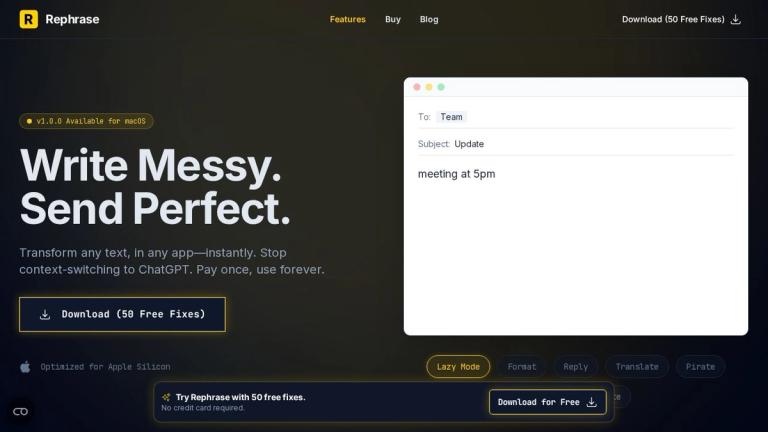
Write Messy. Send Perfect.

Rephrase is a native macOS application that transforms any text, in any app, instantly. Instead of switching to ChatGPT or other AI tools, Rephrase lives where you work—integrating seamlessly with Slack, Notion, Mail, Discord, and virtually any application where you can type.

The tool is designed to eliminate the friction between thinking and communicating. Whether you're typing a quick note, drafting an email, or formatting a list, Rephrase handles the transformation with a simple keyboard shortcut. It's optimized for Apple Silicon and offers a one-time purchase model with 50 free fixes to start.

Key Capabilities
  • Lazy Mode: Type casually and let AI transform it into professional text (e.g., "meeting 5pm" → "I'll see you at the meeting at 5:00 PM.")
  • Instant Formatting: Convert messy bullet points or lists into perfectly formatted content
  • Tone Shift: Adjust the tone of your writing—make rude emails polite, or verbose emails concise
  • Custom Prompts: Create your own transformation rules for any text manipulation you can imagine

Rephrase positions itself not just as a grammar checker, but as a "text engine for your imagination"—a universal text tool that works across your entire macOS workflow.

Target Audience

macOS users who write frequently across multiple applications, including professionals, writers, and anyone who wants to improve their text output without switching contexts.

Key Features
  • Lazy Mode - converts casual typing to professional text
  • Instant Formatting - transforms messy lists into formatted content
  • Tone Shift - adjusts writing tone (polite, concise, etc.)
  • Custom Prompts - create personalized text transformations
  • Works in Any App - Slack, Notion, Mail, Discord, and more
  • Native macOS Integration - optimized for Apple Silicon
  • Privacy First - text processing with privacy focus
  • One-time Purchase - pay once, use forever
Use Cases
  • Quickly drafting professional emails from casual notes
  • Formatting messy lists into clean bulleted lists or tables
  • Adjusting tone of business communications
  • Transforming text without switching to separate AI tools
  • Improving writing quality across any macOS application
  • Creating custom text transformation workflows
Pros
  • Works across all macOS applications seamlessly
  • One-time purchase model (no subscription)
  • 50 free fixes to try before buying
  • Optimized for Apple Silicon performance
  • Privacy-focused approach
  • Eliminates context-switching to AI chatbots
  • Customizable with user-created prompts
Cons
  • macOS only - not available for Windows or other platforms
  • Requires macOS with Apple Silicon optimization
  • Limited information on offline capabilities
  • New product (v1.0.0) - may have early-stage limitations
Pricing

One-time purchase model with 50 free fixes included. Pay once, use forever.

Latest News

Private AI Assistant for Mac: Secure, Private, and Trusted - Rephrase - Global Hotkeys for macOS

Private AI Assistant for Mac: Secure, Private, and Trusted - Rephrase - Global Hotkeys for macOS

8/4/2026

Private AI Assistant for Mac: Secure, Private, and Trusted - Rephrase - Global Hotkeys for macOS Security·Dec 08, 2025 # Private AI Assistant for Mac: Secure, Private, and Trusted Stop feeding your data to the cloud. Discover the best private AI assistant for Mac that respects your privacy with a...

The Future is Native: Why AI Belongs in Your OS, Not Your Browser - Rephrase - Global Hotkeys for macOS

The Future is Native: Why AI Belongs in Your OS, Not Your Browser - Rephrase - Global Hotkeys for macOS

8/4/2026

The Future is Native: Why AI Belongs in Your OS, Not Your Browser - Rephrase - Global Hotkeys for macOS Vision·Nov 22, 2025 # The Future is Native: Why AI Belongs in Your OS, Not Your Browser The era of copy-pasting to ChatGPT is ending. Discover why the next generation of AI tools will live dire...

Grammarly Alternative for Mac: The Native, Private, Lifetime Choice - Rephrase - Global Hotkeys for macOS

Grammarly Alternative for Mac: The Native, Private, Lifetime Choice - Rephrase - Global Hotkeys for macOS

8/4/2026

Grammarly Alternative for Mac: The Native, Private, Lifetime Choice - Rephrase - Global Hotkeys for macOS Comparison·Dec 15, 2025 # Grammarly Alternative for Mac: The Native, Private, Lifetime Choice Why pay a subscription for a slow, privacy-invasive browser extension? Rephrase is the native, on...

ChatGPT Mac App Alternative: Stop the Context Switching - Rephrase - Global Hotkeys for macOS

ChatGPT Mac App Alternative: Stop the Context Switching - Rephrase - Global Hotkeys for macOS

8/4/2026

ChatGPT Mac App Alternative: Stop the Context Switching - Rephrase - Global Hotkeys for macOS Product·Dec 12, 2025 # ChatGPT Mac App Alternative: Stop the Context Switching Looking for a ChatGPT Mac app alternative? Discover why a native, inline AI tool like Rephrase is faster, private, and cheap...

Notion AI Alternative for Mac: Unchain Your Productivity - Rephrase - Global Hotkeys for macOS

Notion AI Alternative for Mac: Unchain Your Productivity - Rephrase - Global Hotkeys for macOS

8/4/2026

Notion AI Alternative for Mac: Unchain Your Productivity - Rephrase - Global Hotkeys for macOS Productivity·Dec 10, 2025 # Notion AI Alternative for Mac: Unchain Your Productivity Love Notion AI but wish it worked in Apple Notes, Slack, or Xcode? Rephrase is the system-wide Notion AI alternative ...

FAQ

More Products

TinyPNG is Tinify’s browser-based image compressor and converter. This review explains how its web tool differs from its Developer API, what each free allowance covers, and when its compression, conversion, resizing, and cropping features may fit an image workflow.

Zamzar is an online file conversion and compression service for documents, images, video, sound, and other formats. Its free web service has daily file and upload-size limits.

iLoveIMG is a browser-based image service for compression, resizing, cropping, conversion, and editing, with a free Basic plan and paid options.

Smallpdf is an online PDF toolkit for conversion, compression, editing, merging, signing, and more. Its Free plan includes 30+ tools but limits downloads.

Convertio is a browser-based service for converting files between supported formats, with optional settings for many conversion types.

FreeConvert is an online file converter with more than 1,500 listed conversion types and a free allowance of 20 conversion minutes per day.

HiPDF is an online PDF service with conversion, editing, compression, merging, cropping, image tools, and AI features.

123apps is a browser-based suite of video, audio, PDF, and file-conversion tools. Its apps are free to use with limits on file size and daily operations.

ChatPDF summarizes PDFs and answers questions about them. Its free plan allows two document analyses per day, with no account needed to get started.

CloudConvert is a browser-based converter for more than 200 file formats, including documents, images, audio, video, archives, and specialist formats.

OCR.space provides free browser-based OCR for images and PDFs, searchable PDF creation, and a separate API for adding text recognition to software.

Free online itinerary maker with 900+ trip plans across 96 countries. Edit day-by-day in the browser; export to PDF, Excel, CSV, Google Sheets or .ics. Free account required to download/print. Optional Pro adds premium themes; AI chat helps draft plans.

TasteDir is a curated directory of finished, well-crafted software from indie makers and small teams. Every listed tool is reviewed by hand.

An AI meeting copilot that combines live transcripts, screenshots, and project documents to deliver contextual answers, response drafts, and meeting recaps.

Create professional invoices free in your browser: live preview, any currency, tax and discounts, custom templates, and no-watermark PDF. No signup needed.

Vidsembly is an AI video creation platform that turns PowerPoint presentations, PDFs, and documents into narrated videos. Create AI presentations, clone voices, translate slides, transcribe recordings, generate soundtracks, and host videos in one place.