LogoAI Jet
icon of ResumeBuilder.com

ResumeBuilder.com

Build resumes and cover letters with guided prompts, AI suggestions, templates, and free TXT downloads; Word and PDF resume exports require a paid plan.

Introduction

ResumeBuilder.com review 2026

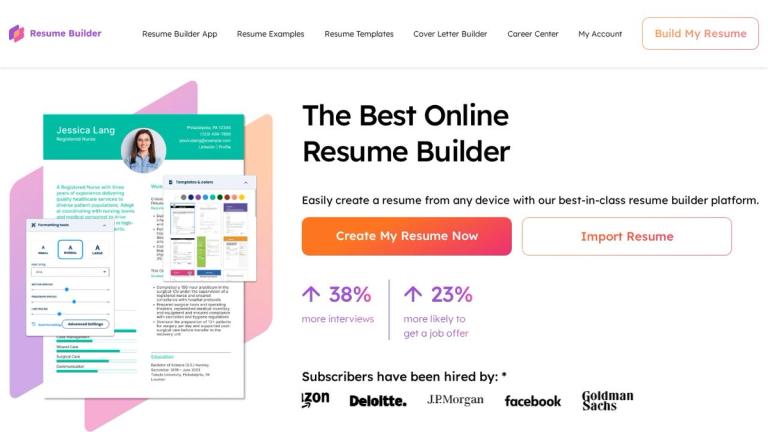
ResumeBuilder.com is an online resume and cover letter builder for people who want help organizing application materials without starting from a blank page. Its tools include guided steps, expert tips, content suggestions, an AI resume builder, a cover letter generator, and professionally designed templates. You can work in a phone, tablet, or desktop browser, import an existing resume, and edit details such as fonts, colors, and layout. The key decision is what you need to download: the official pricing page lists unlimited resume downloads in TXT format on the free plan, while Word and PDF resume downloads are included with paid plans.

Features
  • Guided resume creation and editing: Add experience, education, skills, and other details using the builder’s step-by-step process. The site also promotes expert tips and suggested phrases, which can help when you need ideas for presenting your background. You can start with a blank document or import an existing resume and customize it in the editor.
  • AI writing suggestions: The AI resume builder can suggest tailored content and keywords for a target role. The site describes it as a way to create a first draft or improve phrasing, not a replacement for checking that each statement accurately reflects your experience. Review the current plan details if access to a particular AI feature matters to your decision; advertised capabilities do not establish that every feature is included with free access.
  • Templates and design controls: ResumeBuilder.com offers professionally designed templates, including ATS-friendly options, and says users can customize fonts and colors. Its site advertises more than 30 customizable templates, while its template and example pages also offer a range of starting points for different roles. The free plan’s confirmed resume download is plain-text TXT, so do not expect that file to retain a chosen visual design.
  • Resume examples and career help: The site provides more than 500 resume examples and templates, plus advice on resume writing, ATS compatibility, and job searches. These resources can help you decide what to include or how to phrase a skill. They are reference material: adapt examples to your own work history rather than copying claims that do not apply to you.
  • Cover letter generator: The Cover Letter Generator can create personalized letters, and the pricing page says it is available for free with TXT downloads. The site also describes AI-supported, industry-tailored cover letters and matching application materials. The free-download statement confirms TXT, not a formatted PDF or Word cover letter export.
  • Free and paid downloads: Free access includes unlimited resume TXT downloads and free cover letter TXT downloads. The pricing page lists unlimited Word and PDF resume downloads for subscribers. TXT is a practical option for saving or reusing text, but it does not preserve a designed template. If a formatted file is essential, check the plan and checkout terms before relying on an export.
  • Additional subscriber tools: Paid plans also list ResumeCheck resume review, resume feedback through a shareable link, instant job matching, interview preparation tools, and career support webinars. The free plan includes a Bold.pro professional profile; a custom URL and enhanced visibility are listed with subscriptions. These are separate from the basic task of writing and downloading a TXT resume.
Who may find it useful

ResumeBuilder.com may suit a first-time applicant who wants prompts, examples, and a structured way to assemble a resume. It can also help someone updating a resume: importing an existing file, editing its contents, and tailoring suggestions to a target role are useful starting points. In either case, check dates, job titles, skills, and results yourself. A polished sentence is only useful if it is accurate and specific to your experience.

It is also an option for preparing a cover letter alongside a resume. The free generator and TXT download can be enough if you mainly need help drafting the letter’s content or plan to format it elsewhere. If you want a matched, designed document, confirm which formats and features your chosen plan provides rather than assuming the free TXT option includes formatted exports.

The choice between free and paid access largely comes down to file format and extra tools. If plain-text files meet your needs, the free plan covers unlimited resume TXT downloads and cover letter TXT downloads. If you need a designed Word or PDF resume, the pricing page lists those downloads as paid features. Subscriber tools such as ResumeCheck, feedback, job matching, and interview preparation may also matter, but consider whether you will use them before subscribing.

Paid offers renew automatically unless canceled, and the official pages show differing prices and billing terms. Check the current checkout offer, renewal amount and cancellation deadline before subscribing. Download documents you want to keep before canceling: the site says cancellation removes dashboard and stored-document access unless you resubscribe.

A useful general workflow is to gather accurate employment dates, responsibilities, skills, and measurable results before you begin. Then use the builder’s prompts and suggestions to organize that material, revise the wording in your own voice, and proofread the final draft. This is practical resume-writing advice, not a claim that the product automatically verifies your experience or guarantees a particular hiring outcome. Likewise, a template labeled ATS-friendly can help with a readable structure, but it cannot guarantee that every employer’s system will interpret a resume as intended.

Pros
  • Free access includes unlimited resume downloads in TXT format and a free cover letter generator with TXT downloads.
  • Guided prompts, AI suggestions, templates, an editor, and resume examples support the writing process.
  • You can use the browser-based builder on a phone, tablet, or computer and import an existing resume.
  • Paid plans list Word and PDF resume downloads and additional career tools.
Cons
  • Free downloads are TXT; the pricing page lists Word and PDF resume downloads for paid plans.
  • Paid plans renew automatically unless canceled under the stated terms, so check the renewal date and amount.
  • Free access to the builder does not establish that every advertised AI feature or customization is free.
  • The service says you lose dashboard access to saved documents after canceling unless you download them first.

Latest News

Press - ResumeBuilder.com

Press - ResumeBuilder.com

8/5/2026

Resume Builder’s career advisor team has been featured by news outlets including Bloomberg, Harvard Business Review, Forbes, and CNBC. Learn About Resume Builder ... A growing share of older Americans are delaying retirement or returning to work, according to a new ResumeBuil... Read More ... A rece...

Member Sign In - Resume Builder

Member Sign In - Resume Builder

8/5/2026

By clicking 'Submit' you also agree to our Terms and Conditions and Privacy Policy · Need an account? Sign up for free

About Us - ResumeBuilder.com

About Us - ResumeBuilder.com

8/5/2026

Enter the email address associated with your ResumeBuilder.com account. Click Reset Password. You will receive an email at the address you provided. Follow the instructions in the email to finish resetting your password. Please contact us if you continue to have issues resetting your password. ... O...

Current Resume Trends for 2025 - ResumeBuilder.com

Current Resume Trends for 2025 - ResumeBuilder.com

8/5/2026

Applicants may also include more about their personal values or goals in the profile summary to attract employers who share these principles. While many of the current trends in resumes for 2025 have been a part of the job search process for a few years, industry standards often change. It's best to...

The Best Free Online Resume Builder - ResumeBuilder.com

The Best Free Online Resume Builder - ResumeBuilder.com

8/5/2026

Enter the email address associated with your ResumeBuilder.com account. Click Reset Password. You will receive an email at the address you provided. Follow the instructions in the email to finish resetting your password. Please contact us if you continue to have issues resetting your password. ... O...

Alternatives

  • Zety

    Zety offers a wide range of professional resume templates and a user-friendly interface for creating compelling resumes.

  • Resume.io

    Resume.io provides a streamlined resume building process with pre-written content and ATS-friendly templates.

  • Kickresume

    Kickresume combines resume and cover letter building with career coaching resources for job seekers.

  • Canva

    Canva's resume templates offer creative design options for those looking to stand out visually.

  • LinkedIn Resume Builder

    LinkedIn's resume builder leverages your profile data to create a resume and provides insights on job market trends.

  • VisualCV

    VisualCV focuses on creating visually appealing resumes and portfolios with analytics to track resume performance.

  • MyPerfectResume

    MyPerfectResume offers step-by-step guidance and pre-written phrases to help users create effective resumes quickly.

  • Indeed Resume

    Indeed Resume allows you to create and upload a resume directly to the Indeed job board, increasing visibility to potential employers.

  • Enhancv

    Enhancv provides unique resume templates and content suggestions to help candidates showcase their skills and experience effectively.

  • CakeResume

    CakeResume offers a free-form, drag-and-drop interface for building visually rich and interactive resumes.

FAQ

User Reviews

4.6/5.0
(14reviews)
Click stars to rate

Pricing

Pricing Model: Freemium, Subscription

Free Plan

Unlimited access to all features, can download resume files in TXT format.

Free

14-Day Full Access Trial

Unlimited access to all features for 14 days, can download resume files in Word or PDF format. After the trial period, it will renew at $23.95 every four weeks.

$2.95
one-time

Monthly Subscription (After Trial)

Enjoys the same benefits as the annual plan, including unlimited use of resume builder tools, templates, Word or PDF file downloads, and exclusive tools like ResumeCheck.

$23.95/every four weeks
monthly

Annual Subscription (Pro Plan)

Full access to resume builder tools, templates, Word or PDF file downloads, and exclusive tools like ResumeCheck. Includes unlimited customization and over 60 resume design templates.

$95.40/year
yearly

More Products

TinyPNG is Tinify’s browser-based image compressor and converter. This review explains how its web tool differs from its Developer API, what each free allowance covers, and when its compression, conversion, resizing, and cropping features may fit an image workflow.

Zamzar is an online file conversion and compression service for documents, images, video, sound, and other formats. Its free web service has daily file and upload-size limits.

iLoveIMG is a browser-based image service for compression, resizing, cropping, conversion, and editing, with a free Basic plan and paid options.

Smallpdf is an online PDF toolkit for conversion, compression, editing, merging, signing, and more. Its Free plan includes 30+ tools but limits downloads.

Convertio is a browser-based service for converting files between supported formats, with optional settings for many conversion types.

FreeConvert is an online file converter with more than 1,500 listed conversion types and a free allowance of 20 conversion minutes per day.

HiPDF is an online PDF service with conversion, editing, compression, merging, cropping, image tools, and AI features.

123apps is a browser-based suite of video, audio, PDF, and file-conversion tools. Its apps are free to use with limits on file size and daily operations.

ChatPDF summarizes PDFs and answers questions about them. Its free plan allows two document analyses per day, with no account needed to get started.

CloudConvert is a browser-based converter for more than 200 file formats, including documents, images, audio, video, archives, and specialist formats.

OCR.space provides free browser-based OCR for images and PDFs, searchable PDF creation, and a separate API for adding text recognition to software.

Free online itinerary maker with 900+ trip plans across 96 countries. Edit day-by-day in the browser; export to PDF, Excel, CSV, Google Sheets or .ics. Free account required to download/print. Optional Pro adds premium themes; AI chat helps draft plans.

Contextual nofollow link exchanges for sites you control, handled with your coding agent and your approval.

TasteDir is a curated directory of finished, well-crafted software from indie makers and small teams. Every listed tool is reviewed by hand.

An AI meeting copilot that combines live transcripts, screenshots, and project documents to deliver contextual answers, response drafts, and meeting recaps.

Create professional invoices free in your browser: live preview, any currency, tax and discounts, custom templates, and no-watermark PDF. No signup needed.